# Getting started

Using a no-code platform, CustomerGlu enables product and marketing teams to create rich in-app gamified journeys.

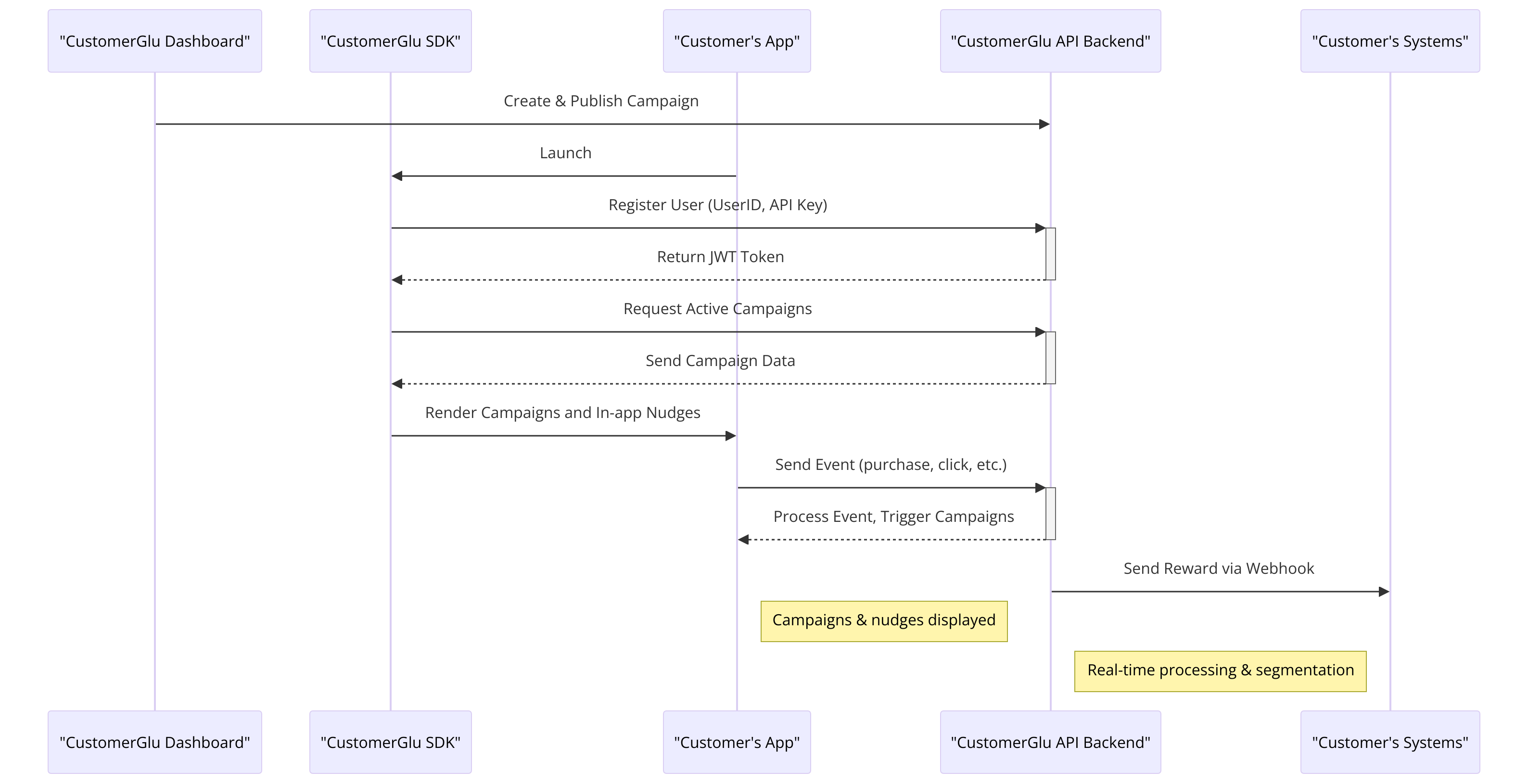
To learn about CustomerGlu, the best way is to understand it via a sequence diagram 👇

<figure><img src="https://1004846827-files.gitbook.io/~/files/v0/b/gitbook-x-prod.appspot.com/o/spaces%2F-M0ahLW2WavtwcwNbSR9%2Fuploads%2FREHtcnk0F6aTjYPCCRbu%2FCustomerGlu%20ER%20Diagram.png?alt=media&amp;token=259a18ee-a8f7-44e3-ac51-a2e248107f3c" alt=""><figcaption><p>Rendering a campaign on the end user app</p></figcaption></figure>

## **Definitions**

1. **CustomerGlu Dashboard:** Access the [dashboard](https://dashboard.customerglu.com) by logging in with your account credentials. This is where you can manage campaigns, view analytics, and obtain your API keys.
2. **CustomerGlu SDK**: CustomerGlu provides a variety of SDKs suitable for integration with multiple platforms including Web, Native iOS, Android, React Native, and Flutter. For platforms not directly supported by an SDK, CustomerGlu's REST APIs can be utilized.
3. **CustomerGlu API Backend:** This is the core REST API engine of CustomerGlu that the SDKs interact with to create and manage user flows effectively.&#x20;
4. **Customer's Entities**:
   1. **App**: Your web or mobile application where CustomerGlu experiences are to be integrated and displayed.
   2. **Systems**: Your backend systems that listen for rewards, analytics, and other related events.

## Quickstart Guide

This Quickstart Guide will walk you through integrating CustomerGlu's Web SDK in a sandbox environment and launching a few campaigns.

### Step 1: Clone the CodeSandbox Template

Start by cloning our pre-configured CodeSandbox template:

[![Edit Wallet (forked)](https://codesandbox.io/static/img/play-codesandbox.svg)](https://codesandbox.io/p/sandbox/wallet-9c7vyy)

### Step 2: Configure Your API Key

To interact with CustomerGlu's platform, you will need to update the template with your API Key.

#### Find your API Key and update it in the CodeSandbox

You can find your API key within the CustomerGlu Dashboard, as shown below

{% embed url="<https://youtu.be/R98sqQvKxIY>" %}
Video to copy the API Key and insert it in the code sandbox to get started
{% endembed %}

### Step 3: Run Campaigns

With the API Key configured, you can start running campaigns directly from the sandbox:

1. **Launch the Application:**
   * Use the built-in web browser in CodeSandbox to view your application and start interacting with the integrated CustomerGlu SDK.
2. **Monitor Campaign Performance:**
   * Return to the CustomerGlu Dashboard to see real-time analytics and the performance of your campaigns.

### Step 4: Next Steps

After testing in the sandbox environment, consider the following steps to deepen your integration:

* **Customize the SDK:** Explore various SDK methods and events to customize user experiences further.
* **Advanced Configurations:** Integrate more complex workflows and handle various user states and transitions.

<table data-view="cards"><thead><tr><th></th><th></th><th></th><th data-hidden data-card-cover data-type="files"></th><th data-hidden data-card-target data-type="content-ref"></th></tr></thead><tbody><tr><td>CustomerGlu SDK Guide</td><td></td><td></td><td><a href="https://1004846827-files.gitbook.io/~/files/v0/b/gitbook-x-prod.appspot.com/o/spaces%2F-M0ahLW2WavtwcwNbSR9%2Fuploads%2F5dQwjQ8ulZ8SQ3VFdjYj%2FScreenshot%202024-04-13%20at%2012.11.30%E2%80%AFAM.png?alt=media&amp;token=084837cd-c95a-409d-8351-a3386837964a">Screenshot 2024-04-13 at 12.11.30 AM.png</a></td><td><a href="/sdk">Integrating with SDKs</a></td></tr><tr><td>REST APIs</td><td></td><td></td><td><a href="https://1004846827-files.gitbook.io/~/files/v0/b/gitbook-x-prod.appspot.com/o/spaces%2F-M0ahLW2WavtwcwNbSR9%2Fuploads%2Fb9IgzBjP1yHSUCxv1deC%2FScreenshot%202024-04-13%20at%2012.10.03%E2%80%AFAM.png?alt=media&amp;token=298965c2-ed66-4efb-b780-745f4e2a38ef">Screenshot 2024-04-13 at 12.10.03 AM.png</a></td><td><a href="/integration-doc">Integrating with APIs</a></td></tr></tbody></table>

{% hint style="info" %}
Check out the comparison between SDK and API Integration [here](https://help.customerglu.com/guides/sdk-vs-api).
{% endhint %}


# Quickstart Guide for React Web Apps

CustomerGlu enables growth teams to run gamified programs in minutes using a low-code builder. This guide will help you integrate the CustomerGlu React SDK into your web application.

## Quickstart Guide

This Quickstart Guide will walk you through integrating CustomerGlu's React web SDK in a sandbox environment and launching a few campaigns.

### Install the SDK package using NPM

### Installation

[![npm version](https://badge.fury.io/js/@customerglu%2Freact-web-sdk.svg)](https://badge.fury.io/js/@customerglu%2Freact-web-sdk)

Or if you wish to set up your existing React project with CustomerGlu React SDK, you can install the latest package from npm and import it into your project as follows:

You can install the package using npm or yarn:

```sh
npm install @customerglu/react-web-sdk
```

### Getting `gluToken` and `userId` from Postman

You will need a `gluToken` and `userId` to interact with our React Component. Follow these steps to get them using Postman:

[![Run In Postman](https://run.pstmn.io/button.svg)](https://app.getpostman.com/run-collection/6995209-c95f9bd3-2538-4869-940a-69e7a2972487?action=collection%2Ffork\&source=rip_markdown\&collection-url=entityId%3D6995209-c95f9bd3-2538-4869-940a-69e7a2972487%26entityType%3Dcollection%26workspaceId%3D026e7fe7-dae7-49d3-a47a-03311ded3d22)

1. Fork the Postman Collection.
2. Get **CustomerGlu** `writeKey` from [here](/schema/faq#find-customerglu-api-key).
3. Use `Register the User` request to get the `userId` and `gluToken`
   * Fill in the relevant `userId` and `writeKey` in the request body.
   * After sending the request you'll receive a `token` as `gluToken` in the response body.

> Note: Any relevant `UserId` can be provided.

### Usage

```jsx
import { CustomerGluComponent } from "@customerglu/react-web-sdk";

export default function App() {
  return (
    <div className="App">
      <div
        id="embedId" // this Id we can setup from dashboard
        style={{
          width: "100vw",
          cursor: "pointer",
        }}
      >
        <CustomerGluComponent
          userId="<YOUR-USER-ID>"
          gluToken="<USER-GLU_TOKEN>"
          region="<REGION>"
        >
          // <Loader /> you can render your loading component
        <CustomerGluComponent />
      </div>
    </div>
  );
}
```

### Here’s a basic example of how to use the component in your project:

Start by cloning our pre-configured CodeSandbox template for React Web:

[![Edit cg-react-sandbox](https://codesandbox.io/static/img/play-codesandbox.svg)](https://codesandbox.io/p/devbox/6q5ss2?file=%2Fsrc%2Fstyles.css%3A5%2C4)

{% hint style="info" %}
Please replace the `gluToken` and `userId` obtained by `Register the User.Also, add the relevant region.`In the CodeSandbox, a test `gluToken` and `userId` with a relevant campaign have already been provided.
{% endhint %}

To complete activities for the user, you can use CustomerGlu Debugger from the CustomerGlu Dashboard or you can also use the following API call via Postman:

```shell
curl --location 'https://events.customerglu.com/server/v4' \
--header 'Content-Type: application/json' \
--header 'X-API-KEY: <YOUR-WRITE-KEY>' \
--data '{
   "user_id":"<YOUR-USER-ID>",
   "event_name":"<YOUR-EVENT-NAME>",
    "event_properties":{
       "<KEY-1>": <VALUE-1>
   }
}'
```

Upon refresh, you should see the relevant banner or campaign being rendered in the app.

If you face any issues in the above setup, please contact us via the support channel.


# Quickstart Guide for React Native Apps

CustomerGlu enables growth teams to run gamified programs in minutes using a low-code builder. This guide will help you integrate the CustomerGlu React Native SDK into your App.

## Pre-Requisites

* OpenJDK 17
* Android Studio
* Xcode

## **Recipe**

This Quickstart Guide will walk you through an existing implementation of the CustomerGlu React Native SDK using CustomerGlu Sandbox App. You'd learn the fundamentals of using CustomerGlu React Native SDK in your existing app project.

1. Set up the Sandbox app in your IDE
2. Identify and authenticate your Users
3. Load a campaign via Campaign ID in the app
4. Load a campaign with Dynamic Nudges
5. Handling Taps and Clicks(Navigation and Analytics)

## 🛠️ Setup the Sandbox App&#x20;

<div align="left"><img src="https://img.shields.io/badge/github-repo-67F337?logoColor=67F337" alt="SandboxApp"></div>

Start by cloning our pre-configured Demo App with React Native SDK

```javascript
git clone https://github.com/customerglu/React-Native-Sandbox-App.git
```

### 1. Update the API Key in the Sandbox App

Open the Sandbox App in Visual Studio Code or any relevant editor.

{% tabs %}
{% tab title="Android" %}

* Open the Android Manifest file located at `/android/app/src/main/AndroidManifest.xml`&#x20;
* Add your API Key in `<meta-data>` of the `AndroidManifest.xml` file  like this:

```xml
<meta-data android:name="CUSTOMERGLU_API_KEY"  
    android:value="YOUR_API_KEY" />
```

{% hint style="info" %}
[FAQ](/schema/faq#how-to-find-your-customerglu-api-key)
{% endhint %}
{% endtab %}

{% tab title="iOS" %}
Open the Android Manifest file path -ios/app\_name/Info.plist Add the following key to the `Info.plist` fil&#x65;**:**

```xml
<key>CUSTOMERGLU_WRITE_KEY</key>
<string>YOUR_WRITE_KEY</string>
```

{% hint style="info" %}
[FAQ](/schema/faq#how-to-find-your-customerglu-api-key)
{% endhint %}
{% endtab %}
{% endtabs %}

### **2. Install Dependencies for Sandbox App**

Run the following command in the terminal to install dependencies&#x20;

```javascript
npm install
```

### 3. Launch the Emulator and build the App&#x20;

Launch the Emulator via Android Studio or another emulator and launch the app using the following command

{% tabs %}
{% tab title="Android" %}

```
npx react-native run-android
```

{% endtab %}

{% tab title="iOS" %}

```
npx react-native run-ios
```

{% endtab %}
{% endtabs %}

### 4. Allow Permission and Verify App launch

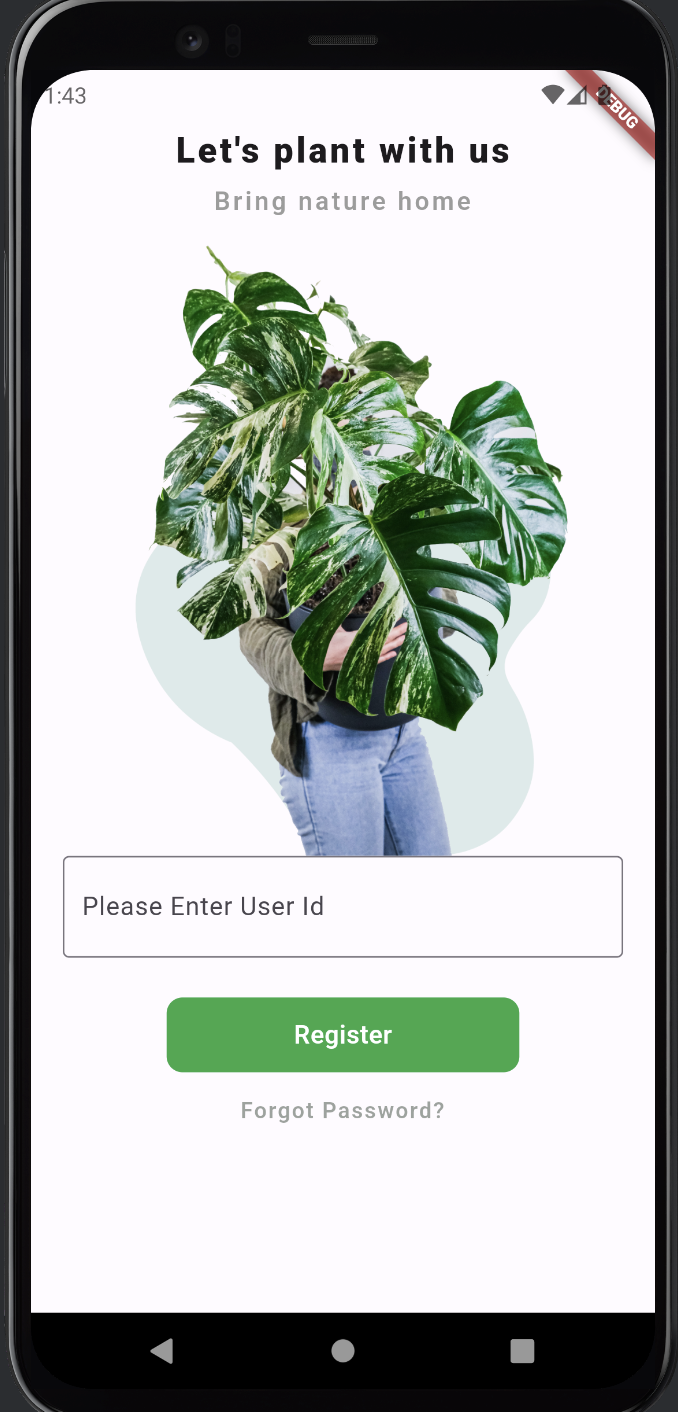
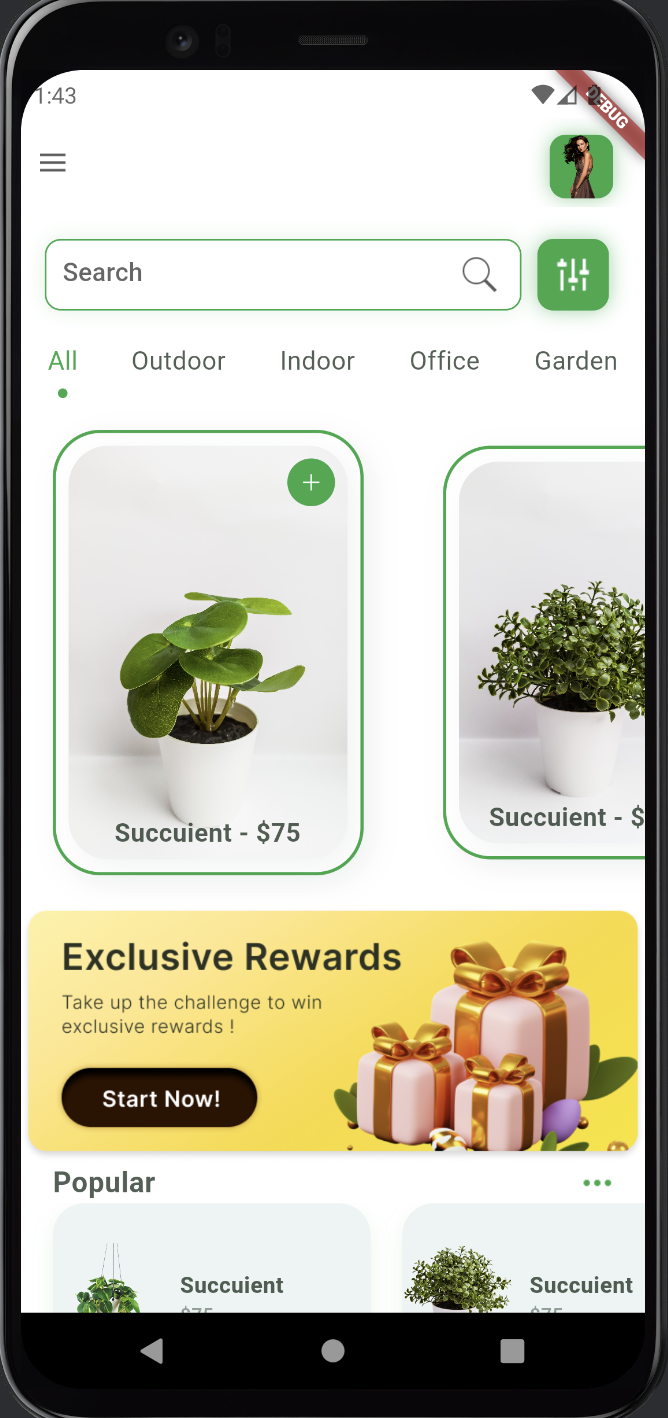
After launching the app, it'll ask for permission to send notifications, please allow it to test Firebase Cloud Messaging based Push Notifications.&#x20;

<div align="left"><figure><img src="https://1004846827-files.gitbook.io/~/files/v0/b/gitbook-x-prod.appspot.com/o/spaces%2F-M0ahLW2WavtwcwNbSR9%2Fuploads%2F5M4KcoYGMeTvvSkear7V%2FScreenshot%202024-08-05%20at%208.49.29%E2%80%AFPM.png?alt=media&amp;token=656f68ef-781a-4e60-b76e-9338fa801747" alt="" width="357"><figcaption></figcaption></figure> <figure><img src="https://1004846827-files.gitbook.io/~/files/v0/b/gitbook-x-prod.appspot.com/o/spaces%2F-M0ahLW2WavtwcwNbSR9%2Fuploads%2FhiY8pGsv5FyrnNACp51n%2FScreenshot%202024-08-05%20at%208.51.24%E2%80%AFPM.png?alt=media&amp;token=286c84a6-4639-45cc-baed-6ec77d4ea58d" alt="" width="358"><figcaption></figcaption></figure></div>

&#x20; You're all set to launch & test CustomerGlu campaigns now! 🎉

## 🔍 Identify and Authenticate your Users

All campaigns within CustomerGlu are activated for a unique User ID. This User ID is provided during User Registration via the SDK in the app code.

### Register the User on the Sandbox app launch

CustomerGlu React Native SDK provides the method `registerUser(userId: string)` that authenticates and identifies a specific user so that campaigns can be activated for the eligible users. Eligibility via segmentation is also checked at this step on the server side.

To see the sample implementation, open `/src/RegisterScreen.js` and then check for `handleSubmitButton()` function declaration, and the `registerUser()` function inside the block.

{% hint style="info" %}
We recommend using the `registerUser()` call at the start of each session.
{% endhint %}

## 🎨 Load a campaign via Campaign ID in the app

CustomerGlu React Native SDK provides 2 methods to launch the campaign experiences inside the app:

1. **Load a Campaign via Campaign ID by clicking a button or any other event in the app.**
2. **Load a Campaign via a Dynamic Entrypoint attached to the campaign.**

## Load a Campaign using a Banner or Button

CustomerGlu React Native SDK provides the method `loadCGCampaign(campaignID: string)` to start loading a launched campaign from the dashboard with campaignId.

### 1. Launch a Campaign

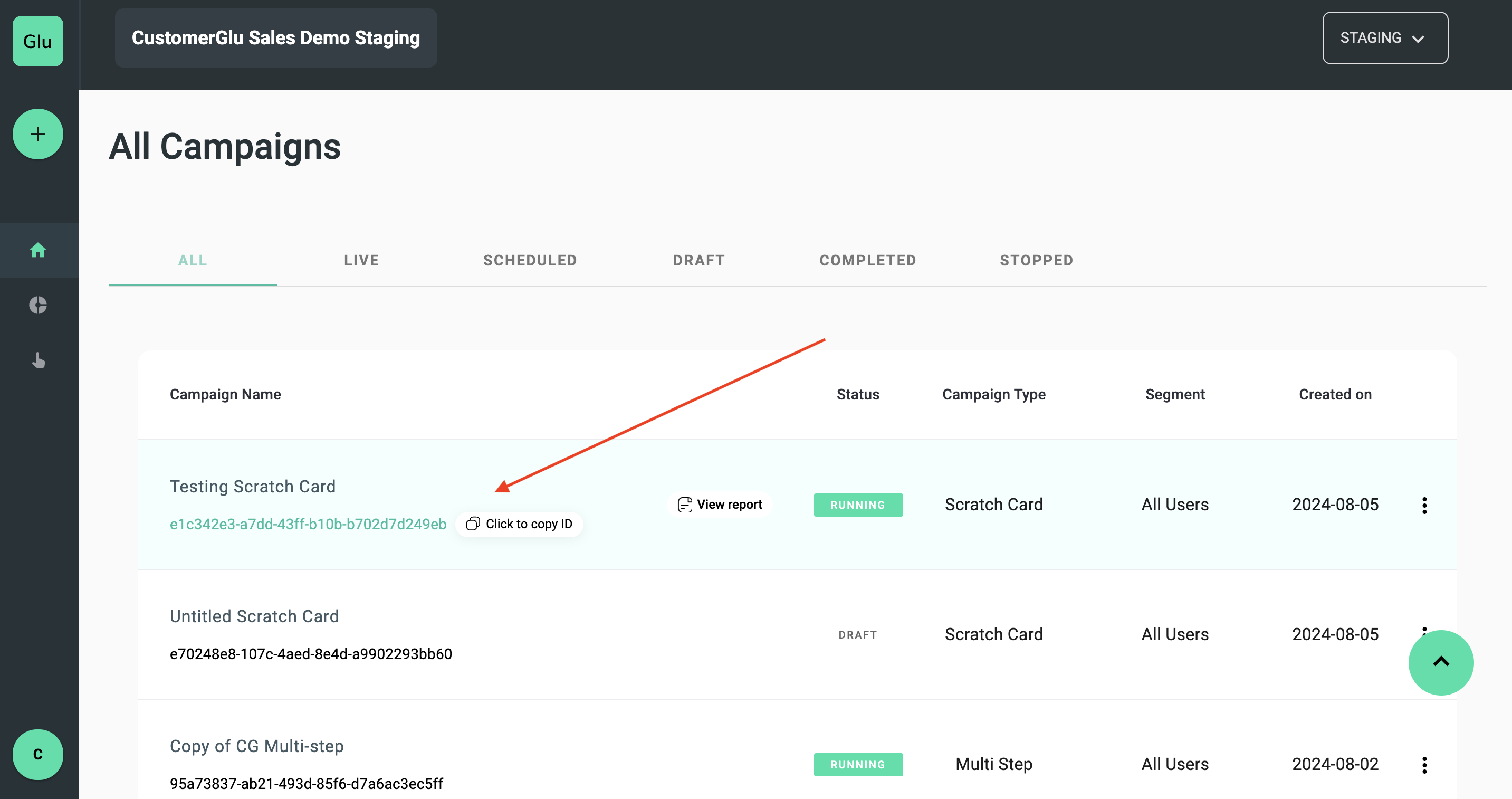
For test purposes, you can launch any campaign via the CustomerGlu dashboard.

{% embed url="<https://youtu.be/esJG6kjzdfM>" %}

### 2. Copy the Campaign ID

After launching the campaign from dashboard copy the `campaignId` of that campaign&#x20;

<figure><img src="https://1004846827-files.gitbook.io/~/files/v0/b/gitbook-x-prod.appspot.com/o/spaces%2F-M0ahLW2WavtwcwNbSR9%2Fuploads%2FW1tQ0v3vWFhcEAhdNAhY%2FScreenshot%202024-08-05%20at%209.14.03%E2%80%AFPM.png?alt=media&amp;token=690bbf76-6c09-4ae7-92a9-2f32642715a7" alt=""><figcaption></figcaption></figure>

### 3. Update the \`campaignId\` in the Sandbox App

* Open file `/src/screen/HomeScreen.jsx`
* Search for the `loadCGCampaign(“”)` function call inside the return block of the `HomeScreen` component, and update it with the `campaignID`

### 4. Test the Campaign

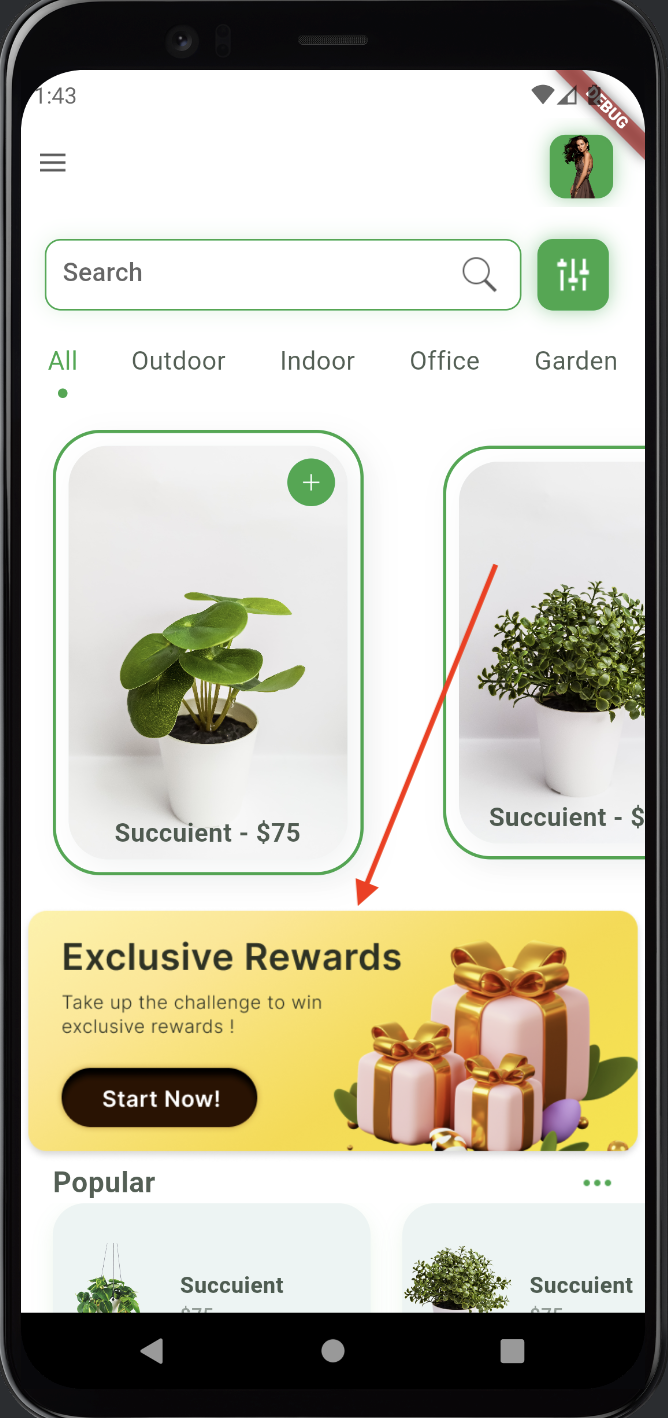
* Go back to the emulator and click on the banner present in the `HomeScreen`
* The campaign should now load in a new web view.

<figure><img src="https://1004846827-files.gitbook.io/~/files/v0/b/gitbook-x-prod.appspot.com/o/spaces%2F-M0ahLW2WavtwcwNbSR9%2Fuploads%2F4XZOpSShwILVodVjSxhY%2FScreenshot%202024-08-05%20at%208.51.24%E2%80%AFPM.png?alt=media&amp;token=36f79d5a-885f-43d6-9518-95ca312eaba9" alt="" width="179"><figcaption></figcaption></figure>

Great going! We can now see the created campaign in the sandbox App 🚀

##

## Load a campaign with Dynamic Nudges

CustomerGlu can launch spontaneous campaigns using native entry points that are dynamically mounted at runtime.

### 1. Launch a Campaign

For test purposes, start creating any new campaign.

### 2. Configure the Nudge

* In the campaign creation wizard, navigate to the **Nudges** section
* Click on `+ ADD ANOTHER NUDGE`
* Set the channel to `App` and the type of Nudge to `Floating`
* Configure the Nudge with a background image and specify the on-click behavior to navigate to a campaign

### 3. Set Trigger Criteria

* Define the screens where you want to show the Nudge.
* For Android, select `HomeScreen` as the allowed screen that is configured for the Sandbox App. If the option is not present, ddd a Custom Screen with the name `HomeScreen`

{% embed url="<https://youtu.be/reaLR61xjgo>" %}

### 4. Handle the Screen Name in the code

In `HomeScreen.jsx`, use `setCGScreenName("HomeScreen")` during app load

```javascript
useFocusEffect(
    React.useCallback(() => {
        setCGScreenName("HomeScreen");
    }, [])
);

```

{% hint style="info" %}
We can use `setCGScreenName("ScreenName") in the app's router code or screen initialisation code to enable Dynamic Nudges`
{% endhint %}

### 5. Testing the Dynamic Nudge

* Relaunch the Emulator&#x20;
* In the HomeScreen you are able to see the Floating nudge

<figure><img src="https://1004846827-files.gitbook.io/~/files/v0/b/gitbook-x-prod.appspot.com/o/spaces%2F-M0ahLW2WavtwcwNbSR9%2Fuploads%2F5Ex2nHqZIi6x3JPd6RD1%2FScreenshot%202024-08-05%20at%209.11.52%E2%80%AFPM.png?alt=media&amp;token=c9a4b632-cf4d-4c7c-b846-f0418073430c" alt="" width="179"><figcaption></figcaption></figure>

Well Done! Now we can see the Dynamic Nudges in the Sandbox App 🏆

## Handling Navigation and Analytics

CustomerGlu React Native SDK emits various events when users interact with CTAs/Activities. These events can be handled within the app code to trigger navigation, analytics, or custom workflows.

### Handling Navigation on Activity Card or Button Tap&#x20;

1. **Observe Deeplink Events for Navigation**
   * In the Metro server terminal, you might see

<figure><img src="https://1004846827-files.gitbook.io/~/files/v0/b/gitbook-x-prod.appspot.com/o/spaces%2F-M0ahLW2WavtwcwNbSR9%2Fuploads%2Feeml5L2Gf3mvlnJyJq4A%2FScreenshot%202024-08-05%20at%209.33.54%E2%80%AFPM.png?alt=media&amp;token=784aa5ee-a4d8-4eb2-8bfc-a76cc91619e1" alt=""><figcaption></figcaption></figure>

2. **Edit \`HomeScreen.jsx\`**
   * Locate the `useEffect` function and add the event listener:

```javascript
const eventdeeplink = RncustomergluManagerEmitter.addListener(
    'CUSTOMERGLU_DEEPLINK_EVENT',
    (reminder) => {
        if (Platform.OS === 'ios') {
            reminder = reminder.data;
        }
        console.log('CUSTOMERGLU_DEEPLINK_EVENT...Handle your Redirection logic', reminder);
        navigation.navigate("Profile");
    }
);

```

3. **Capture Analytics Events**
   * For Capture Analytics add another listener for analytics

```javascript
const eventanalytics = RncustomergluManagerEmitter.addListener(
    'CUSTOMERGLU_ANALYTICS_EVENT',
    (reminder) => console.log('CUSTOMERGLU_ANALYTICS_EVENT...', reminder)
);

```

**Congratulations!** You finished setting up the CustomerGlu React Native SDK with the Sandbox app.

Please refer to [Full SDK Documentation](/sdk/mobile-sdks#pre-requisites) for full reference and advanced use cases.


# Quickstart Guide for Flutter Apps

CustomerGlu enables growth teams to run gamified programs in minutes using a low-code builder. This guide will help you integrate the CustomerGlu Flutter SDK into your App.

## Pre-Requisites <a href="#pre-requisites" id="pre-requisites"></a>

* Android Studio
* Xcode

## **Recipe** <a href="#recipe" id="recipe"></a>

This Quickstart Guide will walk you through an existing implementation of the CustomerGlu Flitter SDK using CustomerGlu Sandbox App. You'd learn the fundamentals of using CustomerGlu  Flutter SDK in your existing app project.

1. Set up the Sandbox app in your IDE
2. Identify and authenticate your Users
3. Load a campaign via Campaign ID in the app
4. Load a campaign with Dynamic Nudges
5. Handling OnClicks Actions (Navigation and Analytics)

## 🛠️ Setup the Sandbox App&#x20;

Start by cloning our pre-configured Demo App with Flutter SDK

<div align="left"><img src="https://img.shields.io/badge/github-repo-67F337?logoColor=67F337" alt="SandboxApp"></div>

Start by cloning our pre-configured Demo App with  Flutter SDK

```
git clone https://github.com/customerglu/FlutterSandbox.git
```

### 1. Update the API Key in the Sandbox App

Open the Sandbox App in Visual Studio Code or any relevant editor.

{% tabs %}
{% tab title="Android" %}

* Open the Android Manifest file located at `/android/app/src/main/AndroidManifest.xml`&#x20;
* Add your API Key in `<meta-data>` of the `AndroidManifest.xml` file  like this:

```xml
<meta-data android:name="CUSTOMERGLU_API_KEY"  
    android:value="YOUR_API_KEY" />
```

{% hint style="info" %}
[FAQ](/schema/faq#how-to-find-your-customerglu-api-key)
{% endhint %}
{% endtab %}

{% tab title="iOS" %}
Open the  Info.plist file path - ios/app\_name/Info.plist Add the following key to the `Info.plist` fil&#x65;**:**

```xml
<key>CUSTOMERGLU_API_KEY</key>
<string>YOUR_API_KEY</string>
```

{% hint style="info" %}
[FAQ](/schema/faq#how-to-find-your-customerglu-api-key)
{% endhint %}
{% endtab %}
{% endtabs %}

### **2. Install Dependencies for Sandbox App**

Run the following command in the terminal to install dependencies&#x20;

```
flutter pub get
```

### 3. Launch the Emulator and build the App <a href="#id-3.-launch-the-emulator-and-build-the-app" id="id-3.-launch-the-emulator-and-build-the-app"></a>

Launch the Emulator via Android Studio or Xcode and launch the app.

<div align="left"><figure><img src="https://1004846827-files.gitbook.io/~/files/v0/b/gitbook-x-prod.appspot.com/o/spaces%2F-M0ahLW2WavtwcwNbSR9%2Fuploads%2FYBaLz2qdWwsuxvmibTUY%2FScreenshot%202024-08-14%20at%204.01.57%E2%80%AFPM.png?alt=media&amp;token=0c700067-0693-446c-8bfd-c991afed5044" alt="" width="339"><figcaption></figcaption></figure> <figure><img src="https://1004846827-files.gitbook.io/~/files/v0/b/gitbook-x-prod.appspot.com/o/spaces%2F-M0ahLW2WavtwcwNbSR9%2Fuploads%2FX1B4iNNVjqhaZVmStueO%2FScreenshot%202024-08-14%20at%204.02.49%E2%80%AFPM.png?alt=media&amp;token=5d3505f3-539e-4a6d-9a71-d389a99b4adb" alt="" width="334"><figcaption></figcaption></figure></div>

&#x20;You're all set to launch & test CustomerGlu campaigns now! 🎉

## 🔍 Identify and Authenticate your Users

All campaigns within CustomerGlu are activated for a unique User ID. This User ID is provided during User Registration via the SDK in the app code.

### Register the User on the Sandbox app launch

CustomerGlu Flutter SDK provides the method `registerDevice(userData)` that authenticates and identifies a specific user so that campaigns can be activated for the eligible users. Eligibility via segmentation is also checked at this step on the server side.

To see the sample implementation, open `/lib/pages/register_page.dart` and then check for `registerUserWithCG()` function declaration, and the `registerDevice()` function inside the block.

{% hint style="info" %}
For using segmentation for the users please look the [Mobile SDKs](/sdk/mobile-sdks#updateuser-attributes)&#x20;
{% endhint %}

{% hint style="info" %}
We recommend using the `registerDevice()` call at the start of each session.
{% endhint %}

## Methods to Load a campaign in the app

CustomerGlu Flutter SDK provides 2 methods to launch the campaign experiences inside the app:

1. **Load a Campaign via Campaign ID by clicking a button or any other Widget in the app.**
2. **Load a Campaign via a Dynamic Entrypoint attached to the campaign.**

## Load a Campaign Via Campaign ID using a Banner or Any Widget

CustomerGlu Flutter SDK provides the method `CustomergluPlugin.loadCampaignById("campaign_id")` to start loading a launched campaign from the dashboard with campaignId.

### 1. Launch a Campaign

For test purposes, you can launch any campaign via the CustomerGlu dashboard.

{% embed url="<https://youtu.be/esJG6kjzdfM>" %}

### 2. Copy the Campaign ID

After launching the campaign from dashboard copy the `campaignId` of that campaign&#x20;

<figure><img src="https://1004846827-files.gitbook.io/~/files/v0/b/gitbook-x-prod.appspot.com/o/spaces%2F-M0ahLW2WavtwcwNbSR9%2Fuploads%2FW1tQ0v3vWFhcEAhdNAhY%2FScreenshot%202024-08-05%20at%209.14.03%E2%80%AFPM.png?alt=media&amp;token=690bbf76-6c09-4ae7-92a9-2f32642715a7" alt=""><figcaption></figcaption></figure>

### 3. Update the \`campaignId\` in the Sandbox App

* Open file `/lib/page/home_page.dart`
* Search for the `loadCampaignById(“”)` function call inside the return block of the `HomePage` component, and update it with the `campaignID`

### 4. Test the Campaign

* Go back to the emulator and click on the banner present in the `HomeScreen`
* The campaign should now load in a new web view.

<figure><img src="https://1004846827-files.gitbook.io/~/files/v0/b/gitbook-x-prod.appspot.com/o/spaces%2F-M0ahLW2WavtwcwNbSR9%2Fuploads%2FgbUGN3r28hUU6bd5Zof0%2FScreenshot%202024-08-14%20at%204.02.49%E2%80%AFPM.png?alt=media&amp;token=69e2554a-2eb5-4b30-958e-4d3a136c32df" alt="" width="167"><figcaption></figcaption></figure>

Great going! We can now see the created campaign in the sandbox App 🚀

##

## Load a campaign with Dynamic EntryPoints

CustomerGlu can launch spontaneous campaigns using native entry points that are dynamically mounted at runtime.

### 1. Launch a Campaign

For test purposes, start creating any new campaign.

### 2. Configure the Nudge

* In the campaign creation wizard, navigate to the **Nudges** section
* Click on `+ ADD ANOTHER NUDGE`
* Set the channel to `App` and the type of Nudge to `Floating`
* Configure the Nudge with a background image and specify the on-click behavior to navigate to a campaign

{% embed url="<https://youtu.be/reaLR61xjgo>" %}

### 3. Screen Names present in demo app

| File Name           | ScreenName     |
| ------------------- | -------------- |
| register\_page.dart | RegisterScreen |
| home\_page.dart     | HomeScreeen    |
| details\_page.dart  | ProductScreen  |

### 4. Set Trigger Criteria

* Define the screens where you want to show the Nudge.
* For Android, select `HomeScreen` as the allowed screen that is configured for the Sandbox App. If the option is not present, ddd a Custom Screen with the name `HomeScreen`

### 5.. Handle the Screen Name in the code

In `HomePage.dart`, use CGScreenDetector to wrap the whole widget and add classname`"HomeScreen"` during app load

```dart
  body: CGScreenDetector(
        classname: 'HomeScreen',
        child: Container()
)

```

{% hint style="info" %}
We can use setCurrentClassName`("ScreenName") in the app's router code or screen initialisation code to enable Dynamic Nudges`
{% endhint %}

### 6. Testing the Dynamic Nudge

* Relaunch the Emulator&#x20;
* In the HomeScreen you are able to see the Floating nudge

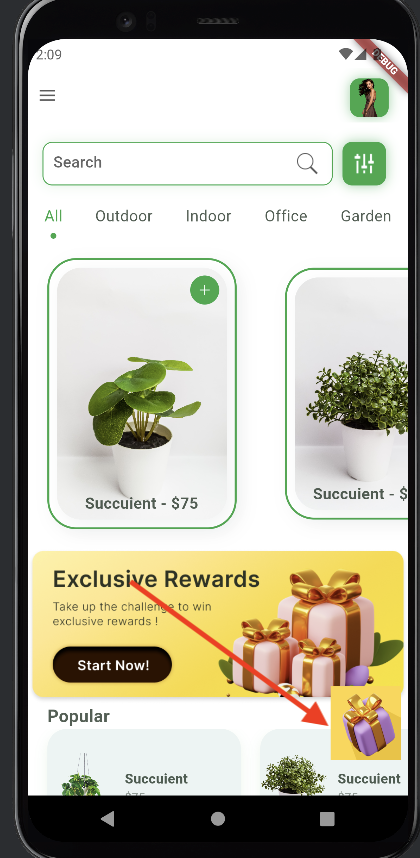
<figure><img src="https://1004846827-files.gitbook.io/~/files/v0/b/gitbook-x-prod.appspot.com/o/spaces%2F-M0ahLW2WavtwcwNbSR9%2Fuploads%2FfdjXUYRML3ScUDjuVTWw%2FScreenshot%202024-08-14%20at%204.27.59%E2%80%AFPM.png?alt=media&amp;token=7abb2611-525a-4192-93c8-78a73aa98e68" alt="" width="210"><figcaption></figcaption></figure>

Well Done! Now we can see the Dynamic Nudges in the Sandbox App 🏆

{% hint style="info" %}
For more Entry Points please refer [Mobile SDKs](/sdk/mobile-sdks#entry-points)
{% endhint %}

## Handling Navigation and Analytics

CustomerGlu Flutter SDK emits various events when users interact with CTAs/Activities. These events can be handled within the app code to trigger navigation, analytics, or custom workflows.

### Configure CTA in Campaign

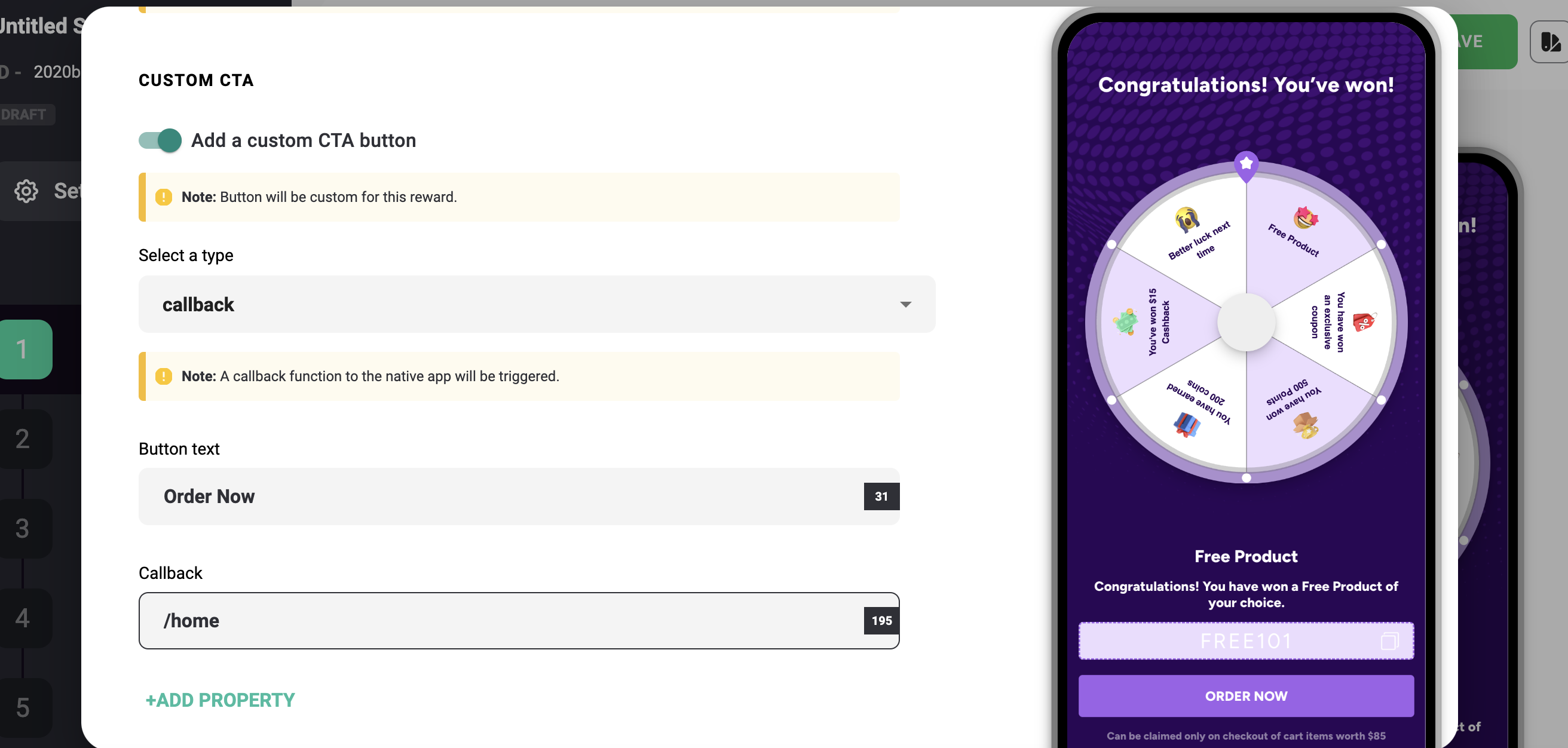
You can add CTA in the Campaign by selecting **Callback** as a type in **Reward Section**

<figure><img src="https://1004846827-files.gitbook.io/~/files/v0/b/gitbook-x-prod.appspot.com/o/spaces%2F-M0ahLW2WavtwcwNbSR9%2Fuploads%2FIVP0BwkK1mim09fgzvwx%2FScreenshot%202024-08-14%20at%206.23.53%E2%80%AFPM.png?alt=media&amp;token=d375ee20-7fdb-4a00-b92b-998d75f3ef07" alt=""><figcaption></figcaption></figure>

### Handling Navigation on Button Tap&#x20;

1. **Observe Deeplink Events**&#x20;

   In the Android studio/Xcode  terminal, you might see.

<figure><img src="https://1004846827-files.gitbook.io/~/files/v0/b/gitbook-x-prod.appspot.com/o/spaces%2F-M0ahLW2WavtwcwNbSR9%2Fuploads%2FTF4e6TVvZJstM5gHizNX%2FScreenshot%202024-08-14%20at%206.28.18%E2%80%AFPM.png?alt=media&amp;token=a61d010b-39b8-42d7-a3df-c01016d40930" alt=""><figcaption></figcaption></figure>

2. **Edit \`main.dart\`**

   Locate[^1] the `initState` function and add the event listener:

```javascript
  static const broadcast_channel = MethodChannel("CUSTOMERGLU_EVENTS");

broadcast_channel.setMethodCallHandler((call) async {

      switch (call.method) {
        case "CUSTOMERGLU_DEEPLINK_EVENT":
          print("CUSTOMERGLU_DEEPLINK_EVENT");
          print(call.arguments);
          // Add your own logic to handle Navigation
          Navigator.push(
            context,
            MaterialPageRoute(
              builder: (builder) => HomePage(),
            ),
          );
          break;
}
});

```

3. **Capture Analytics Events**

   For Capture Analytics add another listener for analytics

```javascript
 case "CUSTOMERGLU_ANALYTICS_EVENT":
          print("CUSTOMERGLU_ANALYTICS_EVENT FROM FLUTTER");
          print(call.arguments);
          break;
 

```

**Congratulations!** You finished setting up the CustomerGlu Flutter SDK with the Sandbox app.

Please refer to [Full SDK Documentation](/sdk/mobile-sdks#pre-requisites) for full reference installation in your app and for advanced use cases.

## Additional References

* [Analytics Event Schema](/schema/analytics-schema-v4)
* [Third Party Integration](/third-party-integrations)
* [User Segmentations](/miscellaneous-topics/user-segmentation)
* [Reward Webhooks](/miscellaneous-topics/configuring-webhooks/rewards-webhook)

[^1]:


# Integrating with SDKs

Express integration requiring minimal developer effort, with out of the box methods for every functionality

Select your Platform:

### <img src="https://1004846827-files.gitbook.io/~/files/v0/b/gitbook-x-prod.appspot.com/o/spaces%2F-M0ahLW2WavtwcwNbSR9%2Fuploads%2FgDiulD0aKlQ8N7V0hOZA%2Fimage.png?alt=media&amp;token=f885fb69-50b8-442f-becf-d0edc5362c76" alt="" data-size="line"> [Web ](/sdk/js-web-sdk)

### <img src="https://1004846827-files.gitbook.io/~/files/v0/b/gitbook-x-prod.appspot.com/o/spaces%2F-M0ahLW2WavtwcwNbSR9%2Fuploads%2FwxqaVi7C453AfrQ4Txli%2Fmob2.png?alt=media&amp;token=e9acbb6e-eb38-42da-9b4c-6a318867d17b" alt="" data-size="line">[Mobile ](/sdk/mobile-sdks)

&#x20;         [   <img src="https://1004846827-files.gitbook.io/~/files/v0/b/gitbook-x-prod.appspot.com/o/spaces%2F-M0ahLW2WavtwcwNbSR9%2Fuploads%2FAyCfFJT03tGBUT0u0gyh%2Fandroid-logo-12380.png?alt=media&amp;token=ee051372-feee-4733-b10d-0c26a6453939" alt="" data-size="line">  Android](/sdk/mobile-sdks#android)

&#x20;           [<img src="https://1004846827-files.gitbook.io/~/files/v0/b/gitbook-x-prod.appspot.com/o/spaces%2F-M0ahLW2WavtwcwNbSR9%2Fuploads%2FMZCY2POKEF1Uy29lPFtj%2Fimage.png?alt=media&amp;token=89208a8f-d181-433b-b03e-2a6c4ba10512" alt="" data-size="line">  iOS](/sdk/mobile-sdks#ios)

&#x20;          [ <img src="https://1004846827-files.gitbook.io/~/files/v0/b/gitbook-x-prod.appspot.com/o/spaces%2F-M0ahLW2WavtwcwNbSR9%2Fuploads%2F9huJ9yPvYgZTF6EZc9mo%2Fkindpng_3557482.png?alt=media&amp;token=06f102b0-04b7-47bd-8457-41a8be07f395" alt="" data-size="line">  Flutter](/sdk/mobile-sdks#flutter)

&#x20;          [ <img src="https://1004846827-files.gitbook.io/~/files/v0/b/gitbook-x-prod.appspot.com/o/spaces%2F-M0ahLW2WavtwcwNbSR9%2Fuploads%2Fuohc3rWf39456w3DmtKI%2F1174949_js_react%20js_logo_react_react%20native_icon.png?alt=media&amp;token=cc118ad4-4ff9-4014-a824-3c645f8a68ce" alt="" data-size="line"> React Native](/sdk/mobile-sdks#react-native)

&#x20;           <img src="https://1004846827-files.gitbook.io/~/files/v0/b/gitbook-x-prod.appspot.com/o/spaces%2F-M0ahLW2WavtwcwNbSR9%2Fuploads%2Fc0oVMcgwXpmkpoXxyGcc%2Fpngegg.png?alt=media&amp;token=f34ad4f1-a74f-47a2-8efd-eadfcc977e91" alt="" data-size="line"> [Cordova](/sdk/cordova-sdk)

### &#x20;<img src="https://1004846827-files.gitbook.io/~/files/v0/b/gitbook-x-prod.appspot.com/o/spaces%2F-M0ahLW2WavtwcwNbSR9%2Fuploads%2F1sXCzs56tgdAIRogatAy%2F58482ec0cef1014c0b5e4a70.png?alt=media&amp;token=e553b968-dd25-454f-bbba-a5f9b4a9d056" alt="" data-size="line">[ Shopify](/sdk/shopify)


# Web SDK

Launch CustomerGlu games, challenges, rewards and nudges on web applications/websites within minutes...

{% embed url="<https://youtu.be/0FUzm06InmM>" %}

## Installation

Paste the given snippet in your website’s HTML file just before closing the body (`</body>` ) tag.

```html
<script type="text/javascript">
      window["gluConfig"] = {
        writeKey: "{{WRITE_KEY}}",  //provided by CustomerGlu
        userIdentification: {
          userId: "{{USER_ID}}",
          anonymousId: "{{ANONYMOUS_ID}}",
          userToken: "TOKEN" //using this will make writeKey optional
        },
        userAttributes: {
          gluAttributes: {},        //add CG reserved user properties here (key-value pair)
          customAttributes: {}      //add all your custom user properties here (key-value pair) 
        },
        onLoadError: function () {  //error handling function if SDK fails to load
          console.log("error"); 
        }
      };
</script>

<script type="text/javascript">
  (()=>{"use strict";!function(){const e=window.gluConfig||{},t=[],o={open:{returnPromise:!0,callMethod:"open"},close:{returnPromise:!1,callMethod:"close"},register:{returnPromise:!1,callMethod:"register"},listenToAnalytics:{returnPromise:!1,callMethod:"listenToAnalytics"},getCampaignDetails:{returnPromise:!0,callMethod:"getCampaignDetails"}},r=["open","close","register","listenToAnalytics","getCampaignDetails"],n={};for(let e=0;e<r.length;e++)n[r[e]]=function(){const n=o[r[e]],s=Array.prototype.slice.call(arguments);if(n.returnPromise)return new Promise(((e,o)=>{t.push({callMethod:n.callMethod,arguments:s.concat({resolve:e,reject:o}),isPromise:!0})}));t.push({callMethod:n.callMethod,arguments:s})};let s=document.createElement("script");s.type="text/javascript",s.async=!0,s.src="https://assets.customerglu.com/scripts/sdk/v4.6/sdk.js",s.onload=function(){const o=new window.CustomerGlu(e.writeKey,e.userIdentification,e.userAttributes);for(let e=0;e<t.length;e++)o[t[e].callMethod](...t[e].arguments);window.glu=o},s.onerror=function(){if(t&&t.length){for(let e=0;e<t.length;e++)t[e].isPromise&&t[e].arguments[t[e].arguments.length-1]("GLU_SDK_LOAD_ERROR");e.onLoadError&&e.onLoadError()}},document.getElementsByTagName("body")[0].appendChild(s),window.glu=n}()})();
</script>
```

{% hint style="warning" %}
Replace the variables with correct values.
{% endhint %}

You are now ready to load CustomerGlu UI on your website. You can now use:

* The Nudges section on the dashboard to add dynamic entrypoints like floating launchers, popups, banners, etc.
* The subsequent SDK Functionality to programmatically load campaigns.

## Functionality

On pasting the above script, a global instance `glu` will be available in the window.

The `glu` instance supports the given methods:

## Register User

Use the given method to register a user with CustomerGlu:

```typescript
glu.register(writeKey: string, userIdentification: IUserIdentification, userAttributes: IUserAttributes);
```

:warning: `writeKey` is a string that will be provided by CustomerGlu.

`UserIdentification` follows the given structure:

```typescript
interface IUserIdentification {
  userId?: string;
  anonymousId?: string;
}
```

* If the user is not logged in the platform, `userId` can be null, and `anonymousId` can be passed (an anonympusId will be auto-assigned if not passed explicitly). User progress/state of the campaigns will be linked to the anonymousId
* After the user logs in, the same `anonymousId` and the `userId` can be passed. And progress linked to `anonymousId` will be linked with the `userId`. If user is already logged in, userId can be passed directly.

:warning: At least one function call with both - anonymousId and userId is required to map the anonymousId to the userId after the user logs in.

* `UserAttributes` are used for segmentation. They follow the given structure:

```typescript
interface IUserAttributes {
  gluAttributes?: {
    userName?: string;
    appVersion?: string;
    deviceType?: string;
    deviceName?: string;
    deviceId?: string;
    firebaseToken?: string;
  };
  customAttributes?: {
    [key: string]: string | number;
  };
}
```

* `customAttributes` can hold any extra key-value pair that might be used for user segmentation/other purposes. Example: {"location":"Mumbai""}

## Open

The given function can be used to render CustomerGlu UI fragments on the screen:

```typescript
glu.open(container: IContainer, content: IContent): Promise<string>
```

:warning:  It returns the promise of a string, that can be used to close the UI using [`glu.close`](#2.3-close) method.

#### Function parameters:

* [Container](#containers)
* [Content](#content)

## Containers

* `container` holds the container details. i.e. If the UI is a bottom sheet, pop up or be embedded etc.
* The styling of the container can be customised using the `css` property present in each container type. The container elements are targeted using special class names.
* Different containers can have same class names for styling, but the styles gets scoped to only the targeted container.
* Media queries and your custom CSS variables can also be used inside the string.

All supported `container` types are listed down below:

{% tabs %}
{% tab title="Popup" %}

![](https://1004846827-files.gitbook.io/~/files/v0/b/gitbook-x-prod.appspot.com/o/spaces%2F-M0ahLW2WavtwcwNbSR9%2Fuploads%2FnpHz9YPN2PtRWUDS91B9%2FUntitled.png?alt=media\&token=9728d4a2-9ccc-4b45-9286-4df16ca7ee4e)

#### Code

```typescript
/* interface */
interface IPopUp {
  typeId: "POP_UP";
  css: string;
}

/* example */
const container: IPopUp = {
  typeId: "POP_UP",
  css: `
    .__glu_container {
      border-radius: 10px;
      background-color: #000;
      cursor: pointer;
    }
    .__glu_backdrop {
      background-color: #000;
      opacity: 0.5;
    }
    @media screen and (max-width: 700px) {
      .__glu_container {
          height: 400px;
          width: 40p0x;
      }
    }`
}
```

#### Sandbox

{% embed url="<https://codesandbox.io/embed/m84w8s?hidenavigation=1&module=/index.html&view=Preview>" %}

{% endtab %}

{% tab title="Bottom Sheet" %}
![](https://1004846827-files.gitbook.io/~/files/v0/b/gitbook-x-prod.appspot.com/o/spaces%2F-M0ahLW2WavtwcwNbSR9%2Fuploads%2FxYjROIW696HTMEAn56NL%2FUntitled%20\(1\).png?alt=media\&token=8fa0d265-c25b-4ef7-b5d6-2f39a8a6e829)

#### Code

```typescript
/* interface */
interface IBottomSheet {
  typeId: "BOTTOM_SHEET";
  css: string;
  height: string;         // <- in px or % 
}

/* example */
const container: IBottomSheet = {
  typeId: "BOTTOM_SHEET",
  height: "60%",
  css: `
    .__glu_container {
        border-top-left-radius: 20px;
        border-top-right-radius: 5px;
        background-color: #fff;
    }
    .__glu_backdrop {
	background-color: #000;
          opacity: 0.5;
    }`
}
```

#### Sandbox

{% embed url="<https://codesandbox.io/embed/tmvlg3?hidenavigation=1&module=/index.html&view=Preview>" %}
{% endtab %}

{% tab title="Floating Icon Button" %}
![](https://1004846827-files.gitbook.io/~/files/v0/b/gitbook-x-prod.appspot.com/o/spaces%2F-M0ahLW2WavtwcwNbSR9%2Fuploads%2FtW1jBadKF5NxtnXoSLYA%2FUntitled%20\(2\).png?alt=media\&token=222f4558-4ba5-4bd9-b75f-e37fa522c44c)

#### Code

```typescript
/* interface */
interface IIconButton {
  typeId: "ICON_BUTTON";
  css: string;
}

/* example */
const container: IIconButton = {
  typeId: "ICON_BUTTON",
  css: `
    .__glu_container {
	border-radius: 50%;
        background-color: #000;
        cursor: pointer;
    }
    @media screen and (max-width: 450px) {
      .__glu_container {
          height: 40px;
          width: 40px;
      }
    }`
}
```

{% endtab %}

{% tab title="Chat Box" %}

![](https://1004846827-files.gitbook.io/~/files/v0/b/gitbook-x-prod.appspot.com/o/spaces%2F-M0ahLW2WavtwcwNbSR9%2Fuploads%2FJdDXcjjSe1Er40oW6Alx%2FUntitled%20\(3\).png?alt=media\&token=d8695260-6ae2-4689-ac37-4db39405918f)

#### Code

```typescript
/* interface */
interface IChatBox {
  typeId: "CHAT_BOX";
  css: string;
}

/* example */
const container: IChatBox = {
  typeId: "CHAT_BOX",
  css: `
    .__glu_container {
        border-radius: 12px;
        background-color: #000;
        cursor: pointer;
    }
    @media screen and (max-width: 450px) {
        .__glu_container {
            height: 100vh;
            width: 100vw;
          }
    }`
}
```

#### Sandbox

{% embed url="<https://codesandbox.io/embed/fxhdzy?hidenavigation=1&module=/index.html&view=Preview>" %}
{% endtab %}

{% tab title="Embed" %}

![](https://1004846827-files.gitbook.io/~/files/v0/b/gitbook-x-prod.appspot.com/o/spaces%2F-M0ahLW2WavtwcwNbSR9%2Fuploads%2F1l7QzjLTSATnJP1d1j6k%2FUntitled%20\(4\).png?alt=media\&token=de54ab48-e5f8-4cb2-b58a-e0ef42273edb)

#### Code

```typescript
/* interface */
interface IEmbedded {
  typeId: "EMBEDDED";
  css: string;
  elementHookId: string;  // <- HTML elelemt selector (eg: .class, #id, main, body)
}

/* example */
const embedded: IEmbedded = {
  typeId: "EMBEDDED",
  elementHookId: "#app",
  css: `
      .__glu_container {
          width: 500px;
          margin: 0 auto;
          height: 1000px;
          overflow: scroll;
        }`
}
```

:warning: `elementHookId` should be a valid html selector or element on the page. The glu container will be appended inside the that element

#### Sandbox

{% embed url="<https://codesandbox.io/embed/jm6ml7?hidenavigation=1&module=/index.html&view=Preview>" %}
{% endtab %}
{% endtabs %}

## Content

`content` holds details regarding what gets rendered inside the [`container`](#containers).&#x20;

All supported `content` types are listed down below:

{% tabs %}
{% tab title="Wallet" %}

![](https://1004846827-files.gitbook.io/~/files/v0/b/gitbook-x-prod.appspot.com/o/spaces%2F-M0ahLW2WavtwcwNbSR9%2Fuploads%2F3cc5NaFOiNjmi3pQqXcW%2FUntitled%20\(5\).png?alt=media\&token=dcf8ca26-a0ce-4353-a05a-551377c91d9c)

**Code**

```tsx
/* interface */
interface IWallet {
  typeId: "WALLET";
}

/* example */
const content: IWallet = {
  typeId: string
}
```

####

#### Sandbox

{% embed url="<https://codesandbox.io/embed/9c7vyy?hidenavigation=1&module=/index.html&view=Preview>" %}
{% endtab %}

{% tab title="Campaign" %}

![](https://1004846827-files.gitbook.io/~/files/v0/b/gitbook-x-prod.appspot.com/o/spaces%2F-M0ahLW2WavtwcwNbSR9%2Fuploads%2Fxwci3kmooEL8MprNAagY%2FUntitled%20\(6\).png?alt=media\&token=8a5106d5-91d4-4142-9fd9-555e14201f42)

#### Code

```tsx
/* interface */
interface ICampaign {
  typeId: "CAMPAIGN";
  conditions: {
    campaignId?: string[];
    type?: "referral" | "gamechallenge" | "streak" | "multistep" | "spinthewheel" | "scratchcard" | "slotmachine" | "giftbox" | "tossthecoin" | "memorygame" | "catchinggame" | "quiz" | "direct" [];     
    status?: "pristine" | "in-progress" | "completed" [];     
  };
}

/* example #1: select a single campaign */
const content: ICampaign = {
  typeId: "CAMPAIGN",
  conditions: {
    campaignId: ["asd283mkla-3890njakd-jkandsk3-kjadnjk3"]
  }
}

/* example #2: select a scratch card if present else a spin the wheel campaign if present */
const content: ICampaign = {
  typeId: "CAMPAIGN",
  conditions: {
    type: ["scratchcard", "spinthewheel"]
  }
}
```

* `conditions` property inside the `ICampaign` is in key-value pair format. Key is the property that needs to be filtered for. Value is an array of acceptable set of values.
* The first campaign that satisfies all the conditions is selected.
* If the campaign is not found, an error `CAMPAIGN_NOT_FOUND` is thrown.

#### Sandbox

{% embed url="<https://codesandbox.io/embed/8r362x?hidenavigation=1&module=/index.html&view=Preview>" %}
{% endtab %}

{% tab title="Static Image" %}

![](https://1004846827-files.gitbook.io/~/files/v0/b/gitbook-x-prod.appspot.com/o/spaces%2F-M0ahLW2WavtwcwNbSR9%2Fuploads%2FqiEGmkxCBxGEZW8MhY0r%2FUntitled%20\(7\).png?alt=media\&token=ccb5d54b-74d5-4d8f-817d-1382b89d5816)

#### Code

```tsx
/* interface */
interface IStaticImage {
  typeId: "STATIC";
  src: string;
  action: IAction; // <- on click action
}

/* example #1: on click redirect */
const content: IStaticImage = {
  typeId: "STATIC",
  src: "https://uploads-ssl.webflow.com/60ae16f0e20bce50d40c3c7e/61efce5c2ab738e60fd0856f_Group%2027.png",
  action: {
    type: "REDIRECT",
    data: {
      url: "https://website.com/rewards"
    }
  }
}

/* example #2: on click open wallet in a pop up */
const content: IStaticImage = {
  typeId: "STATIC",
  src: "https://uploads-ssl.webflow.com/60ae16f0e20bce50d40c3c7e/61efce5c2ab738e60fd0856f_Group%2027.png",
  action: {
    type: "TOGGLE_FRAME_CONTENT";
    id: string;
    container: {
      typeId: "POP_UP",
      css: `
        .__glu_container {
	  border-radius: 10px;
          background-color: #000;
          cursor: pointer;
        }
   `},
    content: {
      typeId: "WALLET"
    }
  }
}

/* example #3: on click open a campaign in a bottom sheet */
const content: IStaticImage = {
  typeId: "STATIC",
  src: "https://uploads-ssl.webflow.com/60ae16f0e20bce50d40c3c7e/61efce5c2ab738e60fd0856f_Group%2027.png",
  action: {
    type: "TOGGLE_FRAME_CONTENT";
    id: string;
    container: {
      typeId: "BOTTOM_SHEET",
      css: `
        .__glu_container {
	  border-radius: 10px;
          background-color: #000;
          cursor: pointer;
        }
     `},
    content: {
      typeId: "CAMPAIGN",
      conditions: {
        campaignId: ["asd283mkla-3890njakd-jkandsk3-kjadnjk3"]
      }
    }
  }
}
```

{% endtab %}
{% endtabs %}

## Close

The [`glu.open`](#open) method returns a unique string. Following method can be used to close the frame:

```tsx
glu.close(id: string);
```

#### Function parameters:

**id:** unique string returned by [`glu.open`](#open) method

## Get Campaign Details

`glu.getCampaignDetails` can be used to get the campaign details. The result include the campaign details and the **array** of rewards earned for that campaign.

```
glu.getCampaignDetails(filter: IFilter, config: IConfig): Promise<ICampaignDetailsResult>
```

* It accepts 2 arguments: `filter` and `config`
  * `filter` helps in identifying the campaign for which the details are needed.
  * `config` has configurations like: should the reward details also exist with the details of the campaign.

```typescript
/* filter interface */   
interface ICampaingDetailsFilter {
  campaignId?: (string | boolean | number)[] | string;
  [key: string]: (string | boolean | number)[] | string;
}

/* config interface */   
interface ICampaingDetailsConfig {
  includeRewards: boolean;
}

/* RESULT interface */ 
interface ICampaignDetailsResult {
  details: {
	  campaignId: string;
	  status: "pristine" | "completed";
	  type: string;
	  url: string;
	  banner?: any;
	};
  rewards?: {
	  game_name?:
	    | "spinthewheel"
	    | "memorygame"
	    | "scratchcard"
	    | "slotmachine"
	    | "quiz"
	    | "direct"
	    | "giftbox"
	    | "not_available"
	    | "swipeui"
	    | "tossthecoin"
	    | "unitygame"
	    | "rollthedice";
	  state?: "pristine" | "complete" | "expired" | "not_available";
	  campaign_id?: string;
	  reward_user_id?: string;
	  user_id?: string;
	  status?: string;
	  selected_slot_index?: number | "not_available";
	  reward_name?: string;
	  reward_type?: string;
	  code?: string;
	  reward_amount?: string | number;
	  details?: { [key: string]: string } | "not_available";
	}[];
}

/* example */
glu
   .getCampaignDetails(
      { campaignId: "f8cca67-596e-4b28-a173-8a018cdb2cf8" },
      { includeRewards: true }
    )
    .then((res) => {
      document.querySelector("#app").textContent = JSON.stringify(res);
    }).catch(err => console.log(err));
```

{% embed url="<https://codesandbox.io/embed/jfk7mn?hidenavigation=1&module=/index.html&view=Preview>" %}

## Listen to Analytics

You can listen to the analytics events triggered from the glu ui by registering a callback with the SDK’s `addAnalyticsListener` method.

```typescript
glu.addAnalyticsListener(listener: (analyticsEvent: any) => void)
```

* `glu.addAnalyticsListener` accepts a callback function as an argument. & whenever an analytics event is triggered, it is passed on to the callback as the first argument.
* Schema can be found here:<https://docs.customerglu.com/schema/analytics-schema-v4>


# Mobile SDKs

Integrating CustomerGlu on your Mobile Apps

## Pre-Requisites

{% tabs %}
{% tab title="Android" %}
CustomerGlu Android SDK supports API 21 and above. Please ensure the `minSDKVersion` in the app's `build.gradle` file reflects the same.

{% hint style="info" %}
​**Note:**

If **Proguard** is enabled in the app, please add the following rule in&#x20;

`proguard-rules.pro` file to ensure smooth working of CustomerGlu SDK:

```java
-keep class com.customerglu.sdk.Modal.*{*;}
```

{% endhint %}

### Permissions

Add the following permissions to the `AndroidManifest.xml` file

```xml
<uses-permission android:name="android.permission.INTERNET" />
<uses-permission android:name="android.permission.ACCESS_NETWORK_STATE" />
```

{% endtab %}

{% tab title="iOS" %}
CustomerGlu iOS SDK supports **IOS 12.0+** and requires **Xcode 12** or above to build.
{% endtab %}

{% tab title="Flutter" %}
{% tabs %}
{% tab title="Android" %}
CustomerGlu Flutter SDK supports API 21 and above. Please ensure the `minSDKVersion` in the app's `build.gradle` file reflects the same.

Firstly add the permission of internet in Manifest file

```xml
<uses-permission android:name="android.permission.INTERNET" />
<uses-permission android:name="android.permission.ACCESS_NETWORK_STATE" />
```

{% hint style="info" %}
**Note:**

If **Proguard** is enabled in the app, please add the following rule in the `build.gradle` file to ensure smooth working of CustomerGlu SDK.&#x20;

```java
buildTypes {
    release {
        // TODO: Add your own signing config for the release build.
        // Signing with the debug keys for now, so `flutter run --release` works.
        signingConfig signingConfigs.debug
        proguardFiles getDefaultProguardFile('proguard-android-optimize.txt'), 
        'proguard-rules.pro'
    }
}
```

Create a **Proguard** rules file if not present and add the following rule in Proguard Rules file:

```java
-keep class com.customerglu.sdk.Modal.*{*;}
```

###

{% endhint %}
{% endtab %}

{% tab title="iOS" %}
CustomerGlu iOS SDK supports **IOS 11.0+** and requires **Xcode 12** or above to build.
{% endtab %}
{% endtabs %}
{% endtab %}

{% tab title="React Native" %}
{% tabs %}
{% tab title="Android" %}
CustomerGlu Android SDK supports API 21 and above. Please ensure the `minSDKVersion` in the app's `build.gradle` file reflects the same.

{% hint style="info" %}
​**Note:**

If **Proguard** is enabled in the app, please add the following rule in Proguard Rules file to ensure smooth working of CustomerGlu SDK:

```java
-keep class com.customerglu.sdk.Modal.*{*;}
```

{% endhint %}

### Permissions

Add the following permissions to the `AndroidManifest.xml` file

```xml
<uses-permission android:name="android.permission.INTERNET" />
<uses-permission android:name="android.permission.ACCESS_NETWORK_STATE" />
```

{% endtab %}

{% tab title="iOS" %}
CustomerGlu iOS SDK supports **IOS 11.0+** and requires **Xcode 12** or above to build.
{% endtab %}
{% endtabs %}
{% endtab %}
{% endtabs %}

## Installation

{% tabs %}
{% tab title="Android" %}
Add the following dependency to the app's `build.gradle` file:

```java
dependencies{
    implementation 'com.customerglu:CustomerGluLibrary:3.0.4'
}
```

Add the below code snippet in project level build.gradle file:

```java
allprojects {
    repositories {
        ...
        mavenCentral()
    }
}
```

For new Projects , add the below code snippet in settings.gradle file (if above not work):

```java
dependencyResolutionManagement {
    repositoriesMode.set(RepositoriesMode.FAIL_ON_PROJECT_REPOS)
    repositories {
        ...
        mavenCentral()

    }
}
```

{% endtab %}

{% tab title="iOS" %}

#### Option 1: Using CocoaPods

Add `CustomerGlu` to your Podfile and run `pod install`

`pod 'CustomerGlu'`

#### Option 2: Using Swift Package Manager

Add  <https://github.com/customerglu/CG-iOS-SDK> as a Swift Package Repository in Xcode and follow the instructions to add Intercom as a Swift Package.&#x20;

![](https://1004846827-files.gitbook.io/~/files/v0/b/gitbook-x-prod.appspot.com/o/spaces%2F-M0ahLW2WavtwcwNbSR9%2Fuploads%2FmgQhjKelyCAwG6nN1Ory%2FScreenshot%202022-01-11%20at%206.43.03%20PM.png?alt=media\&token=aaaa0e98-656b-4730-a135-1f35ffd38a65)
{% endtab %}

{% tab title="Flutter" %}
**Option 1**&#x20;

Add the CustomerGlu Flutter plugin in `pubspec.yaml` file&#x20;

```dart
customerglu_plugin: ^2.1.0
```

**Option 2**&#x20;

Run this command With Flutter:

```shell
flutter pub add customerglu_plugin
```

{% endtab %}

{% tab title="React Native" %}
**Option 1**&#x20;

Add the CustomerGlu React Native plugin in package.json file

```dart
"@customerglu/react-native-customerglu" : "2.1.1"
"@react-native-community/push-notification-ios": "^1.10.1",
"@react-native-firebase/app": "^15.1.1",
"@react-native-firebase/messaging": "^15.1.1",
"react-native-push-notification": "^8.1.1",

```

**Option 2**&#x20;

Run this command With npm:

```shell
npm install @customerglu/react-native-customerglu
```

{% endtab %}
{% endtabs %}

## Initialise SDK

{% tabs %}
{% tab title="Android" %}
Add your WriteKey/API Key in meta-data of the `AndroidManifest.xml` file like this:

```xml
<meta-data android:name="CUSTOMERGLU_WRITE_KEY" android:value="YOUR_WRITE_KEY" /> 
<!-- only value should be changed -->
```

{% hint style="info" %}
**WriteKey** - Mandatory (WriteKey/API Key is provided by CustomerGlu)
{% endhint %}

**Define the global instance of CustomerGlu SDK** in  your Application class:

```java
public CustomerGlu customerGlu;
customerGlu = CustomerGlu.getInstance();
```

For **Initialising SDK** add the following line in your **Application Class (Mandatory)**

```java
CustomerGlu.getInstance().initializeSdk(getApplicationContext());
```

{% endtab %}

{% tab title="iOS" %}
&#x20;Add the following key to the `Info.plist` file.

```xml
<key>CUSTOMERGLU_WRITE_KEY</key>
<string>YOUR_WRITE_KEY</string>
```

{% hint style="info" %}
**WriteKey** - Mandatory (WriteKey/API Key is provided by CustomerGlu)
{% endhint %}

**Define the global instance of CustomerGlu SDK**&#x20;

You can store the global instance of CustomerGlu SDK in a variable so you don't have to use `CustomerGlu.getInstance` for each function call

```swift
let customerGlu = CustomerGlu.getInstance
```

For **Initialising SDK** add the following line in your **AppDelegate  (Mandatory)**

```java
CustomerGlu.getInstance.initializeSdk()
```

{% endtab %}

{% tab title="Flutter" %}
To initialize the SDK, the initialization method must be called at every app launch before using any other method from the CG SDK. This should be done in main.dart at the entry point of the app. Use the following values to specify the region: \
\
"**in**" → Indian Region \
"**me**" → Middle-East Region \
"**us**" → USA Region

```dart
import 'package:customerglu_plugin/customerglu_plugin.dart';

  
void main() {
  WidgetsFlutterBinding.ensureInitialized();

  // Initialize CustomerGlu SDK with the desired region ("in", "me", or "us")
  CustomergluPlugin.initSDK("me"); // Change "me" to "in" or "us" as needed

  runApp(MyApp());
}
```

{% tabs %}
{% tab title="Android" %}
Add your WriteKey/API Key in meta-data of the `AndroidManifest.xml` file like this:

```xml
<meta-data android:name="CUSTOMERGLU_WRITE_KEY"  
    android:value="YOUR_WRITE_KEY" />  //Don't Change Name
```

{% hint style="info" %}
**WriteKey** - Mandatory (WriteKey/API Key is provided by CustomerGlu)
{% endhint %}
{% endtab %}

{% tab title="iOS" %}
Add the following key to the `Info.plist` fil&#x65;**:**

```xml
<key>CUSTOMERGLU_WRITE_KEY</key>
<string>YOUR_WRITE_KEY</string
```

{% hint style="info" %}
**WriteKey** - Mandatory (WriteKey/API Key is provided by CustomerGlu)
{% endhint %}

{% endtab %}
{% endtabs %}
{% endtab %}

{% tab title="React Native" %}
{% tabs %}
{% tab title="Android" %}
Add your WriteKey/API Key in meta-data of the `AndroidManifest.xml` file like this:

```xml
<meta-data android:name="CUSTOMERGLU_WRITE_KEY"  
    android:value="YOUR_WRITE_KEY" />  //Don't Change Name
```

{% hint style="info" %}
**WriteKey** - Mandatory (WriteKey/API Key is provided&#x20;
{% endhint %}

To initialize the SDK the initialization method must be called at every app launch before using any other method from the CG SDK. use it in index.js at entry point of the app<br>

```
import { initCGSDK } from '@customerglu/react-native-customerglu';

initCGSDK("in");  
```

{% endtab %}

{% tab title="iOS" %}
Add the following key to the `Info.plist` fil&#x65;**:**

```xml
<key>CUSTOMERGLU_WRITE_KEY</key>
<string>YOUR_WRITE_KEY</string>
```

{% hint style="info" %}
**WriteKey** - Mandatory (WriteKey/API Key is provided&#x20;
{% endhint %}

\
To initialize the SDK the initialization method must be called at every app launch before using any other method from the CG SDK. use it in **index.js** or **App.js** at entry point of the app<br>

```
import { initCGSDK } from '@customerglu/react-native-customerglu';

initCGSDK("in");  

```

{% endtab %}
{% endtabs %}
{% endtab %}
{% endtabs %}

## Register User (Mandatory)&#x20;

Registering a user of your platform with CustomerGlu is mandatory to be able to show any CG powered UIs and experiences to the user. Users need not be registered on your platform. You can check out the flow to handle non-logged/guest users [here](/miscellaneous-topics/handling-non-logged-in-users).

As the same registration method can also be used to update user attributes, it is recommended to use this method on every app launch, after signing in/up and reaching the app home page.

{% tabs %}
{% tab title="Android" %}
This method is now used to register the user with CG. Make sure to call it on every **App launch**. In **SDK v3.0.0** or above we are **not accepting CustomAttributes** here in the registerDevice:

<pre class="language-java"><code class="lang-java">
customerGlu.registerDevice(this, registerData, new DataListner() {
            //this method register your device with CG and load the campaigns
            @Override
            public void onSuccess(Boolean success) {
<strong>                Toast.makeText(getApplicationContext(), "Registered" , Toast.LENGTH_SHORT).show();
</strong>            }
            @Override
            public void onFail(String message) {
                Toast.makeText(getApplicationContext(), "" + message, Toast.LENGTH_SHORT).show();
            }
        }
);

</code></pre>

{% hint style="info" %}
**Note:** The Register function is  used to generate token only
{% endhint %}

#### Function Parameters:

1. **Context:** this/getApplicationContext()
2. **userData:** A HashMap that holds user information

**Sample UserData object**

```java
Map<String,Object> userData = new HashMap<>();
String user_id="testUser_1";
String fcmToken="FCM_TOKEN_OF_DEVICE";
userData.put("userId",user_id); // Mandatory:any identifier to uniquely identify a user of your platform
userdata.put("firebaseToken",fcmToken); // for enabling Firebase Notifications
userdata.put("referredBy": "userAId"); // for referrals
userdata.put("referralCode": "userAReferralCode"); // for referrals
```

{% hint style="info" %}
**Note:** You can check out the complete userData object payload [here](/integration-doc#register-a-device).
{% endhint %}
{% endtab %}

{% tab title="iOS" %}
This method is now used to register the user with CG. Make sure to call it on every **App launch**. In **SDK v3.0.0** or above we are **not accepting CustomAttributes** here in the registerDevice:

```swift
customerGlu.registerDevice(userdata: userData) { success in
            if success {
               print("Register Successfully")
            } else {
                print("error")
            }
        }
```

{% hint style="info" %}
**Note:** The Register function is used to generate Token only
{% endhint %}

#### Function Parameters:

1. **userData:** A Dictionary that holds user information

**Sample UserData object**

<pre class="language-swift"><code class="lang-swift"> var userData = [String: AnyHashable]()
        userData["userId"] = "testUser_1" // Mandatory:any identifier to uniquely identify a user of your platform
        userData["userName"] = "John Doe"
        userData["firebaseToken"] = CustomerGlu.getInstance.fcmToken // for enabling Firebase Notifications
        userData["apnsDeviceToken"] = CustomerGlu.getInstance.apnToken // for enabling APNS Notifications
        userdata["referredBy": "userAId"]; // for referrals
<strong>        userdata["referralCode": "userAReferralCode"]; // for referrals
</strong>       
</code></pre>

{% hint style="info" %}
**Note:** You can check out the complete userData object payload [here](https://docs.customerglu.com/integration-doc#register-a-device)
{% endhint %}
{% endtab %}

{% tab title="Flutter" %}
Use the given function to register a user with CustomerGlu :&#x20;

```dart
bool is_registered = await CustomergluPlugin.registerDevice(userData)
```

{% hint style="info" %}
**Note:** The Register function is also used to update the user attributes
{% endhint %}

**Sample UserData object**

```dart
var userData = {
'userId': user_id, // Mandatory:any identifier to uniquely identify a user of your platform
'firebaseToken': "FCM_TOKEN_OF_DEVICE", // for enabling Firebase Notifications
'referredBy': "userAId", // for referrals
'referralCode': "userAReferralCode", // for referrals
'customAttributes':{ 
 // any custom key-value pairs, which may be used for targeting can be sent as customAttributes
// segments can be created by applying filters on these customAttributes
// campaigns can be launched on specific segments
"orderCount":5,
"city":"Mumbai"
 }
'profile':{
"firstName":"JaneDoe"
 }
}
```

{% hint style="info" %}
**Note:** You can check out the complete userData object payload [here](/integration-doc#register-a-device).
{% endhint %}
{% endtab %}

{% tab title="React Native" %}
Use the given function to register a user with CustomerGlu :&#x20;

```dart
import { RegisterDevice } from '@customerglu/react-native-customerglu';
var ok = await RegisterDevice(userData);
if (ok == true) {
// Success 
}else { 
// fail
} 

```

{% hint style="info" %}
**Note:** The Register function is also used to update the user attributes
{% endhint %}

**Sample UserData object**

```dart
let userData = {
'userId': user_id, // Mandatory:any identifier to uniquely identify a user of your platform
'firebaseToken': "FCM_TOKEN_OF_DEVICE", // for enabling Firebase Notifications
'apnsDeviceToken': "APN_TOKEN_OF_DEVICE", // for enabling APN Notifications only for IOS
'referredBy': "userAId", // for referrals
'referralCode': "userAReferralCode", // for referrals
'customAttributes':{ 
 // any custom key-value pairs, which may be used for targeting can be sent as customAttributes
// segments can be created by applying filters on these customAttributes
// campaigns can be launched on specific segments
"orderCount":5,
"city":"Mumbai"
 }
'profile':{
"firstName":"JaneDoe"
 }
}
```

{% hint style="info" %}
**Note:** You can check out the complete userData object payload [here](/integration-doc#register-a-device).
{% endhint %}
{% endtab %}
{% endtabs %}

## **UpdateUser Attributes**

This method is used to update the user custom Attributes to add users to the respective segments

{% tabs %}
{% tab title="Android" %}

```java
Map<String, Object> attributes = new HashMap<>();
attributes.put("city", "Mumbai");
customerGlu.updateUserAttributes(getApplicationContext(), attributes);

```

{% endtab %}

{% tab title="iOS" %}

<pre class="language-java"><code class="lang-java">var myCustomAttributes = [String: AnyHashable]()
myCustomAttributes["city"] = "Mumbai"
<strong>CustomerGlu.getInstance.updateUserAttributes(customAttributes: myCustomAttributes)
</strong></code></pre>

{% endtab %}

{% tab title="Flutter" %}

```dart
var attributes = {
'count': 50
}
CustomergluPlugin.updateUserAttributes(attributes)
```

{% endtab %}

{% tab title="React Native" %}

```javascript
  userAttributes = {
            city : "Mumbai"
    }
    UpdateUserAttributes(userAttributes)
```

{% endtab %}
{% endtabs %}

## **UpdateUser Profile**

You can update the user profile and customAttributes values by using following method:

{% hint style="info" %}
**Note:** You can check out the complete userData object payload [here](/integration-doc#register-a-device).
{% endhint %}

{% tabs %}
{% tab title="Android" %}

```java
Map<String, Object> registerData = new HashMap<>();
registerData.put("userName", "glutest-234");

customerGlu.updateProfile(this, registerData, new DataListner() {
            //this method register your device with CG and load the campaigns
            @Override
            public void onSuccess(Boolean success) {

            }
            @Override
            public void onFail(String message) {
                Toast.makeText(getApplicationContext(), "" + message, Toast.LENGTH_SHORT).show();
            }
        }
);

```

{% endtab %}

{% tab title="iOS" %}

```swift
customerGlu.updateProfile(userdata: ["userName" : "glutest"])
```

{% endtab %}

{% tab title="Flutter" %}

```dart
var userData = {
'userName': "glutest"
}

CustomergluPlugin.updateProfile(userData)
```

{% endtab %}

{% tab title="React Native" %}

```javascript
userdata = {
    userName: "glutest"
    }
UpdateProfile(userdata)
```

{% endtab %}
{% endtabs %}

## **Clear Data on Logout (Mandatory)**&#x20;

Use the given function when the user logs out, to clear CustomerGlu SDK cached data like user\_id, token, entry point related data, etc.

{% tabs %}
{% tab title="Android" %}

```java
customerGlu.clearGluData(getApplicationContext());
```

{% endtab %}

{% tab title="iOS" %}

```swift
customerGlu.clearGluData();
```

{% endtab %}

{% tab title="Flutter" %}

```dart
CustomergluPlugin.clearGluData()
```

{% endtab %}

{% tab title="React Native" %}

```dart
import {dataClear} from '@customerglu/react-native-customerglu';
dataClear();
```

{% endtab %}
{% endtabs %}

## **Handling Webview Events**

CG Webviews send the following types of events to the app:

* **Deeplink redirection Events (OPEN\_DEEPLINK)**: Redirect to a given screen on click of buttons from CustomerGlu UIs Example: Clicking on "Go To Cart" should redirect to the Cart Screen
* **Analytics Events (ANALYTICS)**: Send click analytics events on CG UI directly from the app to your servers/CDP Platform\
  Example: coupon code copied event

{% hint style="info" %}
**Note:** Analytics events need to be explicitly enabled
{% endhint %}

### **Enable Analytics Events**&#x20;

If click analytics are to be captured directly via the app, you can enable the analytics events by using the given function:

{% tabs %}
{% tab title="Android" %}

```java
customerGlu.enableAnalyticsEvent(true);
```

{% endtab %}

{% tab title="iOS" %}

```swift
customerGlu.enableAnalyticsEvent(event: true)
```

{% endtab %}

{% tab title="Flutter" %}

```dart
CustomergluPlugin.enableAnalyticsEvent(true)
```

{% endtab %}

{% tab title="React Native" %}

```javascript
import {enableAnalytic} from '@customerglu/react-native-customerglu';
enableAnalytic(true);
```

{% endtab %}
{% endtabs %}

### **Handling Events**&#x20;

{% tabs %}
{% tab title="Android" %}
For handling [Deeplink](/schema/webview-callback-schema#open-deeplink) or [Analytics](/schema/webview-callback-schema#analytics) events triggered by the webview, you need to register a broadcast receiver and handle the logic for the respective event:

```java
BroadcastReceiver mMessageReceiver;
 
mMessageReceiver = new BroadcastReceiver() {
    @Override
    public void onReceive(Context context, Intent intent) {
        try {

           if(intent.getAction().equalsIgnoreCase("CUSTOMERGLU_DEEPLINK_EVENT"))
            {
            String data =  intent.getStringExtra("data");
            JSONObject jsonObject = new JSONObject(data);
            String message = jsonObject.getString("deepLink");
           // Add the logic to redirect to appropriate page
          Toast.makeText(getApplicationContext(), message, Toast.LENGTH_SHORT).show();
            }
            /* If you want to listen analytics event */
             if(intent.getAction().equalsIgnoreCase("CUSTOMERGLU_ANALYTICS_EVENT"))
               {

                  String data =  intent.getStringExtra("data");
                  JSONObject jsonObject = new JSONObject(data);
                  Toast.makeText(getApplicationContext(), jsonObject.toString(), Toast.LENGTH_LONG).show();
                  //This Event can be forwarded to your Servers/CDP tool
                }
        }
        catch (Exception e)
        {
            System.out.println(e);
        }
    }

};
registerReceiver(mMessageReceiver,new IntentFilter("CUSTOMERGLU_DEEPLINK_EVENT"));
/* If you want to listen analytics event register the below reciever*/
registerReceiver(mMessageReceiver,new IntentFilter("CUSTOMERGLU_ANALYTICS_EVENT"));


```

{% hint style="info" %}
**Note:** Do not unregister the broadcast receiver in the app lifecycle.
{% endhint %}
{% endtab %}

{% tab title="iOS" %}

### Deeplink Events

For handling [Deeplink](https://docs.customerglu.com/sdk/pages/-MTGK7BZ4d0aMD6C93uc#1.-open-deeplink) events triggered by the webview, you need to add a notification observer:

<pre class="language-swift"><code class="lang-swift">NotificationCenter.default.addObserver(
            self,
            selector: #selector(self.catchDeeplinkNotification),
            name: Notification.Name("CUSTOMERGLU_DEEPLINK_EVENT"),
            object: nil)

@objc private func catchDeeplinkNotification(notification: NSNotification) {
        //do stuff using the userInfo property of the notification object
        if let userInfo = notification.userInfo as? [String: Any] // or use if you know the type  [AnyHashable : Any]
        {
<strong>             print(userInfo)
</strong><strong>        }
</strong>    }
</code></pre>

###

### Analytics Events&#x20;

For handling analytics events triggered by the webview, you need to a notification observer:

```swift
NotificationCenter.default.addObserver(
          self,
          selector: #selector(self.catchAnalyticsNotification),
          name: Notification.Name("CUSTOMERGLU_ANALYTICS_EVENT"),
          object: nil)
@objc private func catchAnalyticsNotification(notification: NSNotification) {
      if let userInfo = notification.userInfo as? [String: Any]
      {
         print(userInfo)
			}
}
```

{% endtab %}

{% tab title="Flutter" %}
For handling [Deeplink](https://docs.customerglu.com/sdk/pages/-MTGK7BZ4d0aMD6C93uc#1.-open-deeplink) and Analytics broadcast events in Flutter you need to create a `MethodChannel` and handle the logic for the respective event:&#x20;

```dart
static const broadcast_channel = MethodChannel("CUSTOMERGLU_EVENTS");
broadcast_channel.setMethodCallHandler((call) async {
  switch (call.method) {
    case "CUSTOMERGLU_DEEPLINK_EVENT":
      print("CUSTOMERGLU_DEEPLINK_EVENT");
      print(call.arguments);
      var json = jsonDecode(call.arguments);
      print(json["name"]);
      break;
    case "CUSTOMERGLU_ANALYTICS_EVENT":
      print("CUSTOMERGLU_ANALYTICS_EVENT");
      print(call.arguments);
      var json = jsonDecode(call.arguments);
      print(json["event_name"]);
      break;
  }
});
```

{% endtab %}

{% tab title="React Native" %}
For handling [Deeplink](https://docs.customerglu.com/sdk/pages/-MTGK7BZ4d0aMD6C93uc#1.-open-deeplink) and Analytics broadcast events in React-Native you need to add following code in your js file :&#x20;

```javascript

useEffect(() => {
        const { Rncustomerglu } = NativeModules;
        const RncustomergluManagerEmitter = new NativeEventEmitter(Rncustomerglu);

        const eventanalytics = RncustomergluManagerEmitter.addListener(
            'CUSTOMERGLU_ANALYTICS_EVENT',
            (reminder) => console.log('CUSTOMERGLU_ANALYTICS_EVENT...', reminder)
        );
        const eventdeeplink = RncustomergluManagerEmitter.addListener(
            'CUSTOMERGLU_DEEPLINK_EVENT',
            (reminder) =>  
             if (Platform.OS === ‘ios’) {
                    reminder = reminder.data
                }
             console.log('CUSTOMERGLU_DEEPLINK_EVENT...', reminder)
        );
        }
        return () => {
            eventanalytics.remove();
            eventdeeplink.remove();
        }
    }, []);
```

{% endtab %}
{% endtabs %}

## Nudge Configuration

Nudge Configuration is an object that can be passed as an optional parameter to the [openWallet](#open-wallet), [loadCampaignById](#open-campaign) and [openNudge](#open-nudge) methods to configure the layout, height, and other related properties for the webview.

{% tabs %}
{% tab title="Android" %}

```java
NudgeConfiguration nudgeConfiguration = new NudgeConfiguration();
nudgeConfiguration.setAbsoluteHeight(700);
nudgeConfiguration.setRelativeHeight(60);
nudgeConfiguration.setLayout("bottom-popup");
nudgeConfiguration.setOpacity(0.9);
nudgeConfiguration.setCloseOnDeepLink(true);
 
```

{% endtab %}

{% tab title="iOS" %}

```swift
let nudgeConfiguration = CGNudgeConfiguration()
            nudgeConfiguration.closeOnDeepLink = false
            nudgeConfiguration.opacity = 0.9
            nudgeConfiguration.layout = "bottom-default"
            nudgeConfiguration.absoluteHeight = 100
            nudgeConfiguration.relativeHeight = 70
```

{% endtab %}

{% tab title="Flutter" %}

```dart
nudgeConfiguration = NudgeConfiguration(relativeHeight: 50,
absoluteHeight: 700, layout: "bottom-slider",closeOnDeepLink: true,
opacity: 0.7),
```

{% endtab %}

{% tab title="React-Native" %}

```javascript
 let nudgeConfigurationData = {
        nudgeConfiguration:{
             layout:'middle-default',
             opacity:'0.8',
             closeOnDeepLink:true,
             absoluteHeight:'50',
             relativeHeight:'60'
        },
    };
```

{% endtab %}
{% endtabs %}

1. **Relative Height** - It accepts an integer value from 1 to 100 as Percentage(%) of device screen height. **Default value: 70**
2. **Absolute Height** - It accepts an integer value greater than 0. It follows native units like px (iOS) and dp (android) to adjust height. **Default value: 0**&#x20;

{% hint style="info" %}
Provide either relative or absolute dimensions for height. Priority is given to relative height in case of both being defined.
{% endhint %}

&#x20; 3\. **Layout** - Set the layout of nudge. Possible values: \[full-default, middle-popup, bottom-popup, bottom-slider] | Refer [here](#supported-layouts) to see al supported layouts. **Default value : full-default**&#x20;

&#x20; 4\. **closeOnDeepLink** -  If set to `true` **,** the Webview will be dismissed automatically if the user is redirected to an app screen from a button in the UI. **Default value: false**  &#x20;

&#x20; 5\. **Opacity** - For any of the layouts except for fullscreen, set the background opacity of the screen not covered by content. It can take values between 0 to 1, where 0 means fully transparent and 1 means fully opaque background. **Default value: 0.5**

## Open Wallet

CustomerGlu offers a fully customisable wallet page which contains challenges, games, rewards and other user specific information as shown below:

&#x20;                                             ![](https://1004846827-files.gitbook.io/~/files/v0/b/gitbook-x-prod.appspot.com/o/spaces%2F-M0ahLW2WavtwcwNbSR9%2Fuploads%2FckhOAUGWzIXBno8gR7Gz%2Fimage.png?alt=media\&token=0d310bf9-35e4-4505-9a7a-61bc8cafb814)

Use the following function to open the wallet screen powered by CustomerGlu:

{% tabs %}
{% tab title="Android" %}

```java
customerGlu.openWallet(getApplicationContext(),nudgeConfiguration);
```

#### Function Parameters

1. **Context:** this/getApplicationContext()
2. **NudgeConfiguration(optional)** : Please refer to the [NudgeConfiguration](#nudge-configuration)                        &#x20;
   {% endtab %}

{% tab title="iOS" %}

```swift
customerGlu.openWallet(nudgeConfiguration: nudgeConfiguration)
```

#### Function Parameters

&#x20; **NudgeConfiguration(optional)** : Please refer to the [NudgeConfiguration](#nudge-configuration)
{% endtab %}

{% tab title="Flutter" %}

```dart
CustomergluPlugin.openWallet(nudgeConfiguration: nudgeConfiguration)
```

**Function Parameters:**

**NudgeConfiguration(optional)** : Please refer to the [NudgeConfiguration](#flutter)&#x20;
{% endtab %}

{% tab title="React native" %}

```dart
import { openWallet } from '@customerglu/react-native-customerglu';
openWallet(nudgeConfigurationData)
```

**Function Parameters:**

**NudgeConfiguration(optional)** : Please refer to the [NudgeConfiguration](#nudge-configuration)
{% endtab %}
{% endtabs %}

## Open Campaign

You can also open specific campaigns by using the **campaignId** or **tag** assigned to a campaign.

**CampaignId**

![Finding the campaignId](https://1004846827-files.gitbook.io/~/files/v0/b/gitbook-x-prod.appspot.com/o/spaces%2F-M0ahLW2WavtwcwNbSR9%2Fuploads%2FwsthlE303wIocU4lN6jo%2Fimage.png?alt=media\&token=7b0645b2-12cd-4cc7-910a-ce38ad778a3d)

**Tag**

![Adding a tag](https://1004846827-files.gitbook.io/~/files/v0/b/gitbook-x-prod.appspot.com/o/spaces%2F-M0ahLW2WavtwcwNbSR9%2Fuploads%2FRAcsadZN149hN2nD0B1J%2Fimage.png?alt=media\&token=ad13a13e-6c19-4e78-bc4a-bc044f2f883c)

Use the following function to open a specific campaign:

{% tabs %}
{% tab title="Android" %}

```java
customerGlu.loadCampaignById(getApplicationContext(),"CAMPAIGN_ID/TAG",nudgeConfiguration);
```

#### Function Parameters

1. **Context:** this/getApplicationContext()
2. **CampaignId/Tag :** Unique Identifier assigned to a campaign, can be copied from the dashboard.
3. **NudgeConfiguration(optional)** : Please refer to the [NudgeConfiguration](#nudge-configuration)
   {% endtab %}

{% tab title="iOS" %}

```swift
customerGlu.loadCampaignById(campaign_id: "CAMPAIGN_ID/TAG", nudgeConfiguration: nudgeConfiguration);
```

####

#### Function Parameters

1. **CampaignId/Tag :** Unique Identifier assigned to a campaign, can be copied from the dashboard.
2. **NudgeConfiguration(optional)** : Please refer to the [NudgeConfiguration](#nudge-configuration)
   {% endtab %}

{% tab title="Flutter" %}

```dart
CustomergluPlugin.loadCampaignById("CAMPAIGN_ID/TAG",nudgeConfiguration: nudgeConfiguration);
```

#### Function Parameters

1. **CampaignId/Tag :** Unique Identifier assigned a campaign, can be copied from the dashboard.
2. **NudgeConfiguration** - Please refer to  [NudgeConfiguration](#flutter)&#x20;
   {% endtab %}

{% tab title="React Native" %}

```dart
import { loadCampaginById } from '@customerglu/react-native-customerglu';
loadCampaginById("CAMPAIGN_ID/TAG",nudgeConfigurationData)
```

#### Function Parameters

1. **CampaignId/Tag :** Unique Identifier assigned a campaign, can be copied from the dashboard.
2. **NudgeConfiguration(optional)** : Please refer to the [NudgeConfiguration](#nudge-configuration)
   {% endtab %}
   {% endtabs %}

{% hint style="info" %}
**Note:** If the value of campaignId/tag provided is empty/invalid, wallet will be opened by default. To handle this case in a custom manner, [**CG\_INVALID\_CAMPAIGN\_ID**](#handling-invalid-campaign-id) event can be consumed
{% endhint %}

#### Verify CampaignId

You can verify the campaignId before opening the campaign using the below method

{% tabs %}
{% tab title="Android" %}

```java
customerGlu.isCampaignValid("campaignId");
```

{% endtab %}

{% tab title="iOS" %}

```swift
customerGlu.isCampaignValid("campaignId");
```

{% endtab %}
{% endtabs %}

Above method returns the boolean value is the campaign valid or not.<br>

**Function Parameters**

1. **CampaignId/Tag :** Unique Identifier assigned to a campaign, can be copied from the dashboard.

## Entry Points

Entry Points are the various ways how users can discover and explore experiences like games, challenges, rewards, nudges, wallet, etc.

The following entry points are supported by CustomerGlu Mobile SDKs:

1. **Banner**
2. **Floating Button/Launcher**
3. **Popup**
4. **Embed View**

#### &#x20; **Banner                                                                                                Floating Button/Launcher**

&#x20;  ![](https://1004846827-files.gitbook.io/~/files/v0/b/gitbook-x-prod.appspot.com/o/spaces%2F-M0ahLW2WavtwcwNbSR9%2Fuploads%2FFSsUNNL7xTk0Kz9C4oR6%2F22-04-19-16-00-58.gif?alt=media\&token=b63f419a-ac3a-4b9e-b355-1a308fe892ec)                            ![](https://1004846827-files.gitbook.io/~/files/v0/b/gitbook-x-prod.appspot.com/o/spaces%2F-M0ahLW2WavtwcwNbSR9%2Fuploads%2FedM96hvoaNOwu48SDnbu%2F22-05-02-11-16-19%20\(1\).gif?alt=media\&token=6629ef1e-56b2-40de-9659-dac926578751)

#### &#x20;                                                                                   **Popup**

&#x20;                                                    ![](https://1004846827-files.gitbook.io/~/files/v0/b/gitbook-x-prod.appspot.com/o/spaces%2F-M0ahLW2WavtwcwNbSR9%2Fuploads%2FVVKqZJat0mGSgMHIiFlv%2F22-05-02-12-05-42%20\(1\).gif?alt=media\&token=0e8f6b2a-2095-43d5-81fc-033baa13e01a)

### **Enable Entry Points**

Use the given function to enable Entry Points in the app (should be called on every app launch):

{% tabs %}
{% tab title="Android" %}

```java
customerGlu.enableEntryPoints(getApplicationContext(), true);
```

{% endtab %}

{% tab title="iOS" %}

```swift
customerGlu.enableEntryPoints(enabled: true)
```

{% endtab %}

{% tab title="Flutter" %}

```dart
CustomergluPlugin.enableEntryPoints(true);
```

{% endtab %}

{% tab title="React Native" %}

```javascript
import { enableEntryPoints } from '@customerglu/react-native-customerglu';
enableEntryPoints(true);
```

{% endtab %}
{% endtabs %}

### **Setting up Banners**

Banners need elements with unique ids to be pre-defined in the app screens. These components need to be added at all the places where banners need to show up- that is why it is important to add these elements generously, covering all possible use cases where a banner might be needed, as an app release will be required to edit them.

{% hint style="info" %}
**Note:** These components will not take any screen space and will remain hidden in the background unless the banners configured are activated explicitly from the dashboard.
{% endhint %}

{% tabs %}
{% tab title="Android" %}
Add the following component, wherever a banner might be needed, in the Activity’s layout file (XML):

```xml
<com.customerglu.sdk.entrypoints.Banner
    android:layout_width="wrap_content"
    android:layout_height="wrap_content"
    android:id="@+id/someUniqueIdentifier"/> //same id should be configured on the dashboard
```

{% endtab %}

{% tab title="iOS" %}
Banners can be set up in the following ways:

#### **1. Storyboard / XIB**&#x20;

* &#x20;Drag and drop an empty UIView on the ViewController in which a banner might be needed, and adjust it to the correct position.&#x20;
* Under **identity inspector** add **BannerView** as the class name.
* Under **attribute inspector** add a unique value for **BannerId.**&#x20;
* Height constraint can be added in the same view.

#### **2. SwiftUI**&#x20;

If the app screens are developed using SwiftUI, add the following banner component, wherever a banner might be needed:

```swift
// Add code where a banner might be needed
Spacer()
VStack {
           AddBannerView()
}.padding(.horizontal, 10)
Spacer()

//Struct for adding banner view
struct AddBannerView: UIViewRepresentable {
    func updateUIView(_ uiView: BannerView, context: Context) {

    }
    
    func makeUIView(context: Context) -> BannerView {
        let view = BannerView(frame: CGRect(x: 0, y: 0, width: UIScreen.main.bounds.width-30, height: 0), bannerId: "Add unique bannerId ID here")
        view.setContentHuggingPriority(.required, for: .horizontal)
        view.setContentHuggingPriority(.required, for: .vertical)
        return view
    }
}
```

{% endtab %}

{% tab title="Flutter" %}
Add the following banner component, wherever a banner might be needed, in the flutter layout :

<pre class="language-dart"><code class="lang-dart"><strong>CustomergluPlugin().showBanner(id:"uniqueBannerId") 
</strong></code></pre>

**For Android:**

In `MainActivity` add the following code in `configureFlutterEngine` to add BannerVie&#x77;**:**

```java
import io.flutter.embedding.android.FlutterActivity;
import io.flutter.embedding.engine.FlutterEngine;
import com.customerglu.customerglu_plugin.FLNativeFactoryBannerView;

public class MainActivity extends FlutterActivity {

    @Override
    public void configureFlutterEngine( FlutterEngine flutterEngine) {
        super.configureFlutterEngine(flutterEngine);
        flutterEngine
                .getPlatformViewsController()
                .getRegistry()
                .registerViewFactory("cgnativebanner", new FLNativeFactoryBannerView());
    }

}
```

{% endtab %}

{% tab title="React Native" %}
Add the following banner component, wherever a banner might be needed, in the React-Native layout :

```javascript
import { BannerWidget } from '@customerglu/react-native-customerglu';
<BannerWidget
    bannerId="UniqueBannerId"
 />

```

{% endtab %}
{% endtabs %}

{% hint style="info" %}
&#x20;**Note** : The `id` or `bannerId` is mandatory and the exact same id needs to be set on the dashboard as the bannerId in the entry point configuration section. Please follow a semantic nomenclature like `screenName_banner_1` for the ids for ease of configuration on the dashboard.
{% endhint %}

:information\_source: **Banner Loaded Callback:**

The banner will be hidden automatically in cases like the banner being disabled, user not eligible to see the banner (not in segment/campaign already completed).

If the status of banner components is also needed by the app, for use cases like changing the  parent container size, depending on visibility of the banner, the following method can be used to check the banner availability:

{% tabs %}
{% tab title="Android" %}
Register a Broadcast Receiver, listen for the banner load event and handle the logic:<br>

```java
BroadcastReceiver mMessageReceiver;

  mMessageReceiver = new BroadcastReceiver() {
            @Override
            public void onReceive(Context context, Intent intent) {
                // Extract data included in the Intent
                try {

                  
                    if (intent.getAction().equalsIgnoreCase("CUSTOMERGLU_BANNER_LOADED")) {

                        String data = intent.getStringExtra("data"); 
                         JSONObject jsonObject = new JSONObject(data);
                         
                         System.out.println(jsonObject.toString());
                       //  Output - {"banner1":2,"banner2":0}
           // Key is the bannerId and value is number of banners in the Banner Component
                    }

                } catch (Exception e) {
                    System.out.println(e);
                }
            }

        };

        registerReceiver(mMessageReceiver, new IntentFilter("CUSTOMERGLU_BANNER_LOADED"));
```

{% endtab %}

{% tab title="iOS" %}
Add a Notification Observer, listen for the banner load event and handle the logic:

```swift
// Add Observer to listen Notification with name CUSTOMERGLU_BANNER_LOADED
NotificationCenter.default.addObserver(
                    self,
                    selector: #selector(self.getBannersCount),
                    name: Notification.Name("CUSTOMERGLU_BANNER_LOADED"),
                    object: nil)
                    
// Method to listen notification with name CUSTOMERGLU_BANNER_LOADED
@objc private func getBannersCount(notification: NSNotification) {
       if let userInfo = notification.userInfo as? [String: Any]
            {
                    //  Output - ["banner1":2,"banner2":0]
                    // Key is the bannerId and value is number of banners in the Banner Component
                    print(userInfo)
            }
  }
```

{% endtab %}

{% tab title="Flutter" %}
Create a MethodChannel, listen for the banner load event and handle the logic:

```dart
static const broadcast_channel = MethodChannel("CUSTOMERGLU_EVENTS");
broadcast_channel.setMethodCallHandler((call) async {
  switch (call.method) {
    case "CUSTOMERGLU_BANNER_LOADED":
      print(call.arguments);
      break;

  }
});
```

{% endtab %}

{% tab title="React Native" %}
Add the following code to listen for banner load event callback:

```javascript
useEffect(() => {
        const { Rncustomerglu } = NativeModules;
        const RncustomergluManagerEmitter = new NativeEventEmitter(Rncustomerglu);
        const eventbanner = RncustomergluManagerEmitter.addListener(
            'CUSTOMERGLU_BANNER_LOADED',
            (reminder) => console.log('CUSTOMERGLU_BANNER_LOADED...', reminder)
        );
        const eventfheight = RncustomergluManagerEmitter.addListener(
            'CGBANNER_FINAL_HEIGHT',
             (reminder) => {
                    console.log('CGBANNER_FINAL_HEIGHT....', reminder["entry1"])
                    if (reminder["entry1"]) {                            
                }
            );
        }

        return () => {
            eventbanner.remove();
            eventfheight.remove();
        }
    }, []);
```

{% endtab %}
{% endtabs %}

### **Setting up Embed View**

Embed views can be used to embed CustomerGlu campaigns and screens directly in your native screens. Embed view works similar to [Banners](#setting-up-banners) and needs elements with unique ids to be pre-defined in the app screens. These components need to be added at all the places where Embed view need to show up- that is why it is important to add these elements generously, covering all possible use cases where a Embed view might be needed, as an app release will be required to edit them.

{% hint style="info" %}
**Note:** These components will not take any screen space and will remain hidden in the background unless the embed views configured are activated explicitly from the dashboard.
{% endhint %}

{% tabs %}
{% tab title="Android" %}
Add the following component, wherever a banner might be needed, in the Activity’s layout file (XML):

```xml
 <com.customerglu.sdk.entrypoints.CGEmbedView
  android:layout_width="wrap_content"
  android:layout_height="wrap_content" 
  android:id="@+id/someUniqueIdentifier"/> //same id should be configured on the dashboard
```

{% endtab %}

{% tab title="iOS" %}
Banners can be set up in the following ways:

#### **1. Storyboard / XIB**&#x20;

* &#x20;Drag and drop an empty UIView on the ViewController in which a banner might be needed, and adjust it to the correct position.&#x20;
* Under **identity inspector** add **CGEmbedView** as the class name.
* Under **attribute inspector** add a unique value for **embedId.**&#x20;
* Height constraint can be added in the same view.

#### **2. SwiftUI**&#x20;

If the app screens are developed using SwiftUI, add the following banner component, wherever a banner might be needed:

```swift
// Add code where a banner might be needed
Spacer()
VStack {
CGEmbedView(frame: CGRect(x: 0, y: 0, width: UIScreen.main.bounds.width, height: 0), embedId: "embedded1")}.padding(.horizontal, 10)
Spacer()

//Struct for adding embed view
struct EmbedViewAdd: UIViewRepresentable {
  func updateUIView(_ uiView: CGEmbedView, context: Context) {
  }
  func makeUIView(context: Context) -> CGEmbedView {
    let view = CGEmbedView(frame: CGRect(x: 0, y: 0, width: UIScreen.main.bounds.width, height: 0), embedId: "embedded1")
    view.setContentHuggingPriority(.required, for: .horizontal) // << here !!
    view.setContentHuggingPriority(.required, for: .vertical)
    // the same for compression if needed
    return view
  }
}
  
  
```

{% endtab %}

{% tab title="Flutter" %}
Add the following embed component, wherever a embed view might be needed, in the flutter layout :

<pre class="language-dart"><code class="lang-dart"><strong>CustomergluPlugin().CGEmbedView(id:"uniqueEmbedId") 
</strong></code></pre>

**For Android:**

In `MainActivity` add the following code in `configureFlutterEngine` to add BannerVie&#x77;**:**

```java
import io.flutter.embedding.android.FlutterActivity;
import io.flutter.embedding.engine.FlutterEngine;
import com.customerglu.customerglu_plugin.FLNativeFactoryBannerView;

public class MainActivity extends FlutterActivity {

    @Override
    public void configureFlutterEngine( FlutterEngine flutterEngine) {
        super.configureFlutterEngine(flutterEngine);
        flutterEngine
                .getPlatformViewsController()
                .getRegistry()
                .registerViewFactory("cgnativebanner", new FLNativeFactoryBannerView());
    }

}
```

{% endtab %}

{% tab title="React Native" %}
Add the following embed component, wherever a embed view might be needed, in the React-Native layout :

```javascript
import { BannerWidget } from '@customerglu/react-native-customerglu';
  EmbedBannerHeight = RncustomergluManagerEmitter.addListener(
                'CGEMBED_FINAL_HEIGHT',
                (reminder) => {
                    console.log('reminder----', reminder);
                    console.log('reminder["embedded1"]....', reminder["embedded1"])
                    if (reminder && reminder["embedded1"]) {
                        finalEBHeight = (reminder["embedded1"]);
                    }

                }

            );

<EmbedBannerWidget
                    style={{ width: '100%', height: Platform.OS === 'ios' ? finalEBHeight : null }}
                    bannerId="embedded1"
                />

```

{% endtab %}
{% endtabs %}

{% hint style="info" %}
&#x20;**Note** : The `id` or `bannerId` is mandatory and the exact same id needs to be set on the dashboard as the bannerId in the entry point configuration section. Please follow a semantic nomenclature like `screenName_banner_1` for the ids for ease of configuration on the dashboard.
{% endhint %}

### **Setting up Floating Buttons and Popups and PIP**

As Floating Buttons and Popups are overlays, they need no special components to be predefined like Banners. They only need to be added on all screens/activities of the app and each screen should be assigned a name/identifier which can then be used to configure these entrypoints via the dashboard.

{% tabs %}
{% tab title="Android" %}
The given function should be used on **every Activity's** `onResume` Method to support adding the floating button/popup entry points on the activity via the dashboard:

```java
@Override
protected void onResume() {
    super.onResume();
    customerGlu.showEntryPoint(MainActivity.this,"screenName");
} 
```

{% endtab %}

{% tab title="iOS" %}
The given function should be used on each **ViewController's** `viewWillAppear()` method to support adding the floating button/popup entry points via the dashboard:

```swift
override func viewWillAppear(_ animated: Bool) {
    super.viewDidLoad()
    customerGlu.setCurrentClassName(className: String(describing: type(of: self)))
}
```

{% endtab %}

{% tab title="Flutter" %}
The given code should be added on every Activity:

```dart
@override 
Widget build(BuildContext context) { 
return CGScreenDetector(
 classname: "screenName",
  child: Scaffold( 
  body: Container( 
  width: MediaQuery.of(context).size.width, 
  decoration: BoxDecoration(color: Colors.white), 
  child: Text("My Widget");
      ),
     )
    );
   }
  
```

**For Android:**

The given function should be used in `MainActivity` , inside the `onResume` method to support adding the floating button/popup entry points on the activity via the dashboard:

```java
@Override
protected void onResume() {
    super.onResume();
        CGUtils.setActivity(this);
} 
```

{% endtab %}

{% tab title="React Native" %}
The given function should be used on every Activity's `useFocusEffect()` Method to support adding the floating button/popup entry points on the activity via the dashboard:

```javascript
import { SetCurrentClassName } from '@customerglu/react-native-customerglu';
import { useFocusEffect, useRoute } from "@react-navigation/native";
const route = useRoute();
    useFocusEffect(
        React.useCallback(() => {
            SetCurrentClassName(route.name);
        }, [navigation])
    );
   
```

{% endtab %}
{% endtabs %}

## Handle CustomerGlu Nudges

The push and in-app nudges sent via CustomerGlu need to be handled by the app.

{% tabs %}
{% tab title="Android" %}
Add the `displayCustomerGluNotification` method in the Firebase `onMessageRecieved` callback to handle nudges, as shown below:

```java
@RequiresApi(api = Build.VERSION_CODES.M)
@Override
public void onMessageReceived(@NonNull RemoteMessage remoteMessage) {
    super.onMessageReceived(remoteMessage);
    JSONObject data = null;
    JSONObject json = new JSONObject(remoteMessage.getData());

     customerGlu.displayCustomerGluNotification(this,json,R.drawable.icon,0.5,true);

    }
```

**Function Parameters:**

1. **context :** this/getApplicationContext()
2. **json :** The json object of the remote message.
3. **icon :** The App Icon to be displayed for the push notifications.
4. **opacity**: For any of the layouts except for fullscreen, set the background opacity of the screen not covered by content. Can take values between 0 to 1, where 0 means fully transparent and 1 means fully opaque background. (Default value is 0.5)
5. **autoclosewebview** : If set to `true` **,** the webview will be dismissed automatically if the user is redirected to an app screen from a button in the UI

{% hint style="info" %}
**Note**: App icon should be in PNG format with size less than 100KB.
{% endhint %}

### Handling Nudges for Background/Killed State

Add the given snippet on the Splash Screen to fetch nudge data and then call the [displayCustomerGluBackgroundNotification](#handle-customerglu-nudges) method on the same

```java
Intent parent_intent = getIntent();
String intentSource = "none";
    if (parent_intent != null) {
        if (parent_intent.getExtras() != null) {
            intentSource = parent_intent.getExtras().getString("type", "none");
            String myType = parent_intent.getExtras().getString("from", "none");
                if (intentSource.equalsIgnoreCase("CustomerGlu")) {
                    Bundle data = parent_intent.getExtras();
                    JSONObject json = new JSONObject();
                    Set<String> keys = data.keySet();
                    for (String key : keys) {
                        try {
                            json.put(key, JSONObject.wrap(data.get(key)));
                            } catch (JSONException e) {
                                        //Handle exception here
                            }
                            }
                    Intent i = new Intent(SplashScreen.this, MainActivity.class);
                    i.setFlags(Intent.FLAG_ACTIVITY_NEW_TASK | Intent.FLAG_ACTIVITY_CLEAR_TASK);
                    startActivity(i);
                    CustomerGlu.getInstance().displayCustomerGluBackgroundNotification(getApplicationContext(), json);


                            }
                        }
      }
```

{% endtab %}

{% tab title="iOS" %}

#### **Configure Notification Type**&#x20;

Set the sender of the nudge (Firebase/APNS) in the `AppDelegate` file:

```swift
customerGlu.isFcmApn(fcmApn:"fcm") //or "apn"
```

**Function Parameter**

**fcmApn:** It accepts a string value out of "fcm" or "apn" depending on the notification service being used by the app.

#### **Set FCM/APNS Token**&#x20;

Add following code in **`didFinishLaunchingWithOptions()`**

```swift
 func application(_ application: UIApplication, didFinishLaunchingWithOptions launchOptions: [UIApplication.LaunchOptionsKey: Any]?) -> Bool {

          
        UNUserNotificationCenter.current().delegate = self
        let authOptions: UNAuthorizationOptions = [.alert, .badge, .sound]
        UNUserNotificationCenter.current().requestAuthorization(
            options: authOptions,
            completionHandler: {_, _ in })
        application.registerForRemoteNotifications()

        //Only For FCM
        FirebaseApp.configure()
        Messaging.messaging().delegate = self

        return true
    }

```

Add the following extension in `AppDelegate`:

```swift
extension AppDelegate: UNUserNotificationCenterDelegate {
    
    // Receive displayed notifications for iOS 10 devices.
    func userNotificationCenter(_ center: UNUserNotificationCenter,
                                willPresent notification: UNNotification,
                                withCompletionHandler completionHandler: @escaping (UNNotificationPresentationOptions) -> Void) {
        // Change this to your preferred presentation option
        customerGlu.cgUserNotificationCenter(center, willPresent: notification, withCompletionHandler: completionHandler)
    }
    
    func application(_ application: UIApplication, didRegisterForRemoteNotificationsWithDeviceToken deviceToken: Data) { //apn
        let tokenString = deviceToken.reduce("", {$0 + String(format: "%02X", $1)})
        print("Device token: \(tokenString)")
        customerGlu.apnToken = tokenString
        
        // Not required for FCM
        let userData = [String: AnyHashable]()
        customerGlu.updateProfile(userdata: userData) { success in
            if success {
            } else {
            }
        }
        
        //Only required for FCM
        Messaging.messaging().apnsToken = deviceToken
        print("APNs token retrieved: \(deviceToken)")
    }
    
    func application(_ application: UIApplication, didFailToRegisterForRemoteNotificationsWithError error: Error) {
    }
    
    func userNotificationCenter(_ center: UNUserNotificationCenter,
                                didReceive response: UNNotificationResponse,
                                withCompletionHandler completionHandler: @escaping () -> Void) {
        let userInfo = response.notification.request.content.userInfo
        print(userInfo)
  // autoclosewebview - If True then it will dismiss the webview on Deeplink Event.

customerGlu.displayBackgroundNotification(remoteMessage: userInfo as? [String: AnyHashable] ?? ["glu_message_type":"glu"],auto_close_webview:false)        completionHandler()
        completionHandler()
    }
    
    func application(_ application: UIApplication, didReceiveRemoteNotification userInfo: [AnyHashable: Any], fetchCompletionHandler completionHandler: @escaping (UIBackgroundFetchResult) -> Void) {
        print(userInfo)
          // autoclosewebview - If True then it will dismiss the webview on Deeplink Event.

customerGlu.cgapplication(application, didReceiveRemoteNotification: userInfo, backgroundAlpha: 0.5 ,auto_close_webview:false,fetchCompletionHandler: completionHandler)     }
     }
    
    func messaging(_ messaging: Messaging, didRefreshRegistrationToken fcmToken: String) {
        print(fcmToken)
    }
}

// MARK: FCM Notification delegate
extension AppDelegate: MessagingDelegate {
    func messaging(_ messaging: Messaging, didReceiveRegistrationToken fcmToken: String?) {
        print("Firebase registration token: \(String(describing: fcmToken))")
        customerGlu.fcmToken = fcmToken ?? ""
        let userData = [String: AnyHashable]()
        customerGlu.updateProfile(userdata: userData) { success in
            if success {
            } else {
            }
        }
    }
}
```

{% endtab %}

{% tab title="Flutter" %}
{% tabs %}
{% tab title="Android" %}

Add your Notification icon  in meta-data of the `AndroidManifest.xml` file like this:

```xml
<meta-data
    android:name="CUSTOMERGLU_NOTIFICATION_ICON"
    android:resource="@drawable/appicon" /><!-- only value should be changed -->
```

Add the following method in the Firebase message listener:

```java
FirebaseMessaging.onMessage.listen((message) {
  print("FirebaseMessaging.onMessage.listen");
  CustomergluPlugin.displayCustomerGluNotification(message.data,autoclosewebview: true);
});
  FirebaseMessaging.onMessageOpenedApp.listen((message) {
      print("FirebaseMessaging.onMessageOpenedApp.listen");
      CustomergluPlugin.displayCustomerGluBackgroundNotification(message.data);
    });
        FirebaseMessaging.instance.getInitialMessage().then((message) async {
      print("FirebaseMessaging.instance.getInitialMessage().then((message)");
      if (message != null) {
        CustomergluPlugin.displayCustomerGluBackgroundNotification(message.data);

      }
    });
```

**Function Parameters:**

**autoclosewebview** : If set to `true` **,** the webview will be dismissed automatically if the user is redirected to an app screen from a button in the UI.
{% endtab %}

{% tab title="iOS" %}

#### **Configure Notification Type**&#x20;

Set the sender of the nudge (Firebase/APNS) in the `AppDelegate` file:

```swift
customerGlu.isFcmApn(fcmApn:"fcm") //or "apn"
```

**Function Parameter**

**fcmApn:** It accepts a string value out of "fcm" or "apn" depending on the notification service being used by the app.

#### **Set FCM/APNS Token**&#x20;

Add following code in **`didFinishLaunchingWithOptions()`**

```swift
 func application(_ application: UIApplication, didFinishLaunchingWithOptions launchOptions: [UIApplication.LaunchOptionsKey: Any]?) -> Bool {

          
        UNUserNotificationCenter.current().delegate = self
        let authOptions: UNAuthorizationOptions = [.alert, .badge, .sound]
        UNUserNotificationCenter.current().requestAuthorization(
            options: authOptions,
            completionHandler: {_, _ in })
        application.registerForRemoteNotifications()

        //Only For FCM
        FirebaseApp.configure()
        Messaging.messaging().delegate = self

        return true
    }

```

Add the following extension in `AppDelegate`:

```swift
extension AppDelegate: UNUserNotificationCenterDelegate {
    
    // Receive displayed notifications for iOS 10 devices.
    func userNotificationCenter(_ center: UNUserNotificationCenter,
                                willPresent notification: UNNotification,
                                withCompletionHandler completionHandler: @escaping (UNNotificationPresentationOptions) -> Void) {
        // Change this to your preferred presentation option
        CustomerGlu.getInstance.cgUserNotificationCenter(center, willPresent: notification, withCompletionHandler: completionHandler)
    }
    
    func application(_ application: UIApplication, didRegisterForRemoteNotificationsWithDeviceToken deviceToken: Data) { //apn
        let tokenString = deviceToken.reduce("", {$0 + String(format: "%02X", $1)})
        print("Device token: \(tokenString)")
        CustomerGlu.getInstance.apnToken = tokenString
        
        // Not required for FCM
        let userData = [String: AnyHashable]()
        CustomerGlu.getInstance.updateProfile(userdata: userData) { success in
            if success {
            } else {
            }
        }
        
        //Only required for FCM
        Messaging.messaging().apnsToken = deviceToken
        print("APNs token retrieved: \(deviceToken)")
    }
    
    func application(_ application: UIApplication, didFailToRegisterForRemoteNotificationsWithError error: Error) {
    }
    
    func userNotificationCenter(_ center: UNUserNotificationCenter,
                                didReceive response: UNNotificationResponse,
                                withCompletionHandler completionHandler: @escaping () -> Void) {
        let userInfo = response.notification.request.content.userInfo
        print(userInfo)
  // autoclosewebview - If True then it will dismiss the webview on Deeplink Event.

CustomerGlu.getInstance.displayBackgroundNotification(remoteMessage: userInfo as? [String: AnyHashable] ?? ["glu_message_type":"glu"],auto_close_webview:false)        completionHandler()
        completionHandler()
    }
    
    func application(_ application: UIApplication, didReceiveRemoteNotification userInfo: [AnyHashable: Any], fetchCompletionHandler completionHandler: @escaping (UIBackgroundFetchResult) -> Void) {
        print(userInfo)
          // autoclosewebview - If True then it will dismiss the webview on Deeplink Event.

CustomerGlu.getInstance.cgapplication(application, didReceiveRemoteNotification: userInfo, backgroundAlpha: 0.5 ,auto_close_webview:false,fetchCompletionHandler: completionHandler)     }
     }
    
    func messaging(_ messaging: Messaging, didRefreshRegistrationToken fcmToken: String) {
        print(fcmToken)
    }
}

// MARK: FCM Notification delegate
extension AppDelegate: MessagingDelegate {
    func messaging(_ messaging: Messaging, didReceiveRegistrationToken fcmToken: String?) {
        print("Firebase registration token: \(String(describing: fcmToken))")
        CustomerGlu.getInstance.fcmToken = fcmToken ?? ""
        let userData = [String: AnyHashable]()
        CustomerGlu.getInstance.updateProfile(userdata: userData) { success in
            if success {
            } else {
            }
        }
    }
}
```

{% endtab %}
{% endtabs %}
{% endtab %}

{% tab title="React native" %}

* Add the given dependencies in your application's `package.json file`:

```javascript
"@react-native-community/push-notification-ios": "^1.10.1",
"@react-native-firebase/messaging": "^15.1.1",
"react-native-push-notification": "^8.1.1"
```

* Import the given function:

```javascript
import { DisplayCGNotification,DisplayCGBackgroundNotification } from '@customerglu/react-native-customerglu';
```

* Add it in the PushNotification library `onNotification` callback, as shown below:

```javascript
import PushNotification from "react-native-push-notification";
PushNotification.configure({
  // (required) Called when a remote is received or opened, or local notification is opened
       onNotification: function (notification) {
        console.log("NOTIFICATION----:", notification);
        if (notification.foreground) {
            if (notification.data.glu_message_type) {
                //ios notification open from forground
                DisplayCGNotification(notification.data, true)

            } else {
                DisplayCGNotification(notification.data.data, true)
            }
        } else {
            //ios  notification open from Background 
            if(Platform.OS==='android'){
                DisplayCGBackgroundNotification(notification.data, true)
            }else{
                DisplayCGNotification(notification.data, true)
            }
        }
    },
    
});

```

#### For Android -&#x20;

Add your Notification icon  in meta-data of the `AndroidManifest.xml` file like this:

```xml
<meta-data
    android:name="CUSTOMERGLU_NOTIFICATION_ICON"
    android:resource="@drawable/appicon" />
```

**For iOS**

* Create a file named `NotificationServices.js` in the src folder and add given code in the file:

```javascript
import messaging from '@react-native-firebase/messaging';
import AsyncStorage from '@react-native-async-storage/async-storage'
import { setApnFcmToken } from '@customerglu/react-native-customerglu'
import PushNotification from 'react-native-push-notification';
import { Platform } from 'react-native';
export async function requestUserPermission() {
    const authStatus = await messaging().requestPermission();
    const enabled =
        authStatus === messaging.AuthorizationStatus.AUTHORIZED ||
        authStatus === messaging.AuthorizationStatus.PROVISIONAL;

    if (enabled) {
        console.log('Authorization status:', authStatus);
        getFcmToken()
    }
}


const getFcmToken = async () => {
    try {
        const fcmTokenfcm = await messaging().getToken()
        await AsyncStorage.setItem('fcmTokenFCM', fcmTokenfcm);
        console.log("fcm token generated", fcmTokenfcm)

        // --------------------If setApnFcmTokenEx((token.token, "")) for apn is commented uncomment below line -------------

        if (Platform.OS === 'ios') {
            setApnFcmToken("", fcmTokenfcm);
        }


    } catch (error) {
        console.log("error in fcm", error)
    }
}

export const notificationListner = async () => {


    messaging().setBackgroundMessageHandler(async remoteMessage => {
        console.log('Message handled in the background!', remoteMessage);
    });

    messaging().onMessage(async remoteMessage => {
        PushNotification.localNotification({
            userInfo: {
                data: remoteMessage.data,
            },
            title: remoteMessage.notification.title,
            message: remoteMessage.notification.body,
           

        });
    });


}
```

* Add the given code in `App.js` :

```javascript
    useEffect(() => {
        if (Platform.OS === 'ios') {
            const type = 'notification';
            PushNotificationIOS.addEventListener(type, onRemoteNotification);
            requestUserPermission();
            notificationListner();
        }
    }, [])
```

* Update the pod file as shown below and and install it again:

```swift
//Reference URLs
//https://rnfirebase.io/install-ios
//https://rnfirebase.io/messaging/usage/installation/ios

//Add Following lines
pod 'RNFBApp', :path => '../node_modules/@react-native-firebase/app'
pod 'RNFBMessaging', :path => '../node_modules/@react-native-firebase/messaging'

use_frameworks! :linkage => :static
pod 'Firebase/Messaging'

$RNFirebaseAsStaticFramework = true

// Remove the following line if it exists
flipper_configuration => FlipperConfiguration.enabled
```

#### **Configure Notification Type**&#x20;

Set the sender of the nudge (Firebase/APNS)

```swift
customerGlu.isFcmApn(fcmApn:"fcm") //or "apn"
```

**Function Parameter**

**fcmApn:** It accepts a string value out of "fcm" or "apn" depending on the notification service being used by the app.

#### **Set FCM/APNS Token**&#x20;

* Add following code in **`didFinishLaunchingWithOptions()`**

```swift
 #import <UserNotifications/UserNotifications.h>
#import <UserNotifications/UNUserNotificationCenter.h>
#import <RNCPushNotificationIOS.h>

 - (BOOL)application:(UIApplication *)application didFinishLaunchingWithOptions:(NSDictionary *)launchOptions

{
  [FIRApp configure];  // Required only if ypu are using FCM
  #ifdef FB_SONARKIT_ENABLED
    InitializeFlipper(application);
  #endif
  
  
  [application registerForRemoteNotifications];
  
  RCTBridge *bridge = [[RCTBridge alloc] initWithDelegate:self launchOptions:launchOptions];
  RCTRootView *rootView = [[RCTRootView alloc] initWithBridge:bridge
                                                   moduleName:@"RncustomergluExample"
                                            initialProperties:nil];

  rootView.backgroundColor = [[UIColor alloc] initWithRed:1.0f green:1.0f blue:1.0f alpha:1];

  self.window = [[UIWindow alloc] initWithFrame:[UIScreen mainScreen].bounds];
  UIViewController *rootViewController = [UIViewController new];
  rootViewController.view = rootView;
  self.window.rootViewController = rootViewController;
  [self.window makeKeyAndVisible];

  UNUserNotificationCenter *center = [UNUserNotificationCenter currentNotificationCenter];
  center.delegate = self;
  return YES;
}

```

* Add the following method in `AppDelegate.m`:

```swift
-(void)userNotificationCenter:(UNUserNotificationCenter *)center willPresentNotification:(UNNotification *)notification withCompletionHandler:(void (^)(UNNotificationPresentationOptions options))completionHandler
{

  NSLog(@"cgUserNotificationCenter");
  completionHandler(UNNotificationPresentationOptionSound | UNNotificationPresentationOptionAlert | UNNotificationPresentationOptionBadge);
}
- (void)application:(UIApplication *)application didRegisterForRemoteNotificationsWithDeviceToken:(NSData *)deviceToken
{
 [RNCPushNotificationIOS didRegisterForRemoteNotificationsWithDeviceToken:deviceToken];
}
// Required for the notification event. You must call the completion handler after handling the remote notification.
- (void)application:(UIApplication *)application didReceiveRemoteNotification:(NSDictionary *)userInfo
fetchCompletionHandler:(void (^)(UIBackgroundFetchResult))completionHandler
{
  [RNCPushNotificationIOS didReceiveRemoteNotification:userInfo fetchCompletionHandler:completionHandler];
}
// Required for the registrationError event.
- (void)application:(UIApplication *)application didFailToRegisterForRemoteNotificationsWithError:(NSError *)error
{
 [RNCPushNotificationIOS didFailToRegisterForRemoteNotificationsWithError:error];
}
// Required for localNotification event
- (void)userNotificationCenter:(UNUserNotificationCenter *)center
didReceiveNotificationResponse:(UNNotificationResponse *)response
         withCompletionHandler:(void (^)(void))completionHandler
{
  
  [RNCPushNotificationIOS didReceiveNotificationResponse:response];
}
```

{% endtab %}
{% endtabs %}

## Supported Layouts

The following layouts are supported by CustomerGlu Mobile SDKs for various functionalities like opening wallet, campaigns, nudges, etc.

#### &#x20;                           Fullscreen                                                                                        Middle Popup

#### ![](https://1004846827-files.gitbook.io/~/files/v0/b/gitbook-x-prod.appspot.com/o/spaces%2F-M0ahLW2WavtwcwNbSR9%2Fuploads%2FG6W6h4GHrR6uu5aHnRpr%2FScreenshot%202022-09-14%20at%2012.57.10%20AM.png?alt=media\&token=df254be8-1886-44f5-8a8e-d0773ca18b1a)                                ![](https://1004846827-files.gitbook.io/~/files/v0/b/gitbook-x-prod.appspot.com/o/spaces%2F-M0ahLW2WavtwcwNbSR9%2Fuploads%2FBysQXRym4r0afrJ3cI33%2FScreenshot%202022-09-14%20at%2012.57.24%20AM.png?alt=media\&token=e4a97f1a-baf8-4762-a423-e6f65024d070)

#### &#x20;                     &#x20;

#### &#x20;                    Bottom Popup                                                                          **Bottom Slider (Draggable)**

![](https://1004846827-files.gitbook.io/~/files/v0/b/gitbook-x-prod.appspot.com/o/spaces%2F-M0ahLW2WavtwcwNbSR9%2Fuploads%2FCijcG7zGjVNjOlHBOTi7%2FScreenshot%202022-09-14%20at%2012.57.39%20AM.png?alt=media\&token=c1272c35-18e8-44c7-8d53-d24fb49feb86)                                ![](https://1004846827-files.gitbook.io/~/files/v0/b/gitbook-x-prod.appspot.com/o/spaces%2F-M0ahLW2WavtwcwNbSR9%2Fuploads%2F69kFOUHgjIBrAtsRbCES%2FScreenshot%202022-09-14%20at%2012.57.32%20AM.png?alt=media\&token=b0112710-df5b-4c90-af49-09d2e8f2b905)

##

## Handling Dark Mode/Light Configuration

The dark mode settings in the CustomerGlu SDK (only v2.2.0+) can be configured using the following Methods

### Handling Configuration Changes

For handling configuration changes like dark/light mode, orientation, etc., Flutter and React-Native apps need to implement this method in android  **MainActivity**

{% tabs %}
{% tab title="Flutter" %}

```java

   @Override
    public void onConfigurationChanged(@NonNull Configuration newConfig) {
        super.onConfigurationChanged(newConfig);
        CGUtils.handleConfigurationChanges(this);

    }
```

{% endtab %}

{% tab title="React-Native" %}

```java
   @Override
    public void onConfigurationChanged(@NonNull Configuration newConfig) {
        super.onConfigurationChanged(newConfig);
        CGUtils.handleConfigurationChanges(this);

    }
```

{% endtab %}
{% endtabs %}

## Handling CustomerGlu Deeplinks

CustomerGlu provides Universal Deeplinks to access particular campaigns and wallet page. To support these deeplinks in the app and redirection to playstore/appstore in case the app is not installed, please follow the given steps:

{% tabs %}
{% tab title="Android" %}
**Step 1**&#x20;

&#x20;Put the intent-filter inside the activity tag in Android Manifest  as below to handle navigation to that activity

```xml
        <intent-filter
                android:autoVerify="true"
                tools:targetApi="m">
                <action android:name="android.intent.action.VIEW" />

                <category android:name="android.intent.category.DEFAULT" />
                <category android:name="android.intent.category.BROWSABLE" />

                <data
                    android:scheme="https"
                    android:host="<your-deeplink-subdomain>.cglu.us" />

            </intent-filter>
```

**Step 2**&#x20;

&#x20;To get the intent data from url you need to add the following method in the OnCreate()  of your activity &#x20;

```java
customerglu.setupCGDeepLinkIntentData(this);
```

**Function Parameter**

**activity :** Pass the activity inside the method

**Step 3**

&#x20;To handle deeplinks in a custom manne&#x72;**,** add the listener in the **Application** Class to get the callback&#x20;

```java
        CustomerGlu.getInstance().setCgDeepLinkListener(new CGDeepLinkListener() {
            @Override
            public void onSuccess(CGConstants.CGSTATE message, DeepLinkWormholeModel.DeepLinkData deepLinkData) {

                if (message.equals(CGConstants.CGSTATE.DEEPLINK_URL)) {
                    String url = "";
                    if (deepLinkData.getContent().getUrl() != null) {
                        url = deepLinkData.getContent().getUrl();

                    }
                    // Add your logic
                }
            }

            @Override
            public void onFailure(CGConstants.CGSTATE exceptions) {
                Log.e("Failure ", exceptions.toString());

            }
        });
```

{% endtab %}

{% tab title="iOS" %}
**Step 1**&#x20;

Add the Associate domain in your project\
&#x20;

<figure><img src="https://1004846827-files.gitbook.io/~/files/v0/b/gitbook-x-prod.appspot.com/o/spaces%2F-M0ahLW2WavtwcwNbSR9%2Fuploads%2Fi3RYhKfPT76R7VbmYR5z%2FScreenshot%202023-03-24%20at%2011.13.53%20AM.png?alt=media&amp;token=3e658647-e207-4b8b-97b3-76ed766c1b3a" alt=""><figcaption></figcaption></figure>

**Step 2**&#x20;

**For SwiftUI**

Implement `.onOpenURL` for the Launch view defined in WindowGroup in `Scene` class

```swift
SomeView.onOpenURL { url in
            // URL handling
            CustomerGlu.getInstance.openDeepLink(deepurl: url){
              success, string, deeplinkdata in
               
            }
           
          }
```

**For UI Kit**&#x20;

Implement the following method in `AppDelegate.swift` file

```swift
func application(_ app: UIApplication, open url: URL, options: [UIApplication.OpenURLOptionsKey : Any] = [:]) -> Bool {
  CustomerGlu.getInstance.openDeepLink(deepurl: url){
              success, string, deeplinkdata in
               
            }
    return true
}
```

{% endtab %}

{% tab title="Flutter" %}
**Android** \
&#x20;Put the intent-filter inside the activity tag in Android Manifest

```xml
        <intent-filter
                android:autoVerify="true"
                tools:targetApi="m">
                <action android:name="android.intent.action.VIEW" />

                <category android:name="android.intent.category.DEFAULT" />
                <category android:name="android.intent.category.BROWSABLE" />

                <data
                    android:scheme="https"
                    android:host="testapp.cglu.us" />

            </intent-filter>
```

**iOS** \
Add the Associate domain in your project\
&#x20;

<figure><img src="https://1004846827-files.gitbook.io/~/files/v0/b/gitbook-x-prod.appspot.com/o/spaces%2F-M0ahLW2WavtwcwNbSR9%2Fuploads%2FbZn6CYInnxHiMXN23Aqg%2FScreenshot%202023-03-24%20at%2011.13.53%20AM.png?alt=media&amp;token=57101c25-b59d-4f70-a07a-709fd7ba0c64" alt=""><figcaption></figcaption></figure>

**Flutter**

Add the callback in `main.dart` in method channel

<pre class="language-dart"><code class="lang-dart"> broadcast_channel.setMethodCallHandler((call) async {
      switch (call.method) {

<strong>case "CG_UNI_DEEPLINK_EVENT":
</strong>          print("CG_UNI_DEEPLINK_EVENT FROM FLUTTER");
          print(call.arguments);
          var json = jsonDecode(call.arguments);
          break;
}
}
</code></pre>

{% endtab %}

{% tab title="React Native" %}
**Android**\
&#x20;Put the intent-filter inside the activity tag in Android Manifest

```xml
        <intent-filter
                android:autoVerify="true"
                tools:targetApi="m">
                <action android:name="android.intent.action.VIEW" />

                <category android:name="android.intent.category.DEFAULT" />
                <category android:name="android.intent.category.BROWSABLE" />

                <data
                    android:scheme="https"
                    android:host="testapp.cglu.us" />

            </intent-filter>
```

**iOS**\
Add the Associate domain in your project

<figure><img src="https://1004846827-files.gitbook.io/~/files/v0/b/gitbook-x-prod.appspot.com/o/spaces%2F-M0ahLW2WavtwcwNbSR9%2Fuploads%2F3QVboutI76PB3rnLpg8a%2FScreenshot%202023-03-24%20at%2011.13.53%20AM.png?alt=media&amp;token=5b7849ab-4c55-4d39-a4a9-b4e0f5327922" alt=""><figcaption></figcaption></figure>

**React-Native**

Implement the below callback:

```javascript

 const CG_UNI_DEEPLINK_EVENT = RncustomergluManagerEmitter.addListener(
            'CG_UNI_DEEPLINK_EVENT',
            (reminder) => 
            console.log('CG_UNI_DEEPLINK_EVENT...', reminder)
        );

```

{% endtab %}
{% endtabs %}

## Send Events (to CG)

User events which may lead to rewards via a campaign need to be sent to CG. These events can be sent directly via the SDKs using the `sendEventData` method:

{% hint style="info" %}
**Note:** Check out all available options to send events [here](/third-party-integrations/send-user-events)
{% endhint %}

{% tabs %}
{% tab title="Android" %}

```java
HashMap<String,Object> eventProperties = new HashMap();
eventProperties.put("orderValue",1000);
customerGlu.sendEventData(Context,"Order_Placed",eventProperties);
```

**Function Parameters**

1. **Context :** this/getApplicationContext()
2. **EventName:** Event names like `order_placed`, `add_to_cart` etc.
3. **EventProperties** - Event properties like `orderId`, `orderAmount`etc. as a HashMap
   {% endtab %}

{% tab title="iOS" %}

```swift
customerGlu.sendEventData(eventName:"Order_Placed",eventProperties:["orderValue",1000])
```

**Function Parameters**&#x20;

1. **eventName:** Event names like `order_placed`, `add_to_cart` etc.
2. **eventProperties** - Event properties like `orderId`, `orderAmount`etc as a dictonary.
   {% endtab %}

{% tab title="Flutter" %}

```java
eventproperties = {"orderValue":1000},
CustomergluPlugin.sendEventData("Order_Placed", eventproperties)
```

**Function Parameters**

1. **EventName:** Event names like `order_placed`, `add_to_cart` etc.
2. **EventProperties** - Event properties like `orderId`, `orderAmount`etc. as an object
   {% endtab %}

{% tab title="React Native" %}

```javascript
import { sendData } from '@customerglu/react-native-customerglu';
let obj = { 
eventName: "completePurchase", 
eventProperties: {
    "orderValue":1000,
    "orderId":"xyz"
    }
}
sendData(obj);
```

**Function Parameters:**&#x20;

1. **EventName:** Event names like `order_placed`, `add_to_cart` etc.
2. **EventProperties** - Event properties like `orderId`, `orderAmount`etc. as an object
   {% endtab %}
   {% endtabs %}

## **Enable SDK Debugging Mode**&#x20;

Debugging mode enables logging for ease of debugging.&#x20;

{% hint style="info" %}
**Note**: Please make sure to disable debugging mode in Release/Production build.
{% endhint %}

The given function can be used to enable SDK debugging mode:

{% tabs %}
{% tab title="Android" %}

```java
customerGlu.gluSDKDebuggingMode(getApplicationContext(), true);
```

{% endtab %}

{% tab title="iOS" %}

```swift
customerGlu.gluSDKDebuggingMode(enabled: true)
```

{% endtab %}

{% tab title="Flutter" %}

```dart
CustomergluPlugin.gluSDKDebuggingMode(true);
```

{% endtab %}

{% tab title="React native" %}

```javascript
import { gluSDKDebuggingMode } from '@customerglu/react-native-customerglu';
gluSDKDebuggingMode(true);
```

{% endtab %}
{% endtabs %}

## **Disable CustomerGlu SDK**

All the functions of SDK can be disabled by using the method:

{% tabs %}
{% tab title="Android" %}

```java
customerGlu.disableGluSdk(true);
```

{% endtab %}

{% tab title="iOS" %}

```swift
customerGlu.disableGluSdk(true);
```

{% endtab %}

{% tab title="Flutter" %}

```dart
CustomergluPlugin.disableGluSdk(true)
```

{% endtab %}

{% tab title="React native" %}

<pre class="language-javascript"><code class="lang-javascript">import { disableGluSdk } from '@customerglu/react-native-customerglu';

<strong>disableGluSdk(true);
</strong></code></pre>

{% endtab %}
{% endtabs %}


# How to Test Integration?

The client-side Integration Test Page can be used to verify the various integration steps on a physical device or Simulator.

<figure><img src="https://1004846827-files.gitbook.io/~/files/v0/b/gitbook-x-prod.appspot.com/o/spaces%2F-M0ahLW2WavtwcwNbSR9%2Fuploads%2FojWvE70rpcufIHyTuDxR%2Fimage.png?alt=media&amp;token=2e595032-b0e0-4b52-b763-1f6e417bb5c9" alt="" width="280"><figcaption><p>Client-Side Integration Test Page</p></figcaption></figure>

### **Triggering the Test Page**

The test page can be triggered via two methods:

#### **1. Via SDK Method**

{% tabs %}
{% tab title="Android" %}

```java
customerglu.testIntegration()
```

{% endtab %}

{% tab title="iOS" %}

```swift
customerglu.testIntegration()
```

{% endtab %}

{% tab title="Flutter" %}

```dart
CustomergluPlugin.testIntegration()
```

{% endtab %}

{% tab title="React Native" %}

<pre class="language-java"><code class="lang-java">import {testIntegration} from '@customerglu/react-native-customerglu';

testIntegration()
<strong>
</strong></code></pre>

{% endtab %}
{% endtabs %}

#### **2. Via the Dashboard**

* Open the Dev Console in CustomerGlu Dashoard

<figure><img src="https://1004846827-files.gitbook.io/~/files/v0/b/gitbook-x-prod.appspot.com/o/spaces%2F-M0ahLW2WavtwcwNbSR9%2Fuploads%2F5SjwvHu0TVYUo2da2A8S%2FScreenshot%202023-07-10%20at%2012.33.38%20PM.png?alt=media&amp;token=4b775e21-3e5e-4cde-9ded-6dba652d2698" alt=""><figcaption></figcaption></figure>

* In Integrations Page, Click on the Gear icon next to the SDK section

<figure><img src="https://1004846827-files.gitbook.io/~/files/v0/b/gitbook-x-prod.appspot.com/o/spaces%2F-M0ahLW2WavtwcwNbSR9%2Fuploads%2FeyHZKlwPg6mlfi3cHm5d%2FScreenshot%202023-07-10%20at%2012.45.54%20PM.png?alt=media&amp;token=2656bdf4-790f-4c2f-a50c-b2ae76b7ef11" alt=""><figcaption></figcaption></figure>

* Click on the Test Integration button and enter the **userId** that is registered with CustomerGlu

<figure><img src="https://1004846827-files.gitbook.io/~/files/v0/b/gitbook-x-prod.appspot.com/o/spaces%2F-M0ahLW2WavtwcwNbSR9%2Fuploads%2FGoHL1BNQHmHayTKhDZvM%2FScreenshot%202023-07-10%20at%2012.51.30%20PM.png?alt=media&amp;token=a919cd9d-d803-4a12-aeb2-47d6d7dc908c" alt=""><figcaption></figcaption></figure>

<figure><img src="https://1004846827-files.gitbook.io/~/files/v0/b/gitbook-x-prod.appspot.com/o/spaces%2F-M0ahLW2WavtwcwNbSR9%2Fuploads%2FwZKJgk7J626tuKvIr4Jk%2FScreenshot%202023-07-10%20at%2012.52.25%20PM.png?alt=media&amp;token=bb32abb1-001a-42e9-b73b-83e026132745" alt=""><figcaption></figcaption></figure>

{% hint style="warning" %}
**Note:** The app needs to be in a running/opened state for the test page to show up.
{% endhint %}


# Cordova SDK

The Javascript Web SDK can be installed in Cordova based Mobile Applications

## Installation

Paste the given snippet ([same as Web SDK](/sdk/js-web-sdk)) in your app’s `/src/index.html` file just before closing the body (`</body>` ) tag.

```html
<script type="text/javascript">
      window["gluConfig"] = {
        writeKey: "{{WRITE_KEY}}",  //provided by CustomerGlu
        userIdentification: {
          userId: "{{USER_ID}}",
          anonymousId: "{{ANNONYMOUS_ID}}",
          userToken: "TOKEN" //using this will make writeKey optional
        },
        userAttributes: {
          gluAttributes: {},        //add CG reserved user properties here (key-value pair)
          customAttributes: {}      //add all your custom user properties here (key-value pair) 
        },
        onLoadError: function () {  //error handling function if SDK fails to load
          console.log("error"); 
        }
      };
</script>

<script type="text/javascript">
  (()=>{"use strict";!function(){const e=window.gluConfig||{},t=[],o={open:{returnPromise:!0,callMethod:"open"},close:{returnPromise:!1,callMethod:"close"},register:{returnPromise:!1,callMethod:"register"},listenToAnalytics:{returnPromise:!1,callMethod:"listenToAnalytics"},getCampaignDetails:{returnPromise:!0,callMethod:"getCampaignDetails"}},r=["open","close","register","listenToAnalytics","getCampaignDetails"],n={};for(let e=0;e<r.length;e++)n[r[e]]=function(){const n=o[r[e]],s=Array.prototype.slice.call(arguments);if(n.returnPromise)return new Promise(((e,o)=>{t.push({callMethod:n.callMethod,arguments:s.concat({resolve:e,reject:o}),isPromise:!0})}));t.push({callMethod:n.callMethod,arguments:s})};let s=document.createElement("script");s.type="text/javascript",s.async=!0,s.src="https://assets.customerglu.com/scripts/sdk/v4.6/sdk.js",s.onload=function(){const o=new window.CustomerGlu(e.writeKey,e.userIdentification,e.userAttributes);for(let e=0;e<t.length;e++)o[t[e].callMethod](...t[e].arguments);window.glu=o},s.onerror=function(){if(t&&t.length){for(let e=0;e<t.length;e++)t[e].isPromise&&t[e].arguments[t[e].arguments.length-1]("GLU_SDK_LOAD_ERROR");e.onLoadError&&e.onLoadError()}},document.getElementsByTagName("body")[0].appendChild(s),window.glu=n}()})();
</script>
```

{% hint style="warning" %}
Replace the variables with correct values.
{% endhint %}

You are now ready to load CustomerGlu UI on your website. You can now use:

* The Nudges & Entry points section on the dashboard to add dynamic entrypoints like floating launchers, popups, banners, etc.
* The subsequent SDK Functionality to programmatically load campaigns.

## Setting up Screen Names

The dynamic nudges and entrypoints can be launched on particular screens of the app by setting up the screen names (as opposed to Web SDK integration on websites- which uses url paths for the same).

{% tabs %}
{% tab title="Android" %}

<figure><img src="https://1004846827-files.gitbook.io/~/files/v0/b/gitbook-x-prod.appspot.com/o/spaces%2F-M0ahLW2WavtwcwNbSR9%2Fuploads%2FnoKsGCfUsYqJom4STim7%2FUntitled%20(10).png?alt=media&amp;token=f8b26a96-dd00-4506-96c8-518467b6d578" alt=""><figcaption></figcaption></figure>

For Android apps, the screen names can be configured in the dashboard in the following format:

```
file:///android_asset/www/{SCREEN_NAME}
```

{% endtab %}

{% tab title="iOS" %}

<figure><img src="https://1004846827-files.gitbook.io/~/files/v0/b/gitbook-x-prod.appspot.com/o/spaces%2F-M0ahLW2WavtwcwNbSR9%2Fuploads%2FnoKsGCfUsYqJom4STim7%2FUntitled%20(10).png?alt=media&amp;token=f8b26a96-dd00-4506-96c8-518467b6d578" alt=""><figcaption></figcaption></figure>

For iOS apps, the screen names can be configured in the dashboard in the following format:

```
file:///var/containers/Bundle/Application/{GUID}/{AppName}/www/{SCREEN_NAME}
```

where `{GUID}` is a unique identifier for the app installation and `{AppName}` is the name of your app
{% endtab %}
{% endtabs %}

Apart from the screen names, all functionalities of the Web SDK can be used out of the box in your Cordova app, check out docs [here](/sdk/js-web-sdk).&#x20;


# Shopify

Integrate the CustomerGlu SDK on your Shopify Store with a few clicks...

1. Log in to your Shopify Store Admin Panel

![](https://1004846827-files.gitbook.io/~/files/v0/b/gitbook-x-prod.appspot.com/o/spaces%2F-M0ahLW2WavtwcwNbSR9%2Fuploads%2FPIGkq6r5vM3DWIwg7EGM%2Fimage.png?alt=media\&token=839d152a-4bac-4842-8449-1aeacd4319be)

&#x20; 2\. Select Online Store->Themes

![](https://1004846827-files.gitbook.io/~/files/v0/b/gitbook-x-prod.appspot.com/o/spaces%2F-M0ahLW2WavtwcwNbSR9%2Fuploads%2FzPkcgvWo6Pijph5L6v81%2Fimage.png?alt=media\&token=9fb91a46-655e-4623-9c39-fbafed34e1d3)

3\. Select Actions->Edit Code

![](https://1004846827-files.gitbook.io/~/files/v0/b/gitbook-x-prod.appspot.com/o/spaces%2F-M0ahLW2WavtwcwNbSR9%2Fuploads%2FitlD7UT6vGttNJgHxtnn%2Fimage.png?alt=media\&token=39fdccd4-f379-4e8b-b4d3-7eab2b7bf850)

4\. In the `theme.liquid` file, paste the code snippet given below, just before the `</body>` tag

&#x20;  :warning: Replace the value of "window.\_\_GLU\_\_writeKey" with your API KEY

```
    {% comment %}__GLU__CODE__START{% endcomment %}
    {% if customer %}
      <script type="text/javascript">
        window.__GLU__userId = "{{ customer.id }}";
      </script>
    {% endif %}
    <script type="text/javascript">
      window.__GLU__writeKey = "<YOUR API KEY>";
    </script>
    <script type="text/javascript" src="https://assets.customerglu.com/scripts/sdk/v4.6/shopify.js"></script>
    {% comment %}__GLU__CODE__END{% endcomment %}
```

![](https://1004846827-files.gitbook.io/~/files/v0/b/gitbook-x-prod.appspot.com/o/spaces%2F-M0ahLW2WavtwcwNbSR9%2Fuploads%2FTnQxlsI26f2BYCeHKxAa%2Fimage.png?alt=media\&token=131489f3-e0ff-4e0e-909f-641acde30992)

5\. Save the file

![](https://1004846827-files.gitbook.io/~/files/v0/b/gitbook-x-prod.appspot.com/o/spaces%2F-M0ahLW2WavtwcwNbSR9%2Fuploads%2FcSTSFWSFJTiODiooYgAV%2FScreenshot%202022-03-16%20at%202.47.23%20AM.png?alt=media\&token=c4b3d6c7-3be0-4321-add5-03f2ef6d7ce5)

6\. Viola! You're all set!

Here's a video walkthrough of the process:

{% embed url="<https://youtu.be/4XtleYBRv-4>" %}


# Integrating with APIs

Achieving the desired custom tailored use-case by calling CustomerGlu APIs and coding out the logic at your end...

### 1. Register Device/User

![](https://1004846827-files.gitbook.io/~/files/v0/b/gitbook-legacy-files/o/assets%2F-M0ahLW2WavtwcwNbSR9%2F-MTFwgtkHaBkZVRZkIIt%2F-MTFwtvo8KcmvX71tjBH%2FProduct%20Flow%20Diagram%20-%20v2.0%20-%201.%20Device%20registration%20flow.jpg?alt=media\&token=084c04a4-8faa-429a-8558-2e2e59299c33)

The following API can be used to register as well as update the attributes of a user:

## Register a device

<mark style="color:green;">`POST`</mark> `https://api.customerglu.com/user/v1/user/sdk?token=true`

Every single user must first be registered with CustomerGlu to create segments, run campaigns and report.\
\
\
To register/update a device/user (Eg: Can be called during user sign up, app Install, firebase token refresh etc)\
\
Returns a JWT token in response\
\
The token needs to be passed in all the subsequent API calls\
\
**To be called on firebase/APNS token refresh to update the token. Custom user attributes can be registered/updated by using `customAttributes` object.**<br>

#### Headers

| Name         | Type   | Description      |
| ------------ | ------ | ---------------- |
| Content-Type | string | application/json |

#### Request Body

| Name                                       | Type   | Description                                         |
| ------------------------------------------ | ------ | --------------------------------------------------- |
| userId<mark style="color:red;">\*</mark>   | string |                                                     |
| writeKey<mark style="color:red;">\*</mark> | string | Write key provided by CustomerGlu                   |
| anonymousId                                | string |                                                     |
| userName                                   | string |                                                     |
| email                                      | string |                                                     |
| phone                                      | string |                                                     |
| deviceId                                   | string |                                                     |
| deviceType                                 | string | Accepted values: android/ios/default                |
| deviceName                                 | string |                                                     |
| firebaseToken                              | string | Firebase token for enabling push notification       |
| cookieId                                   | string |                                                     |
| appVersion                                 | string |                                                     |
| referredBy                                 | string | Id of the referred user (referral programs)         |
| customAttributes                           | object | Custom key-value pair. Can be used for segmentation |
| profile                                    | object |                                                     |
| profile.age                                | string |                                                     |
| profile.city                               | string |                                                     |
| profile.country                            | string |                                                     |
| profile.timezone                           | string |                                                     |
| identities                                 | object |                                                     |
| identities.facebook\_id                    | string |                                                     |
| identities.google\_id                      | string |                                                     |
| identities.android\_id                     | string |                                                     |
| identities.ios\_id                         | string |                                                     |
| identities.clevertap\_id                   | string |                                                     |
| identities.mparticle\_d                    | string |                                                     |
| identities.segment\_id                     | string |                                                     |
| identities.moengage\_id                    | string |                                                     |
| apnsDeviceToken                            | string | APNS token for enabling push notification           |

{% tabs %}
{% tab title="200  Response successfully retrieved." %}

```
{
    "success": true,
    "data": {
        "user": {
            "id": "6022d697eb895132d430a803",
            "userId": "test2081",
            "gluId": "d6aeadf1-7131-4bb9-8c67-e3b003683b1f",
            "userName": "Test User 2077",
            "email": "testuser@customerglu.net",
            "phone": "977777252222",
            "cookieId": "asdhbfkjsdv",
            "appVersion": "1.0.3",
            "client": "c27ecb52-0f00-443e-8dfe-01585b426ca7",
            "referralLink": null,
            "referredBy": "testuser36",
            "customAttributes": {
                "guruLevel": 2
            },
            "profile": {
                "age": "29",
                "city": "Bangalore",
                "country": "India",
                "timezone": "America/Los_Angeles"
            },
            "identities": {
                "facebook_id": "asdf",
                "google_id": "asdf",
                "android_id": "asdf",
                "ios_id": "asdf",
                "clevertap_id": "asdfa",
                "mparticle_id": "asdfasdf",
                "segment_id": "asdf",
                "moengage_id": "asdf"
            },
            "sessionId": "tempSessionId",
            "deviceId": "xampT",
            "deviceType": "ios",
            "deviceName": "Samsung Note 07"
        },
        "token": "eyJhbGciOiJIUzI1NiIsInR5cCI6IkpXVCJ9.eyJ1c2VySWQiOiJ0ZXN0MjA4MSIsImdsdUlkIjoiZDZhZWFkZjEtNzEzMS00YmI5LThjNjctZTNiMDAzNjgzYjFmIiwiY2xpZW50IjoiYzI3ZWNiNTItMGYwMC00NDNlLThkZmUtMDE1ODViNDI2Y2E3IiwiZGV2aWNlSWQiOiJ4YW1wVCIsImRldmljZVR5cGUiOiJpb3MiLCJpYXQiOjE2MTI4OTU4OTUsImV4cCI6MTY0NDQzMTg5NX0.bzW0HWbeI1hAIJN1xuuP5y3zUkzlSWn7fn6lDMxb_eM"
    }
}

```

{% endtab %}
{% endtabs %}

### 2. Fetching all Campaigns and Wallet URLs

The following API can be used to fetch the wallet url, and the urls, status information of individual campaigns available for a user:

## Load Campaigns

<mark style="color:blue;">`GET`</mark> `https://api.customerglu.com/reward/v1.1/user`

To fetch all the ongoing campaigns that can be used to create banners or load the program UI using URLs.\
\
The response can be filtered using query params like:\
\
**status**: \[pristine, clicked, completed] \
**type**: \[memorygame, referral, slotmachine, spinthewheel, quiz, streak, multistep]\
\
Following properties from response object can be used based on the user story\
**defaultUrl**:  the URL for CustomerGlu wallet page which contains all the ongoing campaigns and rewards

#### Query Parameters

| Name   | Type   | Description                                                                                                   |
| ------ | ------ | ------------------------------------------------------------------------------------------------------------- |
| status | string | <p>values can be <br>\[pristine,clicked,completed,in-progress]</p>                                            |
| type   | string | values can be any of these \[spinthewheel,referral,quiz,slotmachine,memorygame,scratchcard, streak,multistep] |

#### Headers

| Name          | Type   | Description                                                             |
| ------------- | ------ | ----------------------------------------------------------------------- |
| Authorization | string | Bearer \<token> (jwt token retrieved from the response of Register API) |
| Content-Type  | string | application/json                                                        |

{% tabs %}
{% tab title="200 " %}

```
{
    "success": true,
    "defaultUrl": "https://customerglu-previews-2.vercel.app/quiz?token=eyJhbGciOiJIUzI1NiIsInR5cCI6IkpXVCJ9.eyJ1c2VySWQiOiJ0ZXN0MjUiLCJjbGllbnQiOiIxN2E5MjNhMS04NGJjLTQwZTYtYWFiZi03YTNkZWE4Nzg0MDEiLCJkZXZpY2VJZCI6ImRldmljZWIiLCJkZXZpY2VUeXBlIjoiYW5kcm9pZCIsImlhdCI6MTYxMDU2MjY0MSwiZXhwIjoxNjQyMDk4NjQxfQ.XDVk0T7GoFgYozj9J17L7LdYtaJbjhpL1DOmF3VPWBw",
    "defaultBanner": {
        "liveCampaignCount": 2,
        "totalRewardCount": 0,
        "unplayedGamesCount": 1,
        "liveChallengeCount": 0
    },
    "campaigns": [
        {
            "campaignId": "3b6a9735-7255-4d38-b186-861b185d22a7",
            "url": "https://customerglu-xyz.com",
            "type": "quiz",
            "status": "clicked",
            "banner": {
                "title": "Food Trivia",
                "body": "Answer these questions based on cuisines from around the world to win rewards",
                "image": "https://customerglu.com/assets/food.png"
            }
        },
        {
            "campaignId": "8eaf889d-e806-4fef-953e-419f1c620ad8",
            "url": "https://customerglu-abc.com",
            "type": "activityProgram",
            "status": "in-progress",
            "banner": {
                "title": "First 100",
                "body": "Get $100 on completing all tasks.",
                "image": "https://customerglu.com/assets/first-100.png"
            }
        }
    ]
}
```

{% endtab %}
{% endtabs %}


# Binding Webview to Native App Functions

Handling the interaction between webview programs and the app

## Binding Webview clicks to native code

![](https://1004846827-files.gitbook.io/~/files/v0/b/gitbook-legacy-files/o/assets%2F-M0ahLW2WavtwcwNbSR9%2F-MTFxN57qN4aUEueto5Q%2F-MTFx_421Z61w_tIAdLa%2FProduct%20Flow%20Diagram%20-%20v2.0%20-%203.%20CTA%20button.jpg?alt=media\&token=fb5d6347-9cf6-4f0e-aef0-6e2785f619b6)

The webview might want to access some native features. Like opening a deeplink, showing the share drawer, etc.

* `callback` native method should be binded with any webview.
* The webview will pass `eventJSON`  to the callback function.

The webview will call this function in the following ways -

```javascript
app.callback(eventJSON); //Android
webkit.messageHandlers.callback.postMessage(eventJSON); // iOS

```

#### Download Sample Kotlin App from our [Github](https://github.com/customerglu/kotlinwebviewnativecomm)

#### Download Sample React Native App from our [Github](https://github.com/customerglu/customerglu-example-react-native)

#### Download Sample Flutter App from our [Github](https://github.com/customerglu/CG-FlutterDemoApp/tree/master)

{% tabs %}
{% tab title="Android(Java)" %}

```java

import android.os.Bundle;
import android.support.v7.app.AppCompatActivity;
import android.support.v7.widget.Toolbar;
import android.view.Menu;
import android.view.MenuItem;
import android.webkit.WebSettings;
import android.webkit.WebView;
import android.util.Log;
import org.json.JSONObject;

public class MainActivity extends Activity {
    @Override
    protected void onCreate(Bundle savedInstanceState) {
        super.onCreate(savedInstanceState);
        setContentView(R.layout.activity_main);
        WebView webView = (WebView)findViewById(R.id.web_view);
        webView.loadUrl("https://app-markk.customerglu.com/program"); // webview url
        webView.getSettings().setJavaScriptEnabled(true);
        webView.addJavascriptInterface(new WebViewJavaScriptInterface(this), "app"); // **IMPORTANT** call it app
    }
    /*
     * JavaScript Interface. Web code can access methods in here
     * (as long as they have the @JavascriptInterface annotation)
     */
    public class WebViewJavaScriptInterface{
        private Context context;
        /*
         * Need a reference to the context in order to sent a post message
         */
        public WebViewJavaScriptInterface(Context context){
            this.context = context;
        }
        /*
         * This method can be called from Android. @JavascriptInterface
         * required after SDK version 17.
         */
        @JavascriptInterface
         // **IMPORTANT** call it callback
        public void callback(String message){
            JSONObject data = new JSONObject(message);
            // data has the event information
            Log.d(data);
        }
    }
}

```

{% endtab %}

{% tab title="iOS(Swift)" %}

```swift
import UIKit
import WebKit
import Foundation

class ViewController: UIViewController , WKScriptMessageHandler{
    @IBOutlet weak var mWebKitView: WKWebView!
    @IBOutlet weak var mEdtTxt: UITextField!
    var mNativeToWebHandler : String = "callback" // **IMPORTANT** call it callback
    var webviewUrl: String = "https://app-markk.customerglu.com/program" // webview url
    override func viewDidLoad() {
        super.viewDidLoad()
        let myURL = URL(string: webviewUrl)
        let myRequest = URLRequest(url: myURL!)
        mWebKitView.load(myRequest)
        let contentController = WKUserContentController()
        mWebKitView.configuration.userContentController = contentController
        mWebKitView.configuration.userContentController.add(self, name: mNativeToWebHandler)
    }

    // message handler
    func userContentController(_ userContentController: WKUserContentController, didReceive message: WKScriptMessage) {
        if message.name == mNativeToWebHandler {
            // message.body holds JSON of the event
            let jsonMessageString: String = message.body as? String;
            let jsonDict = try JSONSerialization.jsonObject(with: jsonMessageString) as? NSDictionary
            // // jsonDict has the event information
            print(jsonDict)
        }
    }
}
```

{% endtab %}

{% tab title="Android(Kotlin)" %}

```
package com.customerglu.kotlinwebviewnativecomm

import android.content.Context
import android.os.Bundle
import android.webkit.JavascriptInterface
import android.widget.Button
import android.widget.Toast
import androidx.appcompat.app.AppCompatActivity
import kotlinx.android.synthetic.main.activity_main.*

class MainActivity : AppCompatActivity() {

    // TODO: Replace url with the url for your program/campaign.
    private val url = "<Provide-Your-campaign-url here>"

    override fun onCreate(savedInstanceState: Bundle?) {
        super.onCreate(savedInstanceState)
        setContentView(R.layout.activity_main)
        exampleWebView.settings.javaScriptEnabled = true
        exampleWebView.addJavascriptInterface(JSComm(this),"app")
        exampleWebView.loadUrl(url)

    }

    /**
     * Receive message from webview
     */
    class JSComm(val context: Context){
        @JavascriptInterface
        fun callback(message:String){
            // Capture message from webview and print as toast
            Toast.makeText(context,message, Toast.LENGTH_LONG).show()
        }
    }

}
```

{% endtab %}

{% tab title="React Native" %}

```
import React from "react";
import WebView, { WebViewMessageEvent } from "react-native-webview";
import { StyleSheet, Text, View } from "react-native";

export function GluWebView({ url }: { url: string }) {

  /* Callback for the WebView */
  function onWebViewEvent(event: WebViewMessageEvent) {
    const data: IWebViewEvent = JSON.parse(event.nativeEvent.data);
    console.log(data);
  }

  return (
    <View style={styles.container}>
      <WebView
        source={{ uri: url }}
        onMessage={onWebViewEvent} /* Pass the callback (line: 34) defined as props */
        renderLoading={() => (
          <Text style={styles.text}>Loading Webview...</Text>
        )}
        renderError={() => (
          <Text style={styles.text}>Error Loading Webview...</Text>
        )}
        startInLoadingState
        style={{ marginTop: 20 }}
      />
    </View>
  );
}

type IWebViewEvent = IOpenDeepLinkEvent | ICloseEvent | IShareEvent;

interface IOpenDeepLinkEvent {
  eventName: "OPEN_DEEPLINK";
  data: {
    deepLink: string;
    name: string;
  };
}

interface ICloseEvent {
  eventName: "CLOSE";
}

interface IShareEvent {
  eventName: "SHARE";
  data: {
    channelName: "WHATSAPP" | "SMS" | "EMAIL" | "OTHERS";
    text: string;
    image: string;
  };
}


const styles = StyleSheet.create({
  container: {
    flex: 1,
    backgroundColor: "#fff",
    alignItems: "stretch",
    justifyContent: "center",
  },
  text: {
    fontSize: 30,
  },
});

```

{% endtab %}

{% tab title="Flutter" %}
**Flutter WebView 4.0 and above:**

```
import 'package:flutter/material.dart';
import 'package:webview_flutter/webview_flutter.dart';

// Import for Android features.
import 'package:webview_flutter_android/webview_flutter_android.dart';
// Import for iOS features.
import 'package:webview_flutter_wkwebview/webview_flutter_wkwebview.dart';
class MyWebView extends StatefulWidget {
  @override
  WebState createState() => WebState();
}

class WebState extends State<MyWebView> {

  late final WebViewController _controller;

  @override
  void initState() {
    super.initState();

    // #docregion platform_features
    late final PlatformWebViewControllerCreationParams params;
    if (WebViewPlatform.instance is WebKitWebViewPlatform) {
      params = WebKitWebViewControllerCreationParams(
        allowsInlineMediaPlayback: true,
        mediaTypesRequiringUserAction: const <PlaybackMediaTypes>{},
      );
    } else {
      params = const PlatformWebViewControllerCreationParams();
    }

    final WebViewController controller =
    WebViewController.fromPlatformCreationParams(params);
    // #enddocregion platform_features

    controller
      ..setJavaScriptMode(JavaScriptMode.unrestricted)
      ..setBackgroundColor(const Color(0x00000000))
      ..setNavigationDelegate(
        NavigationDelegate(
          onProgress: (int progress) {
            debugPrint('WebView is loading (progress : $progress%)');
          },
          onPageStarted: (String url) {
            debugPrint('Page started loading: $url');
          },
          onPageFinished: (String url) {
            debugPrint('Page finished loading: $url');
          },
          onWebResourceError: (WebResourceError error) {
            debugPrint('''
Page resource error:
  code: ${error.errorCode}
  description: ${error.description}
  errorType: ${error.errorType}
  isForMainFrame: ${error.isForMainFrame}
          ''');
          },
          onNavigationRequest: (NavigationRequest request) {
            if (request.url.startsWith('https://www.youtube.com/')) {
              debugPrint('blocking navigation to ${request.url}');
              return NavigationDecision.prevent;
            }
            debugPrint('allowing navigation to ${request.url}');
            return NavigationDecision.navigate;
          },
          onHttpError: (HttpResponseError error) {
            debugPrint('Error occurred on page: ${error.response?.statusCode}');
          },
          onUrlChange: (UrlChange change) {
            debugPrint('url change to ${change.url}');
          },
          onHttpAuthRequest: (HttpAuthRequest request) {
          //  openDialog(request);
          },
        ),
      )
      ..addJavaScriptChannel(
        'app',
        onMessageReceived: (JavaScriptMessage message) {

            print("Handle Your navigation logic "+ message.message);
    
        },
      )
      ..loadRequest(Uri.parse('CAMPAIGN_URL'));

    // #docregion platform_features
    if (controller.platform is AndroidWebViewController) {
      AndroidWebViewController.enableDebugging(true);
      (controller.platform as AndroidWebViewController)
          .setMediaPlaybackRequiresUserGesture(false);
    }
    // #enddocregion platform_features

    _controller = controller;
  }

  @override
  Widget build(BuildContext context) {
    return Scaffold(
        body: SafeArea(
      top: true,
      child: WebViewWidget(controller: _controller,)
    ));
  }
}


```

**Flutter WebView Below v4.0:**&#x20;

```
import 'package:webview_flutter/webview_flutter.dart';
class MyWebView extends StatefulWidget {
  @override
  WebState createState() => WebState();
}

class WebState extends State<MyWebView> {
  @override
  Widget build(BuildContext context) {
    return Scaffold(
        body: SafeArea(
      top: true,
      child: WebView(   
        initialUrl: "CAMPAIGN_URL",    //Need to put Campaign url 
        javascriptMode: JavascriptMode.unrestricted,   //IMPORTANT for enablig javascript
        javascriptChannels: <JavascriptChannel>[
          JavascriptChannel(
              name: 'app', // Name is "app"
              onMessageReceived: (s) {
                print(s.message); // s.message contains event data like  {"eventName":"CLOSE","data":null}
              }),
        ].toSet(),
      ),
    ));
  }
}
```

{% endtab %}
{% endtabs %}

### EventJSON&#x20;

* The native callback function should be able to identify the event using `eventName` property present in the JSON.
* The `data` property contains data relevant to that `eventName`.

Check out all possible Webview events [here](/schema/webview-callback-schema).


# Using \_\_GLU\_NUDGE\_CLICK for Widget Visibility

This guide explains how to programmatically check and respond to the visibility state of CustomerGlu widgets by accessing the \_\_GLU\_NUDGE\_CLICK property stored in localStorage.

### Overview

When a CustomerGlu widget reaches its `completed` state, it stores interaction data in localStorage under the key `__GLU_NUDGE_CLICK`. By default, the widget is automatically hidden when the click count is 1 or more.

> **Important Notes:**
>
> * This data is also stored on the backend and synced across devices
> * The visibility threshold can be customized through Visibility Conditions under Widget Configuration view for a campaign

### Data Structure

The `__GLU_NUDGE_CLICK` property uses the following structure:

```json
{
  "userID": {
    "entrypointId": {
      "campaignId": {
        "clickedCount": 1
      }
    }
  }
}
```

#### Example Data

```json
{  
  "glutest-c840f891-623a-4c0e-9024-3c429575a574": {
    "66f6d8a92c87ddc90dac0fb5": {
      "2512c8d6-1233-411f-8939-83ea68e50006": {
        "clickedCount": 1
      }
    }
  }
}
```

#### Field Explanation

* `userID`: A unique identifier for the user
* `entrypointId`: The ID representing the entry point where the widget is displayed
* `campaignId`: The ID of the campaign associated with the widget
* `clickedCount`: The number of times the widget was clicked (widget is hidden when this equals or exceeds the configured threshold, default is 1)

### How to Access Widget Visibility?

#### Basic Code Example

```javascript
// Read and parse the localStorage data
function getWidgetData() {
  const keyName = "__GLU_NUDGE_CLICK";
  const storedData = localStorage.getItem(keyName);
  
  if (storedData) {
    try {
      return JSON.parse(storedData);
    } catch (error) {
      console.error("Error parsing widget data:", error);
      return null;
    }
  }
  
  return null;
}

// Check if a specific widget should be visible
function isWidgetVisible(userId, entrypointId, campaignId) {
  const data = getWidgetData();
  
  if (!data) {
    // No data means the widget hasn't been clicked yet
    return true;
  }
  
  // Navigate through the nested structure to get clickCount
  // Using optional chaining for safety
  const clickCount = data[userId]?.[entrypointId]?.[campaignId]?.clickedCount || 0;
  
  // Widget is hidden when clickCount is 1 or more (default configuration)
  // Note: This threshold may be different if configured in the CustomerGlu dashboard
  return clickCount < 1;
}
```

### Use Cases

#### 1. Conditional UI Rendering

```javascript
function updateUI() {
  const userId = "user-123"; // Your actual user ID
  const entrypointId = "entry-456"; // Your entrypoint ID
  const campaignId = "campaign-789"; // Your campaign ID
  
  if (isWidgetVisible(userId, entrypointId, campaignId)) {
    // Show related UI elements
    document.getElementById("related-element").style.display = "block";
  } else {
    // Hide related UI elements or show alternatives
    document.getElementById("related-element").style.display = "none";
    document.getElementById("alternative-element").style.display = "block";
  }
}
```

#### 2. Listening for Visibility Changes

```javascript
function setupVisibilityListener(userId, entrypointId, campaignId, callback) {
  // Initial check
  callback(isWidgetVisible(userId, entrypointId, campaignId));
  
  // Listen for localStorage changes
  window.addEventListener("storage", (event) => {
    if (event.key === "__GLU_NUDGE_CLICK") {
      callback(isWidgetVisible(userId, entrypointId, campaignId));
    }
  });
}

// Usage
setupVisibilityListener("user-123", "entry-456", "campaign-789", (isVisible) => {
  console.log("Widget is now:", isVisible ? "visible" : "hidden");
  updateUI();
});
```

#### 3. Integration with Segment API

This example shows how to combine widget visibility with the Segmentation API:

```javascript
async function handleWidgetCompletion(userId, campaignId) {
  // Check if widget is hidden (completed)
  const isVisible = isWidgetVisible(userId, entrypointId, campaignId);
  
  if (!isVisible) {
    // Widget is completed, move user to next campaign
    try {
      // Remove from current campaign
      await fetch(`https://api-us.customerglu.com/segment/${campaignId}/user/delete`, {
        method: 'DELETE',
        headers: {
          'Content-Type': 'application/json',
          'X-API-KEY': 'your-api-key'
        },
        body: JSON.stringify({ userId })
      });
      
      // Add to next campaign
      await fetch(`https://api-us.customerglu.com/segment/next-campaign-id/user/add`, {
        method: 'POST',
        headers: {
          'Content-Type': 'application/json',
          'X-API-KEY': 'your-api-key'
        },
        body: JSON.stringify({ userId })
      });
      
    } catch (error) {
      console.error("Error updating user segments:", error);
    }
  }
}
```

### Best Practices

#### 1. Defensive Coding

Always implement error handling when accessing localStorage:

```javascript
javascriptCopyfunction getClickCount(userId, entrypointId, campaignId) {
  try {
    const data = getWidgetData();
    return data?.[userId]?.[entrypointId]?.[campaignId]?.clickedCount || 0;
  } catch (error) {
    console.error("Error getting click count:", error);
    return 0; // Default on error
  }
}
```

#### 2. Performance Considerations

* Avoid checking localStorage in tight loops or high-frequency events
* Consider caching the result if checking frequently:

```javascript
javascriptCopy// Cache visibility state with a simple refresh mechanism
const visibilityCache = {
  data: {},
  timestamp: 0,
  ttl: 5000, // 5 seconds cache validity
  
  getVisibility(userId, entrypointId, campaignId) {
    const key = `${userId}:${entrypointId}:${campaignId}`;
    const now = Date.now();
    
    // Refresh cache if expired
    if (now - this.timestamp > this.ttl) {
      this.data = {};
      this.timestamp = now;
    }
    
    // Return cached value if exists
    if (this.data[key] !== undefined) {
      return this.data[key];
    }
    
    // Calculate and cache new value
    const isVisible = isWidgetVisible(userId, entrypointId, campaignId);
    this.data[key] = isVisible;
    return isVisible;
  }
};
```

#### 3. Cross-Device Considerations

Since the widget state is synced across devices via the backend, users will generally see consistent widget visibility across their devices. However, there might be a short delay in synchronization.

### Troubleshooting

#### Widget Visibility Inconsistencies

If the widget visibility state seems inconsistent:

1. Verify you're using the correct IDs (userId, entrypointId, campaignId)
2. Check the raw localStorage data:

   ```javascript
   javascriptCopyconsole.log(JSON.parse(localStorage.getItem("__GLU_NUDGE_CLICK")));
   ```
3. Check if the visibility conditions have been customized in the CustomerGlu dashboard
4. Verify there are no network issues preventing backend sync

#### Missing Data

If no data appears in localStorage:

1. Confirm the user has interacted with at least one widget
2. Check browser localStorage permissions and quotas
3. Verify the CustomerGlu SDK is properly initialized

### Visibility Configuration

The default behavior is to hide widgets when clickCount is 1 or more, but this can be customized:

1. Navigate to the Campaign in CustomerGlu dashboard
2. Select the Widget Configuration view
3. Find and update the Visibility Conditions according to your needs


# API-based Segmentation Quickstart Guide

This guide covers everything you need to know about programmatically managing user segments for your CustomerGlu campaigns.

## What is Segmentation?

Segmentation lets you target specific campaigns to specific users. With our APIs, you can add users to campaigns, check their status, and remove them when needed - all programmatically.

### Prerequisites

Before you start:

* ✅ Get your API key from the CustomerGlu Dashboard
* ✅ Note your Campaign IDs from the Campaigns section
* ✅ Have your User IDs ready (same as Registration API)

### API Endpoints

#### 1. Add a User to a Campaign

**Request:**

```http
POST https://api-us.customerglu.com/segment/:campaignId/user/add
Content-Type: application/json
X-API-KEY: your-api-key

{
    "userId": "user-123"
}
```

**Response:**

```http
HTTP/1.1 200 OK
Content-Type: application/json

{
    "success": true,
    "message": "User added to campaign successfully"
}
```

**Effect:** User immediately starts seeing the campaign and can earn associated rewards.

#### 2. Check User's Campaign Status

**Request:**

```http
POST https://api-us.customerglu.com/segment/:campaignId/user/status
Content-Type: application/json
X-API-KEY: your-api-key

{
    "userId": "user-123"
}
```

**Response:**

```http
HTTP/1.1 200 OK
Content-Type: application/json

{
    "success": true,
    "data": {
        "isPresent": true  // or false if not in segment
    }
}
```

#### 3. Remove a User from a Campaign

**Request:**

```http
DELETE https://api-us.customerglu.com/segment/:campaignId/user/delete
Content-Type: application/json
X-API-KEY: your-api-key

{
    "userId": "user-123"
}
```

**Response:**

```http
httpCopyHTTP/1.1 200 OK
Content-Type: application/json

{
    "success": true,
    "message": "User removed from campaign successfully"
}
```

**Effect:** Campaign stops appearing for this user; they stop earning campaign rewards.

## Implementation Examples

#### Personalized Onboarding

```javascript
javascriptCopy// When a new user signs up
function onUserSignup(userId) {
  // Add to onboarding campaign
  fetch('https://api-us.customerglu.com/segment/onboarding-campaign-id/user/add', {
    method: 'POST',
    headers: {
      'Content-Type': 'application/json',
      'X-API-KEY': 'your-api-key'
    },
    body: JSON.stringify({ userId })
  });
  
  // After completion, move to next campaign
  function moveToNextStage() {
    // Remove from onboarding
    fetch('https://api-us.customerglu.com/segment/onboarding-campaign-id/user/delete', {
      method: 'DELETE',
      headers: {
        'Content-Type': 'application/json',
        'X-API-KEY': 'your-api-key'
      },
      body: JSON.stringify({ userId })
    });
    
    // Add to core features campaign
    fetch('https://api-us.customerglu.com/segment/core-features-id/user/add', {
      method: 'POST',
      headers: {
        'Content-Type': 'application/json',
        'X-API-KEY': 'your-api-key'
      },
      body: JSON.stringify({ userId })
    });
  }
}
```

#### A/B Testing

```javascript
javascriptCopy// Split users between variant campaigns
function assignVariant(userId) {
  const variant = Math.random() > 0.5 ? 'a' : 'b';
  const campaignId = `variant-${variant}-campaign-id`;
  
  fetch(`https://api-us.customerglu.com/segment/${campaignId}/user/add`, {
    method: 'POST',
    headers: {
      'Content-Type': 'application/json',
      'X-API-KEY': 'your-api-key'
    },
    body: JSON.stringify({ userId })
  });
  
  return variant; // Track which variant was assigned
}
```

### Regional Endpoints

Select the appropriate base URL for your region:

* 🇺🇸 US: `https://api-us.customerglu.com`
* :flag\_ae: UAE: `https://api-me.customerglu.com`
* :flag\_in: IN: `https://api-in.customerglu.com`

### Error Handling

The API returns standard HTTP status codes. Here are common errors and solutions:

```http
HTTP/1.1 401 Unauthorized
Content-Type: application/json

{
    "success": false,
    "error": "Invalid API key"
}
```

Solution: Verify your API key is correct and active.

```http
HTTP/1.1 404 Not Found
Content-Type: application/json

{
    "success": false,
    "error": "Campaign not found"
}
```

Solution: Double-check the campaign ID exists and is active.

### Best Practices

1. **Check Before Modifying**: Use the status endpoint to avoid redundant operations
2. **Error Handling**: Implement proper error handling with retries for production systems
3. **Webhooks Integration**: Connect user events to segmentation API calls for real-time targeting
4. **Caching**: Cache segment membership locally for frequently checked users
5. **Logging**: Track API calls and responses for debugging and audit purposes

### Need Help?

Run into issues? Check these common troubleshooting steps:

1. Verify API key permissions in your CustomerGlu Dashboard
2. Ensure campaign IDs are correct and campaigns are active
3. Check that user IDs match those in your CustomerGlu account
4. Confirm you're using the correct regional endpoint

For more assistance, contact our developer support team via Slack


# Third-Party Integrations

Integrate with tools that you already use to get started with CustomerGlu

3rd party integrations enables CustomerGlu to connect seamlessly with your existing tool stack and create rich and unified experiences.

🎮 **Explore the immersive realm of Gamification with CustomerGlu's extensive integration capabilities:**

1. **Source Integration:** Dive into the heart of Gamification by leveraging CustomerGlu's integration with various sources.

2. **Destination Integration:** Extend the reach of Gamification beyond boundaries with CustomerGlu's integration support for diverse destinations.

3. **Analytics**: Send CustomerGlu data back to popular CDPs and CEPs to analyze the usage data further

4. **Activities**: Receive user activity data eg. Purchase Completed, Review added etc to complete missions or trigger rewards

5. **Messaging Channels**: Connect with popular Customer Engagement Platforms to send nudges, reminders, rewards over messaging channels viz Push Notifications, Emails, SMS or more.

6. **Cohorts**: Load your existing cohorts or user segments created within various 3rd party platforms like Mixpanel or Amplitude to run gamified campaigns on those.


# Source

Various methods of sending user events to CustomerGlu for completion of activity based campaigns

## Sending Events directly from Server

The following API can be used to send user events directly from your server

## Sending events from server to server

<mark style="color:green;">`POST`</mark> `https://events.customerglu.com/server/v4`

Sending events using server side integration

#### Headers

| Name                                           | Type   | Description                               |
| ---------------------------------------------- | ------ | ----------------------------------------- |
| X-API-KEY<mark style="color:red;">\*</mark>    | string | \<Write- Key provided by the CustomerGlu> |
| Content-type<mark style="color:red;">\*</mark> | string | application/json                          |

#### Request Body

| Name                                                | Type   | Description                                                                     |
| --------------------------------------------------- | ------ | ------------------------------------------------------------------------------- |
| event\_id<mark style="color:red;">\*</mark>         | string | Unique identifier for the event                                                 |
| event\_properties<mark style="color:red;">\*</mark> | object | Key-value pair of event properties (send empty object in case of no properties) |
| event\_name<mark style="color:red;">\*</mark>       | string | Name of the event                                                               |
| timestamp<mark style="color:red;">\*</mark>         | string | ISO Format Timestamp for the event (UTC is recommended)                         |
| user\_id<mark style="color:red;">\*</mark>          | string | UserId of the user, registered with CG, performing the activity                 |

{% tabs %}
{% tab title="200 " %}

```
```

{% endtab %}
{% endtabs %}

{% hint style="warning" %}
To guarantee quick response times, request validations are done at a later stage in the pipeline.&#x20;

Please ensure that all the required fields (marked with '\*') are present in the request payload. Failure to do the same might result in the events not being processed inspite of a success response.
{% endhint %}

## Segment

To send events from segment, set up a webhook for your destination.&#x20;

**Create a new Destination of type "Webhook"**

<figure><img src="https://1004846827-files.gitbook.io/~/files/v0/b/gitbook-x-prod.appspot.com/o/spaces%2F-M0ahLW2WavtwcwNbSR9%2Fuploads%2FrpZRm48OvFqnkzdn4H1S%2Fimage.png?alt=media&amp;token=a7523f8e-69d4-4fe1-8a7c-47fad45013f4" alt=""><figcaption></figcaption></figure>

**Configure Webhook (Actions)**

<figure><img src="https://1004846827-files.gitbook.io/~/files/v0/b/gitbook-x-prod.appspot.com/o/spaces%2F-M0ahLW2WavtwcwNbSR9%2Fuploads%2FibQmz95zk5diO5X2mguD%2Fimage.png?alt=media&amp;token=4a725065-9359-4ff1-9089-734ea0b4ecd4" alt=""><figcaption></figcaption></figure>

**Select the source of data to be sent to CustomerGlu**

<figure><img src="https://1004846827-files.gitbook.io/~/files/v0/b/gitbook-x-prod.appspot.com/o/spaces%2F-M0ahLW2WavtwcwNbSR9%2Fuploads%2FFOFEZVG1PVVGfmmxRDQ6%2Fimage.png?alt=media&amp;token=de92ab86-5709-40fa-9339-8ae4c459d630" alt=""><figcaption></figcaption></figure>

**Set up a name for the webhook**

<figure><img src="https://1004846827-files.gitbook.io/~/files/v0/b/gitbook-x-prod.appspot.com/o/spaces%2F-M0ahLW2WavtwcwNbSR9%2Fuploads%2F9PemtkNcZiKKWqFV1MgK%2Fimage.png?alt=media&amp;token=e7b19a3f-0b41-4278-8773-4a0183ffe82a" alt=""><figcaption></figcaption></figure>

**Add mapping to the Webhook**

<figure><img src="https://1004846827-files.gitbook.io/~/files/v0/b/gitbook-x-prod.appspot.com/o/spaces%2F-M0ahLW2WavtwcwNbSR9%2Fuploads%2FWpnaoTRi0H8LhNQXqveO%2Fimage.png?alt=media&amp;token=05a5761a-1add-4ecb-91c7-2f86159d54f8" alt=""><figcaption></figcaption></figure>

**Select which events to Forward to CustomerGlu**

Choose only the events which are required for Segmentation and completion of Activities in CustomerGlu campaigns.&#x20;

<figure><img src="https://1004846827-files.gitbook.io/~/files/v0/b/gitbook-x-prod.appspot.com/o/spaces%2F-M0ahLW2WavtwcwNbSR9%2Fuploads%2F2pfi9zwi9Qklg7EpkjXQ%2Fimage.png?alt=media&amp;token=90716b26-4808-4390-93ba-ef4c91158ecc" alt=""><figcaption></figcaption></figure>

#### Add test event

Load test event from source

<figure><img src="https://1004846827-files.gitbook.io/~/files/v0/b/gitbook-x-prod.appspot.com/o/spaces%2F-M0ahLW2WavtwcwNbSR9%2Fuploads%2FihsVzllxgJaFNbsGk8ei%2Fimage.png?alt=media&amp;token=869132ed-a10b-454c-b0c1-05935b73f419" alt=""><figcaption></figcaption></figure>

**Configure the webhook request mapping**

* Add the webhook endpoint
* Select batch size as 1
* Add your API Key in the headers with the key name "X-API-KEY"
* Save the webhook

<figure><img src="https://1004846827-files.gitbook.io/~/files/v0/b/gitbook-x-prod.appspot.com/o/spaces%2F-M0ahLW2WavtwcwNbSR9%2Fuploads%2Flfvlih0QDUncObKEkxG5%2Fimage.png?alt=media&amp;token=29ece975-3a86-4a15-a8ec-c6578be38bfa" alt=""><figcaption></figcaption></figure>

## Sending events from moengage

<mark style="color:green;">`POST`</mark> `https://events.customerglu.com/segment/v4`

#### Headers

| Name                                        | Type   | Description                      |
| ------------------------------------------- | ------ | -------------------------------- |
| X-API-KEY<mark style="color:red;">\*</mark> | String | WriteKey provided by customerGlu |

{% tabs %}
{% tab title="200 " %}

```
```

{% endtab %}
{% endtabs %}

## Moengage

In order to start sending events from MoEngage to CustomerGlu, MoEngage streams can be used.\
[MoEngage documentation](https://help.moengage.com/hc/en-us/articles/360045896572-MoEngage-Streams#enabling-streams-for-your-account-0-2)

## Sending events from moengage

<mark style="color:green;">`POST`</mark> `https://stream.customerglu.com/v3/moengage`

#### Headers

| Name                                        | Type   | Description                      |
| ------------------------------------------- | ------ | -------------------------------- |
| X-API-KEY<mark style="color:red;">\*</mark> | String | WriteKey provided by customerGlu |

{% tabs %}
{% tab title="200 " %}

```
```

{% endtab %}
{% endtabs %}

## Amplitude <a href="#amplitude" id="amplitude"></a>

You can set up a webhook on Amplitude to forward specific user events to CustomerGlu.

[Check out docs](https://amplitude.com/docs/data/destination-catalog/webhooks)

### Sending Events from Amplitude

**Headers**

| Name                                        | Type   | Description                      |
| ------------------------------------------- | ------ | -------------------------------- |
| X-API-KEY<mark style="color:red;">\*</mark> | String | WriteKey provided by customerGlu |

### Set Up and Activate Your Webhook Integration

1. Login to your Amplitude account and navigate to **Data.**

<div align="center" data-full-width="true"><figure><img src="https://1004846827-files.gitbook.io/~/files/v0/b/gitbook-x-prod.appspot.com/o/spaces%2F-M0ahLW2WavtwcwNbSR9%2Fuploads%2FcBQnj37aRirttwCD5J9R%2FScreenshot%202024-06-25%20at%2012.47.22%E2%80%AFAM.png?alt=media&amp;token=16d8912a-0bd3-43ce-891e-80274c3f3bec" alt="" width="563"><figcaption></figcaption></figure></div>

2. Navigate to **Destinations** and click on **Add Destination**

<figure><img src="https://1004846827-files.gitbook.io/~/files/v0/b/gitbook-x-prod.appspot.com/o/spaces%2F-M0ahLW2WavtwcwNbSR9%2Fuploads%2FCIgsF2d4gwL4svaBo8dn%2FScreenshot%202024-06-25%20at%2012.51.51%E2%80%AFAM.png?alt=media&amp;token=6bbfb45a-ef8e-42db-881b-99606509ced1" alt="" width="563"><figcaption></figcaption></figure>

3. Search for **Webhook** and click on **Webhook**.

<figure><img src="https://1004846827-files.gitbook.io/~/files/v0/b/gitbook-x-prod.appspot.com/o/spaces%2F-M0ahLW2WavtwcwNbSR9%2Fuploads%2FVwmbjUv3cbVVqaRB4ax7%2FScreenshot%202024-06-25%20at%2012.53.33%E2%80%AFAM.png?alt=media&amp;token=4552189f-0085-4d8c-a9a4-93ae2dc3263b" alt="" width="563"><figcaption></figcaption></figure>

4. Please provide a relevant **Sync Name**.

<figure><img src="https://1004846827-files.gitbook.io/~/files/v0/b/gitbook-x-prod.appspot.com/o/spaces%2F-M0ahLW2WavtwcwNbSR9%2Fuploads%2FGj6LR3Rlhw2CONWYchC2%2FScreenshot%202024-06-25%20at%2012.06.33%E2%80%AFPM.png?alt=media&amp;token=1eb6ee71-12e4-420f-83c9-7a7fd468af18" alt="" width="563"><figcaption></figcaption></figure>

5. Log in to **CustomerGlu**, click on the **Dev Console**.

<figure><img src="https://1004846827-files.gitbook.io/~/files/v0/b/gitbook-x-prod.appspot.com/o/spaces%2F-M0ahLW2WavtwcwNbSR9%2Fuploads%2FsZJEtITlnICcSDqL2PwB%2FScreenshot%202024-06-25%20at%2012.09.39%E2%80%AFPM.png?alt=media&amp;token=98599856-0bb4-4668-9593-4f61aeffa8bb" alt="" width="563"><figcaption></figcaption></figure>

6. Click on **Amplitude** Integration.

<figure><img src="https://1004846827-files.gitbook.io/~/files/v0/b/gitbook-x-prod.appspot.com/o/spaces%2F-M0ahLW2WavtwcwNbSR9%2Fuploads%2FRtSWmqsyKh4F32LfISxE%2FScreenshot%202024-06-25%20at%2012.17.28%E2%80%AFPM.png?alt=media&amp;token=c9cae139-4785-44a7-b895-060623a2bec1" alt="" width="563"><figcaption></figcaption></figure>

7. Here you will find your **Webhook URL** and **headers**.

<figure><img src="https://1004846827-files.gitbook.io/~/files/v0/b/gitbook-x-prod.appspot.com/o/spaces%2F-M0ahLW2WavtwcwNbSR9%2Fuploads%2FB8f48MN08yO9TUGdT1BB%2FScreenshot%202024-06-25%20at%2012.58.33%E2%80%AFAM.png?alt=media&amp;token=6d14d785-44ff-44c4-a607-158e15c3deeb" alt="" width="563"><figcaption></figcaption></figure>

8. Enter your **Webhook URL** and **headers**, then click on Test **Connection**.

<figure><img src="https://1004846827-files.gitbook.io/~/files/v0/b/gitbook-x-prod.appspot.com/o/spaces%2F-M0ahLW2WavtwcwNbSR9%2Fuploads%2FL4O776m4zAtFVCFDJYdj%2FScreenshot%202024-06-25%20at%2012.24.45%E2%80%AFPM.png?alt=media&amp;token=0e4b2ae7-4306-425f-9133-92cf95d2dc14" alt="" width="563"><figcaption></figcaption></figure>

9. Click on **Send Test Events** and you will see a confirmation message. Then click on **Finish** and save your destination.

<figure><img src="https://1004846827-files.gitbook.io/~/files/v0/b/gitbook-x-prod.appspot.com/o/spaces%2F-M0ahLW2WavtwcwNbSR9%2Fuploads%2FNvISmMnzpr5xZW33H1By%2FScreenshot%202024-06-25%20at%201.10.37%E2%80%AFAM.png?alt=media&amp;token=8cd3c8ad-7366-4396-9ba1-c8c634cc0092" alt="" width="563"><figcaption></figcaption></figure>

## CleverTap

You can set up a webhook on CleverTap to forward specific user events to CustomerGlu.

**Configure CustomerGlu Endpoint as a Webhook on Clevertap**

[Check out docs](https://docs.clevertap.com/docs/setup-webhooks)

## Sending events from clevertap

<mark style="color:green;">`POST`</mark> `https://events.customerglu.com/clevertap/v4`

#### Headers

| Name                                        | Type   | Description                      |
| ------------------------------------------- | ------ | -------------------------------- |
| X-API-KEY<mark style="color:red;">\*</mark> | String | WriteKey provided by customerGlu |

{% tabs %}
{% tab title="200 " %}

{% endtab %}
{% endtabs %}

#### **Create and Launch a Webhook Campaign**&#x20;

[Check out Docs](https://docs.clevertap.com/docs/create-message-webhook#broadcast-message)

1. Create a new Webhook Campaign

<figure><img src="https://1004846827-files.gitbook.io/~/files/v0/b/gitbook-x-prod.appspot.com/o/spaces%2F-M0ahLW2WavtwcwNbSR9%2Fuploads%2FZDf68BwXUVa63gbbkld5%2Fimage.png?alt=media&amp;token=9ab30501-8a34-42ce-b8d3-f81e6552cb71" alt=""><figcaption></figcaption></figure>

2. Select "Live Behavior" as the qualification Criteria

<figure><img src="https://1004846827-files.gitbook.io/~/files/v0/b/gitbook-x-prod.appspot.com/o/spaces%2F-M0ahLW2WavtwcwNbSR9%2Fuploads%2F83QV3h7LqMbjfwn8Qk5q%2Fimage.png?alt=media&amp;token=539f1c24-bc16-4545-af14-f2cda94ce8ea" alt=""><figcaption></figcaption></figure>

3. Select the already configured CustomerGlu Webhook Endpoint

<figure><img src="https://1004846827-files.gitbook.io/~/files/v0/b/gitbook-x-prod.appspot.com/o/spaces%2F-M0ahLW2WavtwcwNbSR9%2Fuploads%2Fc341OpHCNtW7tmiEZgjT%2Fimage.png?alt=media&amp;token=e5877a2a-df39-49cd-9c32-2c62482e816b" alt=""><figcaption></figcaption></figure>

4. Select the events that need to be passed to CustomerGlu

<figure><img src="https://1004846827-files.gitbook.io/~/files/v0/b/gitbook-x-prod.appspot.com/o/spaces%2F-M0ahLW2WavtwcwNbSR9%2Fuploads%2FJNgtdZr9EBO6UcVpP6bE%2Fimage.png?alt=media&amp;token=c64e84e8-c715-48c0-9c12-ad774348cab2" alt=""><figcaption></figcaption></figure>

5. Configure the event names and properties that CustomerGlu will receive and expect for any segmentation/campaign related settings.  [Liquid Tags](https://docs.clevertap.com/docs/liquid-tags) can be used for configuring the values.

<figure><img src="https://1004846827-files.gitbook.io/~/files/v0/b/gitbook-x-prod.appspot.com/o/spaces%2F-M0ahLW2WavtwcwNbSR9%2Fuploads%2FeXx1bCXzwMRyadczrCoF%2Fimage.png?alt=media&amp;token=24907e45-acd0-4c7f-afcf-692cf14ffbf5" alt=""><figcaption></figcaption></figure>

{% hint style="info" %}
Note: Please make sure that the resultant payload can be parsed as a valid JSON.
{% endhint %}

## Webengage

**Configure CustomerGlu Endpoint as a Webhook on Webengage**

Webengage allows setting up a webhook url, and forwards all the events to the same.\
The following url can be set up as the Webhook endpoint on your Webengage Dashboard.

[Check out Docs](https://docs.webengage.com/docs/webhook-configuration)

## Sending events from webengage

<mark style="color:green;">`POST`</mark> `https://events.customerglu.com/webengage/v4`

{% tabs %}
{% tab title="200 " %}

{% endtab %}
{% endtabs %}

\
In order to enable webhooks from Webengage, the following inputs from your WebEngage Dashboard need to be added in the Integrations Page of CustomerGlu dashboard:

| Name        | Description                                                                                           |
| ----------- | ----------------------------------------------------------------------------------------------------- |
| licenseCode | Your WebEngage account license code                                                                   |
| Secret      | MD5 Hex of the combination of your WebEngage license code and the Webhook Secret Key separated by `:` |

[Check out docs for getting the required credentials](https://docs.webengage.com/docs/webhooks#section-request-verification)

MD5 Hex of `<Your_Webengage_License_Code>:<Your_Webhook_Secret_Key>` can be generated [here](https://codebeautify.org/md5-hash-generator)


# Destination

You can set up Outbound Integrations (CG->Your Source) to receive analytics events in real-time.

CustomerGlu can forward all [Analytics Events](/schema/analytics-schema-v4) to various sources:

## Webhook

Set up an analytics webhook with CustomerGlu to start receiving [analytics events](/schema/analytics-schema-v4) on the same.

## Segment

CG can directly forward [analytics events](/schema/analytics-schema-v4) to your segment dashboard. Share the **writeKey** and **Data processing region** of your workspace to set outbound event integration.

#### Go to Connections->Sources->Add an HTTP API Source

<figure><img src="https://1004846827-files.gitbook.io/~/files/v0/b/gitbook-x-prod.appspot.com/o/spaces%2F-M0ahLW2WavtwcwNbSR9%2Fuploads%2F4upDTsdEiV5DIFr5xCFT%2FScreenshot%202023-02-15%20at%204.53.53%20PM.png?alt=media&amp;token=bb1a378d-43a0-43c1-b76d-bcb994758165" alt=""><figcaption></figcaption></figure>

#### Give the source a Name and Copy the Write Key to be shared with CustomerGlu

<figure><img src="https://1004846827-files.gitbook.io/~/files/v0/b/gitbook-x-prod.appspot.com/o/spaces%2F-M0ahLW2WavtwcwNbSR9%2Fuploads%2FoGMNlSPwuguzEiuWmjpC%2FScreenshot%202023-02-15%20at%204.55.15%20PM.png?alt=media&amp;token=dc0170d9-67aa-407c-926e-c0f5643d9bfc" alt=""><figcaption></figcaption></figure>

#### The Test Step Can be skipped

<figure><img src="https://1004846827-files.gitbook.io/~/files/v0/b/gitbook-x-prod.appspot.com/o/spaces%2F-M0ahLW2WavtwcwNbSR9%2Fuploads%2FTvyp9oLTiPnEAtUUcU2K%2FScreenshot%202023-02-15%20at%204.55.34%20PM.png?alt=media&amp;token=6914c9b6-f86e-48af-8e66-9255239b2d75" alt=""><figcaption></figcaption></figure>

Also share the **Data processing region** of your Workspace with CG. It can be:

* Oregon (Default) — api.segment.io
* Dublin — events.eu1.segmentapis.com/

[Segment Documentation](https://segment.com/docs/guides/regional-segment/)

## MoEngage

CG can directly forward [analytics events](/schema/analytics-schema-v4) to your segment dashboard. The following inputs from your MoEngage Dashboard can be shared in the Integration Page of CustomerGlu dashboard:

1. [**APP ID**](https://developers.moengage.com/hc/en-us/articles/4413174104852-Event-)

<figure><img src="https://1004846827-files.gitbook.io/~/files/v0/b/gitbook-x-prod.appspot.com/o/spaces%2F-M0ahLW2WavtwcwNbSR9%2Fuploads%2FHHzkPtYxKCTSteiNunDd%2Fimage.png?alt=media&amp;token=7f054007-fdce-4aae-b7f3-8784e9c4c2e1" alt=""><figcaption></figcaption></figure>

2. [**DATA API ID**](https://developers.moengage.com/hc/en-us/articles/4404674776724-Overview)
3. [**DATA API KEY**](https://developers.moengage.com/hc/en-us/articles/4404674776724-Overview)

<figure><img src="https://1004846827-files.gitbook.io/~/files/v0/b/gitbook-x-prod.appspot.com/o/spaces%2F-M0ahLW2WavtwcwNbSR9%2Fuploads%2FxSBPxmfpOCejUUAYM79E%2Fimage.png?alt=media&amp;token=8c5b3b7e-ed4c-4c41-b946-0ecaa726f1f9" alt=""><figcaption></figcaption></figure>

<figure><img src="https://1004846827-files.gitbook.io/~/files/v0/b/gitbook-x-prod.appspot.com/o/spaces%2F-M0ahLW2WavtwcwNbSR9%2Fuploads%2Fx8toCJS97mrxG38to5FK%2Fimage.png?alt=media&amp;token=b283e452-35f2-4f3c-bceb-7c85659ab2ac" alt=""><figcaption></figcaption></figure>

4. [**DATA CENTER NAME**](https://help.moengage.com/hc/en-us/articles/360057030512-Data-Centers-in-MoEngage#01G5DQVXGT2KZMXTJPF77QPJ25)

<figure><img src="https://1004846827-files.gitbook.io/~/files/v0/b/gitbook-x-prod.appspot.com/o/spaces%2F-M0ahLW2WavtwcwNbSR9%2Fuploads%2FNQ3Cfnv20qcXFU0WlbGA%2Fimage.png?alt=media&amp;token=9ff1f3a3-fd31-4943-b621-87a64e689fa9" alt=""><figcaption></figcaption></figure>

## Amplitude

CustomerGlu can directly forward [analytics events](/schema/analytics-schema-v4) to your Amplitude dashboard. The following inputs from your Amplitude Dashboard can be shared in the Integration Page of CustomerGlu dashboard:

* Amplitude API Key
* Amplitude Region

[Find your Amplitude Credentials here](https://amplitude.com/docs/apis/analytics/http-v2)

### Steps To Integrate With CustomerGlu

1. Log in to **CustomerGlu**, click on the **Dev Console**.

<figure><img src="https://1004846827-files.gitbook.io/~/files/v0/b/gitbook-x-prod.appspot.com/o/spaces%2F-M0ahLW2WavtwcwNbSR9%2Fuploads%2FGSReQD3XLL4TYz2EPUex%2FScreenshot%202024-06-25%20at%2012.09.39%E2%80%AFPM.png?alt=media&amp;token=4cb898b8-d791-4127-beb2-f2bce871ff05" alt="" width="563"><figcaption></figcaption></figure>

2. Click on **Amplitude** Integration.

<figure><img src="https://1004846827-files.gitbook.io/~/files/v0/b/gitbook-x-prod.appspot.com/o/spaces%2F-M0ahLW2WavtwcwNbSR9%2Fuploads%2FkPkwhiZu3bDVaG5nkAC7%2FScreenshot%202024-06-25%20at%2012.17.28%E2%80%AFPM.png?alt=media&amp;token=66c32059-160d-4ac9-9ef4-21a3a8523094" alt="" width="563"><figcaption></figcaption></figure>

3. Click on **Outbound.**

<figure><img src="https://1004846827-files.gitbook.io/~/files/v0/b/gitbook-x-prod.appspot.com/o/spaces%2F-M0ahLW2WavtwcwNbSR9%2Fuploads%2FB2AMllnoYIIekodakfsR%2FScreenshot%202024-06-25%20at%205.45.33%E2%80%AFPM.png?alt=media&amp;token=0c82382d-9047-4aa5-99a0-bd1a267c39ad" alt="" width="563"><figcaption></figcaption></figure>

4. Insert your **Amplitude** credentials here and you will see a confirmation **snackbar**.

<figure><img src="https://1004846827-files.gitbook.io/~/files/v0/b/gitbook-x-prod.appspot.com/o/spaces%2F-M0ahLW2WavtwcwNbSR9%2Fuploads%2F5UOLuz0eLOl3pTkFiti1%2FScreenshot%202024-06-25%20at%205.48.26%E2%80%AFPM.png?alt=media&amp;token=d9c65774-2332-4f23-8afc-cfbfaa7c8e54" alt="" width="563"><figcaption></figcaption></figure>

## CleverTap

CustomerGlu can directly forward [analytics events](/schema/analytics-schema-v4) to your CleverTap dashboard. The following inputs from your CleverTap Dashboard can be shared in the Integration Page of CustomerGlu dashboard:

* Account ID
* Region
* Passcode

[Check CleverTap documentation on how to find these credentials](https://developer.clevertap.com/docs/api-quickstart-guide#get-clevertap-account-credentials-to-authenticate-api-requests)

## WebEngage

CustomerGlu can directly forward [analytics events](/schema/analytics-schema-v4) to your WebEngage dashboard. The following inputs from your WebEngage Dashboard can be shared in the Integration Page of CustomerGlu dashboard:

* API Key
* Web License Code

[Check WebEngage documentation on how to find these credentials](https://docs.webengage.com/docs/rest-api-getting-started#getting-your-credentials)

## Google Sheets

Google sheets can be linked to CustomerGlu campaigns to sync real-time reward, survey data to the sheets.

* Connect your Google Account and allow the required permissions

<figure><img src="https://1004846827-files.gitbook.io/~/files/v0/b/gitbook-x-prod.appspot.com/o/spaces%2F-M0ahLW2WavtwcwNbSR9%2Fuploads%2F6xrtyyXIGZITbC74rYUL%2Fgsi-1.jpg?alt=media&amp;token=34dff77b-6530-4263-8f8d-eb4fa1ece834" alt=""><figcaption></figcaption></figure>

* Link a Sheet to a **running** campaign from the Reports page

<figure><img src="https://1004846827-files.gitbook.io/~/files/v0/b/gitbook-x-prod.appspot.com/o/spaces%2F-M0ahLW2WavtwcwNbSR9%2Fuploads%2FlEIYYPeDFzGEjyLh1R0r%2Fgsi-2.jpg?alt=media&amp;token=99c5719d-bd11-460a-8bd7-bfe5879d1a7e" alt=""><figcaption></figcaption></figure>

* Create a new sheet or link an existing sheet by pasting the url

<figure><img src="https://1004846827-files.gitbook.io/~/files/v0/b/gitbook-x-prod.appspot.com/o/spaces%2F-M0ahLW2WavtwcwNbSR9%2Fuploads%2FvCo4CZ5WqkCjuY82FnZ9%2Fgsi-3.jpg?alt=media&amp;token=f4908eeb-b37f-4fa6-a873-3e8ac8ccab2e" alt=""><figcaption></figcaption></figure>

* Real-time Campaign data is synced with the sheet

<figure><img src="https://1004846827-files.gitbook.io/~/files/v0/b/gitbook-x-prod.appspot.com/o/spaces%2F-M0ahLW2WavtwcwNbSR9%2Fuploads%2F39MfuQbtr6tu2K6SYKHR%2Fimage.png?alt=media&amp;token=ca5aa288-d9ca-4cdb-b3fb-04e0cb209145" alt=""><figcaption></figcaption></figure>


# Customer.io

### Capabilities

* Analytics
* Messaging

### Introduction

Welcome to the CustomerGlu integration guide for Customer.io. This document provides detailed instructions on integrating Customer.io's targeted messaging and automation capabilities with CustomerGlu. Enhance your engagement strategies by leveraging Customer.io to send personalised messages based on user behaviour and data.

### Getting Started

Before initiating the integration, ensure you have administrative access to both your CustomerGlu and Customer.io accounts and have the necessary API keys and credentials at hand.

### Prerequisites

* Active CustomerGlu and Customer.io accounts.
* Customer.io API Key and Region.

## Get your API Key and Region from Customer.io

1. Login to your Customer.io account and navigate to **Data Pipelines**

<figure><img src="https://1004846827-files.gitbook.io/~/files/v0/b/gitbook-x-prod.appspot.com/o/spaces%2F-M0ahLW2WavtwcwNbSR9%2Fuploads%2FPjiZOFulQt2zNvksdyu8%2F1.png?alt=media&amp;token=f661695d-bbfe-46ce-a45e-b175bef0e771" alt=""><figcaption></figcaption></figure>

2. Find your Customer.io's **Data Center** by opening the **Privacy & Data Settings**

<figure><img src="https://1004846827-files.gitbook.io/~/files/v0/b/gitbook-x-prod.appspot.com/o/spaces%2F-M0ahLW2WavtwcwNbSR9%2Fuploads%2F2IpbUglGKWT37TFfer69%2F4.png?alt=media&amp;token=ac9441d4-9a58-45b3-bc35-0f20765a1b77" alt=""><figcaption></figcaption></figure>

Note down your Data Center, we'd need this info to complete integration within CustomerGlu

<figure><img src="https://1004846827-files.gitbook.io/~/files/v0/b/gitbook-x-prod.appspot.com/o/spaces%2F-M0ahLW2WavtwcwNbSR9%2Fuploads%2Frlrs7cum3D6aWCX6Fkyy%2F5.png?alt=media&amp;token=8a54a5db-e723-42f4-ab60-ec7c1e732d55" alt=""><figcaption></figcaption></figure>

2. Navigate to **Sources** -> click on **Add source** to add a new HTTP source

<figure><img src="https://1004846827-files.gitbook.io/~/files/v0/b/gitbook-x-prod.appspot.com/o/spaces%2F-M0ahLW2WavtwcwNbSR9%2Fuploads%2FHz9lIueoPqkv3eipbYx2%2F2.png?alt=media&amp;token=08f54cad-624d-45f3-ad33-060bb8444152" alt=""><figcaption></figcaption></figure>

3. Name the HTTP Source and copy your **API key** and then finish the integration setup from CustomerGlu

<figure><img src="https://1004846827-files.gitbook.io/~/files/v0/b/gitbook-x-prod.appspot.com/o/spaces%2F-M0ahLW2WavtwcwNbSR9%2Fuploads%2Fzz2G2pdDbZxtVESL8su2%2Fimage.png?alt=media&amp;token=3ffdd576-f4f4-42ff-a68d-18f8bec80806" alt=""><figcaption></figcaption></figure>

## Complete setup within CustomerGlu

4. Login to your CustomerGlu Dashboard and navigate to **Dev Console,** and click on the **Customer.io integration**

<figure><img src="https://1004846827-files.gitbook.io/~/files/v0/b/gitbook-x-prod.appspot.com/o/spaces%2F-M0ahLW2WavtwcwNbSR9%2Fuploads%2FK23KH9pMODA4VZhBfrwC%2Fimage.png?alt=media&amp;token=791cdc29-48ea-4872-9637-850664b08e91" alt=""><figcaption></figcaption></figure>

5. Fill in the **API Key** and **Data Center** Region as noted in the previous steps and click **Save**

<figure><img src="https://1004846827-files.gitbook.io/~/files/v0/b/gitbook-x-prod.appspot.com/o/spaces%2F-M0ahLW2WavtwcwNbSR9%2Fuploads%2FL9SMWn1M5u441MItWJNO%2FDashboard%20(2).png?alt=media&amp;token=68771391-36b8-4380-a436-d952316c9f51" alt=""><figcaption></figcaption></figure>

## Test your integration

6. After saving the API credentials in CustomerGlu Dev Console, head back to the HTTP Source Page in Customer.io and click on **Test connection**

<figure><img src="https://1004846827-files.gitbook.io/~/files/v0/b/gitbook-x-prod.appspot.com/o/spaces%2F-M0ahLW2WavtwcwNbSR9%2Fuploads%2FEMGQOKtZ65nN5NyrZuOC%2Fimage.png?alt=media&amp;token=045f29f3-bb9d-49ad-a4bc-ba2ab4f6105f" alt=""><figcaption></figcaption></figure>

7. Congratulations! You've successfully enabled Data flow from CustomerGlu to Customer.io, to save the integration click on **Complete Setup**

<figure><img src="https://1004846827-files.gitbook.io/~/files/v0/b/gitbook-x-prod.appspot.com/o/spaces%2F-M0ahLW2WavtwcwNbSR9%2Fuploads%2FMReH8LkDG0KZ16Kvrj96%2Fimage.png?alt=media&amp;token=b1d27a39-1cc9-4a51-868c-8faa327403c4" alt=""><figcaption></figcaption></figure>

In case you're not able to see a "Success! Your source is connected" message from Customer.io, you can Retest connection in 10 minutes or Save & Complete Later

<figure><img src="https://1004846827-files.gitbook.io/~/files/v0/b/gitbook-x-prod.appspot.com/o/spaces%2F-M0ahLW2WavtwcwNbSR9%2Fuploads%2FfZtuPPORp8qN1rBEG80k%2Fimage.png?alt=media&amp;token=ed7e8b6a-342f-4ed0-a26d-eff4043ff546" alt=""><figcaption></figcaption></figure>

If the integration isn't working on following the above steps, please contact CustomerGlu Support.


# Talon.One

### Introduction

Welcome to the CustomerGlu integration guide for Talon.One. This document outlines the process for integrating Talon.One's powerful customer engagement features, including coupon creation, referral code generation, and loyalty ledger queries, with Customerglu. By integrating these services, you can enhance your gamification solutions with personalised promotions, loyalty programs, and more.

### Getting Started

Before you begin, ensure you have access to your Talon.One and Customerglu accounts and possess the necessary API keys for integration.

### Prerequisites

* Active accounts on both CustomerGlu and Talon.One.
* Talon.One API Key.
* Application ID and Campaign ID from Talon.One.

<figure><img src="https://lh7-us.googleusercontent.com/-cz0RRQ1NnBDahBwAcMArD5mbxAq9Ly5IDCqD0csXWONn3CsoQUF3scDt0gZTMYSaYBuGtb_-56uVY-lzD4PdgUTkpgLgLFLDN24ZEbSkuh8bRCSdqbuw7zOIoGQ1MZ8t6LuWeqFk0JLB7lW8mXg2js" alt=""><figcaption></figcaption></figure>

<figure><img src="https://lh7-us.googleusercontent.com/Aq6B0DxPDNCS7UTIbHLVl5eEO-YsW5PqFphUdEtm84kK3e_9m3ZJnua0a6pUPzv6vQnC6JbMygsWAiar3LTSMawnIyH4_P_r3gOlYvCGgf9F38koCqrB-Pt0AC7bWWJSYeR8QWkK9uiUrYixTDazaYg" alt=""><figcaption></figcaption></figure>

### Integration Steps

#### 1. Creating Coupons

To generate a coupon code in Talon.One that can be used within CustomerGlu:

* Endpoint: GET /customer\_engagement/coupon
* Full URI Example: <https://integration.talon.one/customer\\_engagement/coupon?applicationId=YOUR\\_APPLICATION\\_ID\\&campaignId=YOUR\\_CAMPAIGN\\_ID>
* Required Parameters:
  * applicationId: The ID of your Application in Talon.One.
  * campaignId: The ID of your campaign in Talon.One.

#### 2. Generating Referral Codes

For creating a referral code in Talon.One:

* Endpoint: GET /customer\_engagement/referral
* Required Parameters:
  * campaignId: The ID of your campaign in Talon.One.
  * advocateProfileIntegrationId: The integration ID of the advocate.

#### 3. Querying Loyalty Ledger

To retrieve loyalty ledger information for a customer profile:

* Endpoint: GET /customer\_engagement/loyalty
* Required Parameters:
  * profileIntegrationId: The integration ID of the customer profile in Talon.One.
  * loyaltyProgramId: The ID of the loyalty program in Talon.One.

### Detailed Response Examples

To aid in understanding the expected outcomes of your API calls, below are sample responses for key operations:

1. **Creating Coupons**

<figure><img src="https://lh7-us.googleusercontent.com/1dgK2cARbkPYRwwWwADD9aujQMZpNQq5CpSHid_wkU_Ci6Mjmz-8-Iw2uZE2ulH2h01gO9hIDrl2RKA9V9pGdzywVm-EUNg-1nc6bZOxmpfFYzMardQ4gw-uBo8ZMlPD_BRLJ6puAbt9JPYi-6j63hw" alt=""><figcaption></figcaption></figure>

2. **Generating Referral Codes**

<figure><img src="https://lh7-us.googleusercontent.com/dcvWRpcLNM9MWnpTx8YuQPXQKt7gPurEeHH8fqBvc8OK5TTgkfKaQXI1j2Mf9XKb9fPKn2B6Y4IrZfJ0hCy_Q_oGsecAQslERf90501pwo34q5r7q-e1MrPw8-Fd9SWvqA2AOcEwj9L3C5KGL50ozgA" alt=""><figcaption></figcaption></figure>

3. **Querying Loyalty Ledger**

<figure><img src="https://lh7-us.googleusercontent.com/dHBHmewi5PnN0lX0BbUt2hy0Yd4_KLbTCCunnKtNYNLxFTDsTEvaWTEAIh9M0ez7dYhGcJrvroCp3zADZsfyWXfjMbwb_5yIC4lXjMHEep1z9JH8OX92Fm4tFrM8Hl7jemOQ0nXSo-7_CP61pLv2Z9Q" alt=""><figcaption></figcaption></figure>

### Conclusion

Following these steps will allow you to integrate Customerglu with Talon.One’s customer engagement features, empowering you to deliver personalised customer experiences. For more detailed information on each step and additional functionalities, refer to the[ Talon.One API documentation](https://docs.talon.one/third-party-api#tag/Customer-engagement-platforms/operation/cep/loyalty).


# Cohort

You can set up Outbound Integrations (CG->Your Source) to receive analytics events in real-time.

CustomerGlu can forward all [Analytics Events](/schema/analytics-schema-v4) to various sources:

## Webhook

Set up an analytics webhook with CustomerGlu to start receiving [analytics events](/schema/analytics-schema-v4) on the same.

## Segment

CG can directly forward [analytics events](/schema/analytics-schema-v4) to your segment dashboard. Share the **writeKey** and **Data processing region** of your workspace to set outbound event integration.

#### Go to Connections->Sources->Add an HTTP API Source

<figure><img src="https://1004846827-files.gitbook.io/~/files/v0/b/gitbook-x-prod.appspot.com/o/spaces%2F-M0ahLW2WavtwcwNbSR9%2Fuploads%2F4upDTsdEiV5DIFr5xCFT%2FScreenshot%202023-02-15%20at%204.53.53%20PM.png?alt=media&amp;token=bb1a378d-43a0-43c1-b76d-bcb994758165" alt=""><figcaption></figcaption></figure>

#### Give the source a Name and Copy the Write Key to be shared with CustomerGlu

<figure><img src="https://1004846827-files.gitbook.io/~/files/v0/b/gitbook-x-prod.appspot.com/o/spaces%2F-M0ahLW2WavtwcwNbSR9%2Fuploads%2FoGMNlSPwuguzEiuWmjpC%2FScreenshot%202023-02-15%20at%204.55.15%20PM.png?alt=media&amp;token=dc0170d9-67aa-407c-926e-c0f5643d9bfc" alt=""><figcaption></figcaption></figure>

#### The Test Step Can be skipped

<figure><img src="https://1004846827-files.gitbook.io/~/files/v0/b/gitbook-x-prod.appspot.com/o/spaces%2F-M0ahLW2WavtwcwNbSR9%2Fuploads%2FTvyp9oLTiPnEAtUUcU2K%2FScreenshot%202023-02-15%20at%204.55.34%20PM.png?alt=media&amp;token=6914c9b6-f86e-48af-8e66-9255239b2d75" alt=""><figcaption></figcaption></figure>

Also share the **Data processing region** of your Workspace with CG. It can be:

* Oregon (Default) — api.segment.io
* Dublin — events.eu1.segmentapis.com/

[Segment Documentation](https://segment.com/docs/guides/regional-segment/)

## MoEngage

CG can directly forward [analytics events](/schema/analytics-schema-v4) to your segment dashboard. The following inputs from your MoEngage Dashboard can be shared in the Integration Page of CustomerGlu dashboard:

1. [**APP ID**](https://developers.moengage.com/hc/en-us/articles/4413174104852-Event-)

<figure><img src="https://1004846827-files.gitbook.io/~/files/v0/b/gitbook-x-prod.appspot.com/o/spaces%2F-M0ahLW2WavtwcwNbSR9%2Fuploads%2FHHzkPtYxKCTSteiNunDd%2Fimage.png?alt=media&amp;token=7f054007-fdce-4aae-b7f3-8784e9c4c2e1" alt=""><figcaption></figcaption></figure>

2. [**DATA API ID**](https://developers.moengage.com/hc/en-us/articles/4404674776724-Overview)
3. [**DATA API KEY**](https://developers.moengage.com/hc/en-us/articles/4404674776724-Overview)

<figure><img src="https://1004846827-files.gitbook.io/~/files/v0/b/gitbook-x-prod.appspot.com/o/spaces%2F-M0ahLW2WavtwcwNbSR9%2Fuploads%2FxSBPxmfpOCejUUAYM79E%2Fimage.png?alt=media&amp;token=8c5b3b7e-ed4c-4c41-b946-0ecaa726f1f9" alt=""><figcaption></figcaption></figure>

<figure><img src="https://1004846827-files.gitbook.io/~/files/v0/b/gitbook-x-prod.appspot.com/o/spaces%2F-M0ahLW2WavtwcwNbSR9%2Fuploads%2Fx8toCJS97mrxG38to5FK%2Fimage.png?alt=media&amp;token=b283e452-35f2-4f3c-bceb-7c85659ab2ac" alt=""><figcaption></figcaption></figure>

4. [**DATA CENTER NAME**](https://help.moengage.com/hc/en-us/articles/360057030512-Data-Centers-in-MoEngage#01G5DQVXGT2KZMXTJPF77QPJ25)

<figure><img src="https://1004846827-files.gitbook.io/~/files/v0/b/gitbook-x-prod.appspot.com/o/spaces%2F-M0ahLW2WavtwcwNbSR9%2Fuploads%2FNQ3Cfnv20qcXFU0WlbGA%2Fimage.png?alt=media&amp;token=9ff1f3a3-fd31-4943-b621-87a64e689fa9" alt=""><figcaption></figcaption></figure>

## Amplitude

CustomerGlu can directly forward [analytics events](/schema/analytics-schema-v4) to your Amplitude dashboard. The following inputs from your Amplitude Dashboard can be shared in the Integration Page of CustomerGlu dashboard:

* Api Key
* Region

[Find your amplitude Credentials here](https://amplitude.com/docs/apis/analytics/http-v2)

### Steps To Integrate With CustomerGlu

1. Log in to **CustomerGlu**, click on the **Dev Console**.

<figure><img src="https://1004846827-files.gitbook.io/~/files/v0/b/gitbook-x-prod.appspot.com/o/spaces%2F-M0ahLW2WavtwcwNbSR9%2Fuploads%2FGSReQD3XLL4TYz2EPUex%2FScreenshot%202024-06-25%20at%2012.09.39%E2%80%AFPM.png?alt=media&amp;token=4cb898b8-d791-4127-beb2-f2bce871ff05" alt="" width="563"><figcaption></figcaption></figure>

2. Click on **Amplitude** Integration.

<figure><img src="https://1004846827-files.gitbook.io/~/files/v0/b/gitbook-x-prod.appspot.com/o/spaces%2F-M0ahLW2WavtwcwNbSR9%2Fuploads%2FkPkwhiZu3bDVaG5nkAC7%2FScreenshot%202024-06-25%20at%2012.17.28%E2%80%AFPM.png?alt=media&amp;token=66c32059-160d-4ac9-9ef4-21a3a8523094" alt="" width="563"><figcaption></figcaption></figure>

3. Click on **Outbound.**

<figure><img src="https://1004846827-files.gitbook.io/~/files/v0/b/gitbook-x-prod.appspot.com/o/spaces%2F-M0ahLW2WavtwcwNbSR9%2Fuploads%2FB2AMllnoYIIekodakfsR%2FScreenshot%202024-06-25%20at%205.45.33%E2%80%AFPM.png?alt=media&amp;token=0c82382d-9047-4aa5-99a0-bd1a267c39ad" alt="" width="563"><figcaption></figcaption></figure>

4. Insert your **Amplitude** credentials here and you will see a confirmation **snackbar**.

<figure><img src="https://1004846827-files.gitbook.io/~/files/v0/b/gitbook-x-prod.appspot.com/o/spaces%2F-M0ahLW2WavtwcwNbSR9%2Fuploads%2F5UOLuz0eLOl3pTkFiti1%2FScreenshot%202024-06-25%20at%205.48.26%E2%80%AFPM.png?alt=media&amp;token=d9c65774-2332-4f23-8afc-cfbfaa7c8e54" alt="" width="563"><figcaption></figcaption></figure>

## CleverTap

CustomerGlu can directly forward [analytics events](/schema/analytics-schema-v4) to your CleverTap dashboard. The following inputs from your CleverTap Dashboard can be shared in the Integration Page of CustomerGlu dashboard:

* Account ID
* Region
* Passcode

[Check CleverTap documentation on how to find these credentials](https://developer.clevertap.com/docs/api-quickstart-guide#get-clevertap-account-credentials-to-authenticate-api-requests)

## WebEngage

CustomerGlu can directly forward [analytics events](/schema/analytics-schema-v4) to your WebEngage dashboard. The following inputs from your WebEngage Dashboard can be shared in the Integration Page of CustomerGlu dashboard:

* API Key
* Web License Code

[Check WebEngage documentation on how to find these credentials](https://docs.webengage.com/docs/rest-api-getting-started#getting-your-credentials)

## Google Sheets

Google sheets can be linked to CustomerGlu campaigns to sync real-time reward, survey data to the sheets.

* Connect your Google Account and allow the required permissions

<figure><img src="https://1004846827-files.gitbook.io/~/files/v0/b/gitbook-x-prod.appspot.com/o/spaces%2F-M0ahLW2WavtwcwNbSR9%2Fuploads%2F6xrtyyXIGZITbC74rYUL%2Fgsi-1.jpg?alt=media&amp;token=34dff77b-6530-4263-8f8d-eb4fa1ece834" alt=""><figcaption></figcaption></figure>

* Link a Sheet to a **running** campaign from the Reports page

<figure><img src="https://1004846827-files.gitbook.io/~/files/v0/b/gitbook-x-prod.appspot.com/o/spaces%2F-M0ahLW2WavtwcwNbSR9%2Fuploads%2FlEIYYPeDFzGEjyLh1R0r%2Fgsi-2.jpg?alt=media&amp;token=99c5719d-bd11-460a-8bd7-bfe5879d1a7e" alt=""><figcaption></figcaption></figure>

* Create a new sheet or link an existing sheet by pasting the url

<figure><img src="https://1004846827-files.gitbook.io/~/files/v0/b/gitbook-x-prod.appspot.com/o/spaces%2F-M0ahLW2WavtwcwNbSR9%2Fuploads%2FvCo4CZ5WqkCjuY82FnZ9%2Fgsi-3.jpg?alt=media&amp;token=f4908eeb-b37f-4fa6-a873-3e8ac8ccab2e" alt=""><figcaption></figcaption></figure>

* Real-time Campaign data is synced with the sheet

<figure><img src="https://1004846827-files.gitbook.io/~/files/v0/b/gitbook-x-prod.appspot.com/o/spaces%2F-M0ahLW2WavtwcwNbSR9%2Fuploads%2F39MfuQbtr6tu2K6SYKHR%2Fimage.png?alt=media&amp;token=ca5aa288-d9ca-4cdb-b3fb-04e0cb209145" alt=""><figcaption></figcaption></figure>


# Mixpanel

This guide shows how to integrate Mixpanel cohorts with a custom webhook, allowing real-time export of segmented user data to your system.

## Prerequisites

Before setting up the integration, ensure the following:

* A paid Mixpanel plan.
* Access of CutomerGlu Dashboard.

## Steps To Integrate With Mixpanel

1. Log in to **CustomerGlu**, click on the **Dev Console**.

<figure><img src="https://1004846827-files.gitbook.io/~/files/v0/b/gitbook-x-prod.appspot.com/o/spaces%2F-M0ahLW2WavtwcwNbSR9%2Fuploads%2FVCsSKSULqWftVtux2M3z%2Fimage.png?alt=media&amp;token=6677f4ff-1332-4a4d-820f-4b15c936318e" alt="" width="563"><figcaption></figcaption></figure>

2. Click on **Mixpanel** Integration.

<figure><img src="https://1004846827-files.gitbook.io/~/files/v0/b/gitbook-x-prod.appspot.com/o/spaces%2F-M0ahLW2WavtwcwNbSR9%2Fuploads%2FwzdhklI93bTz6l4DSpTi%2FScreenshot%202024-08-23%20at%2011.58.34%E2%80%AFAM.png?alt=media&amp;token=c90aebb4-3f13-4a69-aff7-cb2a228c702b" alt="" width="563"><figcaption></figcaption></figure>

3. &#x20;Copy your **Webhook URL**, **Username** and **Password** from her&#x65;**.**&#x20;

<figure><img src="https://1004846827-files.gitbook.io/~/files/v0/b/gitbook-x-prod.appspot.com/o/spaces%2F-M0ahLW2WavtwcwNbSR9%2Fuploads%2FkYr5vocT7URE7O2AmTaQ%2FScreenshot%202024-08-23%20at%2012.03.09%E2%80%AFPM.png?alt=media&amp;token=2ca8c1f6-83ae-49c2-a635-7777c88541c2" alt="" width="563"><figcaption></figcaption></figure>

4. Login to **Mixpanel** Dashboard > **Data Management** > **Integrations**.

<figure><img src="https://1004846827-files.gitbook.io/~/files/v0/b/gitbook-x-prod.appspot.com/o/spaces%2F-M0ahLW2WavtwcwNbSR9%2Fuploads%2FceDAwHED1E72plPmCEal%2FScreenshot%202024-08-23%20at%2012.12.02%E2%80%AFPM.png?alt=media&amp;token=29945b2b-4c0e-42dc-81f5-af0b9b8169e7" alt="" width="563"><figcaption></figcaption></figure>

5. Go **Custom Webhook** > **Add Connection**.

<figure><img src="https://1004846827-files.gitbook.io/~/files/v0/b/gitbook-x-prod.appspot.com/o/spaces%2F-M0ahLW2WavtwcwNbSR9%2Fuploads%2F3BoyZQ0LHUguG7Ij0DNa%2FScreenshot%202024-08-23%20at%2012.16.19%E2%80%AFPM.png?alt=media&amp;token=108a8a66-868e-48be-807f-589d5d9c8297" alt="" width="563"><figcaption></figcaption></figure>

6. Fill the details copied from the **CustomerGlu** dashboard.

<figure><img src="https://1004846827-files.gitbook.io/~/files/v0/b/gitbook-x-prod.appspot.com/o/spaces%2F-M0ahLW2WavtwcwNbSR9%2Fuploads%2F4mm6iSdLPt7cchzI33iF%2FScreenshot%202024-08-23%20at%2012.51.13%E2%80%AFPM.png?alt=media&amp;token=f6f63f0f-5888-4e82-9848-3bc5e2db6eb7" alt="" width="563"><figcaption></figcaption></figure>

7. Click on **Data Management** > **Cohorts**.

<figure><img src="https://1004846827-files.gitbook.io/~/files/v0/b/gitbook-x-prod.appspot.com/o/spaces%2F-M0ahLW2WavtwcwNbSR9%2Fuploads%2F52m8ePphGbCtFmxjcbM6%2FScreenshot%202024-08-23%20at%2012.29.10%E2%80%AFPM.png?alt=media&amp;token=10967236-3a3d-4ec6-9409-995f4dd3f15c" alt="" width="563"><figcaption></figcaption></figure>

8. Select You **User Segment**  > **Exports** >  Select **CustomerGlu Webhook**.

<figure><img src="https://1004846827-files.gitbook.io/~/files/v0/b/gitbook-x-prod.appspot.com/o/spaces%2F-M0ahLW2WavtwcwNbSR9%2Fuploads%2FXgUvRnmzPbWcfsgZYJQa%2FScreenshot%202024-08-23%20at%2012.31.52%E2%80%AFPM.png?alt=media&amp;token=af0cecd9-e5b8-4445-b2e2-cd1a77fb3f80" alt="" width="563"><figcaption></figcaption></figure>

9. Select one of the following sync types and then click Begin **Sync**:

<figure><img src="https://1004846827-files.gitbook.io/~/files/v0/b/gitbook-x-prod.appspot.com/o/spaces%2F-M0ahLW2WavtwcwNbSR9%2Fuploads%2FD80Sum9dRTr81ie8Cpd4%2FScreenshot%202024-08-23%20at%2012.37.08%E2%80%AFPM.png?alt=media&amp;token=e2b0e757-3b7e-46b3-b124-63e618771408" alt="" width="563"><figcaption></figcaption></figure>

* **One-time Sync**

  In the case of one-time sync, Mixpanel sends a one-time list of users who are currently part of the cohort to CustomerGlu. The cohort name defined in the Mixpanel dashboard appears as the segment under the *Segments* list page of the CustomerGlu dashboard.<br>
* **Recurring Sync**

  In the case of dynamic sync, Mixpanel initiates sync between a cohort and CustomerGlu every **30** **minutes**. The imported segment is updated every **30 minutes** to reflect the most recent list of users in the segment. The cohort name defined in the Mixpanel dashboard appears as the segment under the *Segments* list page of the CustomerGlu dashboard.

{% hint style="info" %}
**Delay in Sync Initialization**

The sync initialization from Mixpanel may take **up to 30 minutes** to start exporting users after it is enabled from the Mixpanel dashboard.
{% endhint %}

{% hint style="info" %}
**Mixpanel Cohort Sync**

Every dynamic cohort sync from Mixpanel includes only the users added or removed from the cohort after the last sync.
{% endhint %}


# Miscellaneous Topics

Going deeper into the world of gamification...

* [Direct Campaign/Wallet URLs](/miscellaneous-topics/direct-campaign-wallet-urls)
* [Sending Events to CustomerGlu](/third-party-integrations/send-user-events)
* [User Segmentation](/miscellaneous-topics/user-segmentation)
* [Configuring Webhooks](/miscellaneous-topics/configuring-webhooks)
* [Referral Campaigns](/miscellaneous-topics/referrals)
* [Sending In-app/Push Noifications](/miscellaneous-topics/notifications)
* [Handling Non-Logged in Users](/miscellaneous-topics/handling-non-logged-in-users)


# Direct Campaign/Wallet URLs

Load Games, Programs, Wallets directly without API/SDK Integration

For use-cases like sending out games as push notifications, redirecting to a campaign/wallet on a banner click in the app, the user-specific url of CustomerGlu campaigns/wallet can be generated by passing the required attributes as url parameters:

### Games

Games include all the non-activity based campaigns like Scratchcard, Spin The Wheel, Slot Machine, etc.

```tsx
https://{{BASE_URL}}/reward/?writekey={WRITE_KEY}&userId={USER_ID}&campaignId={CAMPAIGN_ID}`
```

### Challenges/Programs

Challenges include all the activity based campaigns like Streaks, Multi-steps, Referrals, etc.

```tsx
https://{{BASE_URL}}/program/?writekey={WRITE_KEY}&userId={USER_ID}&campaignId={CAMPAIGN_ID}`
```

### Wallet

Aggregation of all the games, challenges, rewards for a user

```tsx
https://{{BASE_URL}}/wallet/?writekey={WRITE_KEY}&userId={USER_ID}
```

:ballot\_box\_with\_check: `BASE_URL` and `WRITE_KEY` will be shared by CustomerGlu.

:ballot\_box\_with\_check: `CAMPAIGN_ID` for a particular Campaign can be copied from the Dashboard as shown:

![](https://1004846827-files.gitbook.io/~/files/v0/b/gitbook-x-prod.appspot.com/o/spaces%2F-M0ahLW2WavtwcwNbSR9%2Fuploads%2Fda04eBuTfzKOKVxZQvRS%2Fimage.png?alt=media\&token=b1498f2f-5879-46f3-80f5-e379be60507c)


# User Segmentation

Different Segments can be created via the dashboard by adding filters on the user attributes.

![](https://1004846827-files.gitbook.io/~/files/v0/b/gitbook-x-prod.appspot.com/o/spaces%2F-M0ahLW2WavtwcwNbSR9%2Fuploads%2FkfjluXQb2uhhjPLSpXgl%2Fimage.png?alt=media\&token=89923182-61dc-495a-8801-0984b18e817f)

The Created Segment can then be selected for a campaign in the Audience selection screen of the Create Campaign Flow.

![](https://1004846827-files.gitbook.io/~/files/v0/b/gitbook-x-prod.appspot.com/o/spaces%2F-M0ahLW2WavtwcwNbSR9%2Fuploads%2F3k0AQfIGYKMIpMEc8WeU%2Fimage.png?alt=media\&token=2708c7cd-c7d7-4daa-b42b-fe7a270d904c)

Only the users having the attributes which pass the Segment filter conditions will be a part of the campaign.


# Configuring Webhooks

Configure webhooks to receive various types of data from customerglu in real-time

* [Reward Webhook](/miscellaneous-topics/configuring-webhooks/rewards-webhook)
* [Nudge Webhook](/miscellaneous-topics/configuring-webhooks/nudge-webhook)
* [Analytics Webhook](/third-party-integrations/destination#analytics-webhook)


# Rewards Webhook

Send the reward outputs like points, merchandise, cashbacks, coupons to your servers

![](https://1004846827-files.gitbook.io/~/files/v0/b/gitbook-legacy-files/o/assets%2F-M0ahLW2WavtwcwNbSR9%2F-MTFzJJO9IrVkcbEctqO%2F-MTFzR4MRo0OVDrN8Ru1%2FProduct%20Flow%20Diagram%20-%20v2.0%20-%206.%20Reward%20webhook.jpg?alt=media\&token=71be85e9-bfa6-48c5-81fe-4dd2ee9bf2e5)

A webhook url can be provided to CustomerGlu to receive the rewards won by users in real-time

A POST request will be made to the specified Webhook URL . Example request body is as follows

```
{
        "campaignId": "xyz41c29-bb0d-4fe6-8260-1403d1c0e964",
        "type": "scratchcard",
//"direct","spinthewheel","slotmachine","memorygame","quiz",giftbox,...//
        "userId": "testuser1",
        "rewardId": "xyzbb3ca-093f-43f2-84ba-8d5ed0d6c1b4",
//rewardId will be unique and can be used as a de-duplication filter
        "rewardName": "200 Coins",
        "rewardAmount": 400 //optional
        "code": "CODE123"//optional
        "details": {//optional
            "userBName": "testuser2", //in case of a reward for a referral
            "userBId": "testuser2"//in case of a reward for a referral
            "userAName": "testuser0", //in case of a reward for a referral
            "userAId": "testuser0"//in case of a reward for a referral
            "rewardCategory": "RM",//custom attribute
            "currency":"USD"//custom attribute
        }
//details object can also contain any logic/business specific custom attributes which can be given as a campaign input//
}
```

***Optionally***,  to verify the authenticity of request,  a secret token  can be provided to CustomerGlu.&#x20;

When you set a token, you'll receive the `X-CG-SIGNATURE` header in the webhook `POST` request. value of this header will be a hmac hexdigest of the request body with the provided token. See on how to validate the requests

#### Validating Reward Webhook

{% tabs %}
{% tab title="JavaScript" %}

```
const verifySignature = (reqBodyDigest, cgHeader) => {
  return crypto.timingSafeEqual(Buffer.from(cgHeader), Buffer.from(`${reqBodyDigest}`));
}


app.use(bodyParser.json());
app.use(bodyParser.urlencoded({ extended: true }));
app.post('/hook', (req, res) => {
  const jsonString = JSON.stringify(req.body);
  const reqBodyDigest = crypto.createHmac('sha1', token)
    .update(jsonString)
    .digest('hex');
  const cgHeader = req.headers['x-cg-signature'];
  const verify = verifySignature(reqBodyDigest, cgHeader)
}
```

{% endtab %}

{% tab title="Python" %}

```
import hmac,hashlib,json

sampleObj = {"campaignId":"6bab1116-ae8e-4644-9cee-7a3d8ee9aff3","type":"direct","userId":"test-8-june-9","rewardId":"acdc71c6-08ad-4cd9-8c1e-3c812487b854","rewardName":"$15","rewardAmount":15,"details":{"currency":"USD","value":15,"reward_reason":"got_referred","userAName":"Test Solve 7","userAId":"test-8-june-7"}}
gluHeader="f2719895b483fbf3f98e1936bc88271cbe74f138"


def generateSignature(incomingBody):
  key="PbTJp694bmgrfJpJPQmrjGfjgq".encode('utf-8')
  incomingBodyString = json.dumps(incomingBody, ensure_ascii=False, separators=(',', ':')).encode('utf-8')
  return hmac.new(key, incomingBodyString, hashlib.sha1).hexdigest()

def verifySignature(cgHeader,incomingBody):
    return hmac.compare_digest(cgHeader,generateSignature(incomingBody))
    
    
```

{% endtab %}

{% tab title="Java" %}
{% hint style="info" %}
**Note**:&#x20;

CustomerGlu requires the raw body of the request to perform signature verification. If you are using a framework/library, make sure it doesn't manipulate the raw body. Any manipulation to the raw body of the request will cause the verification to fail.
{% endhint %}

{% code overflow="wrap" %}

```java
private static String toHexString(byte[] bytes) {
        Formatter formatter = new Formatter();
        for (byte b : bytes) {
            formatter.format("%02x", b);
        }
        return formatter.toString();
    }
    public static String calculateSHA1HMAC(String payload, String key)
            throws SignatureException, NoSuchAlgorithmException, InvalidKeyException {
        //
        String HMAC_SHA1_ALGORITHM = "HmacSHA1";
        SecretKeySpec signingKey = new SecretKeySpec(key.getBytes(), HMAC_SHA1_ALGORITHM);
        Mac mac = Mac.getInstance(HMAC_SHA1_ALGORITHM);
        mac.init(signingKey);
        return toHexString(mac.doFinal(payload.getBytes()));
    }
```

{% endcode %}
{% endtab %}

{% tab title="PHP" %}

```php
function verifySignature($apiSecret)
{
    $body = json_encode(file_get_contents('php://input')); // get json encoded body
    $hmac = hash_hmac('sha1', $body, $apiSecret); // Generate HMAC from body and shared secret
    $signature = $_SERVER['x-cg-signature'];  // Get signature from request header
    return $hmac == $signature; // compare request signature with generated signature. 
}
```

{% endtab %}
{% endtabs %}

### Webhook Payload Customization

You can define your own schema for the webhook payload. Below are the default keys that we will send as part of the payload. You can extend this with additional custom attributes as needed.

#### Default Keys

* `campaignId`, `type`, `rewardType`, `userId`, `rewardId`, `status`, `transactionId`, `rewardName`, `rewardAmount`, `body`, `rewardExpiry`, `tnc`, `code`,`details`.

#### How To Use

* Use the `$` symbol with Default Keys to access dynamic values, and static values can be accessed without the `$` symbol.

{% hint style="info" %}
Note: If you want to access nested payload values in the root, you can access them using the `dot` operator.
{% endhint %}

* Example Screenshots from CustomerGlu Dashboard > Dev Console > Reward Webhook.

<figure><img src="https://1004846827-files.gitbook.io/~/files/v0/b/gitbook-x-prod.appspot.com/o/spaces%2F-M0ahLW2WavtwcwNbSR9%2Fuploads%2FhK7GFIDqhlXBQNVx62vP%2FScreenshot%202024-09-09%20at%201.39.21%E2%80%AFPM.png?alt=media&amp;token=d83064ea-6702-4c0c-8c28-dc679999169b" alt="" width="563"><figcaption></figcaption></figure>

* Example Payload You Will Receive After Setting Up the Reward Webhook.

<figure><img src="https://1004846827-files.gitbook.io/~/files/v0/b/gitbook-x-prod.appspot.com/o/spaces%2F-M0ahLW2WavtwcwNbSR9%2Fuploads%2F7L2QjyEfmm0ra1tYbBXE%2FScreenshot%202024-09-09%20at%201.42.43%E2%80%AFPM.png?alt=media&amp;token=2262e43c-f08a-43f7-af6b-98ebe0462872" alt="" width="563"><figcaption></figcaption></figure>

### Setting Up Reward Webhook from the Dashboard

{% embed url="<https://drive.google.com/file/d/1APw2_5FIyBfBVcdgvI_QzV6KmU-WYadE/view?usp=drive_link>" %}

#### Whitelisting CustomerGlu Webhook IPs

The following IP address(es) should be whitelisted by your Server, to receive Webhook requests from CustomerGlu:

`20.207.108.216`


# Nudge Webhook

Send the nudge payload (similar to rewards) to your servers in case of not configuring direct nudges from CustomerGlu to End User Device using Firebase/APNS

A webhook url can be provided to CustomerGlu to receive the nudges to be shown to users in real-time

The app can be configured to open the url present in "clickAction" property in a webview.

A POST request will be made to the specified Webhook URL . Example request body is as follows:

```
{
   "client":"xyzc-b2e0-4927-8653-cba2babc2",
   "campaignId":"acxscx26-5437-4b37-855f-a3f6edqccqc4",
   "userId":"glutest-1",
   "notificationType":"push",
   "pageType":"full-default",
   "content":{
      "button":{
         "text":"Go to Reward",
         "action":"https://xyz.customerglu.net"
      },
      "title":"Scratch card unlocked! 😍",
      "body":"Check to see how much you've won 🙌",
      "clickAction":"https://xyz.customerglu.net",
      "image":""
   },
   "timeRemaning":"",
   "expiry":""
}
```

***Optionally***,  to verify the authenticity of request,  a secret token  can be provided to CustomerGlu.&#x20;

When you set a token, you'll receive the `X-CG-SIGNATURE` header in the webhook `POST` request. value of this header will be a hmac hexdigest of the request body with the provided token. See on how to validate the requests

#### Validating Nudge Webhook

{% tabs %}
{% tab title="JavaScript" %}

```
const verifySignature = (reqBodyDigest, cgHeader) => {
  return crypto.timingSafeEqual(Buffer.from(cgHeader), Buffer.from(`${reqBodyDigest}`));
}


app.use(bodyParser.json());
app.use(bodyParser.urlencoded({ extended: true }));
app.post('/hook', (req, res) => {
  const jsonString = JSON.stringify(req.body);
  const reqBodyDigest = crypto.createHmac('sha1', token)
    .update(jsonString)
    .digest('hex');
  const cgHeader = req.headers['x-cg-signature'];
  const verify = verifySignature(reqBodyDigest, cgHeader)
}
```

{% endtab %}

{% tab title="Python" %}

```
import hmac,hashlib,json

sampleObj = {"campaignId":"6bab1116-ae8e-4644-9cee-7a3d8ee9aff3","type":"direct","userId":"test-8-june-9","rewardId":"acdc71c6-08ad-4cd9-8c1e-3c812487b854","rewardName":"$15","rewardAmount":15,"details":{"currency":"USD","value":15,"reward_reason":"got_referred","userAName":"Test Solve 7","userAId":"test-8-june-7"}}
gluHeader="f2719895b483fbf3f98e1936bc88271cbe74f138"


def generateSignature(incomingBody):
  key="PbTJp694bmgrfJpJPQmrjGfjgq".encode('utf-8')
  incomingBodyString = json.dumps(incomingBody, ensure_ascii=False, separators=(',', ':')).encode('utf-8')
  return hmac.new(key, incomingBodyString, hashlib.sha1).hexdigest()

def verifySignature(cgHeader,incomingBody):
    return hmac.compare_digest(cgHeader,generateSignature(incomingBody))
    
    
```

{% endtab %}

{% tab title="Java" %}
{% hint style="info" %}
**Note**: CustomerGlu requires the raw body of the request to perform signature verification. If you are using a framework/library, make sure it doesn't manipulate the raw body. Any manipulation to the raw body of the request will cause the verification to fail.
{% endhint %}

```java
private static String toHexString(byte[] bytes) {
        Formatter formatter = new Formatter();
        for (byte b : bytes) {
            formatter.format("%02x", b);
        }
        return formatter.toString();
    }
    public static String calculateSHA1HMAC(String payload, String key)
            throws SignatureException, NoSuchAlgorithmException, InvalidKeyException {
        //
        String HMAC_SHA1_ALGORITHM = "HmacSHA1";
        SecretKeySpec signingKey = new SecretKeySpec(key.getBytes(), HMAC_SHA1_ALGORITHM);
        Mac mac = Mac.getInstance(HMAC_SHA1_ALGORITHM);
        mac.init(signingKey);
        return toHexString(mac.doFinal(payload.getBytes()));
    }
```

{% endtab %}
{% endtabs %}


# Notifications

Sending in-app/push notifications via CustomerGlu

CustomerGlu supports *Firebase Messaging* and *Apple Push Notification service* (*APNs*) to send in-app/push notifications to the users. Following requirements have to be met for enabling notifications from CustomerGlu:

* Your FCM Server key/Apple Push Notification Authentication Key has to be shared with CustomerGlu
* firebaseToken/apnsDeviceToken, deviceType, deviceId has to be provided during device/user registration
* The tokens must be updated on refresh from device

## Firebase Cloud Messaging (FCM)

![](https://1004846827-files.gitbook.io/~/files/v0/b/gitbook-x-prod.appspot.com/o/spaces%2F-M0ahLW2WavtwcwNbSR9%2Fuploads%2FmRYae70EeaoQ6nrxjjgH%2Fimage.png?alt=media\&token=585bc867-c207-477b-8b33-1dfa944978a6)

#### Creating Private Key for Firebase Account

Go to Project Settings > service accounts > Generate new private key for Node.js

![](https://1004846827-files.gitbook.io/~/files/v0/b/gitbook-x-prod.appspot.com/o/spaces%2F-M0ahLW2WavtwcwNbSR9%2Fuploads%2FAp1UyfG9SfV65PDHo6lp%2Fimage.png?alt=media\&token=54b8afa5-b75e-45d5-89d6-9e990bbf644d)

## Apple Push Notification service (APNs)

#### Creating Authentication Key for APNS

When sending push notifications using an APNs Auth Key, we require the following information about your app:

* Auth Key file (.p8 format)
* Key ID
* Team ID
* Your app’s bundle ID

1. Visit the Apple [Developer Member Center](https://developer.apple.com/account/).
2. Click on “Certificates, Identifiers & Profiles”.
3. Go to Keys from the Left Menu.
4. Create a new Auth Key by clicking on the “+” button in the top right corner.

![](https://1004846827-files.gitbook.io/~/files/v0/b/gitbook-x-prod.appspot.com/o/spaces%2F-M0ahLW2WavtwcwNbSR9%2Fuploads%2FbDyQZWVnWKT8VLG6JphD%2Fimage.png?alt=media\&token=4067ee12-4439-46c6-9622-7e092a22b1aa)

5\. On the following page, add a Key Name, and select APNs

![](https://1004846827-files.gitbook.io/~/files/v0/b/gitbook-x-prod.appspot.com/o/spaces%2F-M0ahLW2WavtwcwNbSR9%2Fuploads%2FCOPCFWbzsIVMgBBmv5ik%2Fimage.png?alt=media\&token=cb4ecad5-b2ee-4c29-a0b5-3775831bb821)

6\. On this page, you will be able to download your auth key file.

![](https://1004846827-files.gitbook.io/~/files/v0/b/gitbook-x-prod.appspot.com/o/spaces%2F-M0ahLW2WavtwcwNbSR9%2Fuploads%2FKFtwGXx8tekAf2boq0yV%2Fimage.png?alt=media\&token=dfe76090-fdeb-4d1b-aa85-3faf719db698)

7\. TeamID can be found in the "View Account" menu

![](https://1004846827-files.gitbook.io/~/files/v0/b/gitbook-x-prod.appspot.com/o/spaces%2F-M0ahLW2WavtwcwNbSR9%2Fuploads%2Fe0aSNcHT7n1p2cAf37YY%2Fimage.png?alt=media\&token=942d4947-fce0-4f85-a60f-6badee009a2a)

8\. Your app’s bundle ID can be found in Xcode.


# CustomerGlu Notification

CustomerGlu sends notification as firebase data messages in the following formats

### Using webview

If you would like to use the layouts from CG,  you can extract the nudge url from data messages and load it in a webview

```
{
  name: 'CustomerGlu',
  data: {
    "type": "CustomerGlu",
    "glu_message_type":"in-app",
    "title": "Attended live class X time(s)",
    "body": "You are doing great! Just x more times to go and win your reward",
    "image": "",
    "nudge_url": "https://staging.d283eczxp8leqk.amplifyapp.com/program-nudge/streak-progress/?token=eyJhbGciOiJIUzI1NiIsInR5cCI6IkpXVCJ9.eyJ1c2VySWQiOiIyMzk3OTMiLCJjbGllbnQiOiI0ZjdmNjE5OC0yNGNmLTRkZDYtODcxOS04MjdkM2RlNzYwNGYiLCJpYXQiOjE2MTcwMTU3MDEsImV4cCI6MTY0ODU1MTcwMX0.sAoqC8TGw3SSFl3W7PvJJilLivD7tL3Y-n23iBWHXAU&campaignId=44941f5f-a84f-46c0-9901-6e80e445a257"
  }
}
```

![Fullscreen nudge](https://1004846827-files.gitbook.io/~/files/v0/b/gitbook-legacy-files/o/assets%2F-M0ahLW2WavtwcwNbSR9%2F-MX6o1o5jpU8KpdhP8gB%2F-MX6oEpiH34EG7jcPHDT%2FScreenshot%20from%202021-03-31%2015-54-53.png?alt=media\&token=897114d0-d1b1-46fb-89ec-cfe414af444a)

### Using Native In-app Layouts

If In-app layout already exists in the app, You can build the in-app notifications using he data messages we send. sample below

```
{
  name: 'CustomerGlu',
  notification: {
    title: "Congrats!!",
    body: "You're now 7 steps away from getting 10000 Bonus points! Click here to complete rest of the activities to earn $100"
  },
  data: {
    data: "JSON NOTIFICATION OBJECT"
  },
  token: 'tempsdajhsadvvjhsdv'
}
```

### CustomerGlu Notification Object

```
{
      "type": "CustomerGlu",
      "glu_message_source": "",
      "glu_user_id": "",
      "glu_campaign_id": "",
      "glu_message_type": "in-app",
      "glu_push_message_content": {
        "title": "Your friend just signed up",
        "body": "Get all of your friends on here",
        "image": "/assets/multi-step/mini-icons/7.png",
        "cta_button_text": "Go To Challenge",
        "cta_button_link": "/tasks?event=customerGlu&deepLink=",
        "deeplink": "/tasks?event=customerGlu&deepLink="
      },
      "glu_inapp_message_content": {
        "page_name": "",
        "page_type": "middle-default",
        "page_accent": "default",
        "page_details": {
          "title": "Your friend just signed up",
          "body": "Get all of your friends on here",
          "image": "/assets/multi-step/mini-icons/7.png",
          "cta_button_text": "Go To Challenge",
          "cta_button_link": "/tasks?event=customerGlu&deepLink="
        }
      }
    }
  }
```

### Handling CustomerGlu Notifications

{% tabs %}
{% tab title="Android (Java)" %}

```java
@RequiresApi(api = Build.VERSION_CODES.M)
public static void displayCustomerGluNotification(Context context,JSONObject json,int icon) {
    JSONObject data = null;
    try {
        data = new JSONObject(String.valueOf(json));
        System.out.println(data);
        String type = data.getString("type");
        String in_app="";
        String in_app_type="";

        if(type.equalsIgnoreCase("CustomerGlu")) {
            String url = data.getString("nudge_url");
            String body = data.getString("body");
            String title = data.getString("title");
            String glu_message_type = data.getString("glu_message_type");
            String image = data.getString("image");
            if(data.has("inapp")) {
                 in_app = data.getString("inapp");
                JSONObject in_app_object = new JSONObject(in_app);
                 in_app_type = in_app_object.getString("type");
            }

            if (glu_message_type.equalsIgnoreCase("in-app")) {
                CustomerGlu.handleDataMessage(context,url,in_app_type);
            }
            else {
                if(image.equalsIgnoreCase(""))
                {
                    displayNotification(context, title, body, url,icon);

                }
                else {
                    displayExpandedNotification(context, title, body, url, image,icon);
                }
            }
        }
        else
        {
            return;
        }
    } catch (JSONException e) {
        e.printStackTrace();
    }


}
 public static void handleDataMessage(Context context,String url,String type) {

            System.out.println(type);
            if(type.equalsIgnoreCase("bottom-slider"))
            {
                Intent intent = new Intent(context, BottomSheet.class);
                intent.putExtra("nudge_url", url);
                intent.setFlags(FLAG_ACTIVITY_NEW_TASK);
                context.startActivity(intent);
            }
           else if(type.equalsIgnoreCase("bottom-default"))
            {
                Intent intent = new Intent(context, BottomDialog.class);
                intent.putExtra("nudge_url", url);
                intent.setFlags(FLAG_ACTIVITY_NEW_TASK);
                context.startActivity(intent);
            }
         else   if(type.equalsIgnoreCase("middle-default"))
            {
                Intent intent = new Intent(context, MiddleDialog.class);
                intent.putExtra("nudge_url", url);
                intent.setFlags(FLAG_ACTIVITY_NEW_TASK);
                context.startActivity(intent);
            }

else            {
                Intent intent = new Intent(context, NotificationWeb.class);
                intent.putExtra("nudge_url", url);
                intent.setFlags(FLAG_ACTIVITY_NEW_TASK);
                context.startActivity(intent);
            }

    }


    @RequiresApi(api = Build.VERSION_CODES.M)
    public static void displayExpandedNotification(Context context, String title, String message, String url,String image,int icon) {
        System.out.println("sdadsad");
        System.out.println(url);
        Intent intent = new Intent(context, NotificationWeb.class);
        intent.setFlags(FLAG_ACTIVITY_NEW_TASK);
        intent.putExtra("nudge_url",url);
        PendingIntent pendingIntent = PendingIntent.getActivity(context, 0, intent, 0);

        Bitmap bmp = null;
        try {
            InputStream in = new URL(image).openStream();
            bmp = BitmapFactory.decodeStream(in);
        } catch (IOException e) {
            e.printStackTrace();
        }
        NotificationCompat.Builder builder = new NotificationCompat.Builder(context, "234")
                .setSmallIcon(icon)
                .setContentTitle(Html.fromHtml(title))
                .setContentText(Html.fromHtml(message))
                .setAutoCancel(true)
                .setContentIntent(pendingIntent)
                .setPriority(PRIORITY_MAX)
                .setLargeIcon(bmp)
                .setStyle(new NotificationCompat.BigPictureStyle()
                        .bigPicture(bmp)
                        .bigLargeIcon(null))
                .setDefaults(DEFAULT_ALL);
        NotificationManager manager = context.getSystemService(NotificationManager.class);

        if (Build.VERSION.SDK_INT >= Build.VERSION_CODES.O) {
            @SuppressLint("WrongConstant") NotificationChannel notificationChannel = new NotificationChannel("234", "CustomerGlu", NotificationManager.IMPORTANCE_MAX);

            manager.createNotificationChannel(notificationChannel);
        }
        manager.notify(Integer.parseInt(("234")), builder.build());


    }

    @RequiresApi(api = Build.VERSION_CODES.M)
    public static void displayNotification(Context context, String title, String message, String url,int icon) {
        System.out.println("sdadsad");
        System.out.println(url);
        Intent intent = new Intent(context, NotificationWeb.class);
        intent.setFlags(FLAG_ACTIVITY_NEW_TASK);
        intent.putExtra("nudge_url",url);
        PendingIntent pendingIntent = PendingIntent.getActivity(context, 0, intent, 0);

        NotificationCompat.Builder builder = new NotificationCompat.Builder(context, "234")
                .setSmallIcon(icon)
                .setContentTitle(Html.fromHtml(title))
                .setContentText(Html.fromHtml(message))
                .setAutoCancel(true)
                .setContentIntent(pendingIntent)
                .setPriority(PRIORITY_MAX)
                .setDefaults(DEFAULT_ALL);
        NotificationManager manager = context.getSystemService(NotificationManager.class);

        if (Build.VERSION.SDK_INT >= Build.VERSION_CODES.O) {
            @SuppressLint("WrongConstant") NotificationChannel notificationChannel = new NotificationChannel("234", "CustomerGlu", NotificationManager.IMPORTANCE_MAX);

            manager.createNotificationChannel(notificationChannel);
        }
        manager.notify(Integer.parseInt(("234")), builder.build());


    }
```

{% endtab %}

{% tab title="Android (Kotlin)" %}

```kotlin
@RequiresApi(api = Build.VERSION_CODES.M)
public static void displayCustomerGluNotification(Context context,JSONObject json,int icon) {
    JSONObject data = null;
    try {
        data = new JSONObject(String.valueOf(json));
        System.out.println(data);
        String type = data.getString("type");
        String in_app="";
        String in_app_type="";

        if(type.equalsIgnoreCase("CustomerGlu")) {
            String url = data.getString("nudge_url");
            String body = data.getString("body");
            String title = data.getString("title");
            String glu_message_type = data.getString("glu_message_type");
            String image = data.getString("image");
            if(data.has("inapp")) {
                 in_app = data.getString("inapp");
                JSONObject in_app_object = new JSONObject(in_app);
                 in_app_type = in_app_object.getString("type");
            }

            if (glu_message_type.equalsIgnoreCase("in-app")) {
                CustomerGlu.handleDataMessage(context,url,in_app_type);
            }
            else {
                if(image.equalsIgnoreCase(""))
                {
                    displayNotification(context, title, body, url,icon);

                }
                else {
                    displayExpandedNotification(context, title, body, url, image,icon);
                }
            }
        }
        else
        {
            return;
        }
    } catch (JSONException e) {
        e.printStackTrace();
    }


}
 public static void handleDataMessage(Context context,String url,String type) {

            System.out.println(type);
            if(type.equalsIgnoreCase("bottom-slider"))
            {
                Intent intent = new Intent(context, BottomSheet.class);
                intent.putExtra("nudge_url", url);
                intent.setFlags(FLAG_ACTIVITY_NEW_TASK);
                context.startActivity(intent);
            }
           else if(type.equalsIgnoreCase("bottom-default"))
            {
                Intent intent = new Intent(context, BottomDialog.class);
                intent.putExtra("nudge_url", url);
                intent.setFlags(FLAG_ACTIVITY_NEW_TASK);
                context.startActivity(intent);
            }
         else   if(type.equalsIgnoreCase("middle-default"))
            {
                Intent intent = new Intent(context, MiddleDialog.class);
                intent.putExtra("nudge_url", url);
                intent.setFlags(FLAG_ACTIVITY_NEW_TASK);
                context.startActivity(intent);
            }

else            {
                Intent intent = new Intent(context, NotificationWeb.class);
                intent.putExtra("nudge_url", url);
                intent.setFlags(FLAG_ACTIVITY_NEW_TASK);
                context.startActivity(intent);
            }

    }


    @RequiresApi(api = Build.VERSION_CODES.M)
    public static void displayExpandedNotification(Context context, String title, String message, String url,String image,int icon) {
        System.out.println("sdadsad");
        System.out.println(url);
        Intent intent = new Intent(context, NotificationWeb.class);
        intent.setFlags(FLAG_ACTIVITY_NEW_TASK);
        intent.putExtra("nudge_url",url);
        PendingIntent pendingIntent = PendingIntent.getActivity(context, 0, intent, 0);

        Bitmap bmp = null;
        try {
            InputStream in = new URL(image).openStream();
            bmp = BitmapFactory.decodeStream(in);
        } catch (IOException e) {
            e.printStackTrace();
        }
        NotificationCompat.Builder builder = new NotificationCompat.Builder(context, "234")
                .setSmallIcon(icon)
                .setContentTitle(Html.fromHtml(title))
                .setContentText(Html.fromHtml(message))
                .setAutoCancel(true)
                .setContentIntent(pendingIntent)
                .setPriority(PRIORITY_MAX)
                .setLargeIcon(bmp)
                .setStyle(new NotificationCompat.BigPictureStyle()
                        .bigPicture(bmp)
                        .bigLargeIcon(null))
                .setDefaults(DEFAULT_ALL);
        NotificationManager manager = context.getSystemService(NotificationManager.class);

        if (Build.VERSION.SDK_INT >= Build.VERSION_CODES.O) {
            @SuppressLint("WrongConstant") NotificationChannel notificationChannel = new NotificationChannel("234", "CustomerGlu", NotificationManager.IMPORTANCE_MAX);

            manager.createNotificationChannel(notificationChannel);
        }
        manager.notify(Integer.parseInt(("234")), builder.build());


    }

    @RequiresApi(api = Build.VERSION_CODES.M)
    public static void displayNotification(Context context, String title, String message, String url,int icon) {
        System.out.println("sdadsad");
        System.out.println(url);
        Intent intent = new Intent(context, NotificationWeb.class);
        intent.setFlags(FLAG_ACTIVITY_NEW_TASK);
        intent.putExtra("nudge_url",url);
        PendingIntent pendingIntent = PendingIntent.getActivity(context, 0, intent, 0);

        NotificationCompat.Builder builder = new NotificationCompat.Builder(context, "234")
                .setSmallIcon(icon)
                .setContentTitle(Html.fromHtml(title))
                .setContentText(Html.fromHtml(message))
                .setAutoCancel(true)
                .setContentIntent(pendingIntent)
                .setPriority(PRIORITY_MAX)
                .setDefaults(DEFAULT_ALL);
        NotificationManager manager = context.getSystemService(NotificationManager.class);

        if (Build.VERSION.SDK_INT >= Build.VERSION_CODES.O) {
            @SuppressLint("WrongConstant") NotificationChannel notificationChannel = new NotificationChannel("234", "CustomerGlu", NotificationManager.IMPORTANCE_MAX);

            manager.createNotificationChannel(notificationChannel);
        }
        manager.notify(Integer.parseInt(("234")), builder.build());


    }
```

{% endtab %}

{% tab title="iOS (Swift)" %}
To handle the notifications configured via CustomerGlu Dashboard (Push/In-app), use the given method:

**Configure Notification Type -**

```swift
CustomerGlu.getInstance.isFcmApn(fcmApn:"fcm") //or "apn"
```

**Function Parameter:**

**fcmApn**- It accepts string "fcm" or "apn" depending on the notfication service being used by the app.

**Set FCM/APNS Token -**

Add following code in **`didFinishLaunchingWithOptions()`**

```swift
 func application(_ application: UIApplication, didFinishLaunchingWithOptions launchOptions: [UIApplication.LaunchOptionsKey: Any]?) -> Bool {

          
        UNUserNotificationCenter.current().delegate = self
        let authOptions: UNAuthorizationOptions = [.alert, .badge, .sound]
        UNUserNotificationCenter.current().requestAuthorization(
            options: authOptions,
            completionHandler: {_, _ in })
        application.registerForRemoteNotifications()

        //Only For FCM
        FirebaseApp.configure()
        Messaging.messaging().delegate = self

        return true
    }

```

Add the following extension in `AppDelegate`:

```swift
extension AppDelegate: UNUserNotificationCenterDelegate {
    
    // Receive displayed notifications for iOS 10 devices.
    func userNotificationCenter(_ center: UNUserNotificationCenter,
                                willPresent notification: UNNotification,
                                withCompletionHandler completionHandler: @escaping (UNNotificationPresentationOptions) -> Void) {
        // Change this to your preferred presentation option
        CustomerGlu.getInstance.cgUserNotificationCenter(center, willPresent: notification, withCompletionHandler: completionHandler)
    }
    
    func application(_ application: UIApplication, didRegisterForRemoteNotificationsWithDeviceToken deviceToken: Data) { //apn
        let tokenString = deviceToken.reduce("", {$0 + String(format: "%02X", $1)})
        print("Device token: \(tokenString)")
        CustomerGlu.getInstance.apnToken = tokenString
        
        // Not required for FCM
        let userData = [String: AnyHashable]()
        CustomerGlu.getInstance.updateProfile(userdata: userData) { success, _ in
            if success {
            } else {
            }
        }
        
        //Only required for FCM
        Messaging.messaging().apnsToken = deviceToken
        print("APNs token retrieved: \(deviceToken)")
    }
    
    func application(_ application: UIApplication, didFailToRegisterForRemoteNotificationsWithError error: Error) {
    }
    
    func userNotificationCenter(_ center: UNUserNotificationCenter,
                                didReceive response: UNNotificationResponse,
                                withCompletionHandler completionHandler: @escaping () -> Void) {
        let userInfo = response.notification.request.content.userInfo
        print(userInfo)
        CustomerGlu.getInstance.displayBackgroundNotification(remoteMessage: userInfo as? [String: AnyHashable] ?? ["glu_message_type": "glu"])
        completionHandler()
    }
    
    func application(_ application: UIApplication, didReceiveRemoteNotification userInfo: [AnyHashable: Any], fetchCompletionHandler completionHandler: @escaping (UIBackgroundFetchResult) -> Void) {
        print(userInfo)
        CustomerGlu.getInstance.cgapplication(application, didReceiveRemoteNotification: userInfo, backgroundAlpha: 0.5, fetchCompletionHandler: completionHandler)
     }
    
    func messaging(_ messaging: Messaging, didRefreshRegistrationToken fcmToken: String) {
        print(fcmToken)
    }
}

// MARK: FCM Notification delegate
extension AppDelegate: MessagingDelegate {
    func messaging(_ messaging: Messaging, didReceiveRegistrationToken fcmToken: String?) {
        print("Firebase registration token: \(String(describing: fcmToken))")
        CustomerGlu.getInstance.fcmToken = fcmToken ?? ""
        let userData = [String: AnyHashable]()
        CustomerGlu.getInstance.updateProfile(userdata: userData) { success, _ in
            if success {
            } else {
            }
        }
    }
}
```

{% endtab %}
{% endtabs %}

### In-App Nudges Samples

![](https://1004846827-files.gitbook.io/~/files/v0/b/gitbook-legacy-files/o/assets%2F-M0ahLW2WavtwcwNbSR9%2F-MU7uOtz6DGUHQtaQbWO%2F-MU7uygdef_o7lW4v7mF%2FGroup%208366.png?alt=media\&token=6bfc1587-eed1-4025-8d29-79aea8337148)


# Testing Nudges

### Prerequisites

* User/Device should be registered with latest firebaseToken ([here](/integration-doc#register-a-device))

```
{
    "userId": "testUser207",
    "userName": "testUser207",
    "appVersion": "4.041",
    "deviceType": "android",
    "deviceName": "Redmi Note 7 Pro",
    "deviceId": "79e87222d4a167d1",
    "firebaseToken": "abcdeghsk",
    "customAttributes": {
        "custom_attributes_a": "a"
    },
    "writeKey": "<writeKey provided by customerGlu>"
}
```

## Send a  Glu nudge to a test device

<mark style="color:green;">`POST`</mark> `https://api.customerglu.com/nudge/v1/send?userId=testusera`

This endpoint allows you to send nudges to test devices which are registered with CustomerGlu

#### Query Parameters

| Name   | Type   | Description                          |
| ------ | ------ | ------------------------------------ |
| userId | string | userId of the user to send the nudge |

#### Headers

| Name      | Type   | Description                       |
| --------- | ------ | --------------------------------- |
| X-API-KEY | string | write key provided by CustomerGlu |

#### Request Body

| Name               | Type   | Description                                   |
| ------------------ | ------ | --------------------------------------------- |
| type               | string | Notification Identifier. Value: "CustomerGlu" |
| glu\_message\_type | string | Accepted values ("in-app", "push")            |
| title              | string | Notification Title                            |
| body               | string | Notification body                             |
| image              | string | Notification Image(Optional)                  |
| nudge\_url         | string | URl to be opened in the webview               |

{% tabs %}
{% tab title="200 Cake successfully retrieved." %}

```
{
    success: true,
    message: "ghchcj/613671371237881278923,
    payload: {
      name: 'CustomerGlu',
      data: {
        type: 'CustomerGlu',
        glu_message_type: 'in-app',
        title: 'Congrats! You are 3 steps away',
        body: 'Tap to see progress',
        image: '',
        nudge_url: 'https://amplify-launcher.dgdcnmnewfrib.amplifyapp.com/program-nudge/multistep-progress/?token=eyJhbGciOiJIUzI1NiIsInR5cCI6IkpXVCJ9.eyJ1c2VySWQiOiJ0ZXN0VXNlcjIwNCIsImNsaWVudCI6IjcyOTUxMGRmLWI1MjAtNGZlNy04N2NiLTNmNGU4ZTNkMmQ2ZSIsImlhdCI6MTYyMDE0MjM1MywiZXhwIjoxNjUxNjc4MzUzfQ.ftIvv8bTK-r6Xrv1paanuAqR0EueZvm62qipCUTzJXk&campaignId=8c18cc98-697b-466d-9623-21e860ba52f3'
      },
      token: 'blesh'
    }
}
```

{% endtab %}
{% endtabs %}


# Referral Campaigns

Setup guide to tracking user's invites and shares with Glu Programs

CustomerGlu supports referral links from:

<img src="https://1004846827-files.gitbook.io/~/files/v0/b/gitbook-x-prod.appspot.com/o/spaces%2F-M0ahLW2WavtwcwNbSR9%2Fuploads%2FJK21gy4HuMmqmvDf6hD7%2Ffirebase.png?alt=media&amp;token=0453d71d-3a95-4baf-82f9-a63f324ba5fe" alt="" data-size="line"> [Firebase](/miscellaneous-topics/referrals/firebase)

<img src="https://1004846827-files.gitbook.io/~/files/v0/b/gitbook-x-prod.appspot.com/o/spaces%2F-M0ahLW2WavtwcwNbSR9%2Fuploads%2Fro0Z8DdXxX1GEbGkDSWS%2Fbranch.png?alt=media&amp;token=11a51cfb-b58a-460d-a203-a73c0fb7a8b5" alt="" data-size="line"> [Branch](/miscellaneous-topics/referrals/branch)


# Firebase

Setting up Firebase Deeplinks and integrating the same with CustomerGlu

### Setting up deep link in Firebase

* Log into your firebase account
* Go to **Dynamic Link** section
* Click on **Add URL Prefix**

![](https://1004846827-files.gitbook.io/~/files/v0/b/gitbook-legacy-files/o/assets%2F-M0ahLW2WavtwcwNbSR9%2F-MSlg0P5ijvxzwqlgx02%2F-MSlkRCaPDAmEp2wlbfW%2FScreenshot%20from%202021-02-05%2016-02-57.png?alt=media\&token=d81a43f6-5553-4bab-9029-da0dfa00cbea)

* Enter the domain name you want to create. From the drop-down select a Google-Provided domains Eg: \<domain-you-entered>.page.link
* Share the WebAPI key with CustomerGlu from your firebase console. It can be found \
  &#x20;**Settings > General> Web API Key**

![](https://1004846827-files.gitbook.io/~/files/v0/b/gitbook-legacy-files/o/assets%2F-M0ahLW2WavtwcwNbSR9%2F-MSlg0P5ijvxzwqlgx02%2F-MSlmpWoCtuVfCd_Xjlq%2FScreenshot%20from%202021-02-05%2016-13-18.png?alt=media\&token=5a6419de-722e-482a-8f25-792f45bd1db4)

* Share following with CustomerGlu
  * **androidPackageName** for android apps
  * **iosBundleId** for ios apps
  * **iosAppStoreId** for ios apps
  * **Default URL** to redirect to if opened from outside ios or android ecosystem
  * **Web API** **Key** see above
  * **URL Prefix** see above **eg:** `<domain-you-entered>.page.link`

### Processing referral link from devices

\
Please refer to the following documentation for receiving and processing the referral links\
Android: <https://firebase.google.com/docs/dynamic-links/android/receive>\
iOS: <https://firebase.google.com/docs/dynamic-links/ios/receive>\
\
The referlink that you extract will be of the format [**https://\<default-url>/?userId=**](https://finin.in/?userId=)**\<referrer'sUserId>\&referralCode=\<code>**\
You can extract this userId by parsing the query parameter of the deepLink like so,

```
// Android
String referrerUserId = deepLink.getQueryParameter("userId");

//iOS
let queryItems = URLComponents(url: deepLink, resolvingAgainstBaseURL: true)?.queryItems
let referrerUserId = queryItems?.filter({(item) in item.name == "userId"}).first?.value
```

### referredBy

Store the referrer userId information and pass it as **referredBy** property in the device registration call for the new user:

```json
{
    "userId": "<new-user-Id>",
    "deviceId": "asd",
    "deviceName": "TestDevice",
    "deviceType": "android",
    "writeKey": "write-key",
    "firebaseToken": "firebase-token",
    "referredBy": "referrerUserId"
}
```

Note: On installation where there is no referrer, you need not send referredBy property in the call

### referralCode

Store the referral code information and pass it as **referralCode** property in the device registration call for the new user:

```json
{
    "userId": "<new-user-Id>",
    "deviceId": "asd",
    "deviceName": "TestDevice",
    "deviceType": "android",
    "writeKey": "write-key",
    "firebaseToken": "firebase-token",
    "referralCode": "ABC-123"
}
```

Note: On installation where there is no referrer, you need not send referralCode property in the call

### Processing referral from registration/app download web page

If your app is not available in the play/app store and you have an app download flow via a webpage, please follow the below steps

* Provide download page URL to CustomerGlu, eg: `https://testclient.com/register`
* When a user clicks on the referralLink he will be redirected to the default URL provided to us with referrer's userId appended as a query parameter. eg:&#x20;
  * `https://testclient.com/register?userId=userA`
* Extract the referrer's userId from the url and make the [deviceRegistration](/integration-doc#register-a-device) call to our server with&#x20;
  * New user's userId&#x20;
  * Referred user's userId as `referredBy` or referral code as `referralCode`
  * other details that are available

```
{
    "userId": "userB",
    "userName": "New User",
    "referredBy":  "userA",
    "phone": "932339089012489",
    "email": "userb@testclient.com"
    "customAttributes": {
        "custom_attr_1": "asdas"
    },
    "writeKey": "<writeKey>"
}
```

* Once the user installs the app and is registered with the same userId (eg: userB in this case), his referral information will be attached to the new user


# Branch

Setting up Branch Deeplinks and integrating the same with CustomerGlu

### Setting up deep link in Branch

* Sign in to your branch.io dashboard
* Enter your preferred domain name & click Next

![](https://paper-attachments.dropbox.com/s_679F188725FEA579B41AF04611AE49D582B96A96F8BAFA5E80DF2855C2E73BB2_1628677775513_image.png)

* Fill the required details about your website iOS/Android app etc. and click Next

![](https://paper-attachments.dropbox.com/s_679F188725FEA579B41AF04611AE49D582B96A96F8BAFA5E80DF2855C2E73BB2_1628677476449_image.png)

* You can now see your first deep link automatically, generated by BranchIO, click on next and it will redirect you to the dashboard

![](https://paper-attachments.dropbox.com/s_679F188725FEA579B41AF04611AE49D582B96A96F8BAFA5E80DF2855C2E73BB2_1628677852882_image.png)

* Click on the Configuration on left sidebar and scroll down to link domain section & copy the link under **Default Link Domain** & share it with CustomerGlu

![](https://paper-attachments.dropbox.com/s_679F188725FEA579B41AF04611AE49D582B96A96F8BAFA5E80DF2855C2E73BB2_1628678983832_image.png)

* Click on the Account Settings on left sidebar and under Profile tab in Branch Key and Secret section, copy the key & share it with CustomerGlu

![](https://paper-attachments.dropbox.com/s_679F188725FEA579B41AF04611AE49D582B96A96F8BAFA5E80DF2855C2E73BB2_1628679495773_image.png)

* Share following with CustomerGlu:
  * **branchKey**
  * **og\_title**: for meta/preview //optional
  * **og\_description**: for meta/preview //optional     &#x20;
  * **og\_image\_url**: for meta/preview //optional     &#x20;
  * **og\_url**: for meta/preview //optional     &#x20;
  * **desktop\_url**: Website Link     &#x20;
  * **ios\_url**: Appstore Link     &#x20;
  * **android\_url**: playStore Link

### Processing referral link from devices

\
Please refer to the following documentation for receiving and processing the referral links\
Android: <https://help.branch.io/developers-hub/docs/android-advanced-features#read-deep-link>\
iOS: <https://help.branch.io/developers-hub/docs/ios-advanced-features#read-deep-link>\
\
The referral link encodes the userId and referralCode information and the same can be extracted from the link to be passed on to CustomerGlu while registering a new user.<br>

### referredBy

Store the referrer userId information and pass it as **referredBy** property in the device registration call for the new user:

```json
{
    "userId": "<new-user-Id>",
    "deviceId": "asd",
    "deviceName": "TestDevice",
    "deviceType": "android",
    "writeKey": "write-key",
    "firebaseToken": "firebase-token",
    "referredBy": "referrerUserId"
}
```

Note: On installation where there is no referrer, you need not send referredBy property in the call

### referralCode

Store the referral code information and pass it as **referralCode** property in the device registration call for the new user:

```json
{
    "userId": "<new-user-Id>",
    "deviceId": "asd",
    "deviceName": "TestDevice",
    "deviceType": "android",
    "writeKey": "write-key",
    "firebaseToken": "firebase-token",
    "referralCode": "ABC-123"
}
```

Note: On installation where there is no referrer, you need not send referralCode property in the call


# Handling Non Logged-in Users

Non logged-in users (who have not been assigned a userId) can also be registered with CustomerGlu and allowed to play games, by providing another unique identifier called anonymousId, essentially making either of userId/anonymousId required.

Any "unique-enough" property like sessionId, deviceId, uuid etc. can be used as the anonymousId for a non logged-in user.

When the userId for a user is assigned/available at a later point of time, the mapping can be informed to CustomerGlu by passing both- userId and anonymousId together in one call.

The above method of passing "anonymousId" works with all the different methods of user/device registration:

* API: Adding in the request payload
* SDK: Adding in the function parameter, at the same level as userId
* Standalone URL: Adding as a url parameter.


# Testing Campaigns with User Logs

**User Logs** helps validate, test, and debug campaigns to ensure every element functions as expected. Use this guide to:

* Validate campaign flows from user registration to reward delivery.
* Debug issues effectively.
* Launch error-free campaigns confidently.

***

### What Are User Logs?

User Logs track the entire journey of a user through campaigns, from registration to reward issuance. They answer key questions such as:

* Is the user registered correctly?
* Are they added to the appropriate segment or audience?
* Are campaign events firing as expected?
* Are rewards and webhooks triggered successfully?

***

### When to Use User Logs

Use User Logs:

* After launching a campaign to verify workflows.
* While staging campaigns to validate setup.
* To troubleshoot issues with events, segments, or rewards.

***

### Step-by-Step Guide

#### 1. Accessing User Logs

1. Navigate to the **User Logs** section in your dashboard.
2. Use the search bar to:
   * Browse recently registered user IDs.
   * Search for a specific user ID to view its details.

<figure><img src="https://1004846827-files.gitbook.io/~/files/v0/b/gitbook-x-prod.appspot.com/o/spaces%2F-M0ahLW2WavtwcwNbSR9%2Fuploads%2F19Eiuwq5GMEHs9QAAGJa%2FScreenshot%202025-01-09%20at%206.54.10%E2%80%AFPM.png?alt=media&amp;token=788752e0-df39-4391-b4ea-3638a19b68e4" alt=""><figcaption></figcaption></figure>

***

#### 2. Verifying User Registration

* Check if the user is **registered** by reviewing:
  * The **registration timestamp**.
  * Any **errors** in the registration log.

**Common Issue:**

* If the user isn’t registered, confirm the registration event was triggered and verify API/webhook setup.

<figure><img src="https://1004846827-files.gitbook.io/~/files/v0/b/gitbook-x-prod.appspot.com/o/spaces%2F-M0ahLW2WavtwcwNbSR9%2Fuploads%2FOWwxSARkLe2skEYI9rJg%2FScreenshot%202025-01-09%20at%205.36.34%E2%80%AFPM.png?alt=media&amp;token=8d5a0bd9-d1a9-4220-85c3-37dbcf143f43" alt=""><figcaption></figcaption></figure>

***

#### 3. Checking Segment or Audience Association

* Confirm if the user belongs to the correct **segment** or **audience**:
  * If **no association** is visible:
    * Verify that the **entry rules** for the segment are correct.
    * Ensure the **required events** for segment entry are firing.

**Common Issue:**

* Event payloads may not match segment rules. Check the schema and alignment between events and entry criteria.

<figure><img src="https://1004846827-files.gitbook.io/~/files/v0/b/gitbook-x-prod.appspot.com/o/spaces%2F-M0ahLW2WavtwcwNbSR9%2Fuploads%2FchNZAaz9UWb1ZDZpOuST%2FScreenshot%202025-01-09%20at%205.36.44%E2%80%AFPM.png?alt=media&amp;token=6635b6e7-1b46-4973-8b4a-b78322be6132" alt=""><figcaption></figcaption></figure>

***

#### 4. Campaign Progression

* Check if the user is participating in campaigns tied to their **segment or audience**:
  * Expand the list of **campaigns** to confirm their enrollment.
  * Ensure they meet the criteria for campaign entry.

<figure><img src="https://1004846827-files.gitbook.io/~/files/v0/b/gitbook-x-prod.appspot.com/o/spaces%2F-M0ahLW2WavtwcwNbSR9%2Fuploads%2FQCWirzUQq2J8eEEg2KT6%2FScreenshot%202025-01-09%20at%205.36.54%E2%80%AFPM.png?alt=media&amp;token=78bc24d0-c2c3-4540-b8a6-b2d9ad03e70a" alt=""><figcaption></figcaption></figure>

***

#### 5. Analyzing Campaign Workflow

Expand a campaign to verify the user’s progress through each step:

1. **Activities**
   * Confirm if required activities (e.g., logins, clicks) are processed correctly.
   * If not processed, check the expected event trigger.
2. **Events**
   * Ensure mission events are being captured and processed.
3. **Rewards**
   * Validate that rewards are issued for completed activities.
   * Check if the webhook fired successfully and the endpoint responded.

**Common Issue:**

* **Rewards not issued:** Verify webhook configurations and ensure the endpoint is active.

<figure><img src="https://1004846827-files.gitbook.io/~/files/v0/b/gitbook-x-prod.appspot.com/o/spaces%2F-M0ahLW2WavtwcwNbSR9%2Fuploads%2FuAY4N0sSLQY1PAp1R3zf%2FScreenshot%202025-01-09%20at%205.37.06%E2%80%AFPM.png?alt=media&amp;token=a669371a-31ab-4958-b0c2-bb2340d8be98" alt=""><figcaption></figcaption></figure>

### Troubleshooting Common Issues

| **Issue**                    | **Cause**                        | **Solution**                                                           |
| ---------------------------- | -------------------------------- | ---------------------------------------------------------------------- |
| **User not registered**      | Registration event not triggered | Verify the event integration and ensure the correct API call was made. |
| **User not in segment**      | Entry rules mismatch             | Check if the event properties align with the segment’s entry criteria. |
| **Activities not processed** | Event trigger issue              | Ensure the required event payload matches the expected schema.         |
| **Rewards not issued**       | Webhook failure                  | Verify webhook URLs and confirm the endpoint is properly configured.   |
| **Campaign flow incomplete** | Missing triggers                 | Check if all required activity triggers are firing for the user.       |

### Conclusion

User Logs provides a comprehensive way to validate and troubleshoot campaigns. By following this guide, you can:

* Verify user registration and segment/audience assignment.
* Track campaign workflows step by step.
* Identify and fix issues proactively.

With this process, you’re equipped to launch campaigns confidently and ensure they perform as expected.


# Using the Editor


# How to edit Buttons in Campaigns

This guide explains how to update CTAs in Campaigns, including activity CTAs and reward nudges triggered on activity completion.

***

#### **Step 1: Access the Activity**

1. Open the **Campaign** where the activity resides.
2. Click on the specific activity you want to edit.

***

#### **Step 2: Navigate to the UI Section**

1. On the right-hand side, locate the **UI** tab (you’ll also see tabs like Logic, Nudges, and Rewards).
2. Click **UI** to access settings for the activity’s visual components.

***

#### **Step 3: Scroll to the Content Block**

1. Inside the **UI** tab, find the **Content Block** section.
2. You’ll see states like:
   * **Default**: For the standard UI view.
   * **Active**: For an engaged state (e.g., clickable CTA).
   * **Inactive**: For a disabled or unavailable state.
3. Select the **Active State** to edit CTAs.

***

#### **Step 4: Edit the "Know More" CTA**

1. Scroll down to the **Know More CTA** field inside the Active State.
2. Expand this field to update:
   * **Text**: Edit the button label (e.g., change *Choose a game* to *Play a game*).
   * **Deep Links**: Update desktop or mobile links if needed.

> 💡 *Note: Changes to the Know More CTA in this section will reflect in the activity’s UI.*

***

#### **Step 5: (Optional) Update the Data Section**

1. Scroll further to locate the **Data Section** field.
2. Update the name here to reflect analytics and reporting needs.

   > ⚠️ *This change is for tracking only and won’t appear in the UI.*

***

#### **Step 6: Edit Reward Nudges (Triggered on Activity Completion)**

1. Navigate to the **Nudges** tab for the activity.
2. Locate the nudge triggered after activity completion (e.g., reward pop-up).
3. Double-click the nudge to open its configuration.
4. Update the **CTA Button**:
   * Change the text (e.g., from *Get my next bonus* to *Claim my reward*).
   * Save your changes.

***

#### **Step 7: Preview and Test**

1. Save all updates.
2. Go back to the Campaign interface and preview the activity:
   * Verify updated CTA text.
   * Confirm functionality (e.g., deep links work correctly).
   * Ensure reward pop-ups display the updated CTA as intended.


# How to Create and Manage Segments in CustomerGlu

### Overview

Segments in CustomerGlu allow you to define target audiences based on user events and attributes. Segments ensure that only relevant users qualify for specific campaigns, making your engagement strategies more effective.

There are two types of segments:

* **Event-Triggered Segments**: Users enter the segment when a specific event occurs, such as `Sign Up` or `Purchase Completed`.
* **Static Segments**: Users are added manually or via CSV import for testing or predefined targeting.

Once a segment is assigned to a campaign, users who qualify will automatically enter the campaign and receive relevant experiences.

***

### Creating a New Segment

#### 1. Navigate to the Segments Section

1. Open the **CustomerGlu Dashboard**.
2. Go to **Segments**.
3. Click **Create Segment**.

#### 2. Name Your Segment

* Enter a **Segment Name** that clearly describes its purpose, e.g., *Activation Experiment - New Users*.

#### 3. Define the Event Trigger

* Select an **Event Trigger** to define when users enter this segment.
* Common event triggers include:
  * `Sign Up`
  * `Purchase Completed`
  * `Reward Granted`
* Events can be sent via **server-side integrations** or through external tools like **RudderStack, Segment, or CustomerGlu’s SDKs**.

**How Event-Triggered Segments Work**

* When a defined event is fired for a user, **they are automatically added to the segment**.
* If the segment is linked to a campaign, the campaign **immediately activates** for that user.
* Example:
  * You create a segment with the event trigger **"Sign Up"**.
  * A new user signs up → They are added to the segment.
  * If this segment is part of a campaign, the campaign starts for them (e.g., they receive a welcome reward or mission).

#### 4. Add Properties & Conditions

* Refine the segment further by adding conditions such as:
  * `Sign Up Date > January 1, 2025`
  * `Channel = Facebook`
  * `Reward Amount > 50`
* **Conditions can use AND/OR logic** to create complex targeting rules.

#### 5. Verify Incoming Events

* To check what events are being received, navigate to:
  * **Developer Console → Data Ingestion**
  * Here, you can see real-time event data to confirm that your event triggers are correct.

#### 6. Save the Segment

* Once the conditions are set, click **Save**.
* The segment will now appear in the **Audience List**, ready to be used in campaigns.

***

### Managing Users in a Segment

#### Viewing Segment Details

* Click on the created segment to:
  * View applied **rules & conditions**.
  * See **total users in the segment**.
  * Check **new users added this week/month**.

#### Adding & Removing Test Users

* Click **“Add User”** and enter a **User ID** to manually add a user.
* This is useful for **testing campaigns before launch**.
* Once testing is complete, you can **remove** the test user.

#### Importing Users via CSV

* Instead of manually adding users, you can **upload a CSV file** containing **user IDs**.
* The system will automatically process and add users to the segment.

***

### Using Segments in a Campaign

#### 1. Assign the Segment to a Campaign

* When creating a new campaign, navigate to the **Audience Section**.
* Select the **Segment** from the list.

#### 2. Editing Segment Filters

* You can edit the **segment conditions** even after assigning it to a campaign.
* This ensures you can fine-tune audience targeting without re-creating segments.

#### 3. Real-Time User Entry

* If the segment is based on an event trigger, users will be **added dynamically** when the event occurs.
* This means the campaign will **immediately activate** for them.


# Webhook Schema

Schema of the payloads of various webhooks supported by CustomerGlu

## Reward Webhook Schema

```jsx
{
		"campaignId": "c666f62e-66b9-4ef7-9191-cc70ff4a3as",
		"type": "spinthewheel",
		"rewardType": "points",
		"userId": "281d08d8-34c0-4ed2-9400-20149c15fg",
		"rewardId": "be1f951c-e9e2-49b9-806b-bf3a6573bas",
		"status": "redeemable-seen",
                "transactionId": "4RjchS3UO-6ubJx2TMPmx3OVyoJKcy7dQMpbji1je8Y", //Idempotent
		"rewardName": "25 coins",
		"rewardAmount": 25,
		"body": "You have won 25 coins",
		"rewardExpiry": 1724913123,
		"tnc": ["NA"],
		"code": "CODE123",//optional
		"details": {//optional
		            "userBName": "testuser2", //in case of a reward for a referral
		            "userBId": "testuser2"//in case of a reward for a referral
		            "userAName": "testuser0", //in case of a reward for a referral
		            "userAId": "testuser0"//in case of a reward for a referral
		            "rewardCategory": "RM",//custom attribute
		            "currency":"USD"//custom attribute,
			    "campaignName": "Daily Reward"
        }
//details object can also contain any logic/business specific custom attributes 
//which can be configured as a campaign input
}
```

| FIELD         | TYPE            | DESCRIPTION                                                                                                                                    | VALUES                                                                                                                                                                                                                      |
| ------------- | --------------- | ---------------------------------------------------------------------------------------------------------------------------------------------- | --------------------------------------------------------------------------------------------------------------------------------------------------------------------------------------------------------------------------- |
| campaignId    | string          | This represents an instance of the campaign.                                                                                                   | Any String Value                                                                                                                                                                                                            |
| type          | enum            | Type of activity                                                                                                                               | "spinthewheel","slotmachine","scratchcard","direct","memorygame","quiz","referral","multistep","streak","activity-scratchcard","collectthestamps","gamechallenge","unity","tossthecoin","rollthedice","unitygame","giftbox" |
| rewardType    | enum            | Type of reward                                                                                                                                 | 'pdr','discount','deliveryDiscount','buyXGetY','freebie','noReward',customReward','coupons','coins','points','cashbacks','stamp','booster'                                                                                  |
| userId        | string          | User Identification.                                                                                                                           | Any String Value                                                                                                                                                                                                            |
| status        | enum            | Describes the state of the coupon                                                                                                              | "redeemable-unseen"                                                                                                                                                                                                         |
| transactionId | string          | Idempotent transaction id that's unique and same for a reward issued for completing an activity within a specific campaign by a specific user. | base64 URL safe string                                                                                                                                                                                                      |
| rewardName    | string          | Title of reward                                                                                                                                | Any String Value                                                                                                                                                                                                            |
| rewardAmount  | number          | Amount of reward that is won by the user                                                                                                       | Any Integer Value                                                                                                                                                                                                           |
| rewardExpiry  | number          | Reward Expiry                                                                                                                                  | Unix timestamp or -1 in-case rewardExpiry is set as never                                                                                                                                                                   |
| body          | string          | Further description around reward.                                                                                                             | Any String Value                                                                                                                                                                                                            |
| tnc           | array of string | Terms and Conditions                                                                                                                           | Any List of Strings                                                                                                                                                                                                         |
| code          | string          | coupon code (if applicable)                                                                                                                    | Any String value                                                                                                                                                                                                            |
| details       | object          | any custom key-value pairs for the reward, configurable by the client                                                                          | Object containing key- value pairs                                                                                                                                                                                          |

## Nudge Webhook Schema

```jsx
{
        "client": "84acf2ac-b2e0-4927-8653-cba2b83816xa",
        "campaignId": "e90eb605-c99f-47fd-9241-73802b58qsx",
        "userId": "testUser-8-aug-10",
        "notificationType": "in-app",
        "pageType": "full-default",
        "content": {
            "title": "Played a game 1 times!",
            "body": "You are doing great! Just play 6 more Games to Win Big!",
            "clickAction": "https://xyz.com/game",
            "image": "",
            "button": {
                "text": "Go to Challenge",
                "action": "https://xyz.com/game"
            }
        },
        "timeRemaning": "",
        "expiry": "",
        "webhookType": "nudge"
    }
```

| FIELD            | TYPE   | DESCRIPTION                                  | VALUES                                                                                        |
| ---------------- | ------ | -------------------------------------------- | --------------------------------------------------------------------------------------------- |
| client           | string | This represents an instance of the client.   | Any String Value                                                                              |
| campaignId       | string | This represents an instance of the campaign. | Any String Value                                                                              |
| userId           | string | User Identification.                         | Any String Value                                                                              |
| notificationType | string | Type of notification                         | Any one of the following value 1. push 2. in-app                                              |
| pageType         | string | Layout of notification                       | Any one of the following 1. full-default 2. middle-default 3. bottom-default 4. bottom-slider |
| timeRemaning     | string | Not utilised                                 | N/A                                                                                           |
| expiry           | string | Not utilised                                 | N/A                                                                                           |
| webhookType      | string | Type of webhook                              | Supported values                                                                              |

| content     | object |                                           |                  |
| ----------- | ------ | ----------------------------------------- | ---------------- |
| title       | string | Heading for notification                  | Any String Value |
| body        | string | Body of the notification                  | Any String Value |
| clickAction | string | Activity to perform on click              | Any String Value |
| image       | string | Image displayed in notification container | Any String Value |

| button | object |                                     |                  |
| ------ | ------ | ----------------------------------- | ---------------- |
| text   | string | Text on the CTA button              | Any String Value |
| action | string | Activity to perform on button click | Any String Value |

## [Raw Event Webhook](/schema/webhook-schema/raw-event-webhook-schema)

[Check out all schemas of Raw Event Webhook here](/schema/webhook-schema/raw-event-webhook-schema)


# Raw Event Webhook Schema

## Frontend Events

### Reward Interaction

```json
{
    "timestamp": "2022-05-27T04:46:51.878Z",
    "event_name": "reward_interaction",
    "event_properties": {
        "page_name": "reward",
        "action": "PLAYED", 
        "game_name": "spinthewheel",
        "state": "pristine",
        "campaign_id": "a1850915-ad4c-4b11-a093-e13d64362778",
        "reward_user_id": "4d36e9a7-913a-4fa6-9f31-0c96227bd77b",
        "user_id": "ba69a092-9d0f-4f14-99bc-393ddf1dbb66",
        "status": "redeemable-seen",
        "selected_slot_index": 2,
        "reward_name": "100 DotCoins",
        "reward_type": "points",
        "code": "XBDSA65",
        "reward_amount": 100,
        "details": {
            "campaignName": "Daily Reward"
        }
    },
"user_id": "test_user123"
}
```

| FIELD                 | TYPE   | DESCRIPTION                                                                        | VALUES                |
| --------------------- | ------ | ---------------------------------------------------------------------------------- | --------------------- |
| timestamp             | string | UTC timestamp of the event.                                                        | Any String Value      |
| eventName             | enum   | Name of a particular event.                                                        | "reward\_interaction" |
| pageName              | enum   | (any string representing client web app screen name): values depend on client DEVs | "reward\_intro"       |
| action                | enum   | What action is being done like a copy, share, etc                                  | "PLAY"                |
| game\_name            | enum   | Title of game.                                                                     | "spinthewheel"        |
| state                 | enum   | Define the state of reward.                                                        | "pristine"            |
| campaign\_id          | string | This represents an instance of the campaign.                                       | Any String Value      |
| status                | enum   | Describes the state of the coupon                                                  | "redeemable-unseen"   |
| selected\_slot\_index | number | Reward slot index                                                                  | Any Integer Value     |
| reward\_name          | string | Title of reward                                                                    | Any String Value      |
| reward\_type          | string | Define the type of reward as user coupon code, discount, etc                       | Any String Value      |
| code                  | string | coupon code value                                                                  | Any String Value      |
| reward\_amount        | number | Amount of reward that is won by the user                                           | Any Integer Value     |
| details               | string | Details around reward.                                                             | Any String Value      |
| campaignName          | string | Tittle of the campaign.                                                            | Any String Value      |
| user\_id              | string | User Identification.                                                               | Any String Value      |

### CTA Interaction

```jsx
{
    "timestamp": "2022-07-11T06:05:45.043Z",
    "event_name": "cta_interaction",
    "event_properties": {
        "page_name": "reward_intro",
        "action": "PLAY",
        "campaign_id": "ba0ca2f3-4651-48ae-9f00-9f7229b45cd5",
        "component_name": "button",
        "reward_user_id": "2b2eb949-a521-4dbb-8c3a-f159f62928bc",
        "user_name": "not_available",
        "time_left": "not_available",
        "value": "Play Quiz"
    },
"user_id": string;
}
```

| FIELD            | TYPE   | DESCRIPTION                                                                        | VALUES             |
| ---------------- | ------ | ---------------------------------------------------------------------------------- | ------------------ |
| timestamp        | string | UTC timestamp of the event.                                                        | Any String Value   |
| eventName        | enum   | Name of a particular event.                                                        | "cta\_interaction" |
| pageName         | enum   | (any string representing client web app screen name): values depend on client DEVs | "game"             |
| action           | enum   | What action is being done like a copy, share, etc                                  | "OPEN\_DEEPLINK"   |
| campaign\_id     | string | This represents an instance of the campaign.                                       | Any String Value   |
| component\_name  | string | Name of component that is in use.                                                  | Any String Value   |
| reward\_user\_id | string | This represents an instance of the reward.                                         | Any String Value   |
| user\_name       | string | Name of the logged-in user                                                         | Any String Value   |
| time\_left       | string | How many seconds users to answer                                                   | Any String Value   |
| value            | string | Text on CTA                                                                        | Any String Value   |
| user\_id         | string | User Identification.                                                               | Any String Value   |

### Program Interaction

```jsx
{
    "timestamp": "2022-07-11T09:00:47.086Z",
    "event_name": "program_interaction",
    "event_properties": {
        "page_name": "program",
        "action": "load_success",
        "program_name": "gamechallenge",
        "campaign_id": "11c941dc-8bdb-4acd-964d-8f67012b64d2",
        "component_name": "not_available",
        "group_name": "not_available",
        "activity": "not_available"
    },
"user_id": string;
}
```

| FIELD           | TYPE   | DESCRIPTION                                                                        | VALUES                 |
| --------------- | ------ | ---------------------------------------------------------------------------------- | ---------------------- |
| timestamp       | string | UTC timestamp of the event.                                                        | Any String Value       |
| eventName       | enum   | Name of a particular event.                                                        | "program\_interaction" |
| pageName        | enum   | (any string representing client web app screen name): values depend on client DEVs | "game"                 |
| action          | enum   | What action is being done like a copy, share, etc                                  | "LOAD\_SUCCESS"        |
| program\_name   | enum   | Name of a particular program                                                       | "gamechallenge"        |
| campaign\_id    | string | This represents an instance of the campaign.                                       | Any String Value       |
| component\_name | string | Name of component that is in use.                                                  | Any String Value       |
| group\_name     | string | Activity group name.                                                               | Any String Value       |
| activity        | string | Name of activity or task.                                                          | Any String Value       |
| user\_id        | string | User Identification.                                                               | Any String Value       |

### Wallet Interaction

```jsx
{
    "timestamp": "2022-07-11T09:16:48.917Z",
    "event_name": "wallet_interaction",
    "event_properties": {
        "pageName": "wallet",
        "action": "load_success"
    },
"user_id": string;
}
```

| FIELD     | TYPE   | DESCRIPTION                                                                        | VALUES                |
| --------- | ------ | ---------------------------------------------------------------------------------- | --------------------- |
| timestamp | string | UTC timestamp of the event.                                                        | Any String Value      |
| eventName | enum   | Name of a particular event.                                                        | "wallet\_interaction" |
| pageName  | enum   | (any string representing client web app screen name): values depend on client DEVs | "game"                |
| action    | enum   | What action is being done like a copy, share, etc                                  | "LOAD\_SUCCESS"       |
| user\_id  | string | User Identification.                                                               | Any String Value      |

### Quiz Interaction

```jsx
{
    "timestamp": "2022-07-11T13:49:19.136Z",
    "event_name": "quiz_interaction",
    "event_properties": {
        "session_id": "0.6494546164134896",
        "page_name": "game",
        "action": "answer_question",
        "campaign_id": "ba0ca2f3-4651-48ae-9f00-9f7229b45cd5",
        "reward_user_id": "560cad42-d325-465a-8467-1fa0d4060572",
        "question_index": 1,
        "correct_answer": "All of the above",
        "user_answer": "All of the above",
        "is_correct": true,
        "time": "not_available"
    },
"user_id": string; "4755018"
}
```

| FIELD            | TYPE    | DESCRIPTION                                                                        | VALUES              |
| ---------------- | ------- | ---------------------------------------------------------------------------------- | ------------------- |
| timestamp        | string  | UTC timestamp of the event.                                                        | Any String Value    |
| eventName        | enum    | Name of a particular event.                                                        | "quiz\_interaction" |
| session\_id      | string  | It would unique for every app launch.                                              | Any String Value    |
| pageName         | enum    | (any string representing client web app screen name): values depend on client DEVs | "game"              |
| action           | enum    | What action is being done like a copy, share, etc                                  | "OPEN\_DEEPLINK"    |
| campaign\_id     | string  | This represents an instance of the campaign.                                       | Any String Value    |
| reward\_user\_id | number  | This represents an instance of the reward.                                         | Any N Value         |
| question\_index  | string  | Denotes index number of questions in total questions.                              | Any String Value    |
| correct\_answer  | string  | Value of correct answers.                                                          | Any String Value    |
| user\_answer     | string  | The chosen by the user.                                                            | Any String Value    |
| is\_correct      | boolean | Tells chosen answer is true or false                                               | Any String Value    |
| time             | string  | How many seconds users to answer                                                   | Any String Value    |
| user\_id         | string  | User Identification.                                                               | Any String Value    |

### Coupon Code Interaction

```jsx
{
    "timestamp": "2022-07-11T13:12:37.729Z",
    "event_name": "coupon_code_interaction",
    "event_properties": {
        "page_name": "not_available",
        "action": "not_available",
        "game_name": "not_available",
        "value": "MW10KGDRV0",
        "campaign_id": "not_available",
        "reward_user_id": "not_available"
    },
"user_id": string;
}
```

| FIELD            | TYPE   | DESCRIPTION                                                                        | VALUES                      |
| ---------------- | ------ | ---------------------------------------------------------------------------------- | --------------------------- |
| timestamp        | string | UTC timestamp of the event.                                                        | Any String Value            |
| eventName        | enum   | Name of a particular event.                                                        | "coupon\_code\_interaction" |
| pageName         | enum   | (any string representing client web app screen name): values depend on client DEVs | "game"                      |
| action           | enum   | What action is being done like a copy, share, etc                                  | "OPEN\_DEEPLINK"            |
| game\_name       | enum   | Reward experience name.                                                            | "gamechallenge"             |
| campaign\_id     | string | This represents an instance of the campaign.                                       | Any String Value            |
| reward\_user\_id | string | This represents an instance of the reward.                                         | Any String Value            |
| user\_id         | string | User Identification.                                                               | Any String Value            |

## Backend Events

### **Activity Completed**

Triggered when the user completes an activity.

<pre class="language-json"><code class="lang-json">{
<strong>    "event_id": "3cf62184-09aa-4b71-be0e-7fa3310be7c3",
</strong>    "event_name":"step_completed",
    "steps_completed":1,
    "status":"in-progress",
    "campaign_id":"ewcw8ee0-474a-bxxqwqw-06f0b6c44a5",
    "user_id":"xyz",
    "client":"1qwxqwxwq-xqxqw-xqqx-7e28931",
    "activity":{
       "count":2,
       "activities":[
          {
             "limits":{
                "campaign":1,
                "daily":1
             },
             "completedCount":{
                "campaign":1,
                "daily":1
             },
             "status":"completed",
             "activityId":"completeProfile",
             "eventName":"WE_HOME_SCREEN_OPEN",
             "completedOn":{
                "$date":"2021-05-26T11:59:58.514Z"
             }
          },
          {
             "limits":{
                "campaign":1,
                "daily":1
             },
             "completedCount":{
                "campaign":0,
                "daily":0
             },
             "status":"pending",
             "activityId":"addTest",
             "eventName":"BACK_PROD_ADD_CLINICAL_TEST",
          }
       ],
    },
    "experience":"multistep",
    "total_steps":2,
    "timestamp": "2022-11-04T06:30:59Z",
    "event_properties": {
	"campaign_id": "ewcw8ee0-474a-bxxqwqw-06f0b6c44a5",
	"client": "1qwxqwxwq-xqxqw-xqqx-7e28931",
	"experience": "multistep",
	"status": "in-progress",
	"stepsCompleted": 1,
	"totalSteps": 2
   }
 }
</code></pre>

| FIELD                            | TYPE        | DESCRIPTION                                    | VALUES                                                                                                                                                                                                                      |
| -------------------------------- | ----------- | ---------------------------------------------- | --------------------------------------------------------------------------------------------------------------------------------------------------------------------------------------------------------------------------- |
| event\_id                        | UUID string | UUID for the event                             | UUID                                                                                                                                                                                                                        |
| event\_name                      | enum        | Type of a particular event.                    | "step\_completed"                                                                                                                                                                                                           |
| steps\_completed                 | number      | A number of the steps were completed.          | Any integer value.                                                                                                                                                                                                          |
| status                           | enum        | Describes the state of the action              | "pristine", "clicked", "completed", "in-progress"                                                                                                                                                                           |
| campaign\_id                     | string      | This represents an instance of the campaign.   | Any String Value                                                                                                                                                                                                            |
| user\_id                         | string      | User Identification.                           | Any String Value                                                                                                                                                                                                            |
| client                           | string      | This represents an instance of the client      | Any String Value                                                                                                                                                                                                            |
| experience                       | enum        | Type of activity                               | "spinthewheel","slotmachine","scratchcard","direct","memorygame","quiz","referral","multistep","streak","activity-scratchcard","collectthestamps","gamechallenge","unity","tossthecoin","rollthedice","unitygame","giftbox" |
| total\_steps                     | number      | Total number of steps are there in experience. | Any Integer Value                                                                                                                                                                                                           |
| event\_properties.stepsCompleted | number      | Number of steps completed                      | Any Integer Value                                                                                                                                                                                                           |
| event\_properties.totalSteps     | number      | Total Number of steps in campaign              | Any Integer Value                                                                                                                                                                                                           |

| activity | object |                      |                   |
| -------- | ------ | -------------------- | ----------------- |
| count    | number | number of activities | Any Integer Value |

| activities        | array of objects | List of all activities in a campaign                  |                                               |
| ----------------- | ---------------- | ----------------------------------------------------- | --------------------------------------------- |
| limits            | number           | a number of times the user can perform this activity. | Any Integer Value                             |
| completedCount    | number           | Count of completed activities from the set limit      | Any Integer Value                             |
| campaign          | number           | Campaign level limit for activity                     | Any Integer Value                             |
| daily             | number           | Daily limit for the activity                          | Any Integer Value                             |
| status            | string           | status of activity                                    | Any of the following                          |
| activityId        | string           | uniqueID for activity                                 | String ID Specified During campaign creation. |
| eventName         | string           | Name of the event send to complete activity           | Any String value                              |
| completedOn.$date | string           | Date of completion                                    | Any Date value                                |

### **Campaign activated**

Triggered when a user starts a multi-step campaign.

```json
{
	"event_id": "9dd3c94b-1e7f-4e3e-aee4-092aa119830f",
	"event_name": "object_created",
	"timeLimit": {
		"expiresOn": {
			"$date": "0001-01-01T00:00:00Z"
		}
	},
	"status": "pristine",
	"campaign_id": "a061a170-f31b-4bf3-bc0a-c7639e9d7cfd",
	"user_id": "glutest-19-oct-1",
	"client": "84acf2ac-b2e0-4927-8653-cba2b83816c2",
	"activity": {
		"count": 2,
		"activities": [{
			"limits": {
				"campaign": 1,
				"daily": 1
			},
			"completedCount": {
				"campaign": 0,
				"daily": 0
			},
			"status": "pending",
			"activityId": "b1194b6b-c04b-4fd9-bfbc-948fcc0a025f",
			"eventName": "Transaction Completed"
		}, {
			"limits": {
				"campaign": 1,
				"daily": 1
			},
			"completedCount": {
				"campaign": 0,
				"daily": 0
			},
			"status": "pending",
			"activityId": "a9e28653-1646-4e31-a054-ebcdc2e710c2",
			"eventName": "CAMPAIGN_COMPLETED"
		}]
	},
	"programExpiry": {
		"type": "relative",
		"expiry": 1667500199,
		"expired": true
	},
	"experience": "multistep",
	"timestamp": "2022-11-03T18:30:00Z",
	"event_properties": {
		"campaign_id": "a061a170-f31b-4bf3-bc0a-c7639e9d7cfd",
		"client": "84acf2ac-b2e0-4927-8653-cba2b83816c2",
		"experience": "multistep",
		"status": "pristine",
		"stepsCompleted": 0,
		"totalSteps": 2
	}
}
```

<table><thead><tr><th width="163">event_name</th><th width="108">enum</th><th>Type of a particular event.</th><th>"object_created"</th></tr></thead><tbody><tr><td>event_id</td><td>string</td><td>UUID for the event</td><td>UUID</td></tr><tr><td>status</td><td>enum</td><td>Describes the state of the action</td><td>"pristine", "clicked", "completed", "in-progress"</td></tr><tr><td>campaign_id</td><td>string</td><td>This represents an instance of the campaign.</td><td>Any String Value</td></tr><tr><td>user_id</td><td>string</td><td>User Identification.</td><td>Any String Value</td></tr><tr><td>client</td><td>string</td><td>This represents an instance of the client</td><td>Any String Value</td></tr><tr><td>experience</td><td>enum</td><td>Type of activity</td><td>"spinthewheel","slotmachine","scratchcard","direct","memorygame","quiz","referral","multistep","streak","activity-scratchcard","collectthestamps","gamechallenge","unity","tossthecoin","rollthedice","unitygame","giftbox"</td></tr><tr><td>expiry</td><td>enum</td><td>Type of campaign validity</td><td>"absolute", "relative", "never"</td></tr><tr><td>timestamp</td><td>ISO timestamp</td><td>Timestamp of the event</td><td>Any Timestamp value</td></tr><tr><td>status</td><td>string</td><td>status of campaign</td><td>"pristine", "clicked", "completed", "in-progress"</td></tr><tr><td>event_properties.stepsCompleted</td><td>number</td><td>Number of steps completed</td><td>Any Number</td></tr><tr><td>event_properties.totalSteps</td><td>number</td><td>Total number of steps in campaign</td><td>Any Number</td></tr><tr><td>limits.campaign</td><td>number</td><td>Total limit for completing activity</td><td>Any Number</td></tr><tr><td>limits.daily</td><td>number</td><td>Total Daily limit for completing activity</td><td>Any Number</td></tr><tr><td>completedCount.campaign</td><td>number</td><td>Activity Completed  per campaign</td><td>Any Number</td></tr><tr><td>completedCount.daily</td><td>number</td><td>Activity Completed  today</td><td>Any Number</td></tr></tbody></table>

<table><thead><tr><th width="164">activities</th><th width="108">array of objects</th><th>List of all activities in a campaign</th><th></th></tr></thead><tbody><tr><td>limits</td><td>number</td><td>a number of times the user can perform this activity.</td><td>Any Integer Value</td></tr><tr><td>completedCount</td><td>number</td><td>Count of completed activities from the set limit</td><td>Any Integer Value</td></tr><tr><td>campaign</td><td>number</td><td>Campaign level limit for the activity</td><td>Any Integer Value</td></tr><tr><td>daily</td><td>number</td><td>The daily limit for the activity</td><td>Any Integer Value</td></tr><tr><td>status</td><td>string</td><td>status of activity</td><td>Any of the following</td></tr><tr><td>activityId</td><td>string</td><td>uniqueID for activity</td><td>String ID Specified During campaign creation.</td></tr><tr><td>eventName</td><td>string</td><td>Name of the event send to complete activity</td><td>Any String value</td></tr><tr><td>completedOn</td><td>string</td><td>Date of completion</td><td>Any Date value</td></tr></tbody></table>

<table><thead><tr><th width="164">timeLimit</th><th width="109">object</th><th width="237"></th><th></th></tr></thead><tbody><tr><td>expiresOn.$date</td><td>ISO timestamp</td><td>time of expiration for campaign</td><td></td></tr></tbody></table>

<table><thead><tr><th width="164">programExpiry</th><th width="115">object</th><th></th><th></th></tr></thead><tbody><tr><td>type</td><td>string</td><td>type of expiration mode</td><td>Any of the following 1. absolute 2. relative 3. never</td></tr><tr><td>expiry</td><td>Unix timestamp</td><td>Unix timestamp for program expiry</td><td>Any Timestamp</td></tr><tr><td>expired</td><td>bool</td><td>flag to specify if a program is expired</td><td>Any bool value</td></tr></tbody></table>

### Activity Step Completed

Triggered when a user completes a sub-step of an activity (also triggered for steps of streaks)

```json
{
	"eventId": "2502c138-b292-4ba8-98bf-a535ddacc00d",
	"event_name": "sub_step_completed",
	"status": "in-progress",
	"campaignId": "d0c6fd39-8d86-4086-be39-17abb52c82fc",
	"user_id": "kaushalpadaliya45@gmail.com",
	"client": "34dc2ebc-819c-423d-85a1-9d22e788a934",
	"activity": {
		"count": 1,
		"activities": [{
			"limits": {
				"campaign": 7,
				"daily": 1
			},
			"completedCount": {
				"campaign": 1,
				"daily": 1
			},
			"status": "in-progress",
			"activityId": "235bd50b-3246-41a7-a0d6-1d66432f2412",
			"eventName": "SkillUp Consumption",
			"completedOn": {
				"$date": "2022-10-17T16:03:19Z"
			}
		}]
	},
	"experience": "streak",
	"totalSteps": 1,
	"timestamp": "2022-10-17T10:33:20Z",
	"event_properties": {
		"campaign_id": "d0c6fd39-8d86-4086-be39-17abb52c82fc",
		"client": "34dc2ebc-819c-423d-85a1-9d22e788a934",
		"experience": "streak",
		"status": "in-progress",
		"stepsCompleted": 0,
		"totalSteps": 1
	}
}
```

| FIELD                            | TYPE      | DESCRIPTION                                  | VALUES                                                                                                                                                                                                                      |
| -------------------------------- | --------- | -------------------------------------------- | --------------------------------------------------------------------------------------------------------------------------------------------------------------------------------------------------------------------------- |
| eventId                          | string    | UUID of the event                            |                                                                                                                                                                                                                             |
| event\_name                      | enum      | Type of a particular event.                  | “sub\_step\_completed”                                                                                                                                                                                                      |
| status                           | string    | Describes the state of the action            | Any String Value                                                                                                                                                                                                            |
| campaignId                       | string    | This represents an instance of the campaign. | Any String Value                                                                                                                                                                                                            |
| user\_id                         | string    | User Identification.                         | Any String Value                                                                                                                                                                                                            |
| client                           | string    | This represents an instance of the client    | Any String Value                                                                                                                                                                                                            |
| experience                       | enum      | Type of activity                             | "spinthewheel","slotmachine","scratchcard","direct","memorygame","quiz","referral","multistep","streak","activity-scratchcard","collectthestamps","gamechallenge","unity","tossthecoin","rollthedice","unitygame","giftbox" |
| totalSteps                       | number    | Count of all step there in streek.           | Any Integer Value                                                                                                                                                                                                           |
| timestamp                        | Timestamp | Timestamp of the event                       | Timestamp                                                                                                                                                                                                                   |
| event\_properties.stepsCompleted | number    | Count of completed steps in a streek.        | Any Number                                                                                                                                                                                                                  |
| event\_properties.totalSteps     | number    | Count of all steps in a streek.              | Any Number                                                                                                                                                                                                                  |

<table><thead><tr><th>activity</th><th width="158">object</th><th></th><th></th></tr></thead><tbody><tr><td>count</td><td>number</td><td>Count of total activities</td><td>Any Integer Value</td></tr></tbody></table>

<table><thead><tr><th width="181">activities</th><th width="176">array of objects</th><th>List of all activities in a campaign</th><th></th></tr></thead><tbody><tr><td>limits</td><td>number</td><td>a number of times the user can perform this activity.</td><td>Any Integer Value</td></tr><tr><td>completedCount</td><td>number</td><td>Count of completed activities from the set limit</td><td>Any Integer Value</td></tr><tr><td>campaign</td><td>number</td><td>Campaign level limit for the activity</td><td>Any Integer Value</td></tr><tr><td>daily</td><td>number</td><td>The daily limit for the activity</td><td>Any Integer Value</td></tr><tr><td>status</td><td>string</td><td>status of activity</td><td>Any of the following</td></tr><tr><td>activityId</td><td>string</td><td>uniqueID for activity</td><td>String ID Specified During campaign creation.</td></tr><tr><td>eventName</td><td>string</td><td>Name of the event send to complete activity</td><td>Any String value</td></tr><tr><td>completedOn</td><td>string</td><td>Date of completion</td><td>Any Date value</td></tr></tbody></table>

### Campaign Expired&#x20;

Triggered when a multistep/game challenge campaign expires for a user.

```json
{
	"event_name": "CAMPAIGN_EXPIRED",
	"event_id": "018a34b1-71bb-4022-b410-cd0b015f136d",
	"client": "c6a4681d-5599-4ba3-bb7c-2XXXXXb",
	"user_id": "glutest-realUser",
	"analytics_version": "3.0.0",
	"timestamp": "2022-09-05T07:27:25.852Z",
	"event_properties": {
		"campaign_details": {
			"campaign_expiry": "2022-09-05T07:27:25.852Z",
			"campaign_id": "6b81a527-fd14-48b9-932a-6d3c1bc9f2XX",
			"campaign_name": "Campaign name configured by the client",
			"campaign_expiration_type": "RELATIVE",
			"campaign_expired": true,
			"campaign_experience": "MEMORYGAME",
			"campaign_state": "RUNNING"
		}
	}
}
```

<table><thead><tr><th>Name</th><th width="117">Type</th><th width="200">Description</th><th>Values</th></tr></thead><tbody><tr><td>event_name</td><td>string</td><td>Name of the event</td><td>"CAMPAIGN_EXPIRED"</td></tr><tr><td>event_id</td><td>UUID</td><td>ID for event</td><td>UUID</td></tr><tr><td>client</td><td>string</td><td>client ID</td><td>UUID</td></tr><tr><td>user_id</td><td>string</td><td>user ID for the event</td><td>userID string</td></tr><tr><td>analytics_version</td><td>string</td><td>version of the event</td><td>version string</td></tr><tr><td>timestamp</td><td>timestamp</td><td>timestamp of the event</td><td>Any timestamp</td></tr><tr><td>event_properties</td><td>object</td><td>addtional event properties</td><td>campaign_details object</td></tr><tr><td>campaign_expiry</td><td>timestamp</td><td>timestamp of event expiry</td><td>Any timestamp</td></tr><tr><td>campaign_id</td><td>string</td><td>campaign ID  </td><td>Any string</td></tr><tr><td>campaign_name</td><td>string</td><td>Name of the campaign</td><td>Any string</td></tr><tr><td>campaign_expiration_type</td><td>enum</td><td>Type of expiration logic</td><td>"ABSOLUTE" "RELATIVE"</td></tr><tr><td>campaign_expired</td><td>boolean</td><td>flag for campaign expiration object</td><td>boolean</td></tr><tr><td>campaign_experience</td><td>enum</td><td>experience of the campaign</td><td>"MEMORYGAME" , "QUIZ" , "SPINTHEWHEEL" , "SCRATCHCARD" , "SLOTMACHINE" , "GIFTBOX" , "ROLLTHEDICE" , "SWIPEUI", "TOSSTHECOIN"</td></tr><tr><td>campaign_state</td><td>enum</td><td>Global status of the campaign</td><td>"RUNNING" "STOPPED" </td></tr></tbody></table>


# Webview Callback Schema

Handling the interaction between webview programs and the app

### **Open Deeplink**

**Example use case**: Webview wants to redirect user to cart page on a button click.

```jsx
{
  "user_id":"xyz",
  "eventName": "OPEN_DEEPLINK",
  "data": {
    "deepLink": string,
    [key: string]: string
  }
}
```

### **Close**

**Example use case:** User wants to close the webview by clicking on close button.

```jsx
{
  "user_id":"xyz",
  "eventName": "CLOSE",
  "data": null
}
```

### **Share**

**Example use case:** User might want to use social share for referral or sharing reward the user won.

```jsx
{
  "user_id":"xyz",
  "eventName": "SHARE"
  "data": {
    "channelName": "WHATSAPP" | "OTHERS",
    "text": "string",
    "image": "string"
  }
}
```

### Invalid Campaign Id

**Example use case:** In case of providing an [invalid campaignId](/sdk/mobile-sdks#handling-invalid-campaign-id) in the open campaign method, the wallet opens up by default. The following event is also triggered and can be consumed to handle the case in a custom manner.

```json
{
  "user_id":"xyz",
  "eventName": "CG_INVALID_CAMPAIGN_ID"
  "data": {
    "campaignId":"xyz-abc-123"
    "message":"Invalid campaignId, opening Wallet"
   }
}
```

### Analytics

**Example use case:** Capture Webview interaction events like page loads, clicks directly on the app

```json
{
   "user_id":"xyz",
   "eventName":"ANALYTICS",
   "data":{
      "timestamp":"2022-07-11T09:16:48.917Z",
      "event_name":"xyz",
      "event_properties":{
         "lorem":"ipsum"
      }
   }
}
```

[Check all analytics events schema here](/schema/webview-callback-schema/analytics-event-schema)


# Analytics Event Schema

Schema of the various analytics events sent from CustomerGlu Programs

### Wallet Interaction

```jsx
{
  "user_id":"xyz",
   "eventName":"ANALYTICS",
   "data": {
		"timestamp": "2022-07-11T09:16:48.917Z",
    "event_name": "wallet_interaction",
    "event_properties": {
        "pageName": "wallet",
        "action": "load_success"
    }
   }
}
```

| FIELD       | TYPE   | DESCRIPTION                                                                        | VALUES                |
| ----------- | ------ | ---------------------------------------------------------------------------------- | --------------------- |
| timestamp   | string | UTC timestamp of the event.                                                        | Any String Value      |
| eventName   | enum   | Type of a particular event.                                                        | "ANALYTICS"           |
| event\_name | enum   | Name of a particular event.                                                        | "wallet\_interaction" |
| pageName    | enum   | (any string representing client web app screen name): values depend on client DEVs | "game"                |
| action      | enum   | What action is being done like a copy, share, etc                                  | "LOAD\_SUCCESS"       |
| user\_id    | string | User Identification.                                                               | Any String Value      |

###

### Coupon Code Copy Interaction

```jsx
{
  "user_id":"xyz",
   "eventName":"ANALYTICS",
   "data":{
    "timestamp": "2022-07-11T13:12:37.729Z",
    "event_name": "coupon_code_interaction",
    "event_properties": {
        "page_name": "not_available",
        "action": "not_available",
        "game_name": "not_available",
        "value": "MW10KGDRV0",
        "campaign_id": "not_available",
        "reward_user_id": "not_available"
    }
   }
}
```

| FIELD            | TYPE   | DESCRIPTION                                                                        | VALUES                      |
| ---------------- | ------ | ---------------------------------------------------------------------------------- | --------------------------- |
| timestamp        | string | UTC timestamp of the event.                                                        | Any String Value            |
| eventName        | enum   | Type of a particular event.                                                        | "ANALYTICS"                 |
| event\_name      | enum   | Name of a particular event.                                                        | "coupon\_code\_interaction" |
| pageName         | enum   | (any string representing client web app screen name): values depend on client DEVs | "game"                      |
| action           | enum   | What action is being done like a copy, share, etc                                  | "OPEN\_DEEPLINK"            |
| game\_name       | enum   | Reward experience name.                                                            | "gamechallenge"             |
| campaign\_id     | string | This represents an instance of the campaign.                                       | Any String Value            |
| reward\_user\_id | string | This represents an instance of the reward.                                         | Any String Value            |
| user\_id         | string | User Identification.                                                               | Any String Value            |

###

### **CTA Button Interaction**

```jsx
{
  "user_id":"xyz",
   "eventName":"ANALYTICS",
   "data":{
    "timestamp": "2022-07-11T06:05:45.043Z",
    "event_name": "cta_interaction",
    "event_properties": {
        "page_name": "reward_intro",
        "action": "PLAY",
        "campaign_id": "ba0ca2f3-4651-48ae-9f00-9f7229b45cd5",
        "component_name": "button",
        "reward_user_id": "2b2eb949-a521-4dbb-8c3a-f159f62928bc",
        "user_name": "not_available",
        "time_left": "not_available",
        "value": "Play Quiz"
    }
   }
}
```

| FIELD            | TYPE   | DESCRIPTION                                                                        | VALUES             |
| ---------------- | ------ | ---------------------------------------------------------------------------------- | ------------------ |
| timestamp        | string | UTC timestamp of the event.                                                        | Any String Value   |
| eventName        | enum   | Type of a particular event.                                                        | "ANALYTICS"        |
| event\_name      | enum   | Name of a particular event.                                                        | "cta\_interaction" |
| pageName         | enum   | (any string representing client web app screen name): values depend on client DEVs | "game"             |
| action           | enum   | What action is being done like a copy, share, etc                                  | "OPEN\_DEEPLINK"   |
| campaign\_id     | string | This represents an instance of the campaign.                                       | Any String Value   |
| component\_name  | string | Name of component that is in use.                                                  | Any String Value   |
| reward\_user\_id | string | This represents an instance of the reward.                                         | Any String Value   |
| user\_name       | string | Name of logged-in user                                                             | Any String Value   |
| time\_left       | string | How many seconds users to answer                                                   | Any String Value   |
| value            | string | Text on CTA                                                                        | Any String Value   |
| user\_id         | string | User Identification.                                                               | Any String Value   |

###

### **Reward Interaction**

```jsx
{
  "user_id":"xyz",
   "eventName":"ANALYTICS",
   "data":{
    "timestamp": "2022-05-27T04:46:51.878Z",
    "event_name": "reward_interaction",
    "event_properties": {
        "page_name": "reward",
        "action": "PLAYED", 
        "game_name": "spinthewheel",
        "state": "pristine",
        "campaign_id": "a1850915-ad4c-4b11-a093-e13d64362778",
        "reward_user_id": "4d36e9a7-913a-4fa6-9f31-0c96227bd77b",
        "user_id": "ba69a092-9d0f-4f14-99bc-393ddf1dbb66",
        "status": "redeemable-seen",
        "selected_slot_index": 2,
        "reward_name": "100 DotCoins",
        "reward_type": "points",
        "code": "XBDSA65",
        "reward_amount": 100,
        "details": {
            "campaignName": "Daily Reward"
        }
    }
   }
}
```

| FIELD                 | TYPE   | DESCRIPTION                                                                        | VALUES                |
| --------------------- | ------ | ---------------------------------------------------------------------------------- | --------------------- |
| timestamp             | string | UTC timestamp of the event.                                                        | Any String Value      |
| eventName             | enum   | Type of a particular event.                                                        | "ANALYTICS"           |
| event\_name           | enum   | Name of a particular event.                                                        | "reward\_interaction" |
| pageName              | enum   | (any string representing client web app screen name): values depend on client DEVs | "reward\_intro"       |
| action                | enum   | What action is being done like a copy, share, etc                                  | "PLAY"                |
| game\_name            | enum   | Title of game.                                                                     | "spinthewheel"        |
| state                 | enum   | Define the state of reward.                                                        | "pristine"            |
| campaign\_id          | string | This represents an instance of the campaign.                                       | Any String Value      |
| status                | enum   | Describes the state of the coupon                                                  | "redeemable-unseen"   |
| selected\_slot\_index | number | Reward slot index                                                                  | Any Number Value      |
| reward\_name          | string | Title of reward                                                                    | Any String Value      |
| reward\_type          | string | Define the type of reward as user coupon code, discount, etc                       | Any String Value      |
| code                  | string | coupon code value                                                                  | Any String Value      |
| reward\_amount        | number | Amount of reward that is won by the user                                           | Any Number Value      |
| details               | string | Details around reward.                                                             | Any String Value      |
| campaignName          | string | Tittle of the campaign.                                                            | Any String Value      |
| user\_id              | string | User Identification.                                                               | Any String Value      |

###

### **Quiz Interaction**

```jsx
{
  "user_id":"xyz",
   "eventName":"ANALYTICS",
   "data":{
    "timestamp": "2022-07-11T13:49:19.136Z",
    "event_name": "quiz_interaction",
    "event_properties": {
        "session_id": "0.6494546164134896",
        "page_name": "game",
        "action": "answer_question",
        "campaign_id": "ba0ca2f3-4651-48ae-9f00-9f7229b45cd5",
        "reward_user_id": "560cad42-d325-465a-8467-1fa0d4060572",
        "question_index": 1,
        "correct_answer": "All of the above",
        "user_answer": "All of the above",
        "is_correct": true,
        "time": "not_available"
    }
   }
}
```

| FIELD            | TYPE    | DESCRIPTION                                                                        | VALUES              |
| ---------------- | ------- | ---------------------------------------------------------------------------------- | ------------------- |
| timestamp        | string  | UTC timestamp of the event.                                                        | Any String Value    |
| eventName        | enum    | Type of a particular event.                                                        | "ANALYTICS"         |
| event\_name      | enum    | Name of a particular event.                                                        | "quiz\_interaction" |
| session\_id      | string  | It would unique for every app launch.                                              | Any String Value    |
| pageName         | enum    | (any string representing client web app screen name): values depend on client DEVs | "game"              |
| action           | enum    | What action is being done like a copy, share, etc                                  | "OPEN\_DEEPLINK"    |
| campaign\_id     | string  | This represents an instance of the campaign.                                       | Any String Value    |
| reward\_user\_id | number  | This represents an instance of the reward.                                         | Any Number Value    |
| question\_index  | string  | Denotes index number of questions in total questions.                              | Any String Value    |
| correct\_answer  | string  | Value of correct answers.                                                          | Any String Value    |
| user\_answer     | string  | The chosen by the user.                                                            | Any String Value    |
| is\_correct      | boolean | Tells chosen answer is true or false                                               | Any String Value    |
| time             | string  | How many seconds users to answer                                                   | Any String Value    |
| user\_id         | string  | User Identification.                                                               | Any String Value    |

### **Program Interaction**

```jsx
{
  "user_id":"xyz",
   "eventName":"ANALYTICS",
   "data":{
    "timestamp": "2022-07-11T09:00:47.086Z",
    "event_name": "program_interaction",
    "event_properties": {
        "page_name": "program",
        "action": "load_success",
        "program_name": "gamechallenge",
        "campaign_id": "11c941dc-8bdb-4acd-964d-8f67012b64d2",
        "component_name": "not_available",
        "group_name": "not_available",
        "activity": "not_available"
    }
	}
}
```

| FIELD           | TYPE   | DESCRIPTION                                                                        | VALUES                 |
| --------------- | ------ | ---------------------------------------------------------------------------------- | ---------------------- |
| timestamp       | string | UTC timestamp of the event.                                                        | Any String Value       |
| eventName       | enum   | Type of a particular event.                                                        | "ANALYTICS"            |
| event\_name     | enum   | Name of a particular event.                                                        | "program\_interaction" |
| pageName        | enum   | (any string representing client web app screen name): values depend on client DEVs | "game"                 |
| action          | enum   | What action is being done like a copy, share, etc                                  | "LOAD\_SUCCESS"        |
| program\_name   | enum   | Name of a particular program                                                       | "gamechallenge"        |
| campaign\_id    | string | This represents an instance of the campaign.                                       | Any String Value       |
| component\_name | string | Name of component that is in use.                                                  | Any String Value       |
| group\_name     | string | Activity group name.                                                               | Any String Value       |
| activity        | string | Name of activity or task.                                                          | Any String Value       |
| user\_id        | string | User Identification.                                                               | Any String Value       |


# Analytics schema V4

Schema and Sample payloads for Analytics Events

Analytics are broadly classified into 4 types:&#x20;

**Page:** Has context of the current page opened by the user. It can be a wallet, program, or any game.

**Track:** Has context of the user’s interaction, on the opened page. All interactions of users are grouped into track type.

**State-Change:** All state changes which happen on the server side are included in this category. Example: campaign completion, activity completion, etc.

**System:** Includes system level events like errors.

### Page

```json
{
   "event_name": "PAGE_OPENED",
   "type" : "page",
   "eventId" : "RGREFBupERuIh7m8XhN",
   "event_id": "RGREFBupERuIh7m8XhN",
   "user_id": "glu-test-user-dec-2-01",
   "userId": "glu-test-user-dec-2-01",
   "timestamp": "Mon, 05 Dec 2022 08:47:29 GMT",
   "session_id": "yQy7tsuA4hZ6mNCKYU",
   "session_time" : 5237,
   "referrer": "string",
   "analytics_version": "4.0.0",
   "page_details":{
      "page_layout": "FULL_PAGE",
      "page_name": "SPIN_THE_WHEEL_GAME_PAGE"
   },
   "campaign_details":{
      "campaign_id": "f0d2b40f-c69b-4851-ae2d-783f5c4aa850",
      "campaign_name": "Challenge",
      "campaign_experience": "SPIN_THE_WHEEL",
      "reward_user_id": "00fc6dbf-7d69-4435-99ff-34b3d6112dba",
      "campaign_state": "PRISTINE",
      "reward_status": "REDEEMABLE-SEEN",
      "selected_slot_index": 1,
      "reward_type": "CUSTOM_REWARD",
      "reward_title": "Discount 10%",
      "reward_amount": 100,
      "coupon_code": "TEST_COUPON_1"
   },
   "platform_details":{
      "device_type": "MOBILE", "WEB",
      "os": "CHROME", "SAFARI",
      "agent_type": "WEB_VIEW",
      "app_platform": "FLUTTER",
   },
   "optional_payload":{ "key1": "value1" }
}
```

<table><thead><tr><th width="166" align="center">FIELD</th><th width="94" align="center">TYPE</th><th width="191" align="center">DESCRIPTION</th><th align="center">VALUES, (subject to change in case of updates)</th></tr></thead><tbody><tr><td align="center">event_name</td><td align="center">string</td><td align="center">PAGE_OPENED: When a page, sub-page, nudge page, or any custom page is opened</td><td align="center">PAGE_OPENED</td></tr><tr><td align="center">type</td><td align="center">string</td><td align="center">Type of event</td><td align="center">page</td></tr><tr><td align="center">event_id, eventId</td><td align="center">string</td><td align="center">Event Identification</td><td align="center">unique string value</td></tr><tr><td align="center">user_id, userId</td><td align="center">string</td><td align="center">User Identification.</td><td align="center">respective user id received from client app</td></tr><tr><td align="center">timestamp</td><td align="center">string</td><td align="center">ISO UTC timestamp of the event.</td><td align="center">time at event fired</td></tr><tr><td align="center">session_id</td><td align="center">string</td><td align="center">user session id</td><td align="center">Any unique string value</td></tr><tr><td align="center">session_time</td><td align="center">number</td><td align="center">time spent by the user till this event</td><td align="center">in milliseconds</td></tr><tr><td align="center">referrer</td><td align="center">string</td><td align="center">source of the redirection, it’s an OPTIONAL PROPERTY</td><td align="center">optional property</td></tr><tr><td align="center">analytics_version</td><td align="center">string</td><td align="center">analytic version used for the respective campaigns</td><td align="center">Any string value with semantic versioning</td></tr><tr><td align="center">page_details</td><td align="center">object</td><td align="center">represents the current page details</td><td align="center"></td></tr><tr><td align="center">page_layout</td><td align="center">string</td><td align="center">represents the type layout used for this page.</td><td align="center">FULL_PAGE, BOTTOM_SHEET, POPUP</td></tr><tr><td align="center">page_name</td><td align="center">string</td><td align="center">name of the page opened. subject to change in case of different pages are added to the campaigns</td><td align="center">Any string value including but not limited to, SPIN_THE_WHEEL_GAME_PAGE, SLOT_MACHINE_GAME_PAGE, TOSS_THE_COIN_GAME_PAGE, ROLL_THE_DICE_GAME_PAGE, GIFT_BOX_GAME_PAGE, CATCHING_GAME_PAGE, SCRATCH_CARD_GAME_PAGE, QUIZ_1_PAGE, INTRO_PAGE, DIRECT_REWARD_PAGE, PERSONALITY_QUIZ_PAGE, CG_WALLET_PAGE, MULTISTEP, STREAK, ACTIVITY_CHALLENGE, GAME_CHALLENGE, REFERRAL</td></tr><tr><td align="center">campaign_details</td><td align="center">object</td><td align="center">It’s an optional property. Available only for campaign-level ui’s.</td><td align="center">optional</td></tr><tr><td align="center">campaign_name</td><td align="center">string</td><td align="center">name of the campaign opened by the user</td><td align="center">Any string value</td></tr><tr><td align="center">campaign_experience</td><td align="center">string</td><td align="center">type of the campaign</td><td align="center">Any string value including but not limited to, SPIN_THE_WHEEL, SCRATCHCARD, DIRECT_REWARD, SLOTMACHINE, MEMORY_GAME, QUIZ, GIFT_BOX, SWIPE_UI, PERSONALITY_QUIZ, TOSS_THE_COIN, ROLL_THE_DICE, REFERRAL ,MULTI_STEP, STREAK, GAME_CHALLENGE</td></tr><tr><td align="center">reward_user_id</td><td align="center">string</td><td align="center">unique reward id of the user for the particular campaign</td><td align="center">Any string value</td></tr><tr><td align="center">campaign_state</td><td align="center">string</td><td align="center">user’s campaign state for the opened campaign</td><td align="center">PRISTINE, IN_PROGRESS, COMPLETED</td></tr><tr><td align="center">reward_status</td><td align="center">string</td><td align="center">user’s reward state for the opened campaign</td><td align="center">REDEEMABLE-SEEN, REDEEMABLE-UNSEEN</td></tr><tr><td align="center">selected_slot_index </td><td align="center">number</td><td align="center">index of the slot selected based on the probability</td><td align="center">Any number starting from 0</td></tr><tr><td align="center">reward_type</td><td align="center">string</td><td align="center">type of reward</td><td align="center"><p>Any string value, including but not limited to: </p><p>["NO_REWARD", "CUSTOM_REWARD", "COUPONS", "COINS", "POINTS", "CASHBACKS", "DIRECT"]</p></td></tr><tr><td align="center">reward_title </td><td align="center">string</td><td align="center">title of reward</td><td align="center">Any string value</td></tr><tr><td align="center">reward_amount</td><td align="center">number</td><td align="center">numeric component of the reward</td><td align="center">Any number</td></tr><tr><td align="center">coupon_code</td><td align="center">string</td><td align="center">Coupon code (if eligible)</td><td align="center">Any string value</td></tr><tr><td align="center">platform_details</td><td align="center"></td><td align="center">user platform details</td><td align="center"></td></tr><tr><td align="center">device_type</td><td align="center">string</td><td align="center">user device type</td><td align="center">MOBILE, WEB</td></tr><tr><td align="center">os</td><td align="center">string</td><td align="center">operating system of the user</td><td align="center">CHROME, ANDROID, IOS, MICROSOFT</td></tr><tr><td align="center">agent_type</td><td align="center">string</td><td align="center">user agent of the ui</td><td align="center">WEB_VIEW, BROWSER, IFRAME</td></tr><tr><td align="center">app_platform</td><td align="center">string</td><td align="center">user app type</td><td align="center">FLUTTER, ANDROID, IOS, WEB</td></tr><tr><td align="center">optional_payload</td><td align="center">object</td><td align="center">any custom properties can be added, for better analytics</td><td align="center">key and value pairs</td></tr></tbody></table>

### Track- Frontend

```json
{
   "event_name": "COUPON_CODE_COPIED",
   "type":"track",
   "eventId" : "EbZ1coFBupERuIh7m8XhN",
   "event_id": "EbZ1coFBupERuIh7m8XhN",
   "user_id": "glu-test-user-dec-2-01",
   "userId": "glu-test-user-dec-2-01",
   "timestamp": "Mon, 05 Dec 2022 08:47:29 GMT",
   "session_id": "ROyQy7tsuA4hZ6mNCKYU",
   "session_time": 5237,
   "referrer": "string",
   "analytics_version": "4.0.0",
   "page_details":{
      "page_layout": "FULL_PAGE",
      "page_name": "SPIN_THE_WHEEL_GAME_PAGE
   },
   "campaign_details":{
      "campaign_id": "f0d2b40f-c69b-4851-ae2d-783f5c4aa850",
      "campaign_name": "Challenge",
      "campaign_experience": "SPIN_THE_WHEEL",
      "reward_user_id": "00fc6dbf-7d69-4435-99ff-34b3d6112dba",
      "campaign_state": "PRISTINE",
      "reward_status": "REDEEMABLE-SEEN",
      "selected_slot_index": 1,
      "reward_type": "CUSTOM_REWARD",
      "reward_title": "Discount 10%",
      "reward_amount": 100,
      "coupon_code": "TEST_COUPON_1"
   },
   "platform_details":{
      "device_type": "MOBILE",
      "os": "CHROME",
      "agent_type": "WEB_VIEW",
      "app_platform": "FLUTTER"
   },
   "interaction_details": {
      "button_name": "string",
      "properties": {
         "code": "CODE_123",
         "deep_link": "xyz/wallet/purchase",
	 "web_link": "https://xyz.com/test",
         "channel": "string"
      },
      "quiz_details":{
      	 "session_id": "jbkj77",
         "question_index": 1,
         "correct_answer": "answer 2",
         "user_answer": "answer 2" ,
         "is_correct": false
      },
   "survey_details":{
      "survey_page_index":1
      "all_fields":[
      {
	"field_type":"text_box",
	"survey_question_index":1,
	"question":"string",
	"user_answers":["string"],
      },
      {
	"field_type":"DOB",
	"survey_question_index":"number",
	"question":"string",
	"user_answers":["string"],
      },
      {
	"field_type":"check_box",
	"survey_question_index":2,
	"question":"string",
	"user_answers":["string"],
      },
      {
	"field_type":"drop_down",
	"survey_question_index":3,
	"question":"string",
	"user_answers":["string"],
      },
      {
	"field_type":"ratings",
	"survey_question_index":4,
	"question":"string",
	"user_answers":["string"],
      }
   ]
},
"optional_payload":{"keys": "values"},
}
```

<table><thead><tr><th width="172" align="center">FIELD</th><th width="98" align="center">TYPE</th><th width="169" align="center">DESCRIPTION</th><th align="center">VALUES, (subject to change in case of updates)</th></tr></thead><tbody><tr><td align="center">event_name</td><td align="center">string</td><td align="center">user interaction event on the UI</td><td align="center"><p>Any string value including but not limited to:</p><pre><code>"COUPON_CODE_COPIED"
"REWARD_CLAIMED"
"TRY_AGAIN_CLICKED"
"CAMPAIGN_BANNER_CLICKED"
"REFERRAL_LINK_COPIED"
"REFERRAL_CODE_COPIED"
"REWARD_CARD_CLICKED"
"VIEW_REWARD_CLICKED"
"QUIZ_QUESTION_SKIPPED"
"QUIZ_QUESTION_ANSWERED"
"CAMPAIGN_PLAY"
"BACK_BUTTON_CLICKED"
"BUTTON_CLICKED"
"VIEW_ALL"
"REMIND_CLICKED"
"CLOSE"
"GAME_PLAYED"
"ACTIVITY_CLICKED"
"CLOSE_CLICKED"
"SURVEY_ANSWERED"
"TIME_OVER"
</code></pre></td></tr><tr><td align="center">type</td><td align="center">string</td><td align="center">Type of event</td><td align="center">track</td></tr><tr><td align="center">event_id, eventId</td><td align="center">string</td><td align="center">Event Identification</td><td align="center">unique string value</td></tr><tr><td align="center">user_id, userId</td><td align="center">string</td><td align="center">User Identification.</td><td align="center">respective user id received from client app</td></tr><tr><td align="center">timestamp</td><td align="center">string</td><td align="center">ISO UTC timestamp of the event.</td><td align="center">time at which event triggered</td></tr><tr><td align="center">session_id</td><td align="center">string</td><td align="center">user session id</td><td align="center">Any unique string value</td></tr><tr><td align="center">session_time</td><td align="center">number</td><td align="center">time spent by the user till this event</td><td align="center">in milliseconds</td></tr><tr><td align="center">referrer</td><td align="center">string</td><td align="center">source of the redirection</td><td align="center">Any string value</td></tr><tr><td align="center">analytics_version</td><td align="center">string</td><td align="center">analytic version used for the respective campaigns</td><td align="center">Any string value with semantic versioning</td></tr><tr><td align="center">page_details</td><td align="center">object</td><td align="center">represents the current page details</td><td align="center"></td></tr><tr><td align="center">page_layout</td><td align="center">string</td><td align="center">represents the type layout used for this page.</td><td align="center">FULL_PAGE, BOTTOM_SHEET, POPUP</td></tr><tr><td align="center">page_name</td><td align="center">string</td><td align="center">name of the page opened. subject to change in case of different pages are added to the campaigns</td><td align="center">Any string value including but not limited to, SPIN_THE_WHEEL_GAME_PAGE, SLOT_MACHINE_GAME_PAGE, TOSS_THE_COIN_GAME_PAGE, ROLL_THE_DICE_GAME_PAGE, GIFT_BOX_GAME_PAGE, CATCHING_GAME_PAGE, SCRATCH_CARD_GAME_PAGE, QUIZ_1_PAGE, INTRO_PAGE, DIRECT_REWARD_PAGE, PERSONALITY_QUIZ_PAGE, CG_WALLET_PAGE, MULTISTEP, STREAK, ACTIVITY_CHALLENGE, GAME_CHALLENGE, REFERRAL</td></tr><tr><td align="center">campaign_details</td><td align="center">object</td><td align="center">It’s an optional property. Available only for campaign-level interactions.</td><td align="center">optional</td></tr><tr><td align="center">campaign_name</td><td align="center">string</td><td align="center">name of the campaign opened by the user</td><td align="center">Any string value</td></tr><tr><td align="center">campaign_experience</td><td align="center">string</td><td align="center">type of the campaign</td><td align="center">Any string value including but not limited to, SPIN_THE_WHEEL, SCRATCHCARD, DIRECT_REWARD, SLOTMACHINE, MEMORY_GAME, QUIZ, GIFT_BOX, SWIPE_UI, PERSONALITY_QUIZ, TOSS_THE_COIN, ROLL_THE_DICE, REFERRAL ,MULTI_STEP, STREAK, GAME_CHALLENGE</td></tr><tr><td align="center">reward_user_id</td><td align="center">string</td><td align="center">unique reward id of the user for the particular campaign</td><td align="center">Any string value</td></tr><tr><td align="center">campaign_state</td><td align="center">string</td><td align="center">user’s campaign state for the opened campaign</td><td align="center">PRISTINE, IN_PROGRESS, COMPLETED</td></tr><tr><td align="center">reward_status</td><td align="center">string</td><td align="center">user’s reward state for the opened campaign</td><td align="center">REDEEMABLE-SEEN, REDEEMABLE-UNSEEN</td></tr><tr><td align="center">selected_slot_index</td><td align="center">number</td><td align="center">Selected slot index based on the probability</td><td align="center">Any number starting from 0</td></tr><tr><td align="center">reward_type</td><td align="center">string</td><td align="center">Type of the reward</td><td align="center"><p>Any string value, including but not limited to: </p><p>["NO_REWARD", "CUSTOM_REWARD", "COUPONS", "COINS", "POINTS", "CASHBACKS", "DIRECT"]</p></td></tr><tr><td align="center">reward_title</td><td align="center">string</td><td align="center">Title of the reward</td><td align="center">Any string value</td></tr><tr><td align="center">reward_amount</td><td align="center">number</td><td align="center">Numeric component of the reward</td><td align="center">Any number</td></tr><tr><td align="center">coupon_code</td><td align="center">string</td><td align="center">Coupon code (if eligible)</td><td align="center">Any string value</td></tr><tr><td align="center">platform_details</td><td align="center">object</td><td align="center">user platform details</td><td align="center"></td></tr><tr><td align="center">device_type</td><td align="center">string</td><td align="center">user device type</td><td align="center">MOBILE, WEB</td></tr><tr><td align="center">os</td><td align="center">string</td><td align="center">the operating system of the user</td><td align="center">CHROME, ANDROID, IOS, MICROSOFT</td></tr><tr><td align="center">agent_type</td><td align="center">string</td><td align="center">user agent of the ui</td><td align="center">WEB_VIEW, BROWSER, IFRAME</td></tr><tr><td align="center">app_platform</td><td align="center">string</td><td align="center">user app type</td><td align="center">FLUTTER, ANDROID, IOS, WEB</td></tr><tr><td align="center">optional_payload</td><td align="center">object</td><td align="center">any custom properties can be added, for better analytics</td><td align="center">It’s an optional payload</td></tr><tr><td align="center">interaction_details</td><td align="center">object</td><td align="center">user interaction (click) details</td><td align="center">It’s an optional object, sub-properties depend on the event_name</td></tr><tr><td align="center">button_name</td><td align="center">string</td><td align="center">button name of this click event</td><td align="center">name of the button</td></tr><tr><td align="center">code</td><td align="center">string</td><td align="center">code copied by user</td><td align="center">Any string value</td></tr><tr><td align="center">deep_link</td><td align="center">string</td><td align="center">deeplink opened by user</td><td align="center">Any string value</td></tr><tr><td align="center">web_link</td><td align="center">string</td><td align="center">web link opened by user</td><td align="center">Any string value</td></tr><tr><td align="center">channel</td><td align="center">string</td><td align="center">share channel</td><td align="center">WHATSAPP, etc</td></tr><tr><td align="center">session_id</td><td align="center">string</td><td align="center">unique quiz session id</td><td align="center">Any string value</td></tr><tr><td align="center">question_index</td><td align="center">number</td><td align="center">question id of the current user</td><td align="center">number</td></tr><tr><td align="center">user_answer</td><td align="center">string</td><td align="center">user answer for the question</td><td align="center">Any string value</td></tr><tr><td align="center">user_answers</td><td align="center">array</td><td align="center">in case of multiple answers (surveys)</td><td align="center">Array of strings</td></tr><tr><td align="center">correct_answer</td><td align="center">string</td><td align="center">correct answer for the question</td><td align="center">Any string value</td></tr><tr><td align="center">is_correct</td><td align="center">boolean</td><td align="center">user answer state</td><td align="center">true, false</td></tr><tr><td align="center">survey_page_index</td><td align="center">number</td><td align="center">current survey page id</td><td align="center">number</td></tr><tr><td align="center">field_type</td><td align="center">string</td><td align="center">current question type</td><td align="center">TEXT_INPUT, CHECK_BOX, DROP_DOWN, RATINGS</td></tr><tr><td align="center">survey_question_index</td><td align="center">number</td><td align="center">current survey question id</td><td align="center">number</td></tr><tr><td align="center">question</td><td align="center">string</td><td align="center">survey question</td><td align="center">Any string value</td></tr></tbody></table>

### Track-SDK

#### Webview Load

```json
{
  "analytics_version":"4.1.0",
  "type":"track",
  "event_name":"WEBVIEW_LOAD",
  "event_id":"018a34b1-71bb-4022-b410-cd0b015f136d",
  "user_id":"string",
  "timestamp":"2022-09-05T07:27:25.852Z",
  "webview_content":{
    "webview_url":"xyz.com",
    "webview_layout":"FULLSCREEN",
    "absolute_height":"",
    "relative_height":""
  },
  "platform_details":{
    "device_type":"MOBILE",
    "os":"CHROME",
    "app_platform":"FLUTTER",
    "sdk_version":"v1.0.9"
  }
}
```

| FIELD              | TYPE         | DESCRIPTION                                        | VALUES                                              |
| ------------------ | ------------ | -------------------------------------------------- | --------------------------------------------------- |
| event\_name        | string(enum) | Name of a particular event.                        | WEBVIEW\_LOAD                                       |
| type               | string       | event type                                         | track                                               |
| event\_id          | string       | Unique event Id                                    | Any String Value                                    |
| user\_id           | string       | User Identification.                               | Any String Value                                    |
| analytics\_version | string       | Version of analytics event                         | "4.0.0"                                             |
| timestamp          | string       | UTC timestamp of the event                         | Any String Value                                    |
| device\_type       | string       | Mobile or Web as the device type                   | "MOBILE", "WEB"                                     |
| os                 | string       | Client platform where the SDK is consumer          | "CHROME", "SAFARI", "MOZILLA", "ANDROID", "IOS"     |
| app\_platform      | string       | SDK development platform / framework / plugin used | "FLUTTER", "ANDROID", "REACT\_NATIVE", "IOS", "WEB" |
| sdk\_version       | string       | SDK version                                        | Any String Value                                    |
| webview\_url       | string       | The website url which is loaded in the webview     | Any String Value                                    |
| webview\_layout    | string       | The webview layout configuration                   | middle-default                                      |
| absolute\_height   | string       | Webview’s absolute height                          | Any String Value (Numbers Only)                     |
| relative\_height   | string       | Webview's height in percentage                     | Any String Value (Numbers Only between 1- 100)      |

#### Webview Dismiss

```json
{
  "analytics_version":"4.1.0",
  "event_name":"WEBVIEW_DISMISS",
  "type":"track",
  "event_id":"018a34b1-71bb-4022-b410-cd0b015f136d",
  "user_id":"string",
  "timestamp":"2022-09-05T07:27:25.852Z",
  "dismiss_trigger":"PHYSICAL_BUTTON",
  "webview_content":{
    "webview_url":"xyz.com",
    "webview_layout":"FULLSCREEN",
    "absolute_height":"",
    "relative_height":""
  },
  "platform_details":{
    "device_type":"MOBILE",
    "os":"CHROME",
    "app_platform":"FLUTTER",
    "sdk_version":"v1.0.9"
  }
}
```

| FIELD              | TYPE         | DESCRIPTION                                        | VALUES                                              |
| ------------------ | ------------ | -------------------------------------------------- | --------------------------------------------------- |
| event\_name        | string(enum) | Name of a particular event.                        | WEBVIEW\_DISMISS                                    |
| type               | string       | Event type                                         | track                                               |
| event\_id          | string       | Unique event Id                                    | Any String Value                                    |
| user\_id           | string       | User Identification.                               | Any String Value                                    |
| analytics\_version | string       | Version of analytics event                         | "4.0.0"                                             |
| timestamp          | string       | UTC timestamp of the event                         | Any String Value                                    |
| device\_type       | string       | Mobile or Web as the device type                   | "MOBILE", "WEB"                                     |
| os                 | string       | Client platform where the SDK is consumer          | "CHROME", "SAFARI", "MOZILLA", "ANDROID", "IOS"     |
| app\_platform      | string       | SDK development platform / framework / plugin used | "FLUTTER", "ANDROID", "REACT\_NATIVE", "IOS", "WEB" |
| sdk\_version       | string       | SDK version                                        | Any String Value                                    |
| dismiss\_trigger   | sting        | Dismiss Mechanism for the Nudge                    | PHYSICAL\_BUTTON                                    |
| webview\_url       | string       | The website url which is loaded in the webview     | Any String Value                                    |
| webview\_layout    | string       | The webview layout configuration                   | middle-default                                      |
| absolute\_height   | string       | Webview’s absolute height                          | Any String Value (Numbers Only)                     |
| relative\_height   | string       | Webview's height in percentage                     | Any String Value (Numbers Only between 1- 100)      |

#### Notification Load (only triggered if the app is in foreground)

```json
{
  "analytics_version":"4.1.0",
  "event_name":"NOTIFICATION_LOAD",
  "type":"track",
  "event_id":"018a34b1-71bb-4022-b410-cd0b015f136d",
  "user_id":"string",
  "timestamp":"2022-09-05T07:27:25.852Z",
  "platform_details":{
    "device_type":"MOBILE",
    "os":"CHROME",
    "app_platform":"FLUTTER",
    "sdk_version":"v1.0.9"
  },
  "nudge":{
    "nudge_id":"",
    "type":"push",
    "campaign_id":"",
    "title":"",
    "body":"",
    "nudge_layout":"",
    "click_action":""
  }
}
```

| FIELD              | TYPE         | DESCRIPTION                                        | VALUES                                              |
| ------------------ | ------------ | -------------------------------------------------- | --------------------------------------------------- |
| event\_name        | string(enum) | Name of a particular event.                        | NOTIFICATION\_LOAD                                  |
| type               | string       | Event type                                         | track                                               |
| event\_id          | string       | Unique event Id                                    | Any String Value                                    |
| user\_id           | string       | User Identification.                               | Any String Value                                    |
| analytics\_version | string       | Version of analytics event                         | "4.0.0"                                             |
| timestamp          | string       | UTC timestamp of the event                         | Any String Value                                    |
| device\_type       | string       | Mobile or Web as the device type                   | "MOBILE", "WEB"                                     |
| os                 | string       | Client platform where the SDK is consumer          | "CHROME", "SAFARI", "MOZILLA", "ANDROID", "IOS"     |
| app\_platform      | string       | SDK development platform / framework / plugin used | "FLUTTER", "ANDROID", "REACT\_NATIVE", "IOS", "WEB" |
| sdk\_version       | string       | SDK version                                        | Any String Value                                    |
| nudge\_id          | string       | Unique nudge identifier                            | Any String Value                                    |
| type               | string       | Nudge type constant                                | push                                                |
| campaign\_id       | string       | Unique Campaign identifier (optional)              | Any String Value                                    |
| title              | string       | Nudge Notification Title                           | Any String Value                                    |
| body               | string       | Nudge Notification Body                            | Any String Value                                    |
| click\_action      | string       | Nudge Notification Load URL                        | Any String Value                                    |
| nudge\_layout      | string       | Represent nudge open layout                        | middle-default                                      |

#### Push Notification Clicked&#x20;

```json
{
  "event_name":"PUSH_NOTIFICATION_CLICK",
  "type":"track",
  "event_id":"018a34b1-71bb-4022-b410-cd0b015f136d",
  "user_id":"string",
  "timestamp":"2022-09-05T07:27:25.852Z",
  "platform_details":{
    "device_type":"MOBILE",
    "os":"IOS",
    "app_platform":"FLUTTER",
    "sdk_version":"v1.0.9"
  },
  "nudge":{
    "nudge_id":"",
    "type":"push",
    "campaign_id":"",
    "title":"",
    "body":"",
    "click_action":""
  }
}
```

| FIELD              | TYPE         | DESCRIPTION                                        | VALUES                                              |
| ------------------ | ------------ | -------------------------------------------------- | --------------------------------------------------- |
| event\_name        | string(enum) | Name of a particular event.                        | PUSH\_NOTIFICATION\_CLICK                           |
| type               | string       | Event type                                         | track                                               |
| event\_id          | string       | Unique event Id                                    | Any String Value                                    |
| user\_id           | string       | User Identification.                               | Any String Value                                    |
| analytics\_version | string       | Version of analytics event                         | "4.0.0"                                             |
| timestamp          | string       | UTC timestamp of the event                         | Any String Value                                    |
| device\_type       | string       | Mobile or Web as the device type                   | "MOBILE", "WEB"                                     |
| os                 | string       | Client platform where the SDK is consumer          | "CHROME", "SAFARI", "MOZILLA", "ANDROID", "IOS"     |
| app\_platform      | string       | SDK development platform / framework / plugin used | "FLUTTER", "ANDROID", "REACT\_NATIVE", "IOS", "WEB" |
| sdk\_version       | string       | SDK version                                        | Any String Value                                    |
| nudge\_id          | string       | Unique nudge identifier                            | Any String Value                                    |
| type               | string       | Nudge type constant                                | push                                                |
| campaign\_id       | string       | Unique Campaign identifier                         | Any String Value                                    |
| title              | string       | Nudge Notification Title                           | Any String Value                                    |
| body               | string       | Nudge Notification Body                            | Any String Value                                    |
| click\_action      | string       | Nudge Notification Load URL                        | Any String Value                                    |

#### Entry Point Load

```json
{
  "analytics_version":"4.1.0",
  "type":"track",
  "timestamp":"2022-09-05T07:27:25.852Z",
  "event_id":"018a34b1-71bb-4022-b410-cd0b015f136d",
  "user_id":"string",
  "event_name":"ENTRY_POINT_LOAD",
  "platform_details":{
    "device_type":"MOBILE",
    "os":"CHROME",
    "app_platform":"FLUTTER",
    "sdk_version":"v1.0.9"
  },
  "entry_point_data":{
    "entry_point_id":"string",
    "entry_point_name":"string",
    "entry_point_location":"string",
    "entry_point_content":{
      "type":"WALLET",
      "campaign_id":"string",
      "static_url":"string"
    },
    "entry_point_container":"POP_UP"
  }
}
```

| FIELD                   | TYPE         | DESCRIPTION                                                                                              | VALUES                                                                                                                                                                                       |
| ----------------------- | ------------ | -------------------------------------------------------------------------------------------------------- | -------------------------------------------------------------------------------------------------------------------------------------------------------------------------------------------- |
| event\_name             | string(enum) | Name of a particular event.                                                                              | ENTRY\_POINT\_LOAD                                                                                                                                                                           |
| type                    | string       | Event type                                                                                               | track                                                                                                                                                                                        |
| event\_id               | string       | Unique event Id                                                                                          | Any String Value                                                                                                                                                                             |
| user\_id                | string       | User Identification.                                                                                     | Any String Value                                                                                                                                                                             |
| analytics\_version      | string       | Version of analytics event                                                                               | "4.0.0"                                                                                                                                                                                      |
| timestamp               | string       | UTC timestamp of the event                                                                               | Any String Value                                                                                                                                                                             |
| device\_type            | string       | Mobile or Web as the device type                                                                         | "MOBILE", "WEB"                                                                                                                                                                              |
| "WEB”                   |              |                                                                                                          |                                                                                                                                                                                              |
| os                      | string       | Client platform where the SDK is consumer                                                                | "CHROME", "SAFARI", "MOZILLA", "ANDROID", "IOS”"CHROME", "SAFARI", "MOZILLA", "ANDROID", "IOS”"CHROME", "SAFARI", "MOZILLA", "ANDROID", "IOS”"CHROME", "SAFARI", "MOZILLA", "ANDROID", "IOS” |
| app\_platform           | string       | SDK development platform / framework / plugin used                                                       | "FLUTTER", "ANDROID", "REACT\_NATIVE", "IOS", "WEB"                                                                                                                                          |
| sdk\_version            | string       | SDK version                                                                                              | Any String Value                                                                                                                                                                             |
| campaign\_id            | string       | Unique Campaign identifier                                                                               | Any String Value                                                                                                                                                                             |
| entry\_point\_id        | string       | Entry point unique identifier                                                                            | Any String Value                                                                                                                                                                             |
| entry\_point\_name      | string       | Entry point unique name                                                                                  | Any String Value                                                                                                                                                                             |
| entry\_point\_location  | string       | Entry point location screen name                                                                         | Any String Value (Screen Name)                                                                                                                                                               |
| type                    | string       | The type of campaign / URL the entry point is opening.                                                   | "WALLET","CAMPAIGN","STATIC"                                                                                                                                                                 |
| static\_url             | string       | The 3rd party URL which is loaded in the webview (Incase of campaignId being missing this URL is loaded) | Any String Value (URL)                                                                                                                                                                       |
| entry\_point\_container | string       | The type of entry point.                                                                                 | "POP\_UP","BOTTOM\_SHEET","ICON\_BUTTON","CHAT\_BOX","FLOATING","EMBED","BANNER"                                                                                                             |

#### ENTRY POINT CLICK

```json
{
  "analytics_version":"4.1.0",
  "type":"track",
  "timestamp":"2022-09-05T07:27:25.852Z",
  "event_name":"ENTRY_POINT_CLICK",
  "event_id":"018a34b1-71bb-4022-b410-cd0b015f136d",
  "user_id":"string;",
  "platform_details":{
    "device_type":"MOBILE",
    "os":"CHROME",
    "app_platform":"FLUTTER",
    "sdk_version":"v1.0.9"
  },
  "entry_point_data":{
    "entry_point_id":"string",
    "entry_point_name":"string",
    "entry_point_location":"string",
    "entry_point_action":{
      "action_type":"open",
      "open_container":"FULLSCREEN",
      "open_content":{
        "type":"WALLET",
        "campaign_id":"string",
        "static_url":"string"
      }
    },
    "entry_point_content":{
      "type":"WALLET",
      "campaign_id":"string",
      "static_url":"string"
    },
    "entry_point_container":"POP_UP"
  }
}
```

| FIELD                   | TYPE         | DESCRIPTION                                                                                              | VALUES                                                                           |
| ----------------------- | ------------ | -------------------------------------------------------------------------------------------------------- | -------------------------------------------------------------------------------- |
| event\_name             | string(enum) | Name of a particular event.                                                                              | ENTRY\_POINT\_CLICK                                                              |
| type                    | string       | Event type                                                                                               | track                                                                            |
| event\_id               | string       | Unique event Id                                                                                          | Any String Value                                                                 |
| user\_id                | string       | User Identification.                                                                                     | Any String Value                                                                 |
| analytics\_version      | string       | Version of analytics event                                                                               | "4.0.0"                                                                          |
| timestamp               | string       | UTC timestamp of the event                                                                               | Any String Value                                                                 |
| device\_type            | string       | Mobile or Web as the device type                                                                         | "MOBILE", "WEB"                                                                  |
| "WEB”                   |              |                                                                                                          |                                                                                  |
| os                      | string       | Client platform where the SDK is consumer                                                                | "CHROME", "SAFARI", "MOZILLA", "ANDROID", "IOS”                                  |
| app\_platform           | string       | SDK development platform / framework / plugin used                                                       | "FLUTTER", "ANDROID", "REACT\_NATIVE", "IOS", "WEB"                              |
| sdk\_version            | string       | SDK version                                                                                              | Any String Value                                                                 |
| campaign\_id            | string       | Unique Campaign identifier                                                                               | Any String Value                                                                 |
| entry\_point\_id        | string       | Entry point unique identifier                                                                            | Any String Value                                                                 |
| entry\_point\_name      | string       | Entry point unique name                                                                                  | Any String Value                                                                 |
| entry\_point\_location  | string       | Entry point location screen name                                                                         | Any String Value (Screen Name)                                                   |
| action\_type            | string       | Entry point action type                                                                                  | OPEN                                                                             |
| open\_container         | string       | Entry point container type                                                                               | middle-default                                                                   |
| type                    | string       | The type of campaign / URL the entry point is opening.                                                   | "WALLET","CAMPAIGN","STATIC"                                                     |
| static\_url             | string       | The 3rd party URL which is loaded in the webview (Incase of campaignId being missing this URL is loaded) | Any String Value (URL)                                                           |
| entry\_point\_container | string       | The type of entry point.                                                                                 | "POP\_UP","BOTTOM\_SHEET","ICON\_BUTTON","CHAT\_BOX","FLOATING","EMBED","BANNER" |

#### ENTRY POINT DISMISS

```json
{
  "analytics_version":"4.1.0",
  "type":"track",
  "event_name":"ENTRY_POINT_DISMISS",
  "event_id":"018a34b1-71bb-4022-b410-cd0b015f136d",
  "user_id":"string",
  "timestamp":"2022-09-05T07:27:25.852Z",
  "entry_point_data":{
    "entry_point_id":"string",
    "entry_point_name":"string",
    "entry_point_location":"string"
  },
  "platform_details":{
    "device_type":"MOBILE",
    "os":"CHROME",
    "app_platform":"FLUTTER",
    "sdk_version":"v1.0.9"
  }
}
```

| FIELD                  | TYPE         | DESCRIPTION                                        | VALUES                                              |
| ---------------------- | ------------ | -------------------------------------------------- | --------------------------------------------------- |
| event\_name            | string(enum) | Name of a particular event.                        | ENTRY\_POINT\_DISMISS                               |
| type                   | string       | Event type                                         | track                                               |
| event\_id              | string       | Unique event Id                                    | Any String Value                                    |
| user\_id               | string       | User Identification.                               | Any String Value                                    |
| analytics\_version     | string       | Version of analytics event                         | "4.0.0"                                             |
| timestamp              | string       | UTC timestamp of the event                         | Any String Value                                    |
| device\_type           | string       | Mobile or Web as the device type                   | "MOBILE", "WEB"                                     |
| "WEB”                  |              |                                                    |                                                     |
| os                     | string       | Client platform where the SDK is consumer          | "CHROME", "SAFARI", "MOZILLA", "ANDROID", "IOS”     |
| app\_platform          | string       | SDK development platform / framework / plugin used | "FLUTTER", "ANDROID", "REACT\_NATIVE", "IOS", "WEB" |
| sdk\_version           | string       | SDK version                                        | Any String Value                                    |
| entry\_point\_id       | string       | Entry point unique identifier                      | Any String Value                                    |
| entry\_point\_name     | string       | Entry point unique name                            | Any String Value                                    |
| entry\_point\_location | string       | Entry point location screen name                   | Any String Value (Screen Name)                      |

### State-Change

#### Campaign Completed

It's triggered when a campaign is completed

* For Games, it gets triggered on winning a reward
* For Challenges, it gets triggered on completing all activities

```json
{
  "event_name":"CAMPAIGN_COMPLETED",
  "type":"state-change",
  "event_id":"018a34b1-71bb-4022-b410-cd0b015f136d",
  "client":"c6a4681d-5599-4ba3-bb7c-2XXXXXb",
  "user_id":"glutest-realUser",
  "analytics_version":"4.0.0",
  "timestamp":"2022-09-05T07:27:25.852Z",
  "campaign_details":{
      "campaign_id":"6b81a527-fd14-48b9-932a-6d3c1bc9f2XX",
      "campaign_name":"Campaign name configured by the client",
      "campaign_experience":"MEMORYGAME",
      "campaign_state":"COMPLETED"
    },
  "reward_details":{
      "reward_index":1,
      "reward_id":"d0f8942b-df4b-4c86-985e-fe13b61f117f",
      "reward_status":"REDEEMABLE-SEEN",
      "reward_title":"Congrats you've won 100 INR Cashback",
      "reward_type":"CUSTOMREWARD",
      "reward_amount":20
    }
}
```

| FIELD                | TYPE         | DESCRIPTION                                | VALUES                                                                                                                                                                                             |
| -------------------- | ------------ | ------------------------------------------ | -------------------------------------------------------------------------------------------------------------------------------------------------------------------------------------------------- |
| event\_name          | string(enum) | Name of a particular event.                | CAMPAIGN\_COMPLETED                                                                                                                                                                                |
| type                 | string       | Event type                                 | state-change                                                                                                                                                                                       |
| event\_id            | string       | Unique event Id                            | Any String Value                                                                                                                                                                                   |
| client               | string       | Your Client Id                             | Any String Value                                                                                                                                                                                   |
| user\_id             | string       | User Identification.                       | Any String Value                                                                                                                                                                                   |
| analytics\_version   | string       | Version of analytics event                 | "4.0.0"                                                                                                                                                                                            |
| timestamp            | string       | UTC timestamp of the event                 | Any String Value                                                                                                                                                                                   |
| campaign\_id         | string       | CampaignId of campaign                     | Any String Value                                                                                                                                                                                   |
| campaign\_name       | string       | Name of the campaign                       | Any String Value                                                                                                                                                                                   |
| campaign\_experience | string       | Experience of campaign                     | Any String value Including but not limited to "MEMORYGAME" ,"QUIZ" , "SPINTHEWHEEL" , "SCRATCHCARD" , "SLOTMACHINE" , "GIFTBOX" , "ROLLTHEDICE" , "SWIPEUI" , "TOSSTHECOIN", “UNITYGAME”, ”SURVEY” |
| campaign\_state      | string(enum) | User’s state in campaign lifecycle         | “COMPLETED”                                                                                                                                                                                        |
| reward\_index        | Number       | Index of reward won by user                | Any numerical value.                                                                                                                                                                               |
| reward\_id           | string       | Unique value for each generated reward     | Any string value                                                                                                                                                                                   |
| reward\_status       | string(enum) | Reward’s state                             | "REDEEMABLE-SEEN"                                                                                                                                                                                  |
| reward\_title        | string       | Reward title added by you for the campaign | Any string value                                                                                                                                                                                   |
| reward\_type         | string(enum) | Reward type added by you for the campaign  | Any String value Including but not limited to "CUSTOMREWARD", "COUPONS" , "COINS" , "POINTS" ,"CASHBACKS","NOREWARD"                                                                               |
| reward\_amount       | Number/null  | Reward amount added by you                 | Any numerical value or null                                                                                                                                                                        |

#### Challenge Accepted

Triggered when the user opts in to become a part of the challenge (explicit acceptance as a pre-requisite is configurable via the dashboard)

```json
{
    "event_id": "40278234-5bd5-4dfd-bcb4-d6a834b25d44",
    "client": "84acf2ac-b2e0-4927-8653-cba2b83816c2",
    "user_id": "glutest-21-oct-134",
    "analytics_version": "4.0.0",
    "type":"state-change",
    "timestamp": "2022-11-25T07:11:51Z",
    "campaign_details": {
        "campaign_id": "1593c385-e3cf-45ad-ad89-fb57732b6903",
        "campaign_name": "multistep",
        "campaign_experience": "MULTISTEP",
        "campaign_status": "PRISTINE",
        "campaign_steps_completed": 0,
        "campaign_total_steps": 1,
        "campaign_expires_on": "2022-11-26T18:29:59Z",
        "campaign_expiry_type": "RELATIVE",
        "campaign_expired": false
    },
    "event_name": "CHALLENGE_ACCEPTED"
}
```

| FIELD                      | TYPE         | DESCRIPTION                                             | VALUES                                                                                                                                                                                                                                                                              |
| -------------------------- | ------------ | ------------------------------------------------------- | ----------------------------------------------------------------------------------------------------------------------------------------------------------------------------------------------------------------------------------------------------------------------------------- |
| event\_name                | string(enum) | Name of a particular event.                             | CHALLENGE\_ACCEPTED                                                                                                                                                                                                                                                                 |
| type                       | string       | Event type                                              | state-change                                                                                                                                                                                                                                                                        |
| event\_id                  | string       | Unique event Id                                         | Any String Value                                                                                                                                                                                                                                                                    |
| client                     | string       | Your Client Id                                          | Any String Value                                                                                                                                                                                                                                                                    |
| user\_id                   | string       | User Identification.                                    | Any String Value                                                                                                                                                                                                                                                                    |
| analytics\_version         | string       | Version of analytics event                              | Any String value Including but not limited to "4.0.0"                                                                                                                                                                                                                               |
| timestamp                  | string       | UTC timestamp of the event                              | Any String Value                                                                                                                                                                                                                                                                    |
| campaign\_id               | string       | CampaignId of campaign                                  | Any String Value                                                                                                                                                                                                                                                                    |
| campaign\_name             | string       | Name of the campaign                                    | Any String Value                                                                                                                                                                                                                                                                    |
| campaign\_experience       | string       | Experience of campaign                                  | Any String value Including but not limited to "SPINTHEWHEEL","SLOTMACHINE","SCRATCHCARD","DIRECT","MEMORYGAME","QUIZ","REFERRAL","MULTISTEP","STREAK","ACTIVITY-SCRATCHCARD","COLLECTTHESTAMPS","GAMECHALLENGE","UNITY","TOSSTHECOIN","ROLLTHEDICE","UNITYGAME","GIFTBOX","SURVEY", |
| campaign\_status           | string       | User’s state in campaign lifecycle                      | Any String value (Including but not limited to 'PRISTINE', 'IN-PROGRESS', 'COMPLETED', 'EXPIRED’ )                                                                                                                                                                                  |
| campaign\_steps\_completed | number       | Number of steps completed by user in campaign lifecycle | Positive numerical value                                                                                                                                                                                                                                                            |
| campaign\_total\_steps     | number       | Total number of steps available in campaign lifecycle   | Positive numerical value                                                                                                                                                                                                                                                            |
| campaign\_expires\_on      | string       | UTC timestamp                                           | Any String Value                                                                                                                                                                                                                                                                    |
| campaign\_expiry\_type     | string(enum) | Type of expiration                                      | 'ABSOLUTE', 'RELATIVE', 'NEVER’                                                                                                                                                                                                                                                     |
| campaign\_expired          | boolean      | flag whether campaign is expired or not                 | true,false                                                                                                                                                                                                                                                                          |

#### Reward Granted

Triggered when the user sees a reward.

```json
{
    "event_id": "d0828fa1-3978-4aa1-8032-7b39be6f6829",
    "type":"state-change",
    "client": "84acf2ac-b2e0-4927-8653-cba2b83816c2",
    "user_id": "glutest-21-oct-32",
    "analytics_version": "4.0.0",
    "timestamp": "2022-11-30T06:33:48Z",
    "campaign_details": {
            "campaign_id": "1593c385-e3cf-45ad-ad89-fb57732b6903",
            "campaign_name": "multistep",
            "campaign_experience": "MULTISTEP",
            "campaign_status": "IN-PROGRESS"
    },
    "reward_details": {
        "reward_coupon_code": null,
        "reward_index": 0,
        "reward_id": "e446226d-b380-4915-917d-e09c74c353e6",
        "reward_status": "REDEEMABLE-SEEN",
        "reward_title": "Unlimited free courses",
        "reward_body": "Woohoo! You've won unlimited free courses on completing the SkillUp Get Started Challenge.",
        "reward_type": "CUSTOMREWARD",
        "reward_amount": null
    },
    "event_name": "REWARD_GRANTED"
}
```

| FIELD                | TYPE         | DESCRIPTION                                | VALUES                                                                                                                                                                                                                                                                              |
| -------------------- | ------------ | ------------------------------------------ | ----------------------------------------------------------------------------------------------------------------------------------------------------------------------------------------------------------------------------------------------------------------------------------- |
| event\_name          | string(enum) | Name of a particular event.                | REWARD\_GRANTED                                                                                                                                                                                                                                                                     |
| type                 | string       | Event type                                 | state-change                                                                                                                                                                                                                                                                        |
| event\_id            | string       | Unique event Id                            | Any String Value                                                                                                                                                                                                                                                                    |
| client               | string       | Your Client Id                             | Any String Value                                                                                                                                                                                                                                                                    |
| user\_id             | string       | User Identification.                       | Any String Value                                                                                                                                                                                                                                                                    |
| analytics\_version   | string       | Version of analytics event                 | Any String value Including but not limited to "4.0.0"                                                                                                                                                                                                                               |
| timestamp            | string       | UTC timestamp of the event                 | Any String Value                                                                                                                                                                                                                                                                    |
| campaign\_id         | string       | CampaignId of campaign                     | Any String Value                                                                                                                                                                                                                                                                    |
| campaign\_name       | string       | Name of the campaign                       | Any String Value                                                                                                                                                                                                                                                                    |
| campaign\_experience | string       | Experience of campaign                     | Any String value Including but not limited to "SPINTHEWHEEL","SLOTMACHINE","SCRATCHCARD","DIRECT","MEMORYGAME","QUIZ","REFERRAL","MULTISTEP","STREAK","ACTIVITY-SCRATCHCARD","COLLECTTHESTAMPS","GAMECHALLENGE","UNITY","TOSSTHECOIN","ROLLTHEDICE","UNITYGAME","GIFTBOX","SURVEY", |
| campaign\_status     | string       | User’s state in campaign lifecycle         | Any String value (Including but not limited to 'PRISTINE', 'IN-PROGRESS', 'COMPLETED', 'EXPIRED’ )                                                                                                                                                                                  |
| reward\_coupon\_code | string/null  | Reward coupon allotted to user             | Any String value                                                                                                                                                                                                                                                                    |
| reward\_index        | Number       | Index of reward won by user                | Any numerical value.                                                                                                                                                                                                                                                                |
| reward\_id           | string       | Unique value for each generated reward     | Any string value                                                                                                                                                                                                                                                                    |
| reward\_status       | string(enum) | Reward’s state                             | "REDEEMABLE-SEEN"                                                                                                                                                                                                                                                                   |
| reward\_title        | string       | Reward title added by you for the campaign | Any string value                                                                                                                                                                                                                                                                    |
| reward\_body         | string       | Reward body added by you for the campaign  | Any string value                                                                                                                                                                                                                                                                    |
| reward\_type         | string(enum) | Reward type added by you for the campaign  | Any String value Including but not limited to "CUSTOMREWARD","COUPONS" ,"COINS","POINTS","CASHBACKS","NOREWARD"                                                                                                                                                                     |
| reward\_amount       | Number/null  | Reward amount added by you                 | Any numerical value or null                                                                                                                                                                                                                                                         |

#### Reward Created

Triggered when the system creates a reward.

```json
{
    "event_id": "4f8fb4a2-d68c-482a-bd6c-e45f6ffae776",
    "type":"state-change",
    "client": "84acf2ac-b2e0-4927-8653-cba2b83816c2",
    "user_id": "glutest-21-oct-32",
    "analytics_version": "4.0.0",
    "timestamp": "2022-11-30T06:33:08Z",
    "campaign_details": {
            "campaign_id": "1593c385-e3cf-45ad-ad89-fb57732b6903",
            "campaign_name": "multistep",
            "campaign_experience": "MULTISTEP",
            "campaign_status": "IN-PROGRESS"
        
    },
    "reward_details": {
        "reward_coupon_code": null,
        "reward_index": 0,
        "reward_id": "e446226d-b380-4915-917d-e09c74c353e6",
        "reward_status": "REDEEMABLE-UNSEEN",
        "reward_title": "Unlimited free courses",
        "reward_body": "Woohoo! You've won unlimited free courses on completing the SkillUp Get Started Challenge.",
        "reward_type": "CUSTOMREWARD",
        "reward_amount": null
    },
    "event_name": "REWARD_CREATED"
}
```

| FIELD                | TYPE         | DESCRIPTION                                | VALUES                                                                                                                                                                                                                                                                              |
| -------------------- | ------------ | ------------------------------------------ | ----------------------------------------------------------------------------------------------------------------------------------------------------------------------------------------------------------------------------------------------------------------------------------- |
| event\_name          | string(enum) | Name of a particular event.                | REWARD\_CREATED                                                                                                                                                                                                                                                                     |
| type                 | string       | Event type                                 | state-change                                                                                                                                                                                                                                                                        |
| event\_id            | string       | Unique event Id                            | Any String Value                                                                                                                                                                                                                                                                    |
| client               | string       | Your Client Id                             | Any String Value                                                                                                                                                                                                                                                                    |
| user\_id             | string       | User Identification.                       | Any String Value                                                                                                                                                                                                                                                                    |
| analytics\_version   | string       | Version of analytics event                 | Any String value Including but not limited to "4.0.0"                                                                                                                                                                                                                               |
| timestamp            | string       | UTC timestamp of the event                 | Any String Value                                                                                                                                                                                                                                                                    |
| campaign\_id         | string       | CampaignId of campaign                     | Any String Value                                                                                                                                                                                                                                                                    |
| campaign\_name       | string       | Name of the campaign                       | Any String Value                                                                                                                                                                                                                                                                    |
| campaign\_experience | string       | Experience of campaign                     | Any String value Including but not limited to "SPINTHEWHEEL","SLOTMACHINE","SCRATCHCARD","DIRECT","MEMORYGAME","QUIZ","REFERRAL","MULTISTEP","STREAK","ACTIVITY-SCRATCHCARD","COLLECTTHESTAMPS","GAMECHALLENGE","UNITY","TOSSTHECOIN","ROLLTHEDICE","UNITYGAME","GIFTBOX","SURVEY", |
| campaign\_status     | string       | User’s state in campaign lifecycle         | Any String value (Including but not limited to 'PRISTINE', 'IN-PROGRESS', 'COMPLETED', 'EXPIRED’ )                                                                                                                                                                                  |
| reward\_coupon\_code | string/null  | Reward coupon allotted to user             | Any String value                                                                                                                                                                                                                                                                    |
| reward\_index        | Number       | Index of reward won by user                | Any numerical value.                                                                                                                                                                                                                                                                |
| reward\_id           | string       | Unique value for each generated reward     | Any string value                                                                                                                                                                                                                                                                    |
| reward\_status       | string(enum) | Reward’s state                             | "REDEEMABLE-UNSEEN","REDEEMABLE-SEEN"                                                                                                                                                                                                                                               |
| reward\_title        | string       | Reward title added by you for the campaign | Any string value                                                                                                                                                                                                                                                                    |
| reward\_body         | string       | Reward body added by you for the campaign  | Any string value                                                                                                                                                                                                                                                                    |
| reward\_type         | string(enum) | Reward type added by you for the campaign  | Any String value Including but not limited to "CUSTOMREWARD","COUPONS" ,"COINS","POINTS","CASHBACKS" ,"NOREWARD"                                                                                                                                                                    |
| reward\_amount       | Number/null  | Reward amount added by you                 | Any numerical value or null                                                                                                                                                                                                                                                         |

#### Campaign Expiry Reminder

Triggered 24 hours before expiry of a campaign (trigger time is configurable with default value being 24 hours)

```json
{
  "analytics_version": "4.0.0",
  "campaign_details": {
    "campaign_experience": "multistep",
    "campaign_expiration_type": "RELATIVE",
    "campaign_expired": false,
    "campaign_expiring_in_hours": 24,
    "campaign_expiry": "2023-05-30T17:55:08.000Z",
    "campaign_id": "d2458db9-9e40-492c-aa26-dcea83d59782",
    "campaign_name": "untitled multi step",
    "campaign_state": "running"
  },
  "client": "0f922980-2d6e-4bb8-ae9a-0b268223b98b",
  "event_id": "29c3088d-5521-4701-86a7-f14a22597aac",
  "event_name": "EXPIRY_REMINDER",
  "timestamp": "2023-05-29T17:51:47.262Z",
	"user_id":" testUserId"
}
```

| FIELD                         | TYPE         | DESCRIPTION                                           | VALUES                                                                                        |
| ----------------------------- | ------------ | ----------------------------------------------------- | --------------------------------------------------------------------------------------------- |
| event\_name                   | string(enum) | Name of a particular event.                           | EXPIRY\_REMINDER                                                                              |
| event\_id                     | string       | Unique event Id                                       | Any String Value                                                                              |
| client                        | string       | Your Client Id                                        | Any String Value                                                                              |
| user\_id                      | string       | User Identification.                                  | Any String Value                                                                              |
| analytics\_version            | string       | Version of analytics event                            | Any String value Including but not limited to "4.0.0"                                         |
| timestamp                     | string       | UTC timestamp of the event                            | Any String Value                                                                              |
| campaign\_expiry              | string       | UTC timestamp of the expiry                           | Any String Value                                                                              |
| campaign\_id                  | string       | CampaignId of campaign                                | Any String Value                                                                              |
| campaign\_name                | string       | Name of the campaign                                  | Any String Value                                                                              |
| campaign\_expiration\_type    | string(enum) | Type of expiration                                    | "RELATIVE" ,"ABSOLUTE"                                                                        |
| campaign\_expired             | boolean      | flag whether campaign is expired or not               | Boolean values (true, false)                                                                  |
| campaign\_experience          | string       | Experience of campaign                                | Any String value Including but not limited to "MULTISTEP", "STREAK", "GAMECHALLENGE",         |
| campaign\_expiring\_in\_hours | int          | Duration in which the campaign is going to be expired | Any Integer value denoting the duration in hours in which the campaign is going to be expired |
| campaign\_state               | string       | Status of the campaign                                | RUNNING, STOPPED                                                                              |

#### Campaign Expired

Triggered when a campaign’s program expiry (absolute/relative) is completed.

```json
{
  "event_name":"CAMPAIGN_EXPIRED",
  "type":"state-change",
  "event_id":"018a34b1-71bb-4022-b410-cd0b015f136d",
  "client":"c6a4681d-5599-4ba3-bb7c-2XXXXXb",
  "user_id":"glutest-realUser",
  "analytics_version":"4.0.0",
  "timestamp":"2022-09-05T07:27:25.852Z",
  "campaign_details":{
    "campaign_expiry":"2022-09-05T07:27:25.852Z",
    "campaign_id":"6b81a527-fd14-48b9-932a-6d3c1bc9f2XX",
    "campaign_name":"Campaign name configured by the client",
    "campaign_expiration_type":"RELATIVE",
    "campaign_expired":true,
    "campaign_experience":"MEMORYGAME",
    "campaign_state":"STOPPED"
  }
}
```

| FIELD                      | TYPE         | DESCRIPTION                             | VALUES                                                                              |
| -------------------------- | ------------ | --------------------------------------- | ----------------------------------------------------------------------------------- |
| event\_name                | string(enum) | Name of a particular event.             | CAMPAIGN\_EXPIRED                                                                   |
| type                       | string       | Event type                              | state-change                                                                        |
| event\_id                  | string       | Unique event Id                         | Any String Value                                                                    |
| client                     | string       | Your Client Id                          | Any String Value                                                                    |
| user\_id                   | string       | User Identification.                    | Any String Value                                                                    |
| analytics\_version         | string       | Version of analytics event              | Any String value Including but not limited to "4.0.0"                               |
| timestamp                  | string       | UTC timestamp of the event              | Any String Value                                                                    |
| campaign\_expiry           | string       | UTC timestamp of the expiry             | Any String Value                                                                    |
| campaign\_id               | string       | CampaignId of campaign                  | Any String Value                                                                    |
| campaign\_name             | string       | Name of the campaign                    | Any String Value                                                                    |
| campaign\_expiration\_type | string(enum) | Type of expiration                      | "RELATIVE" ,"ABSOLUTE"                                                              |
| campaign\_expired          | boolean      | flag whether campaign is expired or not | Boolean values (true, false)                                                        |
| campaign\_experience       | string       | Experience of campaign                  | Any String value Including but not limited to "MULTISTEP","STREAK","GAMECHALLENGE", |
|                            |              |                                         |                                                                                     |
| campaign\_state            | string       | Status of the campaign                  | RUNNING, STOPPED                                                                    |

#### Multistep/Streak User Joined

Triggered when a user joins a multistep, streak, campaign.

```json
{
    "event_id": "131d20ca-3b65-46dd-ab7f-2c72562283eb",
    "type":"state-change",
    "client": "84acf2ac-b2e0-4927-8653-cba2b83816c2",
    "user_id": "glutest-21-oct-134",
    "analytics_version": "4.0.0",
    "timestamp": "2022-11-25T07:11:42Z",
    "campaign_details": {
            "campaign_id": "072ab872-4407-4d19-aea9-c8d977c8cf93",
            "campaign_name": "streak is running",
            "campaign_experience": "STREAK",
            "campaign_status": "PRISTINE",
            "campaign_steps_completed": 0,
            "campaign_total_steps": 5,
            "campaign_expires_on": "2022-12-05T18:29:59Z",
            "campaign_expiry_type": "RELATIVE",
            "campaign_expired": false
        }
    },
    "event_name": "CAMPAIGN_JOINED"
}
```

<table><thead><tr><th>FIELD</th><th width="200">TYPE</th><th>DESCRIPTION</th><th>VALUES</th></tr></thead><tbody><tr><td>event_name</td><td>string(enum)</td><td>Name of a particular event.</td><td>CAMPAIGN_JOINED</td></tr><tr><td>type</td><td>string</td><td>Event type</td><td>state-change</td></tr><tr><td>event_id</td><td>string</td><td>Unique event Id</td><td>Any String Value</td></tr><tr><td>client</td><td>string</td><td>Your Client Id</td><td>Any String Value</td></tr><tr><td>user_id</td><td>string</td><td>User Identification.</td><td>Any String Value</td></tr><tr><td>analytics_version</td><td>string</td><td>Version of analytics event</td><td>Any String value Including but not limited to "4.0.0"</td></tr><tr><td>timestamp</td><td>string</td><td>UTC timestamp of the event</td><td>Any String Value</td></tr><tr><td>campaign_id</td><td>string</td><td>CampaignId of campaign</td><td>Any String Value</td></tr><tr><td>campaign_name</td><td>string</td><td>Name of the campaign</td><td>Any String Value</td></tr><tr><td>campaign_experience</td><td>string</td><td>Experience of campaign</td><td>"MULTISTEP","STREAK"</td></tr><tr><td>campaign_status</td><td>string</td><td>User’s state in campaign lifecycle</td><td>User’s state in campaign lifecycle Any String value (Including but not limited to 'PRISTINE' )</td></tr><tr><td>campaign_steps_completed</td><td>Number</td><td>Number of steps completed by user in campaign lifecycle</td><td>Positive numerical value</td></tr><tr><td>campaign_total_steps</td><td>Number</td><td>Total number of steps available in campaign lifecycle</td><td>Positive numerical value</td></tr><tr><td>campaign_expires_on</td><td>string</td><td>UTC timestamp</td><td>Any String Value</td></tr><tr><td>campaign_expiry_type</td><td>string(enum)</td><td>Type of expiration</td><td>'ABSOLUTE', 'RELATIVE', 'NEVER’</td></tr><tr><td>campaign_expired</td><td>boolean</td><td>flag whether campaign is expired or not</td><td>true,false</td></tr></tbody></table>

#### **MultiStep** **Activity completed**

Triggered when a user completes an activity in a multistep campaign

```json
{
    "event_id": "94dc43bc-9f3f-43a1-93a2-455690777efc",
    "type":"state-change",
    "client": "84acf2ac-b2e0-4927-8653-cba2b83816c2",
    "user_id": "glutest-21-oct-134",
    "analytics_version": "4.0.0",
    "timestamp": "2022-11-25T07:12:11Z",
    "campaign_details": {
            "campaign_id": "1593c385-e3cf-45ad-ad89-fb57732b6903",
            "campaign_name": "multistep",
            "campaign_experience": "MULTISTEP",
            "campaign_status": "IN-PROGRESS",
            "campaign_steps_completed": 0,
            "campaign_total_steps": 1,
            "campaign_expires_on": "2022-11-26T18:29:59Z",
            "campaign_expiry_type": "RELATIVE",
            "campaign_expired": false,
            "campaign_activity": {
            "activity_completed_total": 1,
            "activity_completed_daily": 1,
            "activity_limits_total": 4,
            "activity_limits_daily": 4,
            "campaign_activity_status": "IN-PROGRESS",
            "campaign_activity_id": "d7fa0ffe-e415-472d-86e0-388b754050a2",
            "campaign_activity_event_name": "Update Learning Progress",
            "campaign_activity_completed_on": "2022-11-25T07:12:11Z"
            }
    },
    "event_name": "MULTISTEP_ACTIVITY_COMPLETED"
}
```

| FIELD                             | TYPE         | DESCRIPTION                                                                                       | VALUES                                                                                   |
| --------------------------------- | ------------ | ------------------------------------------------------------------------------------------------- | ---------------------------------------------------------------------------------------- |
| event\_name                       | string(enum) | Name of a particular event.                                                                       | MULTISTEP\_ACTIVITY\_COMPLETED                                                           |
| type                              | string       | Event type                                                                                        | state-change                                                                             |
| event\_id                         | string       | Unique event Id                                                                                   | Any String Value                                                                         |
| client                            | string       | Your Client Id                                                                                    | Any String Value                                                                         |
| user\_id                          | string       | User Identification.                                                                              | Any String Value                                                                         |
| analytics\_version                | string       | Version of analytics event                                                                        | Any String value Including but not limited to "4.0.0"                                    |
| timestamp                         | string       | UTC timestamp of the event                                                                        | Any String Value                                                                         |
| campaign\_id                      | string       | CampaignId of campaign                                                                            | Any String Value                                                                         |
| campaign\_name                    | string       | Name of the campaign                                                                              | Any String Value                                                                         |
| campaign\_experience              | string       | Experience of campaign                                                                            | "MULTISTEP"                                                                              |
| campaign\_status                  | string       | User’s state in campaign lifecycle                                                                | Any String value (Including but not limited to , 'IN-PROGRESS', 'COMPLETED', 'EXPIRED’ ) |
| campaign\_steps\_completed        | Number       | Number of steps completed by user in campaign lifecycle                                           | Positive numerical value                                                                 |
| campaign\_total\_steps            | Number       | Total number of steps available in campaign lifecycle                                             | Positive numerical value                                                                 |
| campaign\_expires\_on             | string       | UTC timestamp                                                                                     | Any String Value                                                                         |
| campaign\_expiry\_type            | string(enum) | Type of expiration                                                                                | 'ABSOLUTE', 'RELATIVE', 'NEVER’                                                          |
| campaign\_expired                 | boolean      | flag whether campaign is expired or not                                                           | true,false                                                                               |
| activity\_completed\_total        | Number       | Total number of steps completed for activity associated with received event in campaign lifecycle | Positive numerical value                                                                 |
| activity\_completed\_daily        | Number       | Total number of steps completed for activity associated with received event in daily lifecycle    | Positive numerical value                                                                 |
| activity\_limits\_total           | Number       | Total number of steps available for activity associated with received event in campaign lifecycle | Positive numerical value                                                                 |
| activity\_limits\_daily           | Number       | Total number of steps available for activity associated with received event in daily lifecycle    | Positive numerical value                                                                 |
| campaign\_activity\_status        | string(enum) | Current activity lifecycle state                                                                  | Any String value (Including but not limited to "COMPLETED", "PENDING", "IN-PROGRESS”)    |
| campaign\_activity\_id            | string       | Unique activity Id                                                                                | Any String value                                                                         |
| campaign\_activity\_event\_name   | string       | Event name associated with activity                                                               | Any String value                                                                         |
| campaign\_activity\_completed\_on | string       | UTC timestamp                                                                                     | Any String Value                                                                         |

#### Multistep activity Rollback

Triggered when a single activity rolls back for a multistep.

```json
{
    "event_id": "63e7a694-e328-4cdf-91c9-5925988c503f",
    "type":"state-change",
    "client": "84acf2ac-b2e0-4927-8653-cba2b83816c2",
    "user_id": "glutest-21-oct-134",
    "analytics_version": "4.0.0",
    "timestamp": "2022-11-25T07:23:31Z",
    "campaign_details": {
            "campaign_id": "1593c385-e3cf-45ad-ad89-fb57732b6903",
            "campaign_name": "multistep",
            "campaign_experience": "MULTISTEP",
            "campaign_status": "COMPLETED",
            "campaign_steps_completed": 0,
            "campaign_total_steps": 1,
            "campaign_expires_on": "2022-11-26T18:29:59Z",
            "campaign_expiry_type": "RELATIVE",
            "campaign_expired": false,
            "campaign_activity": {
                "activity_completed_total": 3,
                "activity_completed_daily": 3,
                "activity_limits_total": 4,
                "activity_limits_daily": 4,
                "campaign_activity_status": "COMPLETED",
                "campaign_activity_id": "d7fa0ffe-e415-472d-86e0-388b754050a2",
                "campaign_activity_event_name": "Update Learning Progress",
                "campaign_activity_completed_on": "2022-11-25T07:12:21Z"
        }
    },
    "event_name": "MULTISTEP_ACTIVITY_ROLLBACK"
}
```

| FIELD                             | TYPE         | DESCRIPTION                                                                                       | VALUES                                                                                   |
| --------------------------------- | ------------ | ------------------------------------------------------------------------------------------------- | ---------------------------------------------------------------------------------------- |
| event\_name                       | string(enum) | Name of a particular event.                                                                       | MULTISTEP\_ACTIVITY\_ROLLBACK                                                            |
| type                              | string       | Event type                                                                                        | state-change                                                                             |
| event\_id                         | string       | Unique event Id                                                                                   | Any String Value                                                                         |
| client                            | string       | Your Client Id                                                                                    | Any String Value                                                                         |
| user\_id                          | string       | User Identification.                                                                              | Any String Value                                                                         |
| analytics\_version                | string       | Version of analytics event                                                                        | Any String value Including but not limited to "4.0.0"                                    |
| timestamp                         | string       | UTC timestamp of the event                                                                        | Any String Value                                                                         |
| campaign\_id                      | string       | CampaignId of campaign                                                                            | Any String Value                                                                         |
| campaign\_name                    | string       | Name of the campaign                                                                              | Any String Value                                                                         |
| campaign\_experience              | string       | Experience of campaign                                                                            | "MULTISTEP"                                                                              |
| campaign\_status                  | string       | User’s state in campaign lifecycle                                                                | Any String value (Including but not limited to , 'IN-PROGRESS', 'COMPLETED', 'EXPIRED’ ) |
| campaign\_steps\_completed        | Number       | Number of steps completed by user in campaign lifecycle                                           | Positive numerical value                                                                 |
| campaign\_total\_steps            | Number       | Total number of steps available in campaign lifecycle                                             | Positive numerical value                                                                 |
| campaign\_expires\_on             | string       | UTC timestamp                                                                                     | Any String Value                                                                         |
| campaign\_expiry\_type            | string(enum) | Type of expiration                                                                                | 'ABSOLUTE', 'RELATIVE', 'NEVER’                                                          |
| campaign\_expired                 | boolean      | flag whether campaign is expired or not                                                           | true,false                                                                               |
| activity\_completed\_total        | Number       | Total number of steps completed for activity associated with received event in campaign lifecycle | Positive numerical value                                                                 |
| activity\_completed\_daily        | Number       | Total number of steps completed for activity associated with received event in daily lifecycle    | Positive numerical value                                                                 |
| activity\_limits\_total           | Number       | Total number of steps available for activity associated with received event in campaign lifecycle | Positive numerical value                                                                 |
| activity\_limits\_daily           | Number       | Total number of steps available for activity associated with received event in daily lifecycle    | Positive numerical value                                                                 |
| campaign\_activity\_status        | string(enum) | Current activity lifecycle state                                                                  | Any String value (Including but not limited to "COMPLETED", "PENDING", "IN-PROGRESS”)    |
| campaign\_activity\_id            | string       | Unique activity Id                                                                                | Any String value                                                                         |
| campaign\_activity\_event\_name   | string       | Event name associated with activity                                                               | Any String value                                                                         |
| campaign\_activity\_completed\_on | string       | UTC timestamp                                                                                     | Any String Value                                                                         |

#### Streak Activity Completed

Triggered when a single activity gets completed for a streak.

```json
{
    "event_id": "103ae181-751e-4f58-9015-eadcf0adda9c",
    "type":"state-change",
    "client": "84acf2ac-b2e0-4927-8653-cba2b83816c2",
    "user_id": "glutest-21-oct-134",
    "analytics_version": "4.0.0",
    "timestamp": "2022-11-25T08:27:48Z",
    "campaign_details": {
            "campaign_id": "072ab872-4407-4d19-aea9-c8d977c8cf93",
            "campaign_name": "streak is running",
            "campaign_experience": "STREAK",
            "campaign_status": "IN-PROGRESS",
            "campaign_steps_completed": 1,
            "campaign_total_steps": 5,
            "campaign_expires_on": "2022-12-05T18:29:59Z",
            "campaign_expiry_type": "RELATIVE",
            "campaign_expired": false,
            "campaign_activity": {
                "activity_completed_total": 1,
                "activity_completed_daily": 1,
                "activity_limits_total": 5,
                "activity_limits_daily": 5,
                "campaign_activity_status": "IN-PROGRESS",
                "campaign_activity_id": "CHECK_IN_ACTIVITY_ID",
                "campaign_activity_event_name": "CAMPAIGN_COMPLETED",
                "campaign_activity_completed_on": "2022-11-25T08:27:48Z"
            }
    },
    "event_name": "STREAK_ACTIVITY_COMPLETED"
}
```

| FIELD                             | TYPE         | DESCRIPTION                                                                                       | VALUES                                                                                   |
| --------------------------------- | ------------ | ------------------------------------------------------------------------------------------------- | ---------------------------------------------------------------------------------------- |
| event\_name                       | string(enum) | Name of a particular event.                                                                       | STREAK\_ACTIVITY\_COMPLETED                                                              |
| type                              | string       | Event type                                                                                        | state-change                                                                             |
| event\_id                         | string       | Unique event Id                                                                                   | Any String Value                                                                         |
| client                            | string       | Your Client Id                                                                                    | Any String Value                                                                         |
| user\_id                          | string       | User Identification.                                                                              | Any String Value                                                                         |
| analytics\_version                | string       | Version of analytics event                                                                        | Any String value Including but not limited to "4.0.0"                                    |
| timestamp                         | string       | UTC timestamp of the event                                                                        | Any String Value                                                                         |
| campaign\_id                      | string       | CampaignId of campaign                                                                            | Any String Value                                                                         |
| campaign\_name                    | string       | Name of the campaign                                                                              | Any String Value                                                                         |
| campaign\_experience              | string       | Experience of campaign                                                                            | "STREAK"                                                                                 |
| campaign\_status                  | string       | User’s state in campaign lifecycle                                                                | Any String value (Including but not limited to , 'IN-PROGRESS', 'COMPLETED', 'EXPIRED’ ) |
| campaign\_steps\_completed        | Number       | Number of steps completed by user in campaign lifecycle                                           | Positive numerical value                                                                 |
| campaign\_total\_steps            | Number       | Total number of steps available in campaign lifecycle                                             | Positive numerical value                                                                 |
| campaign\_expires\_on             | string       | UTC timestamp                                                                                     | Any String Value                                                                         |
| campaign\_expiry\_type            | string(enum) | Type of expiration                                                                                | 'ABSOLUTE', 'RELATIVE', 'NEVER’                                                          |
| campaign\_expired                 | boolean      | flag whether campaign is expired or not                                                           | true,false                                                                               |
| activity\_completed\_total        | Number       | Total number of steps completed for activity associated with received event in campaign lifecycle | Positive numerical value                                                                 |
| activity\_completed\_daily        | Number       | Total number of steps completed for activity associated with received event in daily lifecycle    | Positive numerical value                                                                 |
| activity\_limits\_total           | Number       | Total number of steps available for activity associated with received event in campaign lifecycle | Positive numerical value                                                                 |
| activity\_limits\_daily           | Number       | Total number of steps available for activity associated with received event in daily lifecycle    | Positive numerical value                                                                 |
| campaign\_activity\_status        | string(enum) | Current activity lifecycle state                                                                  | Any String value (Including but not limited to "COMPLETED", "PENDING", "IN-PROGRESS”)    |
| campaign\_activity\_id            | string       | Unique activity Id                                                                                | Any String value                                                                         |
| campaign\_activity\_event\_name   | string       | Event name associated with activity                                                               | Any String value                                                                         |
| campaign\_activity\_completed\_on | string       | UTC timestamp                                                                                     | Any String Value                                                                         |

#### Streak activity Rollback

Triggered when a single activity rolls back for a streak.

```json
{
    "event_id": "8b676c7d-9bfc-4eb3-925d-7a1a7fdd7929",
    "type":"state-change",
    "client": "84acf2ac-b2e0-4927-8653-cba2b83816c2",
    "user_id": "glutest-21-oct-134",
    "analytics_version": "4.0.0",
    "timestamp": "2022-11-25T08:29:21Z",
    "campaign_details": {
            "campaign_id": "072ab872-4407-4d19-aea9-c8d977c8cf93",
            "campaign_name": "streak is running",
            "campaign_experience": "STREAK",
            "campaign_status": "IN-PROGRESS",
            "campaign_steps_completed": 2,
            "campaign_total_steps": 5,
            "campaign_expires_on": "2022-12-05T18:29:59Z",
            "campaign_expiry_type": "RELATIVE",
            "campaign_expired": false,
            "campaign_activity": {
                "activity_completed_total": 2,
                "activity_completed_daily": 2,
                "activity_limits_total": 5,
                "activity_limits_daily": 5,
                "campaign_activity_status": "in-progress",
                "campaign_activity_id": "CHECK_IN_ACTIVITY_ID",
                "campaign_activity_event_name": "CAMPAIGN_COMPLETED",
                "campaign_activity_completed_on": "2022-11-25T08:28:21Z"
            }
    },
    "event_name": "STREAK_ACTIVITY_ROLLBACK"
}
```

| FIELD                             | TYPE         | DESCRIPTION                                                                                       | VALUES                                                                                   |
| --------------------------------- | ------------ | ------------------------------------------------------------------------------------------------- | ---------------------------------------------------------------------------------------- |
| event\_name                       | string(enum) | Name of a particular event.                                                                       | STREAK\_ACTIVITY\_COMPLETED                                                              |
| type                              | string       | Event type                                                                                        | state-change                                                                             |
| event\_id                         | string       | Unique event Id                                                                                   | Any String Value                                                                         |
| client                            | string       | Your Client Id                                                                                    | Any String Value                                                                         |
| user\_id                          | string       | User Identification.                                                                              | Any String Value                                                                         |
| analytics\_version                | string       | Version of analytics event                                                                        | Any String value Including but not limited to "4.0.0"                                    |
| timestamp                         | string       | UTC timestamp of the event                                                                        | Any String Value                                                                         |
| campaign\_id                      | string       | CampaignId of campaign                                                                            | Any String Value                                                                         |
| campaign\_name                    | string       | Name of the campaign                                                                              | Any String Value                                                                         |
| campaign\_experience              | string       | Experience of campaign                                                                            | "STREAK"                                                                                 |
| campaign\_status                  | string       | User’s state in campaign lifecycle                                                                | Any String value (Including but not limited to , 'IN-PROGRESS', 'COMPLETED', 'EXPIRED’ ) |
| campaign\_steps\_completed        | Number       | Number of steps completed by user in campaign lifecycle                                           | Positive numerical value                                                                 |
| campaign\_total\_steps            | Number       | Total number of steps available in campaign lifecycle                                             | Positive numerical value                                                                 |
| campaign\_expires\_on             | string       | UTC timestamp                                                                                     | Any String Value                                                                         |
| campaign\_expiry\_type            | string(enum) | Type of expiration                                                                                | 'ABSOLUTE', 'RELATIVE', 'NEVER’                                                          |
| campaign\_expired                 | boolean      | flag whether campaign is expired or not                                                           | true,false                                                                               |
| activity\_completed\_total        | Number       | Total number of steps completed for activity associated with received event in campaign lifecycle | Positive numerical value                                                                 |
| activity\_completed\_daily        | Number       | Total number of steps completed for activity associated with received event in daily lifecycle    | Positive numerical value                                                                 |
| activity\_limits\_total           | Number       | Total number of steps available for activity associated with received event in campaign lifecycle | Positive numerical value                                                                 |
| activity\_limits\_daily           | Number       | Total number of steps available for activity associated with received event in daily lifecycle    | Positive numerical value                                                                 |
| campaign\_activity\_status        | string(enum) | Current activity lifecycle state                                                                  | Any String value (Including but not limited to "COMPLETED", "PENDING", "IN-PROGRESS”)    |
| campaign\_activity\_id            | string       | Unique activity Id                                                                                | Any String value                                                                         |
| campaign\_activity\_event\_name   | string       | Event name associated with activity                                                               | Any String value                                                                         |
| campaign\_activity\_completed\_on | string       | UTC timestamp                                                                                     | Any String Value                                                                         |

#### All MultiStep rewards consumed

Triggered when all the rewards in a multistep campaign are consumed.

```json
{
  "event_name":"ALL_REWARDS_CONSUMED",
  "type":"state-change",
  "event_id":"018a34b1-71bb-4022-b410-cd0b015f136d",
  "client":"c6a4681d-5599-4ba3-bb7c-2XXXXXb",
  "user_id":"glutest-realUser",
  "analytics_version":"4.0.0",
  "timestamp":"2022-09-05T07:27:25.852Z",
  "campaign_details":{
      "campaign_id":"ewcw8ee0-474a-bxxqwqw-06f0b6c44a5",
      "campaign_experience":"STREAK",
      "campaign_status":"IN-PROGRESS",
      "campaign_steps_completed":1,
      "campaign_total_steps":2,
      "campaign_expires_on":"2021-06-18T08:30:52.937Z",
      "campaign_expiry_type":"RELATIVE",
      "campaign_expired":false
  }
}
```

| FIELD                      | TYPE         | DESCRIPTION                                             | VALUES                                                                                         |
| -------------------------- | ------------ | ------------------------------------------------------- | ---------------------------------------------------------------------------------------------- |
| event\_name                | string(enum) | Name of a particular event.                             | “ALL\_REWARDS\_CONSUMED”                                                                       |
| type                       | string       | Event type                                              | state-change                                                                                   |
| event\_id                  | string       | Unique event Id                                         | Any String Value                                                                               |
| client                     | string       | Your Client Id                                          | Any String Value                                                                               |
| user\_id                   | string       | User Identification.                                    | Any String Value                                                                               |
| analytics\_version         | string       | Version of analytics event                              | Any String value Including but not limited to "4.0.0"                                          |
| timestamp                  | string       | UTC timestamp of the event                              | Any String Value                                                                               |
| campaign\_id               | string       | CampaignId of campaign                                  | Any String Value                                                                               |
| campaign\_experience       | string       | Experience of campaign                                  | "MULTISTEP"                                                                                    |
| campaign\_status           | string       | User’s state in campaign lifecycle                      | User’s state in campaign lifecycle Any String value (Including but not limited to 'PRISTINE' ) |
| campaign\_steps\_completed | Number       | Number of steps completed by user in campaign lifecycle | Positive numerical value                                                                       |
| campaign\_total\_steps     | Number       | Total number of steps available in campaign lifecycle   | Positive numerical value                                                                       |
| campaign\_expires\_on      | string       | UTC timestamp                                           | Any String Value                                                                               |
| campaign\_expiry\_type     | string(enum) | Type of expiration                                      | 'ABSOLUTE', 'RELATIVE', 'NEVER’                                                                |
| campaign\_expired          | boolean      | flag whether campaign is expired or not                 | true,false                                                                                     |

#### All Streak Rewards Consumed

Triggered when all the rewards in a streak campaign are consumed.

```json
{
  "event_name":"ALL_REWARDS_CONSUMED",
  "type":"state-change",
  "event_id":"018a34b1-71bb-4022-b410-cd0b015f136d",
  "client":"c6a4681d-5599-4ba3-bb7c-2XXXXXb",
  "user_id":"glutest-realUser",
  "analytics_version":"4.0.0",
  "timestamp":"2022-09-05T07:27:25.852Z",
  "campaign_details":{
      "campaign_id":"ewcw8ee0-474a-bxxqwqw-06f0b6c44a5",
      "campaign_experience":"STREAK",
      "campaign_status":"IN-PROGRESS",
      "campaign_steps_completed":1,
      "campaign_total_steps":2,
      "campaign_expires_on":"2021-06-18T08:30:52.937Z",
      "campaign_expiry_type":"RELATIVE",
      "campaign_expired":false
  }
}
```

| FIELD                      | TYPE         | DESCRIPTION                                             | VALUES                                                                                         |
| -------------------------- | ------------ | ------------------------------------------------------- | ---------------------------------------------------------------------------------------------- |
| event\_name                | string(enum) | Name of a particular event.                             | “ALL\_REWARDS\_CONSUMED”                                                                       |
| type                       | string       | Event type                                              | state-change                                                                                   |
| event\_id                  | string       | Unique event Id                                         | Any String Value                                                                               |
| client                     | string       | Your Client Id                                          | Any String Value                                                                               |
| user\_id                   | string       | User Identification.                                    | Any String Value                                                                               |
| analytics\_version         | string       | Version of analytics event                              | Any String value Including but not limited to "4.0.0"                                          |
| timestamp                  | string       | UTC timestamp of the event                              | Any String Value                                                                               |
| campaign\_id               | string       | CampaignId of campaign                                  | Any String Value                                                                               |
| campaign\_experience       | string       | Experience of campaign                                  | "STREAK"                                                                                       |
| campaign\_status           | string       | User’s state in campaign lifecycle                      | User’s state in campaign lifecycle Any String value (Including but not limited to 'PRISTINE' ) |
| campaign\_steps\_completed | Number       | Number of steps completed by user in campaign lifecycle | Positive numerical value                                                                       |
| campaign\_total\_steps     | Number       | Total number of steps available in campaign lifecycle   | Positive numerical value                                                                       |
| campaign\_expires\_on      | string       | UTC timestamp                                           | Any String Value                                                                               |
| campaign\_expiry\_type     | string(enum) | Type of expiration                                      | 'ABSOLUTE', 'RELATIVE', 'NEVER’                                                                |
| campaign\_expired          | boolean      | flag whether campaign is expired or not                 | true,false                                                                                     |

#### Reset Streak

It is triggered when the streak gets reset for a user, and the user has to start the progress from 1st streak.

```json
{
	"event_id": "65b39b24-fe45-44b3-b8f1-54b7db050aff",
	"type":"state-change",
	"client": "84acf2ac-b2e0-4927-8653-cba2b83816c2",
	"user_id": "glutest-21-oct-81",
	"analytics_version": "4.0.0",
	"timestamp": "2022-11-17T07:03:42Z",
	"campaign_details": {
			"campaign_id": "072ab872-4407-4d19-aea9-c8d977c8cf93",
			"campaign_name": "streak is running",
			"campaign_experience": "STREAK",
			"campaign_status": "PRISTINE",
			"campaign_steps_completed": 2,
			"campaign_total_steps": 5,
			"campaign_expires_on": "2022-11-27T18:29:59Z",
			"campaign_expiry_type": "RELATIVE",
			"campaign_expired": false
		
	},
	"event_name": "RESET_STREAK"
}
```

| FIELD                      | TYPE         | DESCRIPTION                                             | VALUES                                                                                         |
| -------------------------- | ------------ | ------------------------------------------------------- | ---------------------------------------------------------------------------------------------- |
| event\_name                | string(enum) | Name of a particular event.                             | “STREAK\_RESET”                                                                                |
| type                       | string       | Event type                                              | state-change                                                                                   |
| event\_id                  | string       | Unique event Id                                         | Any String Value                                                                               |
| client                     | string       | Your Client Id                                          | Any String Value                                                                               |
| user\_id                   | string       | User Identification.                                    | Any String Value                                                                               |
| analytics\_version         | string       | Version of analytics event                              | Any String value Including but not limited to "4.0.0"                                          |
| timestamp                  | string       | UTC timestamp of the event                              | Any String Value                                                                               |
| campaign\_id               | string       | CampaignId of campaign                                  | Any String Value                                                                               |
| campaign\_experience       | string       | Experience of campaign                                  | "STREAK"                                                                                       |
| campaign\_status           | string       | User’s state in campaign lifecycle                      | User’s state in campaign lifecycle Any String value (Including but not limited to 'PRISTINE' ) |
| campaign\_steps\_completed | Number       | Number of steps completed by user in campaign lifecycle | Positive numerical value                                                                       |
| campaign\_total\_steps     | Number       | Total number of steps available in campaign lifecycle   | Positive numerical value                                                                       |
| campaign\_expires\_on      | string       | UTC timestamp                                           | Any String Value                                                                               |
| campaign\_expiry\_type     | string(enum) | Type of expiration                                      | 'ABSOLUTE', 'RELATIVE', 'NEVER’                                                                |
| campaign\_expired          | boolean      | flag whether campaign is expired or not                 | true,false                                                                                     |

#### System

Work In Progress...


# FAQ

Welcome to the Credentials Management and Retrieval Guide. This guide provides step-by-step instructions for finding and managing your API keys, access tokens, and secret keys. Whether you're setting

## How to find your CustomerGlu API Key?

1. Log in to **CustomerGlu**, click on the **Dev Console**.

<figure><img src="https://1004846827-files.gitbook.io/~/files/v0/b/gitbook-x-prod.appspot.com/o/spaces%2F-M0ahLW2WavtwcwNbSR9%2Fuploads%2F3PL1x3IW2CKgmMvNK01X%2FScreenshot%202024-06-25%20at%2012.09.39%E2%80%AFPM.png?alt=media&amp;token=09b8810a-def1-45a6-8c91-ceac2ad82732" alt="" width="563"><figcaption></figcaption></figure>

2. You can find your **API Key** here.

<figure><img src="https://1004846827-files.gitbook.io/~/files/v0/b/gitbook-x-prod.appspot.com/o/spaces%2F-M0ahLW2WavtwcwNbSR9%2Fuploads%2Fo3NuBknkxrAdFVG35Bsj%2FScreenshot%202024-06-27%20at%204.26.47%E2%80%AFPM.png?alt=media&amp;token=bf0ba874-652e-4d85-a018-679c11cbf70a" alt="" width="563"><figcaption></figcaption></figure>


# How to find and add Screen Names for Entrypoints

Check where you are using the below methods and verify the screen names. We will add the screen names that can be configured for the app in the dashboard in the next steps&#x20;

### Find Screen Name in App Code

Check in your code where you are using the below method and verify the screen names. We will add the screen names that we can configure for app in dashboard in next steps.

{% tabs %}
{% tab title="Android" %}
The given function should be used on **every Activity's** `onResume` Method

```java
@Override
protected void onResume() {
    super.onResume();
    customerGlu.showEntryPoint(MainActivity.this,"screenName");
} 
```

{% endtab %}

{% tab title="iOS" %}
The given function should be used on each **ViewController's** `viewWillAppear()` method:

```swift
override func viewWillAppear(_ animated: Bool) {
    super.viewDidLoad()
    customerGlu.setCurrentClassName(className: String(describing: type(of: self)))
}
```

{% endtab %}

{% tab title="Flutter" %}
The given code should be added on every Activity:

```dart
@override 
Widget build(BuildContext context) { 
return CGScreenDetector(
 classname: "screenName",
  child: Scaffold( 
  body: Container( 
  width: MediaQuery.of(context).size.width, 
  decoration: BoxDecoration(color: Colors.white), 
  child: Text("My Widget");
      ),
     )
    );
   }
  
```

**For Android:**

The given function should be used in `MainActivity` , inside the `onResume` method to support adding the floating button/popup entry points on the activity via the dashboard:

```java
@Override
protected void onResume() {
    super.onResume();
        CGUtils.setActivity(this);
} 
```

{% endtab %}

{% tab title="React Native" %}
The given function should be used on every Activity's `useFocusEffect()` Method :

```javascript
import { SetCurrentClassName } from '@customerglu/react-native-customerglu';
import { useFocusEffect, useRoute } from "@react-navigation/native";
const route = useRoute();
    useFocusEffect(
        React.useCallback(() => {
            SetCurrentClassName(route.name);
        }, [navigation])
    );
   
```

{% endtab %}
{% endtabs %}

### Add Screen Names to dashboard&#x20;

* Open the CustomerGlu dashboard
* Go to **Nudges section** and create a new nudge
* In the **Trigger Criteria Section** , add the screen name in the **Allowed Screen** field.&#x20;
  * If screen name exists then select the screen name&#x20;
  * If not then you can **Add Custom Screen name** that is configured on app code  <br>

<figure><img src="https://1004846827-files.gitbook.io/~/files/v0/b/gitbook-x-prod.appspot.com/o/spaces%2F-M0ahLW2WavtwcwNbSR9%2Fuploads%2FIIdacB7ST5CgUlpK751T%2FScreenshot%202024-07-17%20at%2011.58.19%E2%80%AFAM.png?alt=media&amp;token=705a1f7a-5968-43e2-8de2-7558f6eeb669" alt=""><figcaption></figcaption></figure>

<figure><img src="https://1004846827-files.gitbook.io/~/files/v0/b/gitbook-x-prod.appspot.com/o/spaces%2F-M0ahLW2WavtwcwNbSR9%2Fuploads%2FqwTEdUtRam8AHzbJQFwg%2FScreenshot%202024-07-17%20at%2012.01.58%E2%80%AFPM.png?alt=media&amp;token=acbef2c2-7ca8-457f-a0fd-97971d3753cf" alt=""><figcaption></figcaption></figure>

* Enter the Screen Name and click on  **SAVE**. Screen Name will be added in list.&#x20;
* Select the newly added screen name and launch a nudge.

{% hint style="warning" %}
Make sure Screen Name present in app needs to be same in dashboard
{% endhint %}


# Demo Apps

Check out Demo Mobile applications, which have the Customerglu SDKs integrated already

You can use these Demo Apps to experiment with various use cases via the CustomerGlu dashboard, even before integrating on your own apps. New campaigns and Entrypoints can be launched via the dashboard and observed on these apps.

{% hint style="info" %}
Contact CustomerGlu Team for Dashboard Access
{% endhint %}

{% embed url="<https://youtu.be/r5NZ1fD6HOM>" %}

### Downloads

<table data-view="cards"><thead><tr><th></th><th data-hidden></th><th data-hidden data-card-target data-type="content-ref"></th></tr></thead><tbody><tr><td><img src="https://1004846827-files.gitbook.io/~/files/v0/b/gitbook-x-prod.appspot.com/o/spaces%2F-M0ahLW2WavtwcwNbSR9%2Fuploads%2FBMHnJY8EtH686mGJNs9x%2FAndroid-Logo.png?alt=media&amp;token=e9018ccc-51a3-4ab2-9f03-82968204dd3f" alt=""></td><td></td><td><a href="https://play.google.com/store/apps/details?id=com.customerglu.cgapp">https://play.google.com/store/apps/details?id=com.customerglu.cgapp</a></td></tr><tr><td><img src="https://1004846827-files.gitbook.io/~/files/v0/b/gitbook-x-prod.appspot.com/o/spaces%2F-M0ahLW2WavtwcwNbSR9%2Fuploads%2FNF9wz5BK0k5xrWPd0MqG%2FIOS-Logo.wine.png?alt=media&amp;token=9dbe785e-4b8c-47d9-9b72-69882e859542" alt=""></td><td>          Coming Soon...</td><td><a href="https://testflight.apple.com/join/Bbm4LFyU">https://testflight.apple.com/join/Bbm4LFyU</a></td></tr><tr><td><img src="https://1004846827-files.gitbook.io/~/files/v0/b/gitbook-x-prod.appspot.com/o/spaces%2F-M0ahLW2WavtwcwNbSR9%2Fuploads%2F9cOnIsa4PdaVSAlv3PpW%2Fonelinkto_3zgjsv%20(2).png?alt=media&amp;token=fbbb2372-f533-439e-938a-39d4d2e36175" alt=""></td><td></td><td></td></tr></tbody></table>

## Using the Demo Apps <a href="#using-the-demo-apps" id="using-the-demo-apps"></a>

&#x20;                                  ​​

<figure><img src="https://files.gitbook.com/v0/b/gitbook-x-prod.appspot.com/o/spaces%2F8jS32xqmsQnJwO7o03WR%2Fuploads%2FjzB0Gi9sv5qzcEU4bZia%2FScreenshot_2023-03-29-11-10-52-84_37748445bedd2c60de21df25017ff95e.jpg?alt=media&#x26;token=2691cead-16b9-43a8-90e5-bb867466ca3d" alt="" width="188"><figcaption></figcaption></figure>

**Test out your Environment**

If you have received dashboard access, you can choose this option. This will require you to enter your specific writekey and test out the campaigns launched on the same.

**Explore Demo App**

Use the demo dashboard shared by CG Team

{% hint style="info" %}
Note: This environment will be used by multiple  teams at any given time, inconsistencies can be expected.​
{% endhint %}

<figure><img src="https://files.gitbook.com/v0/b/gitbook-x-prod.appspot.com/o/spaces%2F8jS32xqmsQnJwO7o03WR%2Fuploads%2FopkoTMfKTbDR9rblhY3c%2FScreenshot_2023-03-29-11-14-29-53_37748445bedd2c60de21df25017ff95e.jpg?alt=media&#x26;token=b546436c-ad95-4be6-b7c0-4ca27f6a7f23" alt="" width="188"><figcaption></figcaption></figure>

**User Id**

Enter any user id, the same will be registered with CustomerGlu and will be used as the unique identifier for that user.

**Write Key**

Enter the Writekey for your Environment.​

{% hint style="success" %}
[How to find your Writekey?](https://customerglu.gitbook.io/customerglu-product-documentation/how-to-find-your-writekey)

**Note:** Not required if “Explore the Demo Apps” option is selected.
{% endhint %}

&#x20;  &#x20;

<figure><img src="https://1004846827-files.gitbook.io/~/files/v0/b/gitbook-x-prod.appspot.com/o/spaces%2F-M0ahLW2WavtwcwNbSR9%2Fuploads%2FgSvE80MBHfpCBrvYp1LL%2FScreenshot_2023-03-29-11-41-55-89_37748445bedd2c60de21df25017ff95e.jpg?alt=media&amp;token=cbb3f60a-67f9-43ff-b2eb-d1825d72480e" alt="" width="188"><figcaption></figcaption></figure>

### **Congrats!**&#x20;

You are now in the Demo App UI. You can launch various campaigns on the Dashboard (Demo or your Specific Dashboard) and add Entrypoints like Banner and Popups, which will reflect on the app.

## Demo App Components

The demo apps includes the following resources/components which can be used via the dashboard for configuring Campaigns and Entrypoints:

<table data-column-title-hidden data-view="cards"><thead><tr><th></th><th></th></tr></thead><tbody><tr><td><h4>Event Name</h4></td><td>Can be used in Activity based Campaigns, Event based Segmentation</td></tr><tr><td><h4>Banner Id</h4></td><td>Can be used for adding a banner entrypoint</td></tr><tr><td><h4>Embed Id</h4></td><td>Can be used to add an embed entrypoint</td></tr><tr><td><h4>Screen Name</h4></td><td>Can be used to trigger entrypoints like popups and floating buttons</td></tr><tr><td><h4>Deeplink</h4></td><td>Can be used as Callbacks to redirect from Campaign UI to the app screen</td></tr></tbody></table>

### Component List

| Type            | Value                 | Properties                                                 | Description                                                             |
| --------------- | --------------------- | ---------------------------------------------------------- | ----------------------------------------------------------------------- |
| **Event Name**  | orderPlaced           | {productCount: Number,amount: Number}                      | Triggered on checkout from cart                                         |
| **Event Name**  | viewedProduct         | {productName: String,productCategory: String,price:Number} | Triggered on opening any product page                                   |
| **Event Name**  | addToWishlist         | {productName: String,productCategory: String,price:Number} | Triggered on clicking the start (wishlist) button on the product screen |
| **Event Name**  | viewedProfile         | -                                                          | Triggered on landing on the Profile Screen                              |
| **Event Name**  | viewedWishlist        | -                                                          | Triggered on landing on the Wishlist Screen                             |
| **Banner Id**   | profile\_banner       | -                                                          | -                                                                       |
| **Banner Id**   | homescreen\_banner    | -                                                          | -                                                                       |
| **Banner Id**   | ordersuccess\_banner  | -                                                          | -                                                                       |
| **Embed Id**    | homescreen\_embed     | -                                                          | -                                                                       |
| **Embed Id**    | ordersuccess\_embed   | -                                                          | -                                                                       |
| **Screen Name** | Home                  | -                                                          | Home Screen                                                             |
| **Screen Name** | Account               | -                                                          | Profile Screen                                                          |
| **Screen Name** | Address               | -                                                          | Address Screen                                                          |
| **Screen Name** | Wishlist              | -                                                          | Wishlist Screen                                                         |
| **Screen Name** | Orders                | -                                                          | Track orders and order history screen                                   |
| **Screen Name** | login                 | -                                                          | Login screen                                                            |
| **Screen Name** | Cart                  | -                                                          | Cart Screen                                                             |
| **Screen Name** | SuccessPage           | -                                                          | Order success screen                                                    |
| **Screen Name** | Category              | -                                                          | Category screen                                                         |
| **Screen Name** | ProductDetails        | -                                                          | Product details screen(any product)                                     |
| **Deeplink**    | customerglu://profile | -                                                          | go to profile screen                                                    |
| **Deeplink**    | customerglu://home    | -                                                          | go to home screen                                                       |
| **Deeplink**    | customerglu://cart    | -                                                          | go to cart screen                                                       |